
Minecraft Server Lag in 2026: Diagnose TPS, MSPT, CPU and RAM
A practical, evidence-first guide to fixing Minecraft Java server lag: read TPS and MSPT, profile with spark, tune chunks, and diagnose CPU, memory and plugins.
Read article ↗Build a Discord OAuth2 dashboard with Node.js, secure sessions, guild permissions, CSRF checks, HTTPS, and a practical deployment checklist for Volyx.
A Discord bot can be easy to install but difficult to manage. Once your bot has per-server settings, moderators often want a dashboard where they can sign in, pick a guild, and make a change without memorizing commands. Building that interface introduces a completely different category of engineering problems: authentication, authorization, sessions, and secure access to your bot’s configuration. A dashboard that looks polished but lets one server administrator modify another server is worse than no dashboard at all.
This guide walks through a small, working Discord OAuth2 dashboard for Node.js, explains the risks at each stage, and shows how to prepare it for a hosting environment such as Volyx. It covers login, the identify and guilds OAuth scopes, server permissions, cookies, CSRF, bot membership, an HTTPS entry point, and testing. The attached example is deliberately self-contained and educational; the final step is to connect the dashboard to your actual bot through a persistent, permission-aware configuration store.
Important before deploying: Volyx can host supported Node.js Discord bots, but a bot runtime does not automatically provide a public HTTPS web endpoint, custom-domain ingress, or a shared database. Check your particular Volyx server’s available network/HTTP options first. Do not paste the dashboard into an existing production bot and assume it will become publicly reachable. The example in this guide does not change any live bot or other users’ server settings.
Quick navigation: Architecture · OAuth2 · Code flow · Guild checks · Sessions · Volyx · Troubleshooting · FAQ
A secure baseline has five pieces: a web page with a Login with Discord link; a backend that exchanges authorization codes for tokens; server-side sessions rather than access tokens in JavaScript; permission checks before every guild-specific operation; and a bot or worker that reads validated settings from a real datastore. A reverse proxy or managed HTTPS endpoint protects the connection from the browser to the server. The Discord OAuth login verifies the user; it does not automatically grant permission to modify any guild they can see.
A useful first milestone is deliberately modest. The user signs in, sees only guilds they own or can manage, and changes a sample setting in memory. An unauthorized user gets 403 Forbidden, a logged-out user gets 401 Unauthorized, and a missing CSRF token cannot change the setting. Once those tests pass, you can replace the demo memory map with a real database and connect it to your bot process.
A Discord dashboard combines separate identities: the human user, the Discord application, the bot account, and the hosting process. The user’s OAuth access token lets your server read approved information about that user. A separate bot token lets the bot act in servers where it is installed. Those tokens have different purposes and must not be confused.
| Component | Responsibility | Never assume |
|---|---|---|
| Browser | Displays dashboard, sends session cookie | Browser-supplied guild IDs prove permission |
| OAuth backend | Validates login state, exchanges authorization code | A redirect containing code is trustworthy without state |
| Session storage | Maps opaque cookie to authenticated user | A cookie should contain the Discord access token |
| Discord API | Supplies user profile, guild memberships and permissions | A previously cached permission remains valid forever |
| Bot installation check | Confirms bot can access the chosen guild | User membership means the bot is installed |
| Persistent config store | Shares validated settings with the bot | An in-memory JavaScript object survives restart |
| HTTPS ingress | Routes encrypted traffic to the backend | A game/bot allocation exposes web traffic by default |
The distinction between authentication and authorization is crucial. A server with 5,000 members may return in a user’s guilds list even when the user is a regular member. A dashboard should not expose privileged settings to that user. Even someone who once had Manage Server permission might lose it; confirm the permission again before accepting a POST request rather than trusting an earlier screenshot or a disabled browser button.
Open the Discord Developer Portal and create an application, or choose the application for your existing bot. Under OAuth2, register the exact redirect URL that your backend will accept, such as https://dashboard.example.com/oauth/callback. The host, scheme, and path matter. If your project uses a local development callback, register that separately in development settings. Do not use a redirect URL supplied by a query string from a stranger.
The example requests only identify and guilds for the user login. The first grants access to basic user information through /users/@me; the second permits /users/@me/guilds to list guilds. You do not need to request the user’s email just to display a guild dashboard. The bot installation flow is distinct: Discord’s Guild Install settings use application installation options, commonly bot and applications.commands. A user authorizing login does not automatically install your bot.
Store these values privately on the backend:
DISCORD_CLIENT_ID=your-application-id
DISCORD_CLIENT_SECRET=private-oauth-client-secret
DISCORD_REDIRECT_URI=https://dashboard.example.com/oauth/callback
DISCORD_BOT_TOKEN=private-token-for-bot-installation-check
HOST=127.0.0.1
PORT=8080
This is a configuration template, not a file containing real credentials. The DISCORD_BOT_TOKEN in the example is optional for login but necessary to verify installation and allow the demonstration toggle. On a trusted VPS with Nginx forwarding traffic locally, HOST=127.0.0.1 keeps the backend reachable only through the proxy. If a managed container routes traffic through an internal bridge, your host might require a different bind address; verify the assigned ingress first.
Do not commit .env files to Git, include them in a public ZIP, or upload screenshots showing the client secret or bot token. If a token leaks, rotate it in the portal and update the server’s protected secrets. Logging full OAuth callback URLs is risky because they contain short-lived authorization codes.
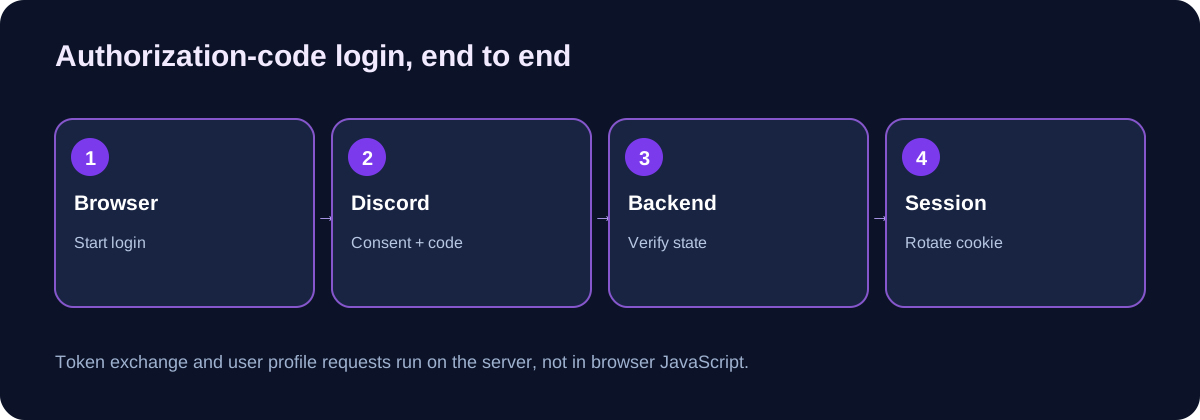
The recommended login path is the OAuth2 authorization-code flow. Your backend generates a cryptographically random state, associates it with the initiating session, and redirects the browser to Discord’s authorization endpoint. The redirect includes a registered redirect_uri and the scopes required to read the profile and guild list.
const { randomBytes } = require('node:crypto');
const state = randomBytes(32).toString('hex');

const authorize = new URL('https://discord.com/oauth2/authorize');
authorize.searchParams.set('response_type', 'code');
authorize.searchParams.set('client_id', process.env.DISCORD_CLIENT_ID);
authorize.searchParams.set('scope', 'identify guilds');
authorize.searchParams.set('redirect_uri', process.env.DISCORD_REDIRECT_URI);
authorize.searchParams.set('state', state);

// Save the state server-side, bound to the initiating browser session.
// Then redirect the browser to authorize.toString().
The code above is deliberately incomplete by itself: saving state requires a server-side session store with expiry, and your callback has to consume it exactly once. Our attached example/server.js includes that connection. Generating a random state without storing and comparing it provides no CSRF defense. Avoid putting predictable user IDs or timestamps in the state value.
Discord can reject a request before showing consent if the client ID or redirect configuration is wrong. Correct the application settings rather than lowering validation, and test with a single registered callback before supporting multiple deployment environments.
When Discord redirects a successful login to your callback, read the code and state query parameters. Compare the returned state against the unexpired value saved for that browser session, reject mismatches, and delete the state so the same callback cannot be replayed. Exchange the authorization code from your backend using a form POST to Discord’s token endpoint. The client_secret is sent only by the server, not in the HTML page or browser JavaScript.
const body = new URLSearchParams({
  client_id: process.env.DISCORD_CLIENT_ID,
  client_secret: process.env.DISCORD_CLIENT_SECRET,
  grant_type: 'authorization_code',
  code: authorizationCode,
  redirect_uri: process.env.DISCORD_REDIRECT_URI,
});

const response = await fetch('https://discord.com/api/v10/oauth2/token', {
  method: 'POST',
  headers: {'Content-Type': 'application/x-www-form-urlencoded'},
  body: body.toString(),
});
if (!response.ok) throw new Error(`OAuth exchange failed: ${response.status}`);
const token = await response.json();
// Keep token.access_token on the backend; never send it to the page.
A code exchange can fail because of a reused code, wrong secret, mismatched redirect URL, expired authorization, or a temporary upstream error. A public error message should explain that login failed without echoing the code, token payload, or internal secret. After a successful exchange, fetch the user profile with the OAuth bearer token, establish a new authenticated session, and rotate the session identifier. Rotating the ID after login reduces session-fixation risk.
A bearer access token expires. You can implement refresh-token handling for a real service, but it increases the responsibility to encrypt, restrict, rotate, and revoke sensitive tokens. The compact example intentionally avoids long-lived refresh-token storage: it expires the session after at most one hour and asks the user to log in again. That tradeoff is suitable for a tutorial, not necessarily a large dashboard.
Call GET /users/@me/guilds using the user’s access token and the guilds scope. Discord returns partial guild objects that can include permission information. A numeric permission value may be represented as a decimal string; use BigInt in Node.js rather than assuming all permission bitfields fit safely in a regular JavaScript integer.
const MANAGE_GUILD = 1n << 5n;
const ADMINISTRATOR = 1n << 3n;
function canManageGuild(guild) {
  const permissions = BigInt(guild.permissions ?? '0');
  return guild.owner === true ||
    (permissions & MANAGE_GUILD) !== 0n ||
    (permissions & ADMINISTRATOR) !== 0n;
}
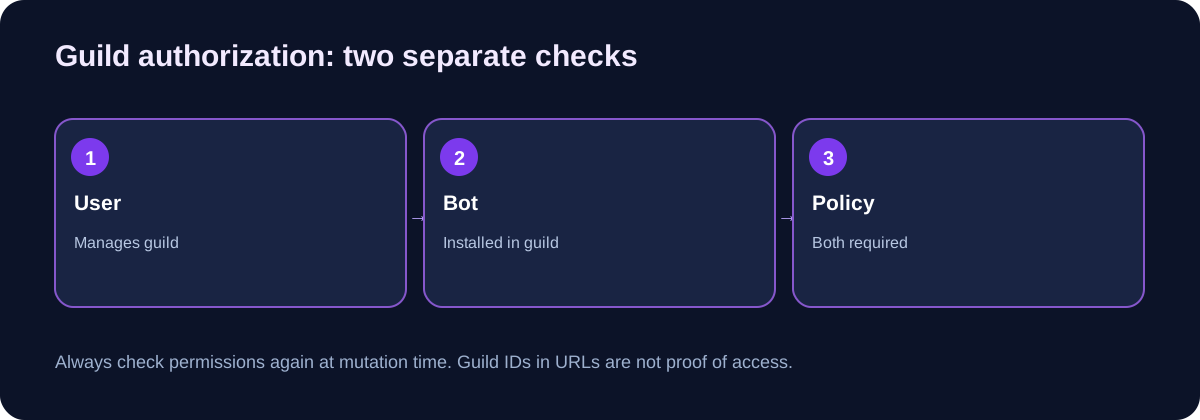
Check the object’s actual shape and handle missing or malformed fields conservatively. Being an owner or holding the relevant permissions is one signal; it is not the whole decision. A dashboard for a specific bot should also verify that bot is installed in the target guild. The example uses the bot token to request guild information from the Discord API. If the bot cannot access that guild, the demonstration disables the setting form rather than pretending the bot is connected.
Important: A guild ID appearing in the browser URL is user input. Never use it as the only authorization check. A malicious user can change /settings/123... to a different ID even when the UI displays no button for that server. Repeat both guild-management and bot-membership checks on the server before every sensitive change.
Consider an example dashboard toggle named Enable welcome feature. The browser submits a POST request containing a guild ID, the new boolean, and a CSRF token. The server should do the following in order: validate the session; reject invalid form types and unknown fields; verify CSRF; retrieve fresh guild permissions for the user; verify the bot can access that guild; and only then update the configuration record.
| Attack or mistake | Unsafe implementation | Defensive rule |
|---|---|---|
| Change another guild’s settings | Trust the guild ID from form submission | Verify user permission and bot presence each time |
| Submit unexpected setting fields | Spread arbitrary JSON into database row | Allowlist explicit inputs and types |
| Replay a browser POST | Rely only on SameSite cookie | Add a session-bound CSRF token |
| Use a stale guild membership | Trust yesterday’s cached authorization | Recheck permissions at mutation time |
| Save values into bot process memory | Dashboard and bot have separate memory | Write to a shared, persistent config store |
| Expose bot token to browser | Use bot token in fetch client-side | Make privileged Discord API calls on backend only |
The bundled demo saves a boolean in a local Map. That proves the authorization and request flow without touching a live bot. It does not update a Discord guild or a hosted Volyx bot. In a production design the write should be a database transaction keyed by guild_id, and the bot should read the same row or receive a trusted notification after changes. The writer and reader must agree on a schema, and the bot should validate settings again before applying any powerful operation.
A shared database can live on your own VPS or with a managed provider the dashboard and bot can both reach. Do not expose database credentials publicly or open an unrestricted database listener just to connect two services.
The session cookie should contain an unpredictable opaque identifier, not the Discord OAuth token, bot token, or the guild permission bitset. The backend stores the sensitive values and maps the cookie to a session record. For a public HTTPS site, a strong configuration is a host-only cookie with Secure, HttpOnly, SameSite=Lax, and Path=/. Use __Host- cookie naming when the HTTPS and host-only requirements are satisfied.
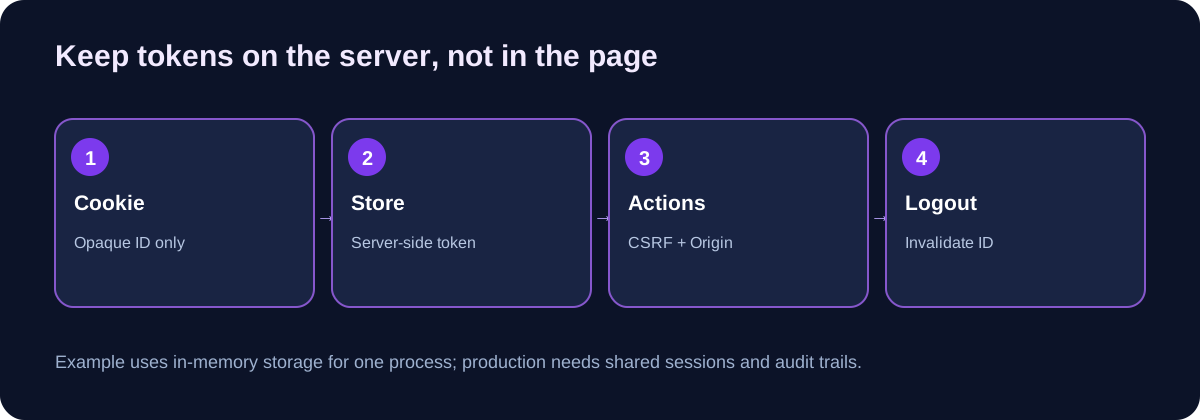
HttpOnly limits access from normal browser JavaScript but does not fix every XSS flaw. SameSite=Lax is useful for OAuth’s top-level return navigation, yet you still need CSRF checks for form mutations. Our sample sends a randomly generated, session-bound CSRF value in the server-rendered form, validates the content type, and checks the Origin header when provided. Server-rendered text is HTML-escaped before reaching the page.
Log out by invalidating the session on the backend as well as expiring the browser cookie. A browser cookie removal by itself does not revoke a stolen session ID. Sessions also need a server-enforced expiration. A single Node process can store sessions in memory for a tutorial, but that becomes unreliable with restarts or multiple instances. For production, use a managed shared session store, rotate signing/encryption keys as appropriate, monitor access, set sensible TTLs, and keep an audit trail of privileged settings changes.
Never silently mark every API endpoint as cacheable. Authorized dashboard responses and OAuth callbacks should send Cache-Control: no-store. Set Content Security Policy and security-related response headers. If your public site sits behind a proxy, enforce TLS at the proxy and correctly configure headers rather than trusting an arbitrary client-supplied X-Forwarded-Proto value.
The ZIP includes an example/ directory that uses Node.js built-in modules only: no downloaded UI framework, no npm dependency installation, and no database required for the initial test. It contains server.js, package.json, .env.example, .gitignore, and ten local tests. We tested it locally using mocked Discord responses; actual Discord OAuth requires your own registered application and credentials.
The example’s endpoints illustrate a complete minimal flow:
| Route | Method | Behavior |
|---|---|---|
/ | GET | Explains the sample and links to login |
/login | GET | Generates session-bound state and redirects to Discord |
/oauth/callback | GET | Validates state, exchanges code, fetches user, rotates session |
/dashboard | GET | Shows guilds user can manage and that bot can access |
/settings/:guildId | POST | Accepts demo boolean after CSRF and permission checks |
/logout | POST | Invalidates authenticated session |
/healthz | GET | Returns a minimal safe health response |
On your own development computer, prepare a registered callback and set environment variables securely, then run:
node --version
node --test tests/*.test.js
node server.js
The tests do not require Discord credentials and do not contact Discord. Running the server for a real login does require real credentials supplied through your environment. Node.js does not automatically read .env.example, so copying that file without a supported environment loader or exporting variables will not configure the process.
The basic demo has intentional limitations: session and feature-toggle state disappear after restart; there is no distributed rate limiter or cross-instance cache; no production database is connected; no Discord bot reads the saved toggles; and a real operator should add structured audit logs, alerting, dependency update checks, secrets rotation, a stronger recovery plan, and a durable session store. A local happy-path test is not a security certification.
There are three common architectures. Shared database: the dashboard writes a validated row, and the bot reads it whenever a command or event requires configuration. This is straightforward and auditable if both processes can reach the database. Message or queue: the dashboard writes a transaction and then emits a notification; the bot refreshes its cache in response. This reduces polling but introduces delivery and retry concerns. Internal service API: the bot’s control service exposes protected endpoints accessible only to the dashboard; this requires strong service authentication and careful network isolation.
For a first Volyx implementation, a shared database is often easier to reason about than an unauthenticated HTTP port. Store one row per guild and feature, use parameterized SQL queries, restrict write privileges, and index by guild ID. Do not confuse settings changes with direct manipulation of Discord’s guild object: your dashboard controls your bot’s behavior, not Discord server administrative settings unless your application has explicit, appropriately authorized capabilities.
If you want real-time display, do not claim every form save means immediate Discord-side success. A database update can succeed while the bot is offline. Show a Saved to dashboard status, and use a separate Applied by bot acknowledgment only when the bot confirms that it loaded or acted on the change.
A Discord bot normally establishes outgoing connections to Discord and can run with no public web route. OAuth login is different: Discord redirects a human browser to a web address you operate. A valid HTTPS URL must reach the dashboard process. This is why a successful Node bot process and a valid OAuth redirect URL are not sufficient on their own.
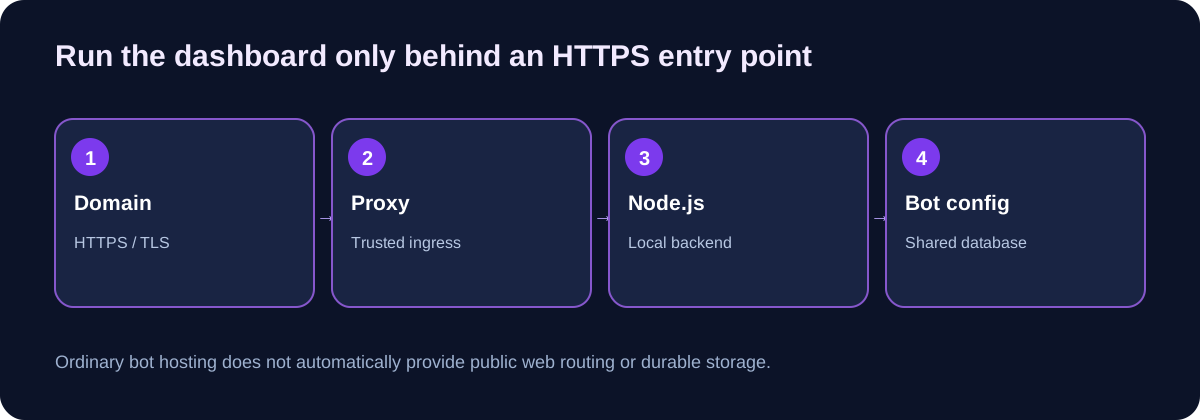
On a managed Volyx server, confirm the Node.js runtime, startup file, assigned port, public HTTP proxy/gateway availability, and whether custom-domain routing is permitted. Keep Discord OAuth client secrets and bot tokens in the private startup/secrets controls available on the server; never use a public file manager link for secret material. If a working HTTPS gateway is not available on that allocation, host the dashboard web backend on a separate suitable VPS or managed web host while keeping the Discord bot on Volyx. The two applications can still exchange validated settings over a secure shared database or authenticated internal API.
On a VPS you administer, a common pattern is:
Browser HTTPS request
    -> TLS-terminating reverse proxy
    -> Node.js dashboard at 127.0.0.1:8080
    -> Discord OAuth and REST APIs
    -> shared configuration database
    -> separate Discord bot process
Choose the same HTTPS callback URL in the Developer Portal and environment settings. Provision a valid certificate, configure a restrictive reverse proxy, and do not let the public site forward arbitrary paths or headers to private management endpoints. If a deploy is behind Cloudflare, make sure the origin TLS settings and trust chain are valid and compatible with your proxy mode. Before enabling the real domain, validate the route using a safe health request and inspect only non-secret log lines.
Do not copy Nginx rules into a game server container. The reverse proxy example is an infrastructure concept for a VPS or web ingress you control. Publishing this guide on
volyx.xyzdoes not automatically provision a dashboard service or OAuth application.
The quickest useful audit is a small matrix rather than an endless browser clicking session. Test a logged-out request, a user who belongs to a guild but cannot manage it, a guild manager whose guild lacks the bot, a manager whose guild has the bot, an expired session, a forged CSRF token, and a browser-origin mismatch. Every test should have an expected HTTP status.
| Test | Expected result | Why it matters |
|---|---|---|
| GET dashboard without session | 401 | Private pages cannot be opened anonymously |
Callback with wrong state | 403 | Rejects unsolicited login responses |
| Reusing the same callback state | 403 | Reduces replay and login CSRF risk |
| Change non-managed guild’s setting | 403 | Prevents broken object-level authorization |
| Change guild missing the bot | 403 | Prevents false control over uninstalled bot |
| POST without CSRF token | 403 | Blocks unauthorized cross-site mutations |
| POST with unexpected form field | 400 | Prevents mass assignment |
| POST authenticated and authorized | 303 redirect | Saves the demo setting correctly |
| Logout then reuse old cookie | 401 | Session invalidation is server-side |
| Health check | 200 | Monitoring can test app process |
The ten bundled tests exercise the local flow with mock Discord API responses. They verify behavior of the demonstration code, not Discord’s live service and not the resilience of your future database or reverse proxy. Real rollout also needs an actual test Discord guild, a separate low-privilege user, a staging domain, monitoring, and a plan to recover from a misconfiguration. Re-test permissions whenever you add a new dashboard action; authorization is not a one-time feature you can mark complete forever.
A custom OAuth2 dashboard is valuable when your bot has workflows you cannot express conveniently with slash commands. But writing a browser-based control plane means operating authentication, session storage, authorization, logs, and uptime. For simple configuration, a /settings slash command restricted to server managers may be easier to maintain.
| Approach | Best use | Main limitation |
|---|---|---|
| Slash-command configuration | Small bot with a handful of settings | Complex multi-step forms are awkward |
| Self-hosted OAuth2 dashboard | Branded control panel, multiple guild settings | Security maintenance and HTTPS service required |
| Hosted admin UI framework | Fast internal tooling | Still needs secure guild authorization integration |
| Static page alone | Documentation or public landing page | Cannot safely store client secrets or exchange OAuth codes |
A static site can render the marketing pages for your bot, but the OAuth code exchange needs a trusted backend. If you pick React, Astro, or another frontend framework, the underlying access-control rules are unchanged. Changing the UI does not make an unsafe API endpoint safe.
Here is a symptom-first checklist. Debug only one layer at a time and avoid changing bot permissions, DNS, and session code simultaneously.
| Symptom | Likely area | Practical check |
|---|---|---|
invalid redirect_uri | OAuth application config | Compare callback URL character-for-character with registered URL |
| Discord login works but callback 404s | Public HTTP routing | Ensure HTTPS ingress forwards /oauth/callback to backend |
Invalid or expired OAuth state | Cookie/state storage | Verify browser preserved the initiating cookie and callback occurred before expiry |
| Token exchange returns 400 | Code/secret/URI mismatch | Check one-use code and env config without logging secrets |
| Login repeats after redirect | Session cookie domain or Secure flag | Check HTTPS, host-only cookie and reverse proxy behavior |
| User sees no guilds | Missing scope or insufficient permissions | Check guilds scope and Manage Guild bits |
| Guild displayed but toggle disabled | Bot not installed/accessible | Check bot membership with bot API token; do not bypass check |
| Authorized POST returns 403 | CSRF, origin, expired login, or revoked permission | Inspect sanitized server logs and retry with fresh session |
| Changes disappear after restart | In-memory demonstration storage | Replace Map with a persistent configuration store |
| Dashboard works locally, 502 publicly | Backend socket or reverse proxy | Verify host/port, process logs and ingress rules |
429 from Discord API | Rate limits | Respect Retry-After and cache non-sensitive data carefully |
| Dashboard response is slow | Repeated live Discord API calls | Measure request count, timeouts, and selective cache duration |
Do not treat a 403 as a reason to disable authorization. Use it as evidence that the authorization check is active and investigate which prerequisite is missing. Logging a user’s raw OAuth bearer token to solve a 401 is an unacceptable tradeoff. Likewise, never ship client_secret to browser code to simplify debugging.
A launch-ready dashboard is not simply a working /login route. At minimum, confirm an HTTPS domain and trusted ingress, private secrets, registered OAuth callback, real Discord permission checks, authorization on each mutation, CSRF protection, persistent sessions, persistent guild configuration, tested bot-side consumers, backups, audit logs, request timeout/rate-limit handling, and an alert for unexpected error rates. Define a way to revoke or disable dashboard access during an incident.
A practical first release might be read-only. Show the servers a user manages and basic bot status, with no buttons that modify behavior. That exercise tests the identity and permission boundaries while limiting the damage from a bug. Add one low-risk toggle in staging, confirm that only an authorized administrator can save it, then integrate a real bot-side read of the setting. Expand slowly and preserve every meaningful security test.
For Volyx, the key architectural decision is whether the bot’s hosting allocation provides the HTTP entry point required by a dashboard. If not, keep the bot where it is and deploy the dashboard independently. Separating components is a normal design choice, not an indication that the Discord bot itself is misconfigured.
Yes. You can write the frontend and backend using free, open tools such as Node.js. Hosting costs and restrictions still depend on where you run the public HTTPS service, the database, and the bot. A free game/bot hosting allocation may not include a web gateway.
No. User OAuth2 login with identify and guilds reads authorized user information. Installing a bot is a separate action using Discord application installation settings and scopes such as bot and applications.commands.
Usually identify to identify the user and guilds to read the guild list. Ask for additional scopes only when a specific feature requires them. You do not need an email scope merely to list guilds.
Being a member is not the same as managing a server. Check ownership, Manage Guild, or relevant Administrator permission, plus your bot’s presence in the guild. Use these checks server-side, not just to show or hide a button.
No. A bot token identifies the bot, while a user’s OAuth access token grants separately approved access to that user’s information. Keep them in different backend-only contexts and never expose either to client-side code.
state required during Discord OAuth login?Use an unpredictable, session-bound, single-use state value to protect authorization responses from cross-site request forgery and unsolicited callbacks. Reject mismatches, expired state, and reuse. Refer to current OAuth2 security guidance when updating the flow.
For this server-rendered dashboard, no. Store tokens in the backend and issue an opaque session cookie with Secure, HttpOnly, and an explicit SameSite policy. A browser-managed bearer token creates unnecessary theft and lifecycle risks for this architecture.
SameSite=Lax remove the need for CSRF protection?No. It is defense-in-depth and does not cover every possible mutation path or browser behavior. Require a session-bound CSRF token for privileged POST requests and validate the origin when appropriate.
The Discord /users/@me/guilds endpoint returns a partial list for the authorized user. Guild ownership and permission flags help identify manageable guilds. Re-check at the time of each sensitive action rather than relying only on an earlier list.
Not to demonstrate login. A persistent multi-user dashboard should use durable storage for configuration and, typically, shared session records. PostgreSQL is one good option if both bot and dashboard can connect safely; other databases can also work.
No. It saves a sample boolean in its own Node.js process memory. It intentionally does not connect to or change a real Discord bot. You must design and test the shared configuration integration separately.
Only if that allocation supports the necessary HTTP listener, routing, startup processes, and HTTPS ingress. Otherwise run the web dashboard on a separate suitable host and connect it to the bot through secured persistent storage.
The public redirect URI must be reachable over HTTPS and match the application’s registered URI. Cookie attributes, TLS termination, proxy forwarding and backend bind address must agree. Debug the proxy path and callback before changing OAuth scopes.
Do not trust the guild ID in a request. On every update, validate the logged-in user, check fresh guild-management permission, verify bot membership, validate exact input fields, and require CSRF protection. Keep a structured audit log for production writes.
A user can lose a role or leave a server between logins. Re-query the guild list or relevant membership state when processing important changes. Expire sessions appropriately, and fail closed if the Discord API cannot confirm permission.
Start read-only, test with a separate low-privilege user and a disposable Discord guild, confirm the HTTPS callback, enable monitoring and audit logs, then add one reversible setting at a time. Keep backups and a clear rollback procedure.
A Discord bot dashboard becomes useful when it reduces friction for legitimate server administrators without creating shortcuts around Discord’s permission model. Treat the login code as a temporary credential, not as your session. Store tokens on the server, enforce authorization per guild and per write, and separate demo UI state from bot-side production configuration.
If you already host a Discord bot on Volyx, start with the accompanying educational example and its tests. Once you confirm your hosting and HTTPS options, integrate a persistent settings store and a secure dashboard service. For the surrounding infrastructure, see our guides on free Discord bot hosting, Node.js API security, PostgreSQL for Node.js, and custom domains and HTTPS. Verify these links are published before exposing the article; the deployment package should not create a new page with dead internal references.
Official references: Discord OAuth2 · Discord developer quick start · Discord user resource · OWASP OAuth2 guidance · OWASP session management.
Explore more in-depth articles with code, visuals, and practical walkthroughs.
Browse all articles ↗
A practical, evidence-first guide to fixing Minecraft Java server lag: read TPS and MSPT, profile with spark, tune chunks, and diagnose CPU, memory and plugins.
Read article ↗
Learn the difference between DDoS floods and Minecraft bot raids, secure a Paper or Velocity server, compare TCPShield and Cloudflare, and respond safely using Volyx.
Read article ↗
Compare five real MIT-licensed JavaScript, TypeScript, and Python Discord bot starters, then learn how to deploy one safely on Volyx.
Read article ↗