
Minecraft Server Lag in 2026: Diagnose TPS, MSPT, CPU and RAM
A practical, evidence-first guide to fixing Minecraft Java server lag: read TPS and MSPT, profile with spark, tune chunks, and diagnose CPU, memory and plugins.
Read article ↗Build a real Node.js and PostgreSQL Notes API with connection pooling, parameterized queries, verified TLS options, migrations, error handling, and safe Volyx deployment steps.

Your first REST API works beautifully—until you restart it and every saved item disappears. The problem may not be the HTTP routes at all. It may be that the application only stored records in memory. A relational database gives your project a separate, persistent place to keep data, but connecting Node.js to PostgreSQL correctly involves more than pasting a password into server.js.
This practical Node.js PostgreSQL guide for 2026 starts with a blank project and finishes with a small Notes API backed by a real database. We will use the pg client, configure a bounded connection pool, create a table with a controlled migration, run parameterized SQL, and distinguish application mistakes from database networking errors. We will also explain the Volyx hosting workflow without assuming that every server allocation exposes the same database or HTTP networking features.
Quick answer: obtain a reachable PostgreSQL endpoint and restricted database credentials; store them in environment variables; create a pg.Pool; run a migration once; use $1, $2 placeholders for values; verify TLS when the connection crosses an untrusted network; and test persistence by restarting the Node.js process. A running app is not proof of a successful database connection—run a real query.
Volyx hosting note: Volyx includes database-management capabilities, including PostgreSQL where enabled for a particular server/account. Availability, credentials, database quotas, address reachability, and whether a public HTTP entry point exists depend on the allocation and configuration. The instructions below tell you what to verify in the panel rather than inventing universal RAM limits, database endpoints, or free-forever guarantees. Volyx’s free-hosting model uses Coins and its published service rules.
Instead of stopping at SELECT NOW(), we will create a small PostgreSQL Notes API. Each note has an automatically generated numeric ID, a title, a completion flag, and a creation time. The examples are intended for learning and small private projects; they are not an audited, production-ready internet service.
| Endpoint | Method | Database operation | Result |
|---|---|---|---|
/healthz | GET | SELECT 1 | Confirms PostgreSQL can answer a query |
/api/notes | GET | SELECT ... ORDER BY id DESC LIMIT 50 | Fetches recently created notes |
/api/notes | POST | Parameterized INSERT | Creates a note and returns it |
/api/notes/:id | PATCH | Parameterized UPDATE | Marks a note completed or incomplete |
/api/notes/:id | DELETE | Parameterized DELETE | Removes a note |
The project download includes server.mjs, db.mjs, migrate.mjs, package.json, and a safe .env.example. The server uses built-in Node.js HTTP APIs and just one database dependency: pg. It does not require Express, an ORM, Docker, or an externally managed Redis instance. That keeps the database connection itself easy to understand before you add more layers.
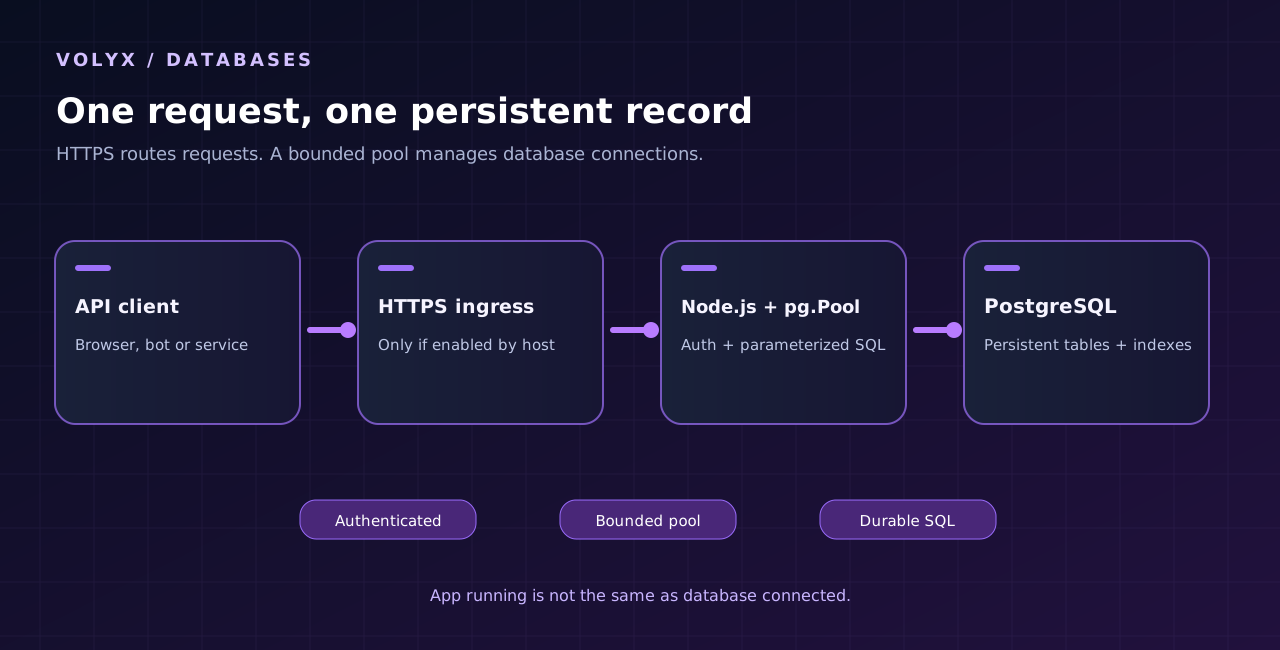
For a toy bot, a JSON file can be enough. Once several requests may update the same data, file-based persistence creates extra problems: incomplete writes, concurrent changes, backups, and querying records efficiently. PostgreSQL provides transactions, constraints, indexes, and mature backup tooling. It lets your application ask for the latest 50 notes or all unfinished tasks without parsing every file.
Still, PostgreSQL is not automatically the right choice for every project. SQLite is excellent for many single-instance applications where a reliable local filesystem is available. MySQL/MariaDB are mature relational alternatives, and the best fit often depends on the libraries, hosting, and skills you already have.
| Question | PostgreSQL | MySQL/MariaDB | SQLite |
|---|---|---|---|
| Separate database service needed? | Usually yes | Usually yes | No, embedded in application |
| Supports transactions? | Yes | Yes with transactional engines | Yes |
| Good for multiple app instances? | Yes, with connection planning | Yes, with connection planning | Requires extra care around concurrent writes/shared filesystems |
| Common Node.js client | pg | mysql2 | Built-in or third-party SQLite library |
| Best reason to choose it here | Constraints, SQL, and a central persistent datastore | Existing MySQL tooling and compatibility | Simpler single-instance deployment |
| What to watch out for | Network/TLS and connection limits | Network/TLS and engine configuration | File durability, storage paths, concurrent writes |
Practical decision: if you already have a PostgreSQL database available in your hosting panel and need durable structured records, this guide is a good match. If your application is just a personal timer with no shared state, you may not need a networked database at all.
Gather the following without pasting secrets into screenshots or public repositories:
node --env-file=.env syntax.5432, but confirm yours), database name, username, password, and any required CA certificate.Never assume localhost refers to your database. Inside a hosting container, 127.0.0.1 normally refers to that container or network namespace. If PostgreSQL runs elsewhere, you need the actual host or private network address supplied by the provider. Test reachability from the environment where Node.js will run.
In Volyx, open your server and check the Databases area if the feature is enabled for that allocation. Look for an option to create or attach a PostgreSQL database; record the displayed engine, database name, endpoint, username, and port. The exact controls and available quota may differ between servers. Do not assume a MySQL endpoint will accept a PostgreSQL connection—these protocols are not interchangeable.
If your allocation does not provide a usable PostgreSQL endpoint, you need an authorized compatible database service reachable from that environment. Avoid exposing PostgreSQL directly on a public IP just to make a tutorial succeed. Prefer an internal/private connection wherever the provider supports one. If you must cross an untrusted network, require verified TLS and an appropriate firewall or access policy.
Preflight questions: Can the application resolve the database hostname? Does the database accept connections from the application’s address? Does the database user have permission to connect to the correct database? Does the endpoint require TLS or a specific root CA? Are you working within the provider’s connection and resource limits?
Create a directory on your computer and add the package file. The included ZIP already contains these files in example-postgres-api/.
mkdir postgresql-notes-api
cd postgresql-notes-api
npm init -y
npm install pg
You may copy the included package.json instead of running npm init. The example declares Node.js 22+ and a compatible pg version. At the time this guide was prepared, the npm release line was pg 8.23.1; verify release and dependency compatibility before future upgrades. For reproducible deployments, generate and commit a package-lock.json from a trusted development environment, and deploy with npm ci when the lockfile exists.
The project separates three responsibilities: db.mjs manages the pool, migrate.mjs performs the database schema setup, and server.mjs responds to HTTP requests. That separation makes it less likely you will accidentally create a new database connection for every web request.
A password copied into server.mjs is easy to leak through a repository, support screenshot, or accidental file download. Instead, use your server’s secrets or Startup-variable mechanism. For local development only, copy the supplied .env.example to .env and fill in your own values:
PGHOST=127.0.0.1
PGPORT=5432
PGDATABASE=volyx_notes
PGUSER=notes_user
PGPASSWORD=replace-with-a-private-password
PG_TLS=disable
API_KEY=replace-with-a-long-random-secret
HOST=127.0.0.1
PORT=3000
The PG_TLS=disable line is appropriate only for an intentionally trusted local development database, not as a blanket recommendation for cloud-hosted PostgreSQL. If the database is remote or the provider requires encryption, choose PG_TLS=verify and configure a trusted CA if needed. The example’s TLS mode does not disable certificate verification. Confirm whether the hostname in the certificate matches your configured PGHOST.
On your own computer, you can run the files using:
node --env-file=.env migrate.mjs
node --env-file=.env server.mjs
In a hosted environment, set the variables in its authorized controls, then run node migrate.mjs once (with migration privileges) and node server.mjs as the application process. Do not upload the local .env file into a publicly served directory. Keep .env in .gitignore and rotate credentials that have ever been exposed.
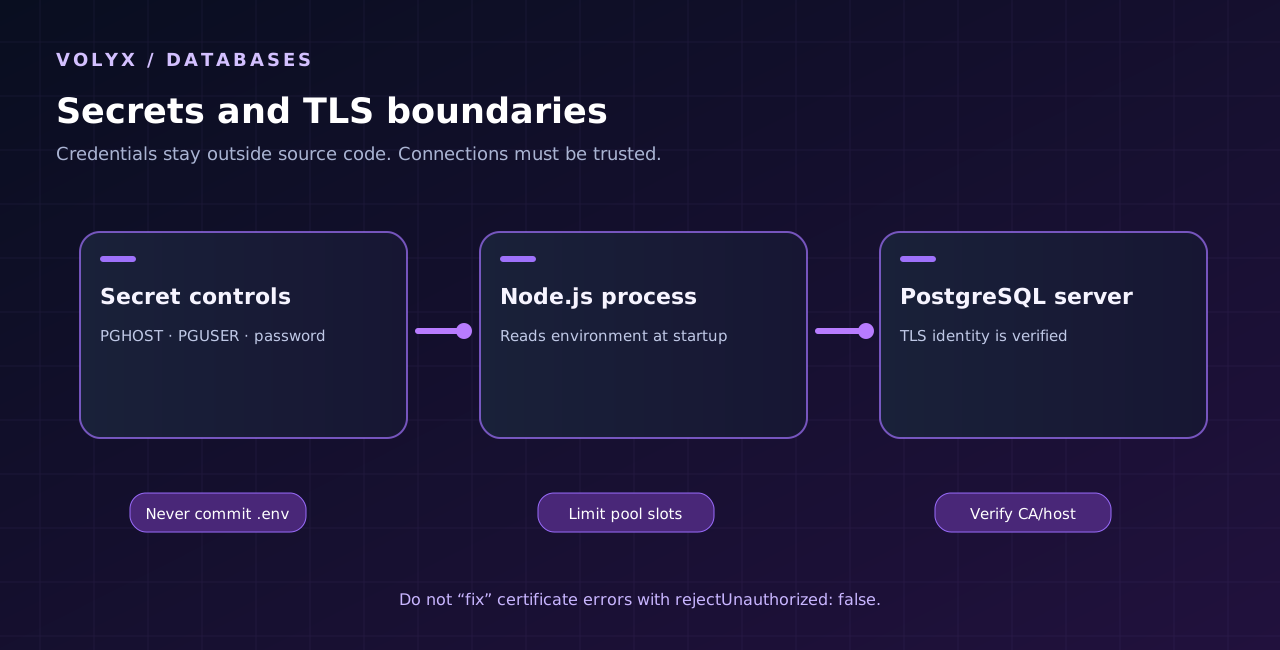
db.mjsA connection pool reuses a bounded set of PostgreSQL client connections. This is more efficient and easier to control than opening an independent client on every request. Too many database connections can exhaust server memory or reach the provider’s connection cap, especially when several app instances run at once.
Here is the heart of the included db.mjs file:
import fs from 'node:fs';
import { Pool } from 'pg';

const ssl = process.env.PG_TLS === 'verify'
  ? (process.env.PG_CA_FILE
      ? { rejectUnauthorized: true, ca: fs.readFileSync(process.env.PG_CA_FILE, 'utf8') }
      : { rejectUnauthorized: true })
  : false;

export const pool = new Pool({
  host: process.env.PGHOST,
  port: Number(process.env.PGPORT || 5432),
  database: process.env.PGDATABASE,
  user: process.env.PGUSER,
  password: process.env.PGPASSWORD,
  ssl,
  max: 5,
  connectionTimeoutMillis: 5000,
  idleTimeoutMillis: 10000,
  statement_timeout: 8000
});
The full packaged file checks for missing variables and rejects unsupported PG_TLS values. max: 5 is an illustrative initial pool size, not a Volyx-wide recommendation. Size it using the database connection limit, other applications sharing the database, and the number of application instances. Five processes each with five connections can consume up to twenty-five connections. Leave room for administration, backups, and migrations.
Also attach an error handler to the pool for idle-client failures, and call pool.end() during graceful shutdown. A pool is not a magic cache for SQL results; it manages database connections, not application data. For a one-off query, pool.query(...) automatically checks out and returns a client.
pool.connect() instead?A multi-statement transaction must run on the same client from BEGIN through COMMIT or ROLLBACK. The node-postgres documentation specifically warns not to issue transaction statements through separate pool.query() calls. Acquire a client, use client.query() for every statement in that transaction, then release() inside finally.
const client = await pool.connect();
try {
  await client.query('BEGIN');
  await client.query('UPDATE notes SET completed=$1 WHERE id=$2', [true, 42]);
  // Additional dependent statements using THIS client belong here.
  await client.query('COMMIT');
} catch (error) {
  await client.query('ROLLBACK');
  throw error;
} finally {
  client.release();
}
For updates that must be atomic, a transaction prevents one successful statement from being committed when a dependent statement fails. For unrelated individual reads, prefer pool.query() to keep the code simple.
For a tutorial, the schema is intentionally small and easy to inspect. The packaged migrate.mjs runs CREATE TABLE IF NOT EXISTS notes using the pg pool. You may run this once using an authorized migration account:
CREATE TABLE IF NOT EXISTS notes (
  id BIGINT GENERATED ALWAYS AS IDENTITY PRIMARY KEY,
  title TEXT NOT NULL CHECK (length(title) BETWEEN 1 AND 160),
  completed BOOLEAN NOT NULL DEFAULT FALSE,
  created_at TIMESTAMPTZ NOT NULL DEFAULT now()
);
The CHECK constraint provides a second line of defense beyond Node.js validation. It cannot replace input validation, but it protects database integrity if a future script writes directly to the table. TIMESTAMPTZ records time in a way that avoids many local-time ambiguities; present dates in the reader’s timezone at the application boundary.
A deployment caution: CREATE TABLE IF NOT EXISTS does not inspect or upgrade an existing table’s columns. Real schema changes need explicit, reviewed migration files and a rollback plan. Never run destructive DDL automatically on each application startup, and do not give the application user table-creation privileges permanently if they are unnecessary.
The download includes a working Node.js HTTP server. Unlike the preceding REST API tutorial that used in-memory notes, this version queries PostgreSQL every time. Its main read route uses a bounded result set:
const result = await pool.query(
  'SELECT id::text AS id, title, completed, created_at FROM notes ORDER BY id DESC LIMIT 50'
);
The write route uses a positional parameter rather than interpolating the user’s text into SQL:
const result = await pool.query(
  'INSERT INTO notes(title) VALUES ($1) RETURNING id::text AS id, title, completed, created_at',
  [title]
);
Suppose someone submits the title hello'); DROP TABLE notes; --. A parameterized query treats that entire string as a value instead of executable SQL. This protects data values, though dynamic table names and column identifiers require separate allowlisting—PostgreSQL parameters do not replace SQL identifiers.
The example returns 401 without a valid API key, validates its JSON body and title length, checks note IDs before using them, and returns 404 for missing rows. It also uses a constant-time comparison of SHA-256 digests for the bearer token. This is a learning API, not a complete authentication system: it has no user accounts, permissions model, audit log, rate limiter, or distributed abuse protection. Add those before public production use.
You should test database persistence, not just whether the Node process prints a startup message.
server.mjs and confirm that its Console shows the expected local listener. Test the health endpoint from the same machine or container./api/notes again using the same database configuration.For an example that listens locally on port 3000:
curl -i http://127.0.0.1:3000/healthz

curl -i http://127.0.0.1:3000/api/notes \
  -H 'Authorization: Bearer YOUR_PRIVATE_API_KEY'

curl -i -X POST http://127.0.0.1:3000/api/notes \
  -H 'Authorization: Bearer YOUR_PRIVATE_API_KEY' \
  -H 'Content-Type: application/json' \
  -d '{"title":"Restart-safe note"}'
These commands are for local testing only. Sending API keys over ordinary HTTP on an untrusted network is unsafe. For external clients, first configure a supported public HTTPS endpoint and send the bearer token over TLS. Never paste a real token in a public issue, screenshot or article.
A successful GET of /healthz returns JSON reporting that a database query completed. Successful POST returns a created note and its ID; GET lists that record. After a restart, the same record is still present. This establishes that the application, network path, database authentication, SQL table, and persistence work together.
A successful HTTP response does not prove backups are running, that all clients are encrypted, or that your deployment is resilient to database outages. Those require separate checks.
The Volyx workflow looks similar to other Pterodactyl-style hosting panels, but do not assume all server templates expose every option:
1. Check eligibility and resources. Sign in to the panel, select the relevant hosting server or create an allocation if your account has the resources and Coins for it. Check the allowed runtime, network endpoints, storage and database slots in your account. Do not assume free indefinite uptime or specific performance specifications.
2. Select Node.js. Use a Node runtime compatible with the package. Node 22+ works for this guide’s .mjs source. If you are using Volyx’s TypeScript support for a different project, configure that runtime separately; this guide does not require TypeScript compilation.
3. Configure database access. In the Databases area, identify PostgreSQL, not MySQL/MariaDB, if it is available for this server. Copy the exact connection details into the server’s supported secret or environment controls. Confirm that the database endpoint is reachable from the running server, not just from the panel page.
4. Upload the project. Use the File Manager or an authorized upload mechanism. Upload the source, package.json, and a vetted lockfile if you generated one. Do not upload .env with production secrets or unnecessary local build artifacts.
5. Install dependencies. Use npm ci when you have a lockfile; otherwise npm install for the initial setup. Execute node migrate.mjs once using a temporary role with the required privilege and then review its output. Use node server.mjs as the application startup command once migration completes.
6. Decide whether HTTP access is needed. A backend component used only by an internal trusted service does not always require a public port. If your goal is a public REST API, check that your Volyx allocation exposes the needed HTTP ingress or reverse proxy with HTTPS. A Node process starting inside a container is not evidence of automatic public routing.
7. Test and monitor. Read Console logs, request /healthz from a permitted location, and verify data survives a restart. If the hosting plan suspends or expires, handle renewal/resources according to the actual Volyx rules; PostgreSQL persistence does not guarantee the API remains online.
Security boundary: The tutorial never requires opening the PostgreSQL port to everyone, disabling TLS certificate checks, or granting an app superuser permissions. If a connection fails, debug reachability, certificates, identity and privileges rather than weakening the database to make a test pass.
TLS protects credentials and queries in transit when correctly configured, but a configuration that merely encrypts the connection without verifying who is on the other end may still be vulnerable to interception. For external PostgreSQL services, prefer a validated certificate chain and hostname matching. Ask your provider for the correct CA certificate if the endpoint uses a private CA.
In this project, use PG_TLS=verify for a TLS endpoint with a trusted certificate. If a custom CA is supplied, set PG_CA_FILE to the readable certificate path. For a deliberately trusted local development database, you can choose PG_TLS=disable; this does not mean that unencrypted public PostgreSQL access is safe.
Avoid a common connection-string trap: node-postgres documents that sslmode, sslcert, sslkey, or sslrootcert values in a connection string may replace or override a separately supplied ssl object. This example uses separate PG* fields to avoid ambiguous mixing. If you switch to DATABASE_URL, pick one documented TLS configuration method and test it rather than combining overlapping options blindly.
When debugging, record the error code and context, not passwords or full connection strings. A quick error table is useful because a database can fail before it authenticates a user, during login, while querying a table, or while waiting for a connection-pool slot.
| Symptom or error | What it often means | First action |
|---|---|---|
ECONNREFUSED | Nothing accepts a TCP connection at that address/port | Verify PostgreSQL host and port from within the app environment |
ENOTFOUND / EAI_AGAIN | DNS is wrong or temporarily failing | Check hostname spelling, resolver, and provider DNS |
ETIMEDOUT | Network path blocked or endpoint unreachable | Verify allowed networks/firewalls and whether the DB service is online |
28P01 / password authentication failed | Credentials are wrong or a role policy rejects the login | Recheck username/password securely; do not print them |
3D000 / database does not exist | Database name mismatched | Copy the exact assigned name from your provider |
42501 / permission denied | Current role lacks required privileges | Grant only necessary privileges through an authorized administrator |
42P01 / relation does not exist | Table missing or wrong schema/search path | Check migration and schema; avoid recreating random tables |
| TLS certificate verification failure | CA or host identity cannot be trusted | Confirm hostname and CA rather than disabling verification |
too many clients already | Database connection limit reached | Reduce pool sizing/instance count; review leaking clients |
connection terminated unexpectedly | Server restart, network reset, or idle connection ended | Check provider events and app retry strategy |
query timeout / statement timeout | Slow query, lock, or overloaded database | Measure the query, indexes, locks, and resource pressure |
401 Unauthorized from your API | API bearer token absent or mismatched | Check API key configuration, not PostgreSQL password |
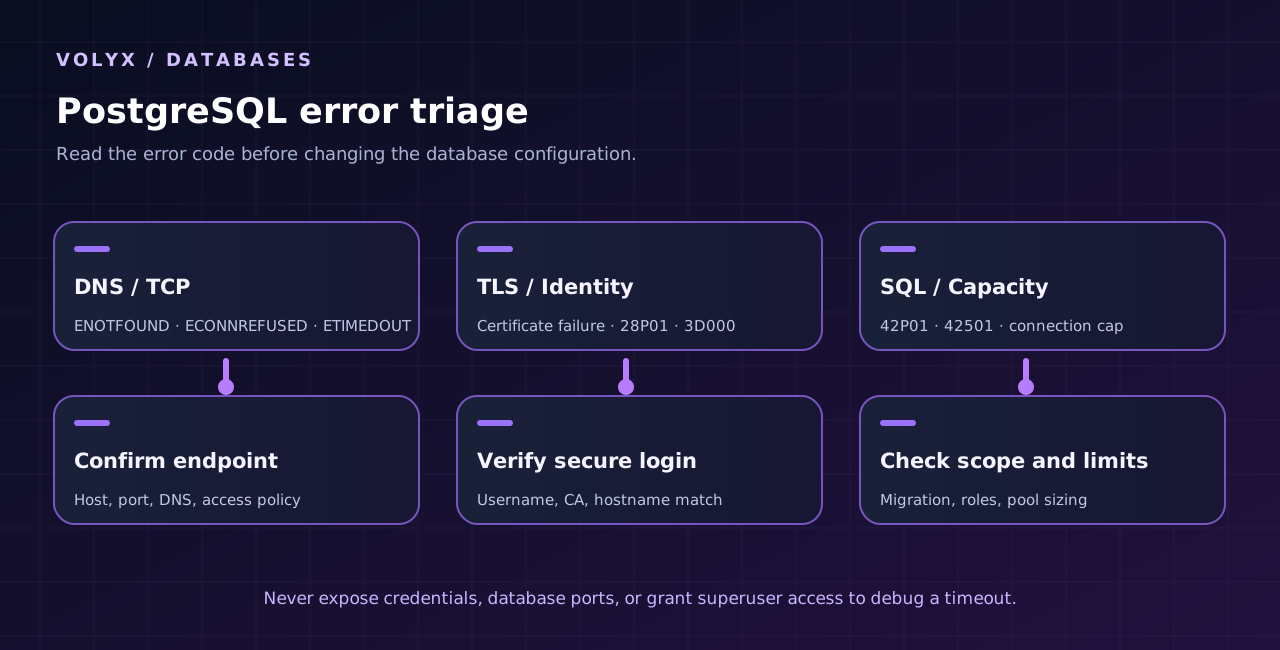
The database may authorize only certain client IP addresses or private networks. Your laptop and a Volyx server do not necessarily share a network identity. Also check whether the database hostname resolves differently from inside a container. The correct fix is an authorized reachable endpoint and appropriate access control, not publishing database credentials in code or permitting all inbound traffic.
For basic queries, pool.query() manages acquiring and releasing the connection. When you call pool.connect(), always client.release() in finally. Add timeouts and inspect the database’s active sessions with an authorized monitoring tool. A pool can wait indefinitely if every checked-out client is leaked and the queue has no timeout.
A persistent database can lose data through human error just as easily as through hardware failure. Before you deploy a significant schema change, verify a backup exists and practice restoring it to a separate test database. A dump that no one has successfully restored is not yet a recovery plan.
PostgreSQL administrators commonly use pg_dump for logical backups when credentials and policy permit it. Some managed hosting plans provide their own backup feature; follow the provider’s supported process. Restrict who can download dumps, encrypt sensitive backups, and define retention based on the project. Do not assume a provider’s server-file backup automatically includes a separate PostgreSQL database.
For a handful of notes, ORDER BY id DESC LIMIT 50 uses the primary-key index in a straightforward way. For a real application with more filters, check EXPLAIN (ANALYZE, BUFFERS) on a safe test dataset before adding indexes indiscriminately. Indexes speed up some reads but increase write and storage costs. Optimize observed bottlenecks instead of copying index recipes without understanding them.
Suppose the database allows 30 active connections, your API runs three separate instances, and other tools need 10 connections. Three pools configured with a maximum of 5 could use up to 15 client connections, leaving a margin for other tools and bursts. This is only arithmetic, not a recommended universal quota or a claim about Volyx. The actual database limit and workload decide the safe settings.
.env, print passwords in logs, or expose them in HTTP errors.pg release, Node version, PostgreSQL release, and migration compatibility.Yes, if you have permission to use a compatible PostgreSQL database and Node.js runtime within the plan’s published limits. The application library pg is open source. Whether your hosting service offers the necessary database and connectivity for free is a separate product-policy question; verify current quotas and any Coins requirements.
Volyx has introduced PostgreSQL alongside MySQL/MariaDB in its database-management interface. Whether it is enabled and reachable for your particular server must be checked in the Databases and Network areas. This guide does not invent your actual database host, port, or user limits.
Not universally. Performance depends on your queries, indexes, concurrency, hardware, configuration, and workload. Choose based on data model, operations, deployment constraints, and the tools you can support rather than a blanket speed ranking.
Yes. A Node.js Discord bot can use pg to store persistent guild settings, command configuration, or moderation records. Keep its database credentials private and avoid doing slow synchronous work while processing Discord events.
No. pg supports SQL queries directly, including positional parameters and transactions. An ORM may help organize a larger application’s models and migrations, but it adds its own tooling and runtime requirements. Start with SQL if you want to understand the connection layer.
ECONNREFUSED mean in Node.js?It normally means the TCP connection was actively refused at the address and port you attempted. Confirm the target hostname, service state, port, and permitted network path. It is different from an incorrect password, which is rejected after reaching a PostgreSQL server.
localhost:5432 work on my computer but not on Volyx?Inside a remote container, localhost refers to that container’s local network context—not your home PC and not necessarily a separate PostgreSQL service. Use the database hostname and port supplied for the environment where the app runs.
DATABASE_URL in GitHub?No. Connection strings usually contain a username and password. Store them in a secret manager or protected environment-variable controls, and revoke/rotate exposed values. You can use a .env.example with obvious placeholders to document required variable names safely.
Start conservatively, then size the pool using the database limit, number of process instances, expected concurrency, and monitoring data. The included example uses five connections as a small illustrative cap, not a guarantee of optimal speed.
42P01?PostgreSQL cannot find the table or relation referenced by that SQL statement in the active schema/search path. Confirm the migration ran successfully in the correct database, then verify the table name and permissions. Avoid repeating destructive migrations blindly.
For connections across untrusted networks, verified TLS is strongly recommended. Local trusted-network test setups may differ. Your provider may supply a CA certificate and require TLS; follow its exact security instructions, and don’t disable certificate verification just to silence a warning.
Yes—provided the API writes to the same persistent PostgreSQL database, the transactions commit successfully, and that database remains intact. A restart does not erase committed rows simply because the application process exited. Backup/recovery is a separate concern.
A single transaction must use one checked-out PostgreSQL client for all its statements, followed by COMMIT or ROLLBACK. Concurrent independent transactions should not share one uncontrolled client. Use a pool and release every checked-out client in finally.
Usually you should not expose PostgreSQL to the whole internet. Prefer a provider-supported private network, narrowly scoped access controls and verified TLS if external access is necessary. Publishing your HTTPS API is different from publishing the database itself.
The important shift is from a server process that looks healthy to a complete data path you can verify: Node.js receives a request, authenticates it, executes parameterized SQL over a controlled connection, receives a result, and stores records that survive a restart. Test that path one step at a time. If a query fails, identify whether the cause is DNS, network access, TLS, PostgreSQL identity, database permissions, SQL schema, or application authorization.
You can explore Volyx hosting, browse the Volyx documentation, and find more practical hosting tutorials in the Volyx Blog. Before choosing the final deployment, verify that your server allocation offers the PostgreSQL endpoint and networking features your application needs. A clearly documented limitation is more valuable than a promise your infrastructure cannot make.
Technical scope: October 2026. Example code is educational and requires your own authorized PostgreSQL environment for database integration testing. Check your installed versions and provider policy before production use.
Explore more in-depth articles with code, visuals, and practical walkthroughs.
Browse all articles ↗
A practical, evidence-first guide to fixing Minecraft Java server lag: read TPS and MSPT, profile with spark, tune chunks, and diagnose CPU, memory and plugins.
Read article ↗
Learn the difference between DDoS floods and Minecraft bot raids, secure a Paper or Velocity server, compare TCPShield and Cloudflare, and respond safely using Volyx.
Read article ↗
Compare five real MIT-licensed JavaScript, TypeScript, and Python Discord bot starters, then learn how to deploy one safely on Volyx.
Read article ↗