
Minecraft Server Lag in 2026: Diagnose TPS, MSPT, CPU and RAM
A practical, evidence-first guide to fixing Minecraft Java server lag: read TPS and MSPT, profile with spark, tune chunks, and diagnose CPU, memory and plugins.
Read article ↗Build a Telegram webhook bot with Node.js, secure its secret header, configure HTTPS and a reverse proxy, then deploy it on a compatible cloud host or Volyx.

A Telegram bot that works perfectly on your laptop can stop answering the moment you close the terminal. Moving it to a cloud server solves only half the problem: Telegram also needs a reliable way to deliver updates to your application. For some bots, long polling is enough. For others, a webhook makes sense because Telegram can send each update straight to your HTTPS endpoint.
This is a hands-on guide to shipping a small, working Node.js Telegram webhook bot in 2026. You’ll create the bot with BotFather, write the HTTP handler, configure a secret header, place the application behind HTTPS, register the webhook, and diagnose failures using logs. We also explain how this fits into the Volyx hosting workflow—and when a Volyx allocation that does not expose a public HTTPS endpoint should use long polling instead.
Quick answer: A webhook bot needs a valid Telegram token, an application that handles Telegram’s HTTPS POST updates, a publicly reachable HTTPS URL, and a configuration that prevents untrusted requests from being treated as Telegram events. This example uses the Telegram secret_token header and a reverse proxy. It does not claim that every free bot-hosting allocation automatically includes its own public HTTPS ingress.
Volyx hosting note: Volyx offers bot hosting with a Coins-based model and supports Node.js workloads, but public incoming HTTP routing, DNS and TLS must be verified for your specific server. An ordinary outbound-capable bot container can use
getUpdatespolling even if it cannot receive webhooks. Don’t configure the following Nginx steps on a shared host unless you control the proxy or your provider explicitly offers such settings.
Telegram’s Bot API offers two mutually exclusive methods to receive updates. With long polling, your program repeatedly asks getUpdates for new events. With webhooks, you register a public URL once; Telegram then sends HTTPS POST requests to that address when updates arrive. You should not operate both on the same bot token at once. Telegram’s official documentation explicitly notes that getUpdates cannot be used while a webhook is active: Telegram Bot API.
| Question | Long polling (getUpdates) | Webhooks (setWebhook) |
|---|---|---|
| Does your bot need a public inbound endpoint? | No | Yes, a reachable HTTPS URL |
| Does it work on a host with outbound traffic only? | Usually, yes | Not without additional ingress or proxy support |
| Who initiates the update connection? | Your bot | Telegram’s servers |
| Who manages TLS and public routing? | Not required for updates | You or your hosting provider |
| Is it suitable for local development? | Very convenient | Requires a public HTTPS tunnel or endpoint |
| What is the main operational risk? | Polling loop stops or token conflicts | Certificate, DNS, proxy, secret or endpoint errors |
Neither model guarantees uninterrupted service. Both require a running application, valid credentials and sensible recovery handling. Webhooks can reduce the need for an ongoing polling loop, but they introduce a public HTTP surface you must secure. Choose the architecture your hosting plan can actually support.
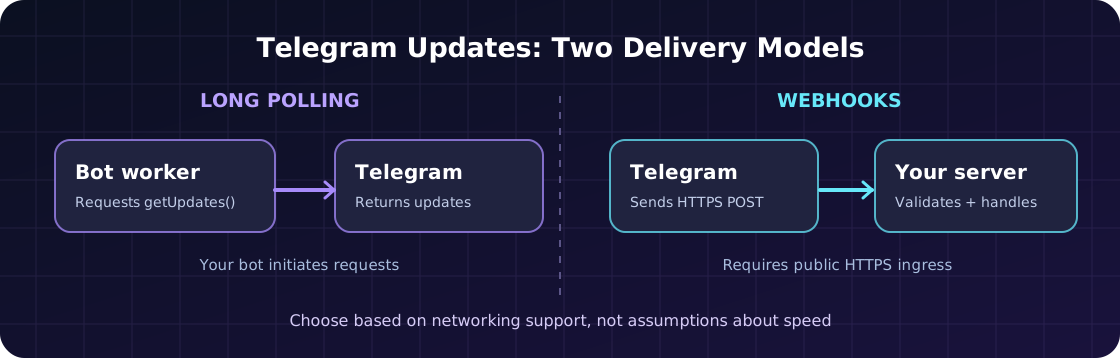
If your Volyx server exposes a supported Node.js runtime and can make outbound HTTPS requests, polling may be the quickest setup. If your specific allocation also has a provider-supported public HTTPS route or you manage a separate reverse proxy that can reach the application, you can use the webhook approach in this article. Check your server’s Network, Startup and hosting documentation first. Avoid assuming that an allocation port displayed in a game-hosting panel is equivalent to a publicly trusted HTTPS URL.
You’ll need access to these items before writing the handler:
.env file exposed by the web server.fetch API used below. Node.js 22 is an example runtime choice, not a Telegram-specific requirement.Do not post your token or webhook secret in screenshots, tickets, example repositories or browser URLs. If you expose the token, regenerate it with BotFather and rotate it everywhere your bot runs.
For a typical self-managed VPS, the path looks like this:
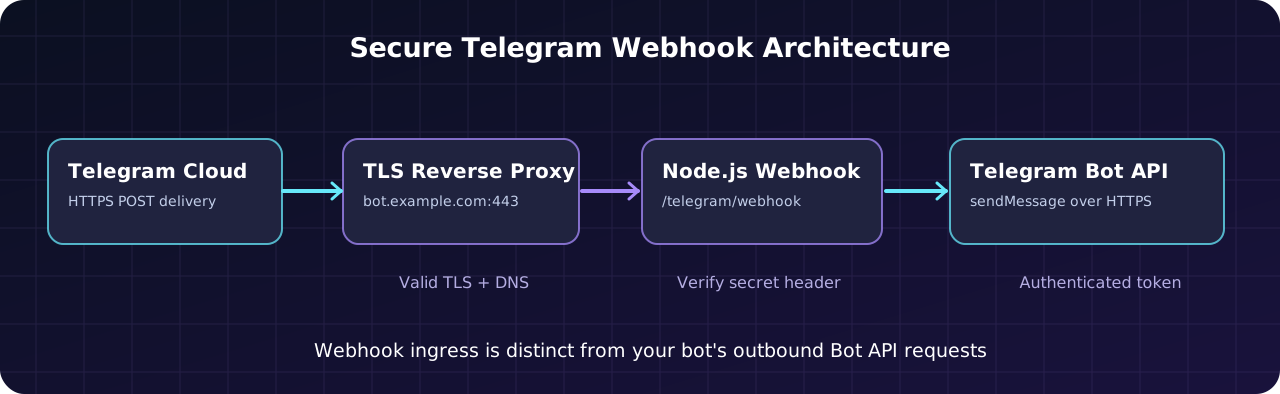
/ping to your Telegram bot.https://bot.example.com/telegram/webhook via HTTPS.127.0.0.1:3000.X-Telegram-Bot-Api-Secret-Token, parses the update and calls Telegram’s sendMessage method.There are two different connections here: Telegram → your webhook URL, and your bot → Telegram’s Bot API. Both must work. A server that can send outgoing HTTPS requests but cannot accept incoming ones supports the second connection, not necessarily the first.
Open the official BotFather account in Telegram and run /newbot. Pick a display name and a unique username ending in bot. BotFather returns an API token. Store it in a password manager or a private secret field; the token effectively authorizes actions as your bot.
Message your new bot once and press Start, so you have a chat you can test against. Later, use /setcommands in BotFather to advertise start, ping and help, although the example below also accepts those commands directly without registering a command menu.
Important: In groups, Telegram’s privacy mode can limit which messages the bot receives. Our example responds to explicit slash commands, so you do not need to disable privacy mode to get a basic demonstration running.
Create a folder named telegram-webhook-bot. The demonstration uses the standard Node.js HTTP library: no Express, no framework-specific middleware and no external npm dependency are necessary. That keeps the deployment path transparent for readers learning how a webhook works.
telegram-webhook-bot/
├── package.json
├── server.mjs
└── register-webhook.mjs
Create package.json:
{
  "name": "volyx-telegram-webhook-example",
  "private": true,
  "version": "1.0.0",
  "type": "module",
  "scripts": {
    "start": "node server.mjs",
    "webhook": "node register-webhook.mjs"
  },
  "engines": { "node": ">=22" }
}
The private flag discourages accidental publishing to npm; it is not a substitute for keeping secrets out of your files. You can download the separate working example files included in the Volyx article package instead of retyping them.
Our example deliberately supports only three commands: /start, /help and /ping. It validates the secret header, limits incoming JSON size, avoids printing messages or credentials into logs, and uses Telegram’s sendMessage endpoint for the response.
The following is the core request-handling logic; the article package also contains a complete runnable server.mjs with the HTTP server bootstrap and error handling:
const expected = process.env.WEBHOOK_SECRET;
const presented = req.headers['x-telegram-bot-api-secret-token'];
if (!safeEqual(presented, expected)) {
  res.writeHead(403).end('Forbidden');
  return;
}

const update = JSON.parse(await readLimitedJSON(req));
const chatId = update?.message?.chat?.id;
const text = update?.message?.text?.trim() || '';

if (chatId && /^\/(start|ping|help)(?:\s|$)/i.test(text)) {
  await sendMessage(chatId, replyFor(text));
}
res.writeHead(200).end('OK');
Why not respond to every message? Doing so can cause unwanted chat spam, particularly when a bot joins a group. A narrow command handler is easier to test and secure. Expand its features only when you have a clear requirement and understand Telegram’s update types.
Why check the header? setWebhook accepts a secret_token and includes that value in the X-Telegram-Bot-Api-Secret-Token header on subsequent update requests. The example uses timing-safe comparison after verifying the byte lengths; no generic public caller should be able to trigger the bot’s update handler without the configured secret. See the official webhook parameters.
Why restrict the body size? A public endpoint should not accept unlimited request bodies. This demo enforces an application-level payload limit. A production reverse proxy should enforce its own reasonable upload and request-rate limits too.
Configure these environment variables in your hosting control panel’s supported secret or startup settings:
| Variable | Example | Why it matters |
|---|---|---|
BOT_TOKEN | Hidden value supplied by BotFather | Authorizes outgoing calls to Telegram |
WEBHOOK_SECRET | Long random alphanumeric/underscore/hyphen string | Verifies Telegram’s secret header |
PUBLIC_WEBHOOK_URL | https://bot.example.com/telegram/webhook | Public HTTPS route registered with Telegram |
PORT | 3000 or the assigned app port | HTTP listener inside your environment |
HOST | 127.0.0.1 for local proxy on the same machine | Bind address; managed containers may require 0.0.0.0 |
Generate a suitable secret using a cryptographically secure random source, for example openssl rand -hex 32 on a trusted machine. Telegram accepts 1–256 characters from [A-Za-z0-9_-] for secret_token. A 64-character hexadecimal secret fits this format. Store it privately and send it to Telegram only when registering the webhook.
On Volyx, open your server and locate the available Startup or protected environment configuration for your selected runtime. Do not assume that an environment variable field named TOKEN is automatically named BOT_TOKEN in your application; the names must match your program. A protected variable is safer than placing secrets inside a publicly downloadable project folder.
Never put the token in the domain path. Although Telegram documents secret URL paths as an option, this example uses the dedicated secret header instead so the bot token is not embedded in the route or server access logs.
Set environment variables through your shell or hosting panel, then run:
node --version
npm start
Expected application output from the included example resembles:
Telegram webhook example listening on 127.0.0.1:3000
Health check: GET /healthz
Webhook endpoint: POST /telegram/webhook
Check the HTTP health endpoint from the same machine or network namespace where the process runs:
curl -i http://127.0.0.1:3000/healthzAn HTTP 200 response means your Node.js process is listening. It does not prove that Telegram can reach the domain, that HTTPS is configured, or that you registered the webhook successfully. Never treat a green health check as an end-to-end test.
For a managed container, 127.0.0.1 refers to the container itself. A reverse proxy running outside that container cannot automatically reach its loopback address. You may need to bind your application to 0.0.0.0 inside the container and route through a provider-approved allocation, while keeping the exposed service protected by the provider network and proxy.
Telegram requires a public HTTPS URL for the usual cloud Bot API webhook flow. The official Bot API lists supported destination ports, including 443, 80, 88 and 8443; serving on the standard public HTTPS port 443 is generally the simplest option. The cloud bot’s internal process can listen on a different private port such as 3000.
If you manage your own VPS, configure a domain record, obtain a trusted certificate and route requests through Nginx (or another supported proxy). A minimal illustrative Nginx location inside an already configured HTTPS server block looks like this:
# Example ONLY: HTTPS virtual host and TLS certificates
# must already be configured and verified.
location = /telegram/webhook {
    limit_except POST { deny all; }
    client_max_body_size 256k;
    proxy_pass http://127.0.0.1:3000;
    proxy_set_header Host $host;
    proxy_set_header X-Real-IP $remote_addr;
    proxy_set_header X-Forwarded-Proto https;
    proxy_read_timeout 15s;
}

location = /healthz {
    proxy_pass http://127.0.0.1:3000;
}
This is a teaching example, not a drop-in instruction to modify Volyx’s shared Nginx configuration. A full deployment needs valid listen 443 ssl, domain matching, certificate settings, service management and upstream connectivity. Test changes with nginx -t before reload; do not overwrite an existing site’s configuration just to add a Telegram bot endpoint.
If your hosting plan does not support the inbound route, choose long polling for now. Buying a domain alone does not create a functioning HTTPS webhook endpoint.
Once the public endpoint is reachable, call Telegram’s setWebhook API with the public HTTPS URL and secret_token. The companion file register-webhook.mjs uses Node’s built-in fetch, reads the token and secret from environment variables, and submits JSON to Telegram:
const api = `https://api.telegram.org/bot${process.env.BOT_TOKEN}/setWebhook`;
const response = await fetch(api, {
  method: 'POST',
  headers: { 'content-type': 'application/json' },
  body: JSON.stringify({
    url: process.env.PUBLIC_WEBHOOK_URL,
    secret_token: process.env.WEBHOOK_SECRET,
    allowed_updates: ['message'],
    drop_pending_updates: false
  })
});
const result = await response.json();
console.log({ ok: result.ok, description: result.description });
The example logs only a status and description, not the credential-bearing API URL. Note that secrets can still leak through shell history, exception traces, external monitoring or process inspection if you configure them carelessly. Avoid printing full request objects.
Run the helper while your bot’s environment variables are set:
npm run webhookIf you receive ok: true, Telegram accepted the registration. That does not mean the public endpoint is responding correctly yet. Send /ping to your bot and inspect the application console and webhook status.
Telegram exposes getWebhookInfo to report webhook state. The included registration helper can query it using a --info option:
node register-webhook.mjs --infoPay attention to these fields:
| Field | What it can tell you | What to investigate |
|---|---|---|
url | Registered public endpoint | Wrong hostname or path |
pending_update_count | Updates awaiting delivery | Endpoint unavailable or repeated errors |
last_error_message | Telegram’s recent delivery error | TLS, timeout, HTTP error or network issue |
last_error_date | When a recent error happened | Correlate with deploy and proxy logs |
max_connections | Configured webhook concurrency | Tune for load after correctness is proven |
Do not publish the full getWebhookInfo output blindly. It can reveal your bot’s webhook domain or operational details. Our helper displays selected diagnostic fields only. Telegram’s own API is the authoritative reference for the complete response structure.
Telegram may repeat delivery after unsuccessful webhook requests. A handler that does work and then crashes before responding successfully can process the same update again. The update_id field is intended to help identify duplicates. In a toy demonstration, duplicates may only produce an extra /ping reply. In a billing, role-management or notification bot, duplicates can be serious.
For production workflows, store processed update_id values in durable storage and design work to be idempotent. A simple in-memory Set does not survive restarts or multiple bot instances, so it cannot provide reliable duplicate protection. The included teaching example deliberately keeps business logic small and does not claim production-grade exactly-once delivery.
The deployment workflow for Node.js code is similar to other bot projects: create a server for the intended runtime, upload your source files, configure your environment, set the startup command and inspect the console. Volyx uses a Coins-based hosting model; the amount of resources available and the rules for keeping a server active depend on your account and current plan.
| Step | Action inside Volyx | What success looks like |
|---|---|---|
| 1 | Create or select a Node.js bot server | Appropriate Node.js runtime available |
| 2 | Upload package.json, server.mjs and helper file | The project files appear in Files |
| 3 | Enter token and secret through protected configuration | App can read required environment values |
| 4 | Configure npm start or the equivalent startup entry | Console says HTTP listener is running |
| 5 | Check assigned network route and domain/TLS features | Public HTTPS requests can reach the process, if supported |
| 6 | Register the webhook and send /ping | Telegram receives a reply and the logs show normal processing |
If step 5 is unavailable, stop at the app setup stage and switch to a polling bot rather than trying to expose your private token or bypass network restrictions. The Volyx website and documentation are the starting points for available hosting features; confirm exact networking support for your individual allocation.
Avoid false promises: This guide doesn’t guarantee that Volyx supplies a free public HTTPS endpoint, a fixed public IP, particular inbound ports, unrestricted CPU/RAM, automatic restarts or 24/7 uptime on every server. Those are deployment requirements to check—not claims to invent for a marketing article.
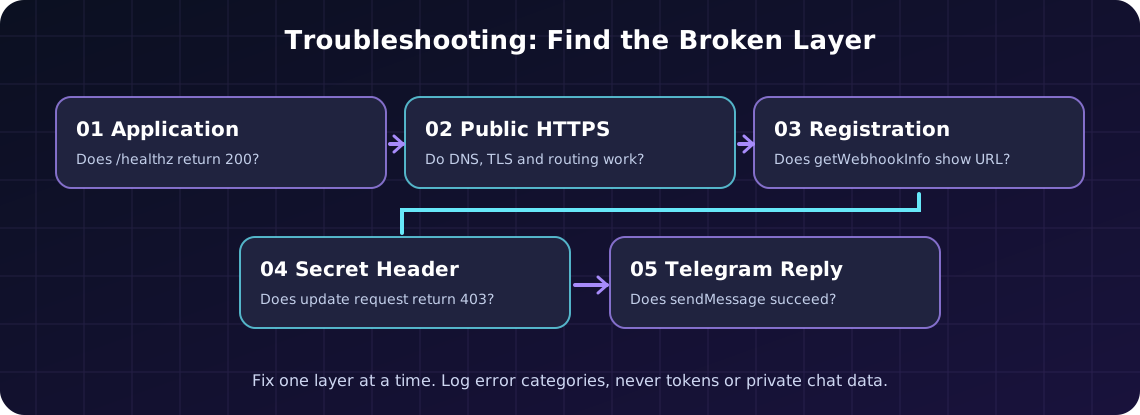
1. setWebhook says the URL is invalid. Confirm the URL starts with https://, uses a publicly resolvable host, has an accepted webhook port, and contains no unescaped spaces. A localhost or container-internal address is not a public webhook destination.
2. The bot is online, but /ping gets no answer. Separate the failure stages: process startup, public TLS, Telegram registration, secret header validation, update parsing and outgoing sendMessage. A working process can still be invisible to Telegram.
3. Telegram reports an SSL or certificate error. Verify the certificate’s hostname, trust chain and expiry using your browser and an independent TLS checker. A certificate valid only for www.example.com is not automatically valid for bot.example.com.
4. The proxy returns 502 Bad Gateway. Your public reverse proxy may be working while the Node.js upstream is stopped, listening on the wrong address or unreachable across a container network. Test the upstream from the proxy’s namespace and inspect the application console.
5. The endpoint returns 403 Forbidden. Check that the WEBHOOK_SECRET value sent to setWebhook exactly matches the environment variable on the server. Do not weaken the endpoint by deleting authentication. Re-register the webhook if you rotate the secret.
6. Telegram reports 404 Not Found. Ensure the registered URL exactly matches the route (/telegram/webhook) and verify Nginx preserves it. Trailing slashes and nested location blocks can matter.
7. getUpdates fails with a webhook conflict. A registered webhook and long polling are mutually exclusive. Call deleteWebhook only when you intentionally migrate back to polling. Decide whether to keep or drop pending updates based on your bot’s business requirements.
8. Incoming messages work, but replies fail. Inspect outgoing HTTPS access to api.telegram.org, authorization errors, chat permissions and Telegram API descriptions. A returned 200 from your own /healthz does not verify sendMessage.
9. Duplicate replies appear after temporary errors. Telegram may retry failed deliveries. Track update_id, implement durable deduplication for state-changing operations and return success only after work has been safely accepted.
10. Messages stop after a server restart. Confirm your process manager or hosting service actually restarts the Node.js process, reloads the secrets and binds to the correct network port. Check your hosting renewal and Coins status rather than assuming the runtime will always remain active.
A public webhook is an internet-facing HTTP application. Even a small demo benefits from controls that are easy to overlook:
allowed_updates) rather than accepting events you do not handle.update_id field as a deduplication key for potentially retried deliveries.For more general advice on keeping bot credentials safe, also see the Volyx Discord bot hosting guide and the 12 common bot hosting error fixes. The Discord-specific parts differ, but secret management and startup diagnosis share many principles.
Sometimes. You need an HTTP application host and a public HTTPS ingress route. A free Node.js container alone may not provide inbound HTTPS. Verify the actual product terms, networking features, and usage limits; otherwise use long polling or a separate approved HTTPS frontend.
It needs a public HTTPS endpoint with a certificate that Telegram accepts. A normal domain or subdomain is the most practical arrangement. Localhost addresses cannot receive ordinary Telegram cloud webhook deliveries.
Yes. Any reliable HTTPS termination and forwarding setup that your provider supports can work, including managed ingress or another reverse proxy. Nginx is a common example, not a Bot API requirement.
No. Telegram sends HTTPS POST requests containing JSON. You can process them with Python, Go, PHP, Java or other supported stacks. Node.js is used here because it produces a compact example with no external runtime dependencies.
No. Telegram documents getUpdates and webhooks as alternative receiving methods for the same bot. Remove the webhook before deliberately switching to polling.
secret_token do?It instructs Telegram to send a custom header with your selected secret on webhook deliveries. Your handler should validate the header before accepting updates. The token is not the same as your bot API token, and both should remain private.
Your private app can listen on a convenient port assigned by its host, such as 3000. What matters externally is that Telegram reaches a supported public webhook port over HTTPS. The reverse proxy maps between the two.
The bot may not be receiving or acknowledging incoming webhook deliveries successfully. Look for timeouts, HTTP errors, certificate failures and crashed workers. Compare getWebhookInfo with your proxy and app logs.
A failed response can lead Telegram to retry. Use update_id for durable deduplication in applications where repeated processing changes state. Assume that delivery and processing are not magically exactly-once.
No. /healthz proves the listener is responding to a local or HTTP check. It does not exercise Telegram registration, the secret header, parsing or outbound Bot API calls. Send a real command to verify the end-to-end path.
No. A 403 is a diagnostic signal. Make sure the secret values agree, the proxy forwards the header and the bot was registered with the current secret. Removing validation opens your public handler to spoofed update requests.
Not necessarily for every workload. Real latency depends on your hosting region, processing time, network conditions and implementation. The main practical distinction is delivery architecture and the requirement for reachable HTTPS, not a universal speed guarantee.
Before calling your setup complete, verify the correct Node runtime, private secrets, a reachable public HTTPS URL, a passing health endpoint, accepted setWebhook registration, a clean getWebhookInfo status, a successful /ping reply and a restart test. If any step fails, investigate it before adding new features.
Visit Volyx Hosting and choose a compatible runtime. If your allocation supports approved public HTTPS routing, use the webhook workflow above; otherwise start with polling and move to webhooks when you have proper ingress. A bot that reliably processes /ping is more useful than an elaborate deployment that cannot receive a single update.
Official references: Telegram Bot API, BotFather introduction, setWebhook, getWebhookInfo, deleteWebhook, and Node.js HTTP server documentation.
Explore more in-depth articles with code, visuals, and practical walkthroughs.
Browse all articles ↗
A practical, evidence-first guide to fixing Minecraft Java server lag: read TPS and MSPT, profile with spark, tune chunks, and diagnose CPU, memory and plugins.
Read article ↗
Learn the difference between DDoS floods and Minecraft bot raids, secure a Paper or Velocity server, compare TCPShield and Cloudflare, and respond safely using Volyx.
Read article ↗
Compare five real MIT-licensed JavaScript, TypeScript, and Python Discord bot starters, then learn how to deploy one safely on Volyx.
Read article ↗