
Minecraft Server Lag in 2026: Diagnose TPS, MSPT, CPU and RAM
A practical, evidence-first guide to fixing Minecraft Java server lag: read TPS and MSPT, profile with spark, tune chunks, and diagnose CPU, memory and plugins.
Read article ↗Diagnose Discord bot RAM and CPU spikes with repeatable measurements. Learn Node.js and Python profiling, cache limits, event-loop fixes, safe restarts, and Volyx console workflows.

Your Discord bot works perfectly on your laptop, but after you deploy it the memory graph climbs, commands respond slowly, and the process sometimes restarts. Is the hosting plan too small? Is Node.js leaking memory? Is Discord sending too many events? There is no useful one-line answer. The first step is to measure what changes and when.
This guide shows you how to reduce Discord bot memory usage and CPU consumption without breaking features that depend on events, caches or background jobs. We use Volyx’s server Console and file-management workflow as the practical deployment example, but the principles also apply to any host running Node.js or Python. Instead of recommending arbitrary RAM numbers, we’ll use a measurable process: establish a baseline, isolate a workload, change one variable, and compare results.
Quick answer: For Node.js bots, record resident memory (RSS), JavaScript heap usage, and CPU time over repeated intervals. Inspect caches, oversized arrays, duplicate event handlers, and synchronous work. For Python bots, start with required intents, bounded caches and tracemalloc snapshots when allocation growth persists. Never assume that forcing garbage collection, raising the memory limit, or restarting every few minutes fixes the cause.
Volyx availability note: The limits shown in your Volyx panel are specific to your server and current allocation. The platform uses a free-hosting and Coins model; this article does not promise a particular RAM allowance, CPU share, uptime guarantee or automatic restart policy for every account. Use the actual figures and controls displayed in your server.
RAM describes memory currently used by the process and supporting runtime. CPU consumption describes processor time being spent executing code. A Discord bot can need very little CPU when idle yet briefly use substantial CPU when generating a report, processing an image, serializing data or handling a burst of commands. Conversely, a bot can accumulate a large cache while spending almost no CPU.
In Node.js, three numbers are often confused:
| Measurement | What it indicates | What it does not prove |
|---|---|---|
| RSS (resident set size) | Memory occupied by the process in physical RAM, including JavaScript heap, native allocations and code | A rising RSS alone does not prove a JavaScript leak |
| heapUsed | V8 JavaScript heap currently in use | It does not account for all native memory or Buffers |
| external / arrayBuffers | Memory managed outside the normal JS heap, such as some Buffer data | It does not describe your entire memory bill |
| CPU time | Processing consumed over an interval | A single short spike does not prove the bot is unhealthy |
| Event-loop delay | How long scheduled work waits before the JS loop can run | It does not identify the exact slow function by itself |
Node’s official process documentation defines rss, heapUsed, external and arrayBuffers. It also notes that RSS can rise despite a relatively stable V8 heap because native allocation and fragmentation behave differently. That is why a good troubleshooting log records multiple measurements over time, not a single screenshot.
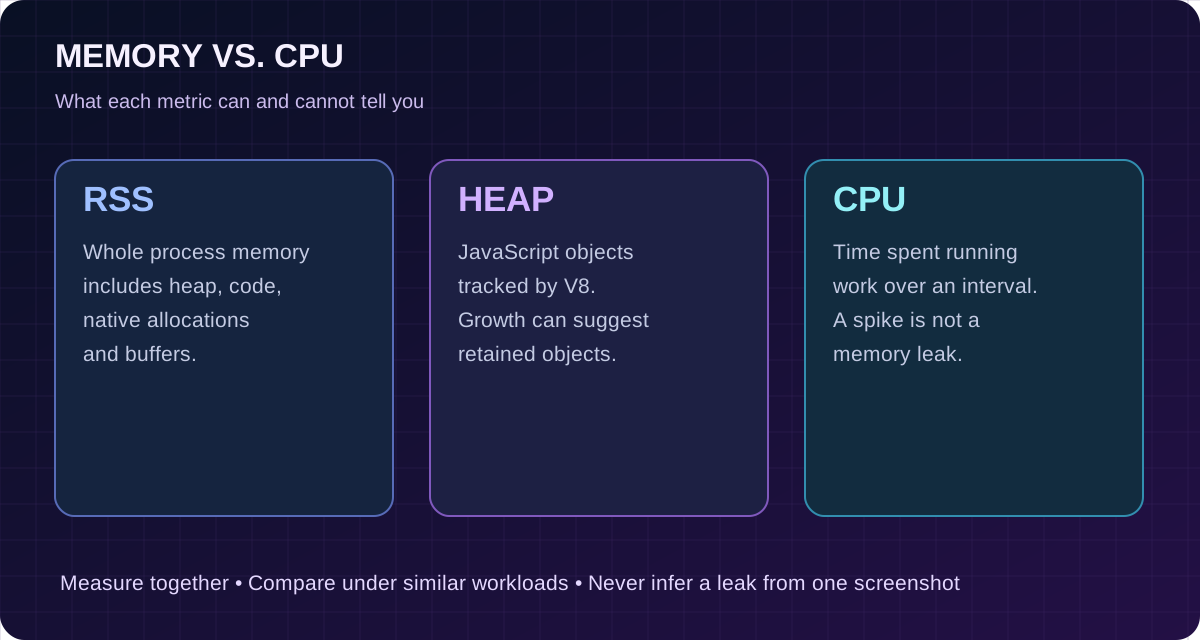
Pattern A — High CPU for a few seconds, then normal: probably a burst of legitimate work, though users may still notice latency. Pattern B — CPU stays high while the bot appears idle: look for tight loops, excessive polls, repeated timers and event handlers. Pattern C — RSS grows and later stabilizes: possibly expected caching or runtime allocation. Pattern D — heapUsed or retained objects grow across repeated comparable workloads and never recover: investigate an application-level leak.
These patterns are hypotheses, not diagnoses. Garbage collection, traffic fluctuations and container scheduling complicate the picture. Measure several runs under comparable conditions before making a change.
node --version or python --version) and your Discord library version.If your bot is completely offline rather than just slow, use the earlier guide Discord Bot Not Starting? 12 Common Hosting Errors first. Startup and performance issues overlap, but a missing token and a memory leak require very different fixes.
Open your server in Volyx, navigate to Console, and check recent log lines. If your account shows separate resource graphs, compare the timestamps on the graphs to the log timestamps. Look for repeated reconnects, batches of expensive requests, an exception logged on every event, or a restart immediately following a high-memory period.
A message such as JavaScript heap out of memory points toward V8 exhaustion, but a container can also terminate a process because its overall memory allocation was exceeded. Those are related but different paths to failure. Check the actual exit reason available to your runtime or control panel; don’t label every unexpected restart an OOM.
Next, open Files and verify you are running the source version you expect. In Startup, confirm the entry file and Node.js/Python version. An unexpectedly old deployment can retain code that you already fixed locally.
Real deployment advice: Do not run profiling commands that expose a public debugging port on a production bot. Node’s inspector can grant powerful access to process internals. Keep debugging local or restricted to a trusted development environment.
This lightweight diagnostic uses the built-in node:process APIs and node:perf_hooks. It does not request a Discord token or install a monitoring agent. Place it next to your bot code as metrics.mjs and import it from your entry file. A runnable standalone demo is included in the article ZIP.
// metrics.mjs — import in your existing Node.js bot.
import { memoryUsage, cpuUsage } from 'node:process';
import { monitorEventLoopDelay } from 'node:perf_hooks';

const mib = (bytes) => Math.round(bytes / 1048576 * 10) / 10;

export function startMetrics(intervalMs = 30_000, emit = console.log) {
  const delay = monitorEventLoopDelay({ resolution: 20 });
  delay.enable();
  let previousCpu = cpuUsage();
  let previousTime = process.hrtime.bigint();

  const timer = setInterval(() => {
    const now = process.hrtime.bigint();
    const deltaUs = Number(now - previousTime) / 1_000;
    const cpu = cpuUsage(previousCpu);
    const spentUs = cpu.user + cpu.system;
    const mem = memoryUsage();
    const cpuPercent = deltaUs > 0 ? 100 * spentUs / deltaUs : 0;

    emit(JSON.stringify({
      at: new Date().toISOString(),
      rssMiB: mib(mem.rss),
      heapUsedMiB: mib(mem.heapUsed),
      externalMiB: mib(mem.external),
      cpuPercentOneCore: Number(cpuPercent.toFixed(1)),
      eventLoopP99Ms: Number((delay.percentile(99) / 1e6).toFixed(1)),
    }));

    previousCpu = cpuUsage();
    previousTime = now;
    delay.reset();
  }, intervalMs);
  timer.unref(); // Do not keep the process running just for metrics.
  return () => { clearInterval(timer); delay.disable(); };
}
In an ESM project, import it near your bot initialization:
import { startMetrics } from './metrics.mjs';
const stopMetrics = startMetrics();
// Initialize and log in your Discord client as usual.
How to interpret the output: cpuPercentOneCore compares process CPU time with elapsed wall time. On a multi-core system, values above 100% are possible; container CPU limits and shared hosts add more nuance. eventLoopP99Ms approximates the 99th-percentile loop delay during that measurement interval. If the bot is idle and CPU and delay are constantly high, investigate synchronous work before buying more RAM.
Privacy and log volume: The example records numerical process metrics only. In a shared log destination, write infrequently and rotate logs; every 30 seconds is plenty for an initial investigation. Remove or disable detailed logging once the issue is understood.
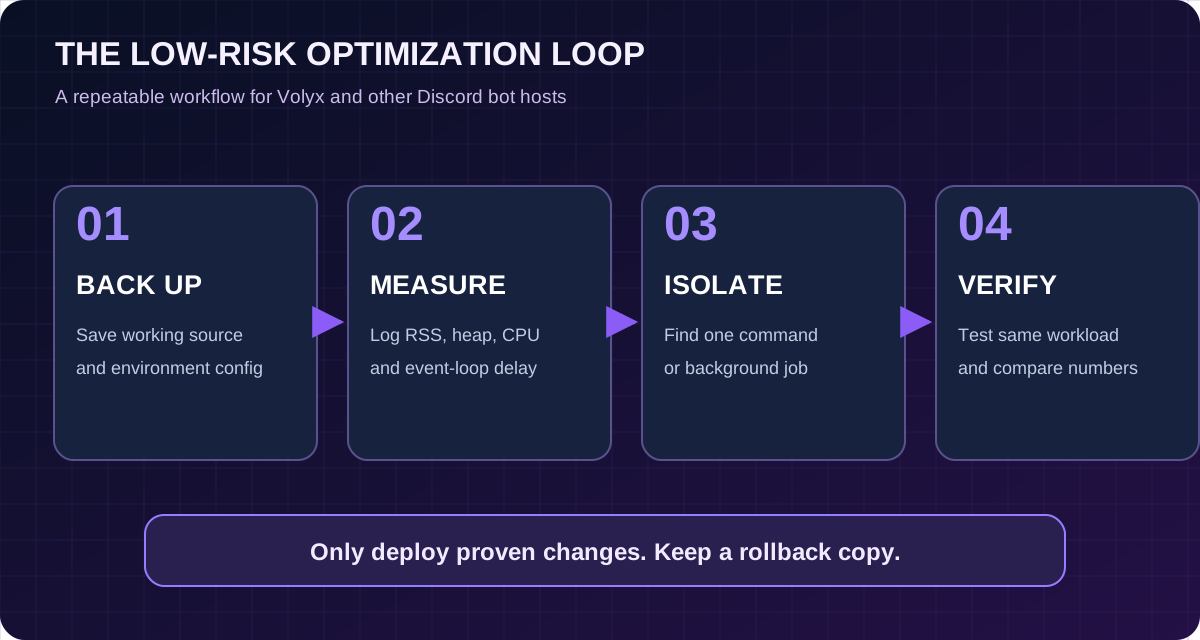
Measure idle, normal, and peak conditions separately. Keep the same bot version, same Discord server selection and similar traffic during the baseline and follow-up.
| Test window | Capture | Question answered |
|---|---|---|
| Idle for 10–15 minutes | RSS, heapUsed, CPU, event-loop delay | Is the bot expensive even when nobody uses it? |
| One known command, repeated safely | Before/after readings | Does one handler allocate or compute too much? |
| Normal server activity | Longer trend over several periods | Is memory growth tied to legitimate caching? |
| A reconnect or restart | Relevant log timestamps | Is state duplicated or restored incorrectly? |
These times are practical observation windows, not universal thresholds. Do not stress-test a shared hosting node or Discord’s public API by deliberately sending floods. A small, controlled test on your own bot is enough to narrow down the responsible code path.
Imagine a bot shows 95 MiB RSS and 42 MiB heapUsed after startup, then 180 MiB RSS and 47 MiB heapUsed after a busy hour. That observation alone does not justify declaring a JavaScript memory leak. The heap barely changed. Buffers, caches, native allocations, allocator behavior or OS accounting could explain some of the difference. In contrast, steadily growing heap with increasingly retained collections is a stronger reason to take heap snapshots and inspect object owners.
The numbers above are illustrative, not a benchmark measured on Volyx.
A surprisingly common performance problem happens during hot reload or when multiple files initialize the same handler. A command is processed once at first, twice after a reconnect or reload, and many times later. CPU, memory and Discord requests rise together.
Avoid placing an unconditional listener registration inside a function called for every reconnect:
// Problem: this function may register duplicates if called repeatedly.
function registerHandlers(client) {
  client.on('interactionCreate', async (interaction) => {
    // ...
  });
}
Instead, register handlers once during startup and maintain the handler lifecycle explicitly. If your bot has a reload system, remove the precise old listener before adding its replacement. Do not routinely call removeAllListeners() on the entire client; that can remove listeners belonging to the library or unrelated features.
For scheduled work, track interval handles. A single moderation sweep every minute may be fine; one interval per guild per user per reconnection can become expensive. Prefer one scheduler reading active work from a bounded queue.
Discord.js cache customization and the current Options API allow developers to bound selected caches with Options.cacheWithLimits() or sweep some older objects. Changing these options is advanced: commands that depend on cached messages or members may fail after an aggressive limit.
Example for a bot that does not need cached message histories and has tested the limits:
import { Client, GatewayIntentBits, Options } from 'discord.js';

const client = new Client({
  intents: [GatewayIntentBits.Guilds],
  makeCache: Options.cacheWithLimits({
    ...Options.DefaultMakeCacheSettings,
    MessageManager: 50,
  }),
});
This is a minimal slash-command-oriented configuration, not a drop-in replacement for moderation, music, member-event, voice or message-reading bots. Retain required intents and cache entries for your features. Cache limits reduce retained objects; they do not magically improve CPU-heavy code or fix repeated listeners.
For a fuller bot, compare default cache sizes with actual workload, inspect the handlers using a given cache, and limit only the data you can safely fetch again. Test on a private development guild first.
Discord Gateway Intents decide which categories of events a bot asks to receive. If you only need slash commands that arrive as interactions, you may not need a continuous stream of message content or member updates. Fewer unnecessary events can reduce event-handler work and some caching.
Do not disable an intent merely because it is marked privileged. A verification bot might legitimately require member-related events. Instead, list each feature, identify its required events, and configure the smallest correct intent set. Verify behavior after changing it in both the Discord Developer Portal and your bot code where applicable.
An intent mismatch can cause features to stop working or the Gateway connection to be rejected. See our companion free Discord bot deployment guide for the basic setup and token-handling workflow.
The Node.js event loop processes callbacks. If one handler performs a huge synchronous task, other events wait even though the bot has plenty of RAM. Common examples include parsing very large JSON, CPU-heavy image transforms, synchronously reading big files, generating lengthy archives or complex regular expressions on untrusted input.
Better approach: move long-running work to an appropriate background job or worker, and keep Discord interactions responsive. Before making an operation asynchronous, ask whether the underlying algorithm can be simplified or whether results can be cached safely.
| Inefficient pattern | Safer alternative | Watch out for |
|---|---|---|
| Rebuilding the same configuration on every command | Parse once, reload on actual file change | Configuration changes need a controlled refresh |
| Synchronous filesystem operations per event | Async I/O and bounded concurrency | Parallel work still needs limits |
| Recomputing an expensive leaderboard repeatedly | Cache a short-lived result or update it incrementally | Stale results and invalidation |
| Massive in-memory arrays of historical events | Persist needed records and paginate queries | Database costs and retention requirements |
| Repeated remote API calls for static data | Backoff-aware caching | Provider rate limits and outdated data |
Do not use asynchronous loops that fire thousands of promises at once. Async I/O can reduce event-loop blocking while still causing high memory use if concurrency is unbounded.
Suppose your bot sends announcements to several guilds. Even if each individual task is small, scheduling all of them at once can retain thousands of pending promise closures, payloads and response objects. A concurrency limit prevents uncontrolled growth.
For your own non-Discord background jobs, a simple queue can process work at a fixed concurrency. For operations hitting Discord endpoints, use the library’s rate-limit handling and API policies; do not construct a generic tight loop that bypasses those protections.
// A small helper for trusted background tasks.
export async function mapLimited(items, limit, worker) {
  if (!Number.isInteger(limit) || limit < 1) {
    throw new Error('limit must be a positive integer');
  }
  const results = new Array(items.length);
  let next = 0;
  async function run() {
    while (next < items.length) {
      const index = next++;
      results[index] = await worker(items[index], index);
    }
  }
  await Promise.all(Array.from(
    { length: Math.min(limit, items.length) }, run
  ));
  return results;
}
This implementation assumes you already have a bounded items array. For unbounded input streams, use a real backpressure-aware queue or stream; collecting a million items into an array defeats the purpose.
A plain Map does not expire values. It is tempting to keep recent user profiles, command results, temporary sessions and cooldowns there forever. Every new key is then retained until you delete it or the process exits.
Store only the fields you need, enforce a maximum size, attach appropriate expiration, and delete entries when a guild, channel or session is no longer relevant. Avoid storing full Discord objects when a user ID and a small data record are sufficient. For persistence, use a database rather than an ever-growing in-process collection.
Privacy matters here too: do not turn a performance cache into a hidden long-term archive of user messages. Limit data retention and follow Discord’s developer policies.
Python has different memory behavior and profiling tools. The standard-library tracemalloc module can compare snapshots of Python allocations and show which lines retain new blocks. It does not provide a full accounting of all native memory or the whole container RSS.
# Start tracing early in a development/test run.
import tracemalloc

tracemalloc.start(10)
before = tracemalloc.take_snapshot()

# Run the specific bot feature you are investigating.
# Then, after the comparable test window:
after = tracemalloc.take_snapshot()

for stat in after.compare_to(before, 'lineno')[:8]:
    print(stat)
Do not run this code literally as one uninterrupted block and expect it to diagnose a production bot: you need to place the two snapshots around a real workload and compare comparable states. Keep profiling temporary and store the output privately because stack traces may contain paths or other operational details.
The discord.py intents guide explains that member cache behavior can be controlled with MemberCacheFlags. It also explains which event payloads already contain enough member information without keeping every member cached.
For an app-command bot that does not need member tracking, begin from its actual requirements, rather than enabling all intents by habit. If you require accurate member joins/leaves or member-specific features, preserve the necessary intents. Tuning max_messages or member-cache flags should be tested against those requirements, not copied into every bot indiscriminately.
async def by itself does not make CPU-intensive work non-blocking. Blocking functions inside a command handler can still freeze the event loop. Prefer asynchronous libraries for I/O, or move ordinary blocking I/O to a thread using asyncio.to_thread() when appropriate.
For CPU-heavy pure-Python tasks, threads often do not provide real multi-core speedups because of the GIL in conventional CPython builds; consider a controlled process-based worker, a queue, or moving expensive work outside the bot. Set timeouts and concurrency limits. More workers are not automatically better on a resource-constrained instance.
Consider this simple anti-pattern:
# Avoid in an async Discord command handler:
import time

async def slow_handler():
    time.sleep(5)  # Blocks the event loop.
For a delay, await asyncio.sleep(5) lets other tasks run. For blocking file I/O, use an appropriate asynchronous strategy. For long CPU jobs, choose a separate worker and measure the total RAM overhead before deploying.
Discord libraries already manage many Gateway reconnect details. A custom wrapper that restarts the client every few seconds can make temporary outages much worse. Avoid a process supervisor inside your application fighting the platform’s own startup and restart controls.
If you add retries to your own external API calls, use capped exponential backoff, honor provider rate-limit headers and stop or alert after repeated failures. Do not include a token in an exception string. Log the operation and outcome rather than dumping entire request objects.
An exception emitted every millisecond can itself become a CPU and disk-consumption problem. Fix the root cause and apply logging rate limits or deduplication where appropriate.
| Symptom | First thing to inspect | Common explanation | Useful next step |
|---|---|---|---|
| CPU elevated even when idle | Repeated timers, loops, exception spam | Work is being scheduled continuously | Disable one recurring task in a test build |
| RSS climbs, heap stays mostly flat | Buffers, native allocations, runtime fragmentation | Not necessarily a JS leak | Track external and Buffer usage |
| Heap climbs after every repeated command | Arrays, maps, cached responses, listeners | Possible retained object growth | Compare heap snapshots |
| High event-loop delay with modest memory | Sync work, parsing, image generation | Main thread temporarily blocked | Profile slow handler and move work |
| Commands lag but CPU is low | Network waits, database calls, rate limits | External dependency or slow query | Time individual stages |
| Out-of-memory termination | Container memory limit, peak allocations | Process exceeded allocation | Find peak-producing workload |
| Bot disconnects without CPU spike | Connectivity, token/intents or Gateway events | May not be resource-related | Read Discord connection logs |
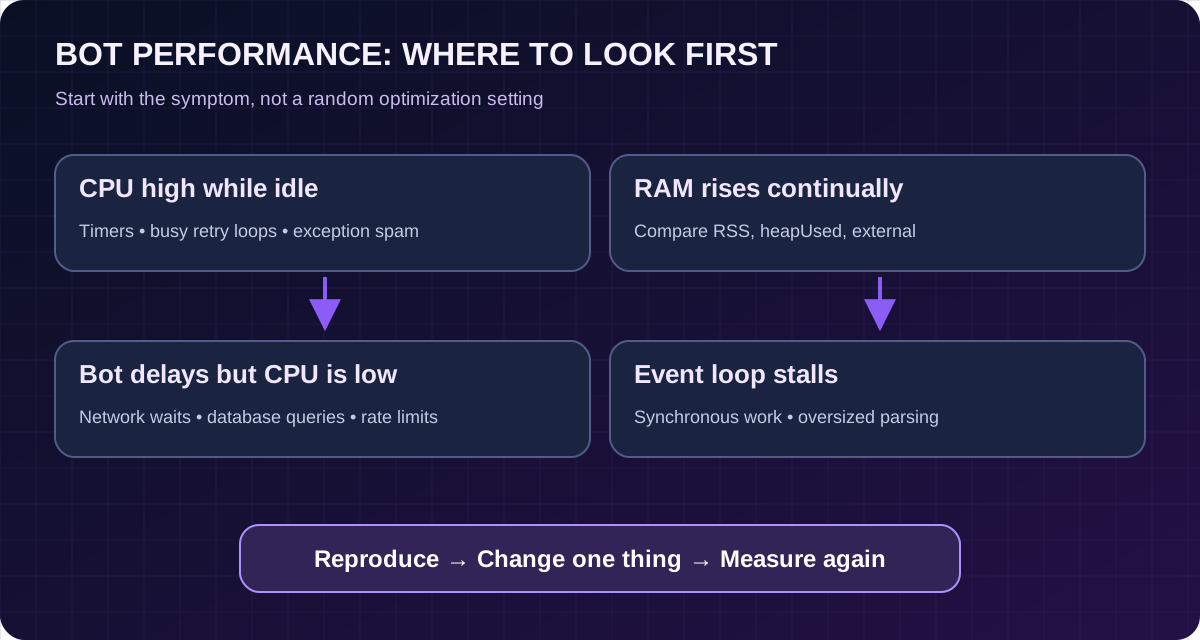
Let’s walk through a hypothetical incident. A slash-command bot starts promptly, then grows slower after repeated use. Console metrics show that CPU bursts align with one statistics command, and heapUsed rises after each invocation. The command reads a growing file and keeps the entire parsed result in an array used for history.
The wrong fix is to restart every hour and declare the issue solved. That merely clears the array. A better fix is to limit the response to the recent records that a user actually requested, move long-term records to a suitable database, and paginate queries. Then measure the same command workload again and confirm both memory and response time improved.
In another bot, the RSS rises while the heap remains stable and event-loop delay stays low. That may call for longer observation rather than an immediate rewrite. The point is to follow the evidence rather than optimize whichever graph looks frightening.
The following workflow avoids changing your running bot blindly:
If you need help moving bot state into persistent storage, see our technical articles and look for the Node.js database guide when it is published. For a fresh deployment, read How to Host a Discord Bot for Free. These topics are complementary, not copies of the same guide.
1. Raising the heap limit without investigation. More heap might prevent a crash in a legitimately memory-intensive workload, but it will not remove a leak and can cause the container to exceed its total limit.
2. Forcing garbage collection every few seconds. Explicit GC can reduce throughput and mask the actual retention problem. Leave it to the runtime unless you are doing a specific controlled diagnostic.
3. Disabling all Discord intents. The bot may become a little quieter only because essential features no longer receive their events.
4. Deleting caches without understanding consumers. Other commands may assume cached messages or members exist; you may trade lower RAM for broken behavior or more API requests.
5. Scheduling an automatic restart as the only solution. It hides growth but introduces disconnects, missing work and avoidable downtime.
6. Believing a universal “100 MB Discord bot” claim. A minimal slash-command bot, a music bot, and a multi-server moderation system run different workloads. Capacity depends on your code and what it does.
| Time | Goal | Proof of progress |
|---|---|---|
| First hour | Capture baseline and identify a suspicious handler or cache | Timestamped RSS, heap, CPU and delay readings |
| First day | Make one safe code change and repeat the same test | Lower or more stable usage without losing functionality |
| First week | Observe real patterns and document a rollback | No recurring growth or unexplained crashes across comparable usage |
This is an editorial workflow, not a service-level guarantee or measured outcome from Volyx servers. The right observation period depends on how frequently your bot runs expensive jobs.
There is no universal number. A small slash-command bot may use considerably less memory than one that handles music, images, large caches or multiple background jobs. Measure your own RSS under realistic conditions and leave headroom for peaks, dependencies and the runtime.
It may retain more cached data, store results that never expire, load larger buffers or suffer an actual memory leak. Compare RSS, heapUsed and external memory over time before deciding which explanation fits.
No. RSS includes memory outside the JavaScript heap and can be affected by allocator fragmentation. A heap snapshot and repeated workload tests are more helpful for finding JavaScript objects that remain reachable.
heapUsed represents occupied V8 JavaScript heap memory. RSS estimates resident memory for the wider process, including native allocations and other runtime components. Both measurements are useful, but they answer different questions.
Use any resource metrics shown in your Volyx server and read the Console logs around spikes. For Node.js, the attached metrics module measures CPU time over intervals; remember this is process-level CPU and not a substitute for understanding container scheduling.
Only if the bot does not need that event data. A slash-command-only design may need fewer gateway events, but message-prefix commands and content-dependent moderation can break if you disable required permissions. Check feature requirements first.
Yes. Features relying on cached messages or members may stop working, behave differently, or make additional API calls. Change one cache limit at a time in a test environment and verify the affected commands.
Not as the primary fix. Scheduled restarts can reduce symptoms but can also interrupt commands, lose in-memory state and hide a leak. Diagnose retention first and add recovery policies only when justified.
Common causes include repeated timers, busy retry loops, exception spam, background jobs and duplicate listeners. Measure CPU and event-loop delay during a quiet window, then disable or instrument suspected jobs one at a time.
No. It tracks Python allocation blocks and supports snapshot comparisons, but it does not fully account for every native library allocation or the whole container’s resident memory. Use it together with other resource measurements.
No. The first improvements are usually code-level and apply on managed game/bot hosting too. A VPS gives more control over monitoring and process management, but it does not automatically fix inefficient code.
Often, if you replace an unbounded in-memory archive with paginated queries or short-lived caches. Database operations add latency and operational complexity, so use appropriate indexes and query limits rather than fetching the entire database into RAM on each command.
--max-old-space-size a reliable fix for out-of-memory errors?It changes a V8 heap ceiling, not the full process or container memory allocation. Increasing it past the available resource budget can make termination more likely. Profile allocations and choose limits only after observing actual usage.
This article makes no such promise. Availability, plan conditions, server expiration and resource limits depend on the account and the Volyx Coins model. Review current platform rules and the actual limits displayed in your panel.
Start with one repeatable metric and one real bottleneck. Avoid copying every optimization setting into a live bot. Gather a baseline, make a minimal change, test required commands, and monitor the result. If the process still fails, collect sanitized logs and a precise reproduction before asking for support.
For the full deployment workflow, visit Volyx and our free Discord bot hosting guide. For startup-specific errors, use the 12-error troubleshooting guide. These links let you continue from measurement to a concrete fix without jumping between unrelated tutorials.
Explore more in-depth articles with code, visuals, and practical walkthroughs.
Browse all articles ↗
A practical, evidence-first guide to fixing Minecraft Java server lag: read TPS and MSPT, profile with spark, tune chunks, and diagnose CPU, memory and plugins.
Read article ↗
Learn the difference between DDoS floods and Minecraft bot raids, secure a Paper or Velocity server, compare TCPShield and Cloudflare, and respond safely using Volyx.
Read article ↗
Compare five real MIT-licensed JavaScript, TypeScript, and Python Discord bot starters, then learn how to deploy one safely on Volyx.
Read article ↗