
Minecraft Server Lag in 2026: Diagnose TPS, MSPT, CPU and RAM
A practical, evidence-first guide to fixing Minecraft Java server lag: read TPS and MSPT, profile with spark, tune chunks, and diagnose CPU, memory and plugins.
Read article ↗Connect a custom domain to a Node.js app, configure DNS and an Nginx reverse proxy, enable HTTPS correctly, and troubleshoot Cloudflare 502, 525 and 526 errors.

You built a Node.js application, confirmed that it starts, and now want people to open it through an address such as https://api.example.com instead of remembering an IP address and a port number. The important part is not typing a domain into a dashboard. DNS, the public HTTP entry point, the reverse proxy, the application listener, and the TLS certificate all have to agree. If one component points to the wrong place, the browser may show a connection timeout, a 502 gateway error, or a Cloudflare TLS error even though Node.js itself is running.
This independent tutorial walks through that chain in 2026. We use an Ubuntu VPS under your administration for the complete Nginx configuration, then explain the different path for a managed Volyx/Pterodactyl application server. You also get a tiny Node.js application that you can run locally to distinguish application failures from domain or certificate failures. The goal is a reliable, testable deployment—not a collection of commands that may overwrite somebody else’s existing web server.
Quick answer: Point your domain’s DNS record to the correct public entry point, confirm your Node.js app listens on its assigned port, configure an authorized reverse proxy to route requests to the app, install a valid origin certificate, and test HTTPS end to end. On Cloudflare, prefer Full (strict) once the origin certificate is ready. A DNS record alone cannot create a public HTTPS route for a private Node.js process.
Before you begin: A Pterodactyl server, even one that runs Node.js, is not necessarily a general-purpose VPS. A customer may not have root access, port 80/443, a reverse proxy, or custom-domain routing. Do not edit
/etc/nginxon a Volyx shared server or assume that adding an A record exposes an application. Use Volyx’s supported domain or proxy integration if available, or place an independently controlled public gateway in front of the app—with the platform owner’s permission and a permitted network route.
| Requirement | Self-managed VPS | Managed application hosting |
|---|---|---|
| Registered domain or subdomain | You control the DNS zone | You control the DNS zone |
| Public HTTP/HTTPS entry point | Usually Nginx, Caddy, or a load balancer | Must be provided or explicitly supported |
| App listening on an available port | Configure a local or assigned port | Use the port the platform assigns |
| TLS certificate | Your responsibility, or managed by your gateway | Provider-managed or a supported external gateway |
| Permission to modify proxy routing | Root or delegated admin access | Usually not available to an individual app owner |
| Firewall/network rules | Under your control | Set by the host or platform |
Our example hostname is api.example.com, and the example Node.js listener is 127.0.0.1:3100. Those values are placeholders, not Volyx’s IP addresses or a live service. Replace them with your own tested values. When a platform provides a dynamic PORT, use it instead of hardcoding 3100.
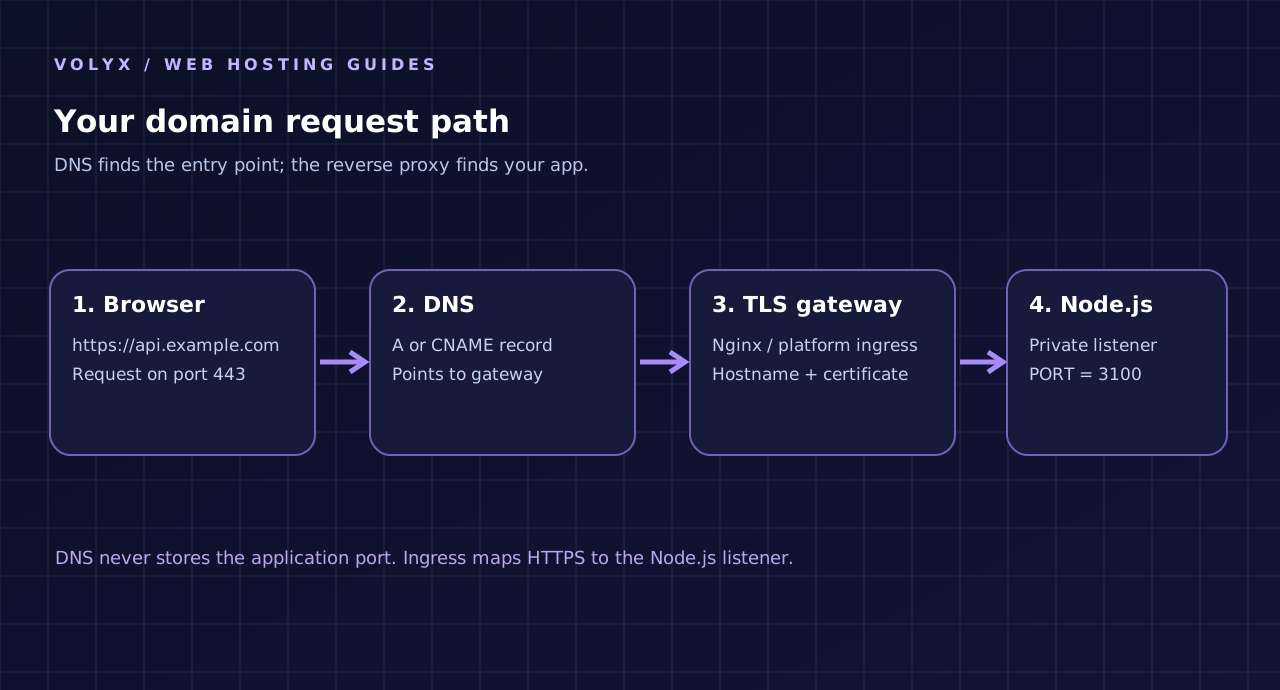
For an API, api.example.com is often a clean choice because it separates application traffic from a marketing site at www.example.com. For a web app, app.example.com may communicate the purpose better. Neither prefix is inherently faster or more secure. What matters is that your DNS, certificate, proxy configuration, app links, and cookie scopes match the chosen hostname.
If your main domain already serves a site, never replace its A record simply to publish a new API. Create a dedicated subdomain or configure a specific path at a gateway you control. Changing the main record can take the public website offline while DNS changes propagate or caches expire.
Before touching DNS, confirm your service responds on its own. The companion download includes an application using Node.js built-in http module. It has two routes: /healthz, which returns a small JSON health response, and /, which explains that the example is running. No third-party runtime packages are required.
import http from 'node:http';

const port = Number.parseInt(process.env.PORT || '3100', 10);
const host = process.env.HOST || '127.0.0.1';

const server = http.createServer((request, response) => {
  const path = new URL(request.url || '/', 'http://localhost').pathname;
  const isHealth = request.method === 'GET' && path === '/healthz';
  const isRoot = request.method === 'GET' && path === '/';
  response.writeHead(isHealth || isRoot ? 200 : request.method === 'GET' ? 404 : 405, {
    'content-type': 'application/json; charset=utf-8',
    'cache-control': 'no-store',
  });
  response.end(JSON.stringify(isHealth
    ? { status: 'ok', service: 'domain-demo' }
    : isRoot ? { message: 'Node.js example is running' }
    : { error: request.method === 'GET' ? 'not_found' : 'method_not_allowed' }));
});

server.listen(port, host, () => {
  console.log(`Listening on ${host}:${port}`);
});
The downloaded version includes stronger checks for port values, startup errors, and request methods. On a private VPS with Nginx on the same machine, binding to 127.0.0.1 prevents direct remote connections to this example listener. On a container hosting platform, the assigned listener may need 0.0.0.0 so the platform gateway can reach it; follow the provider’s networking instructions. Neither address should be guessed from a blog post.
Start the example inside an appropriate development directory:
node --version
PORT=3100 HOST=127.0.0.1 node server.mjs
In another terminal on the same VPS, test:
curl -i http://127.0.0.1:3100/healthzAn HTTP 200 containing "status":"ok" shows that the application is responsive. It does not yet prove the domain, external firewall, TLS, or Cloudflare are configured. If the service fails here, solve its runtime problem before adding more infrastructure. A reverse proxy cannot repair a crashed application.
DNS maps a hostname to the next destination. At the zone’s DNS provider—Cloudflare, Namecheap, or another provider—you normally add one of these records:
| DNS record | Example | Use it when | Common mistake |
|---|---|---|---|
A | api → 203.0.113.10 | You have a public IPv4 entry point | Pointing to a private IP or obsolete VPS |
AAAA | api → authorized IPv6 address | The gateway really serves IPv6 | Publishing IPv6 when the server/firewall cannot answer |
CNAME | api → gateway.example.net | Your platform gives a hostname target | Using an unrelated target or forgetting provider verification |
TXT | Name/value supplied by the host | Domain ownership verification | Deleting the record before verification completes |
CAA | Allowed certificate issuer | Your security policy restricts CAs | Accidentally preventing certificate issuance |
203.0.113.10 belongs to the documentation address range; it is intentionally not your server’s real address. Use the actual public IP given to you by the provider. A DNS-only A record pointing at the VPS does not tell Nginx which Node.js process should receive the request—that is the reverse proxy’s job.
:3100 in DNS?An ordinary A or CNAME record cannot express an arbitrary HTTP application port. Browsers use the URL’s scheme and port (normally 443 for HTTPS), then connect to a gateway that knows how to forward the request. An SRV record does not make regular web browsers automatically route https://api.example.com to port 3100.
With a managed platform, read the provider’s required DNS target instead of publishing the game-server allocation’s IP. A record that works for a Minecraft TCP port may be completely unsuitable for an HTTPS Node.js app.
dig +short api.example.com A
dig +short api.example.com AAAA
If dig is unavailable, you can use nslookup api.example.com. Check the authoritative zone and the DNS record you actually changed. Different resolvers may cache answers for the record’s TTL. A new record may begin resolving quickly, but “DNS propagated” does not mean the app is ready to serve HTTPS.
If your domain uses Cloudflare, the orange cloud means supported HTTP(S) traffic passes through Cloudflare’s reverse proxy; the gray cloud means DNS-only. Cloudflare provides important edge features, but it is not a free generic proxy for any random TCP/UDP port. A customer application on port 3100 does not become reachable through https://api.example.com just because you enable the orange cloud.
The common setup is: the browser connects to Cloudflare on port 443, Cloudflare connects to your public origin gateway, and the gateway forwards internally to the Node.js listener. Cloudflare’s list of supported proxied HTTP ports is limited. For standard HTTPS, using a public origin on 443 avoids unnecessary port complications.
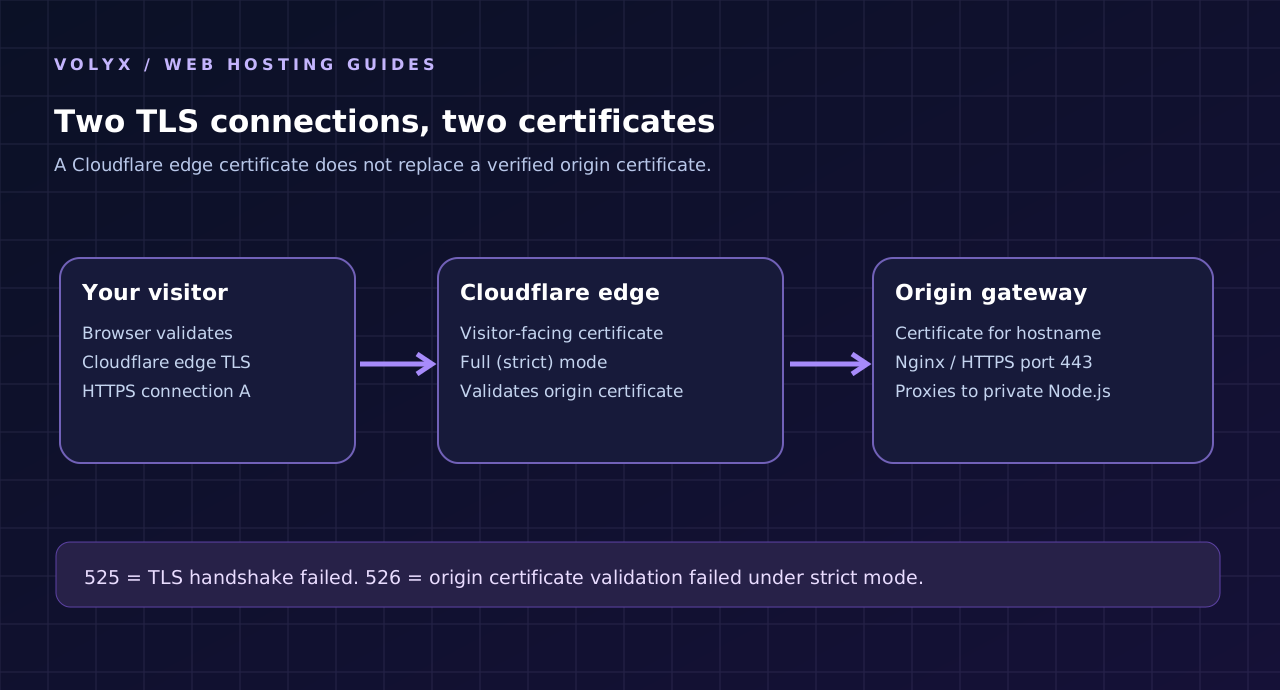
DNS-only can simplify early diagnosis because you can contact the origin directly, but the origin’s IP is visible and TLS configuration remains entirely your responsibility. Proxied provides a Cloudflare HTTP(S) layer but adds another hop with its own settings, error codes, caches, and security controls. Neither choice fixes a missing origin listener or an application that has no permitted public HTTP route.
Do not publicly expose a shared panel IP for convenience without permission. If Volyx provides a managed custom-domain setup, use the hostname, TXT verification, and certificate workflow specified by the platform.
This section is only for a VPS where you have permission to manage Nginx. It is not a shell block intended to be pasted into an existing multi-site Volyx production gateway. If you are a customer using managed hosting, skip to the managed-hosting section instead.
Nginx listens for requests to api.example.com and forwards them to a local Node.js process. A minimal HTTP-stage example looks like this:
server {
    listen 80;
    server_name api.example.com;

    location / {
        proxy_pass http://127.0.0.1:3100;
        proxy_http_version 1.1;
        proxy_set_header Host $host;
        proxy_set_header X-Real-IP $remote_addr;
        proxy_set_header X-Forwarded-For $proxy_add_x_forwarded_for;
        proxy_set_header X-Forwarded-Proto $scheme;
        proxy_connect_timeout 5s;
        proxy_read_timeout 30s;
    }
}
Keep the actual configuration in your own dedicated server block. If your VPS already hosts other applications, identify the active Nginx virtual hosts and existing listeners before adding one. Duplicate server_name directives and global rewrites can route requests to the wrong application.
200 at http://127.0.0.1:3100/healthz from the VPS itself.server_name, upstream port, and configuration managed by your system’s conventions.nginx -t before reloading; if validation fails, do not reload.Do not copy untrusted X-Forwarded-* headers directly into security decisions inside Node.js. Treat forwarded client IP and scheme information as trusted only if it comes from the reverse proxy you control, and limit direct access to the application listener. If your application uses WebSockets or streaming, it needs additional timeout and Upgrade handling beyond this simple HTTP example.
A 502 from Nginx commonly means the proxy cannot establish or complete a valid connection to the upstream Node.js process. The process might have crashed, be listening on the wrong port, or be bound only to an address the proxy cannot reach. Inspect the Nginx error log and the Node.js process logs; do not jump straight to changing DNS again.
An upstream timeout more commonly appears as 504. A missing location/path can cause 404 even when the proxy is healthy. Status codes are clues, not proof of a single root cause.
HTTPS has two separate security concerns: your domain must resolve to a working public entry point, and that entry point must present the right certificate for the hostname. A certificate issued for www.example.com does not automatically cover api.example.com unless that hostname or an appropriate wildcard is included.
For a self-managed Ubuntu VPS, Certbot with Let’s Encrypt is a standard approach. Ubuntu’s documentation describes the Nginx plugin and the HTTP-01 challenge. Depending on the installation, a command like the following may be appropriate only after reviewing the Nginx configuration and confirming control over this virtual host:
# Example for a dedicated VPS you administer; review before running.
sudo certbot --nginx -d api.example.com
The Nginx plugin may edit the server configuration and reload the service. That is intentional behavior—do not execute it on a shared system or while troubleshooting an unrelated domain. Make a configuration backup, verify the requested hostname resolves correctly, and confirm that ACME validation is reachable. HTTP-01 generally needs port 80; DNS-01 is an alternative when supported by your tooling and DNS provider.
For a Cloudflare-proxied origin, you can alternatively use a Cloudflare Origin CA certificate for the Cloudflare-to-origin connection. That certificate is trusted by Cloudflare but is not generally trusted by browsers that connect directly to the origin. It is not interchangeable with a browser-trusted Let’s Encrypt certificate in a DNS-only setup.
In Cloudflare’s Flexible mode, the browser-to-Cloudflare connection is HTTPS, but the Cloudflare-to-origin connection may use plaintext HTTP. This can create a false sense of end-to-end security and may cause redirect loops when the origin always redirects to HTTPS.
With Full, Cloudflare encrypts the origin connection but does not validate the origin certificate. Full (strict) encrypts the connection and verifies that the origin presents a valid, hostname-matching certificate issued by an accepted CA. Prefer Full (strict) when the origin has been configured correctly.
| Error | Usually means | First checks | What not to do |
|---|---|---|---|
| 502 from Nginx | Upstream Node.js connection or response failed | Process logs, bind address, port, upstream URL | Replace DNS records blindly |
| 502 from Cloudflare | Origin returned or caused a bad gateway response | Identify which layer generated the page; check edge/origin logs | Assume Node.js itself generated it |
| 525 | TLS handshake failed between Cloudflare and origin | Origin 443 listener, certificate availability, TLS version, firewall | Switch to Flexible and leave origin unsecured |
| 526 | Cloudflare could not validate the origin certificate in strict mode | Expiration, hostname/SAN, CA trust, served chain | Disable strict validation permanently |
| 521 | Origin refused Cloudflare’s connection | Listener, firewall, blocklists, allowed Cloudflare IPs | Change Node.js code before examining network access |
| 522 | Timed out connecting to origin | Reachability, firewall, routing, server load | Assume a certificate mismatch is the only cause |
| Redirect loop | HTTP/HTTPS policy or origin redirect conflict | Scheme handling, Cloudflare mode, app redirects | Add more redirects without tracing requests |
| Browser certificate warning | Browser does not trust the endpoint certificate | DNS-only vs proxied route, name, chain, expiry | Ignore it for real users |
Cloudflare publishes the exact distinctions between Full, Full (strict), 525 and 526. These errors concern the origin TLS path, not whether a Discord bot token or PostgreSQL query is correct. Check the certificate returned by the origin, not just the certificate the visitor sees at Cloudflare’s edge.
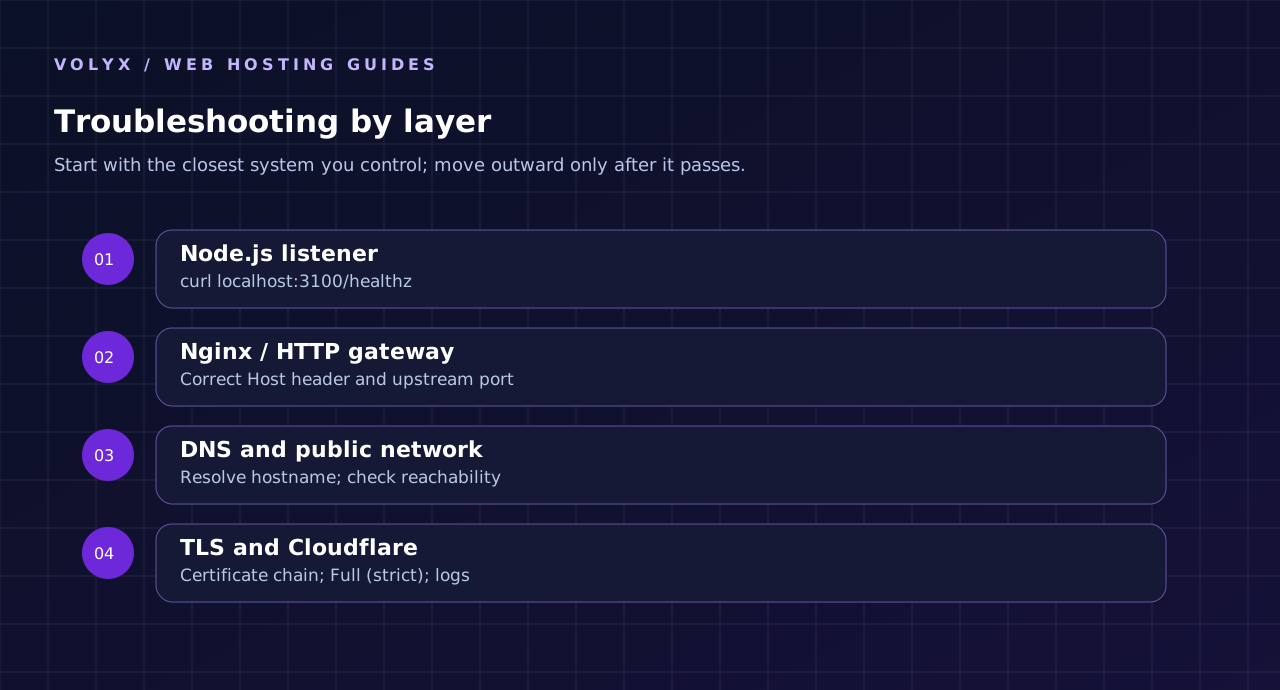
A reliable investigation moves from the inside outward. Make only one configuration change at a time and record what each test proves.
curl -i http://127.0.0.1:3100/healthzIf this fails locally on a VPS with the matching bind address, fix the application or process supervision. If it succeeds, the app layer is probably fine; continue outward.
On a VPS that you control, you can test the intended virtual host without depending on public DNS caches:
curl -i --resolve api.example.com:80:127.0.0.1 \
  http://api.example.com/healthz
This test checks whether Nginx answers the request when sent to the loopback interface with the expected hostname. It does not prove the public firewall or TLS works. This example sends a GET request because its health handler does not implement HEAD.
dig +short api.example.com A
curl -v --max-time 15 https://api.example.com/healthz
A trusted public certificate should match the hostname, and the response should be what your service actually produces. If using Cloudflare, this tests the Cloudflare-facing path. To isolate a VPS origin without changing DNS, an authorized administrator can use a curl --resolve test against the actual origin IP; do not publish private IPs, passwords, or full TLS secrets in support screenshots.
Open a private browser session and test page assets, API requests, and redirects. A successful /healthz does not guarantee cross-origin requests, cookies, CORS preflight, or WebSocket upgrades work. Those require tests matched to the application’s actual use case. Never enable Access-Control-Allow-Origin: * for a credentialed production API merely to remove a browser warning.
Volyx supports different kinds of hosting, and the public website describes bot/application services. That does not establish that every Node.js server has a free inbound HTTPS proxy, DNS mapping, or SSL termination. A Pterodactyl allocation primarily assigns a process/container and its permitted network resources. Publishing it as https://api.yourdomain.com requires an actual HTTP entry point.
A careful Volyx-specific checklist is:
The marketing site’s custom-domain feature, if present, should not be confused with a guarantee that all Pterodactyl containers have the same capability. Settings and resource quotas can change; confirm them on your own server rather than relying on a 2026 screenshot.
Want to build the API first? Read our Node.js REST API deployment guide before configuring DNS. For authentication, input validation and attack prevention, continue with the Node.js API security guide. You can also visit the Volyx documentation for platform-specific controls and account requirements.
This can break the public homepage, email-related DNS assumptions, or other services. Use a dedicated api or app hostname and confirm which service controls each record. DNS changes are not a reversible way to test application routes when visitors use the same name.
If IPv6 resolves to a machine that does not serve your app, some users may see intermittent failures even though IPv4 works. Verify both A and AAAA responses and either configure IPv6 correctly or remove an unintended stale record after checking the effect.
A raw port may work temporarily but bypass your normal TLS and access-control boundary. Prefer a local listener behind an authorized gateway. If you must expose a port directly for a specific protocol, protect it with deliberate firewall and transport security settings; Cloudflare’s ordinary HTTP proxy is not a universal substitute.
Don’t turn off certificate verification, enable NODE_TLS_REJECT_UNAUTHORIZED=0, or stay on an insecure Cloudflare mode as a permanent repair. Diagnose the origin certificate and the trusted CA chain. Security errors usually contain exactly the information you need to fix the cause.
Put public base URLs and allowed origins in validated environment configuration where appropriate. This makes staging and production transitions easier. Be careful with cookie domains, OAuth redirect URLs, webhook allowlists and canonical links: each may need explicit updates when the domain changes.
| Check | What success looks like |
|---|---|
| DNS ownership | Intended A/CNAME/TXT values exist without unrelated records being replaced |
| Application | Local health check succeeds on the configured listener |
| Upstream proxy | Correct hostname maps to correct private port |
| TLS | Valid certificate for the hostname, renewal mechanism verified |
| Cloudflare | Full (strict) works without origin errors where Cloudflare is used |
| Firewall | Only necessary ingress is reachable and proxy-to-app path is authorized |
| Headers | Forwarded headers trusted only from controlled proxy |
| Redirects | HTTP → HTTPS behavior tested without loops |
| Secrets | No .env, token or API key leaked in build output or public logs |
| Monitoring | Health endpoint and proxy/app error logs watched after deployment |
| Recovery | Previous proxy config, certificate plan and rollback steps documented |
When publishing a new service, consider a short deployment window with a clear rollback plan. On a multi-tenant VPS such as a platform node, changes to Nginx or firewall rules can affect many customers. Production safety matters more than deploying a single article or app ten minutes faster.
Not necessarily. You need both DNS control and a supported public HTTP(S) route to your app. A managed container can execute Node.js without exposing port 443 or offering per-customer reverse proxy mappings. Check the host’s domain feature, networking permissions, and certificate support first.
Often no. Let’s Encrypt issues publicly trusted certificates for eligible validated domains, and many managed platforms include TLS termination. But you still need a compatible HTTP entry point and a renewal process. A free certificate does not configure DNS or Nginx automatically unless a particular tool manages those tasks.
No. Cloudflare proxies only supported traffic and ports. It may terminate visitor HTTPS at the edge, but the origin must still accept an appropriate connection through a valid route. A Node.js process running on a private or arbitrary port does not become publicly available merely because the DNS record is proxied.
Both use encrypted connections to the origin, but Full does not validate the origin certificate. Full (strict) checks expiration, hostname match and accepted issuer requirements. Full (strict) is the preferred setting once the origin serves a suitable certificate.
Error 525 reports that the TLS handshake between Cloudflare and the origin failed. Confirm the origin is listening on 443, has a usable certificate/TLS configuration, and accepts connections from Cloudflare. It is not, by itself, evidence of bad DNS or Node.js application logic.
Error 526 means Cloudflare cannot validate the origin certificate when strict certificate validation applies. Typical causes include an expired certificate, mismatched hostname, or untrusted chain. Fix the origin certificate rather than permanently turning off validation.
Check whether Node.js is listening on the same port and address configured in proxy_pass, and whether the process stays up under traffic. A service listening on a different interface or crashing after startup can appear healthy in a process list while remaining unreachable to the proxy.
No. An A record provides address resolution, but the server must accept traffic for that hostname and route it to your API. The domain, firewall, proxy, listener and TLS settings are separate layers.
127.0.0.1 or 0.0.0.0?Use 127.0.0.1 when the reverse proxy runs on the same VPS and only local access is intended. Many containers require 0.0.0.0 to allow the platform’s ingress to reach the process. Follow the network model your host documents; don’t expose unnecessary listeners by habit.
Not as a normal browser-trusted certificate. Cloudflare Origin CA certificates are meant for the Cloudflare-to-origin connection and are not universally trusted by browsers connecting directly. Use a publicly trusted certificate if users connect directly to your origin.
There is no universal countdown. Resolver caches, prior TTL values and provider changes affect how quickly different clients see the new record. You can query DNS resolvers, but a record resolving correctly is only the first part of getting HTTPS working.
Not simply because DNS changed. Restart or redeploy only if the application needs updated environment settings, hostname allowlists, cookies or callback URLs. Always use a process manager or host controls appropriate to your deployment, and avoid restarting unrelated services.
Trace which layer is redirecting, verify the selected SSL mode, and check the app’s forwarded-protocol trust configuration. Origin HTTPS redirects combined with Flexible mode are a frequent culprit. Correct the mismatched scheme before adding another redirect rule.
Yes, if you administer a reverse proxy with distinct hostname mappings and adequate resources. Each application can listen on a different private port while the gateway handles standard HTTPS. Be careful with duplicate server blocks and certificates that do not match each hostname.
No. HTTPS protects transport between defined endpoints; it doesn’t fix broken authorization, insecure application code, exposed tokens or SQL injection. Combine TLS with input validation, access controls, secret management, logging and dependency maintenance.
The right way to publish a Node.js application is to verify the components in order: Node.js listener → authorized reverse proxy → DNS record → origin certificate → public HTTPS → monitoring. That sequence reduces time wasted on random configuration changes and makes failures easier to isolate. If you own a VPS, Nginx and Let’s Encrypt may provide the necessary tools. If you use Volyx-managed hosting, verify that your account actually supports public HTTP ingress and follow the platform’s permitted domain workflow.
For further reading, start with the official Cloudflare Full (strict) guide, Cloudflare proxied-port documentation, NGINX reverse proxy reference, Ubuntu certificate instructions, and Node.js HTTP documentation. Keep a tested rollback available whenever you change the public gateway of an existing site.
Explore more in-depth articles with code, visuals, and practical walkthroughs.
Browse all articles ↗
A practical, evidence-first guide to fixing Minecraft Java server lag: read TPS and MSPT, profile with spark, tune chunks, and diagnose CPU, memory and plugins.
Read article ↗
Learn the difference between DDoS floods and Minecraft bot raids, secure a Paper or Velocity server, compare TCPShield and Cloudflare, and respond safely using Volyx.
Read article ↗
Compare five real MIT-licensed JavaScript, TypeScript, and Python Discord bot starters, then learn how to deploy one safely on Volyx.
Read article ↗