
Minecraft Server Lag in 2026: Diagnose TPS, MSPT, CPU and RAM
A practical, evidence-first guide to fixing Minecraft Java server lag: read TPS and MSPT, profile with spark, tune chunks, and diagnose CPU, memory and plugins.
Read article ↗Build a real FastAPI service, configure environment variables, deploy Uvicorn behind HTTPS, test PostgreSQL connectivity, and troubleshoot Python hosting errors.

A Python API may work flawlessly on your laptop and still fail five minutes after deployment. The application might import correctly but listen on the wrong interface. Its process might show Running while the public domain returns 502 Bad Gateway. A missing DATABASE_URL can stop startup entirely. Or the API might appear at /docs over HTTP locally, but redirects to the wrong scheme behind a proxy.
This guide solves those problems in the order they actually occur. We will create a small FastAPI API from scratch, run it with Uvicorn, add environment-based configuration, test it, discuss PostgreSQL, and choose a safe route to HTTPS. The steps apply to a suitable Volyx Python server when its runtime and network configuration support your application’s needs, as well as other managed hosting platforms and VPS environments.
Deployment scope: Volyx offers Python hosting options, but not every game or bot server allocation includes a public web endpoint, domain routing, or permission to change Nginx. A successful Uvicorn start does not prove you can serve an API publicly. Confirm your account’s HTTP ingress or proxy support before connecting a real domain. Any Nginx configuration in this article belongs on a VPS you administer, not inside an ordinary managed server container.
Quick navigation: Prerequisites · Working API · Uvicorn · Volyx · HTTPS · PostgreSQL · Troubleshooting · FAQ
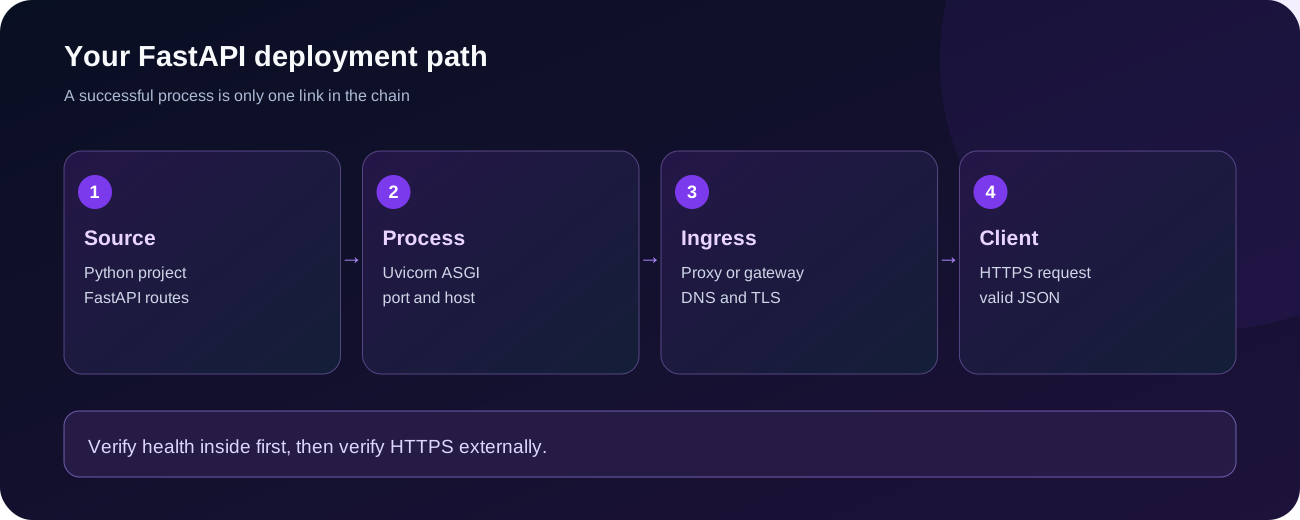
A minimal deployment uses a Python runtime, your project files, installed dependencies, a Uvicorn process that stays running, and a network route between a client and the application. If your public address uses HTTPS, TLS normally terminates at an ingress or reverse proxy. A database is optional for the initial application, but required for records that must survive a restart. A health endpoint makes it possible to check whether the application is responding instead of just trusting the process indicator in a panel.
For this tutorial the initial success criteria are concrete: GET /healthz returns a JSON 200, a request without an API key is rejected, an authenticated request can create and list a temporary note, and malformed input produces a validation error. We can verify all of this before publishing an Internet-facing endpoint.
Python support: Check the version selected in your hosting dashboard. Modern FastAPI supports Python versions starting with 3.10, though you must verify compatibility with the specific dependency versions you install. A Python 3.13 runtime is also suitable for many contemporary applications; choose a version your dependencies explicitly support. Run python --version and, when possible, use python -m pip so dependencies install into the same interpreter that starts the app.
HTTP access: Does your hosting plan provide a publicly reachable TCP port or an HTTP gateway? Is the port assigned by the platform, available in an environment variable, or served by a reverse proxy? Which interface may the app bind to? On a self-managed VPS behind a local reverse proxy you normally bind Uvicorn to 127.0.0.1. In a container, you generally need 0.0.0.0 so the platform’s proxy can connect. Those are different deployment models and should not be mixed.
Process lifetime: Does the platform keep a Python program alive, auto-restart after failures, and provide console logs? If the process exits because the command is wrong, no DNS change can fix it. If the container is suspended when a hosting period ends, setting up a domain will not prevent suspension.
| Requirement | Why it matters | How to confirm |
|---|---|---|
| Python 3.10+ and compatible dependencies | FastAPI and Pydantic use modern Python typing | python --version; verify package metadata |
| Writable project directory | Upload source and install needed dependencies | Hosting file manager or Git workflow |
| Startup command | Uvicorn must remain running | Startup configuration and live console |
| Appropriate binding and port | Proxy needs a reachable socket | Hosting allocation, gateway docs, or VPS config |
| TLS-capable public entry point | Protects requests over the Internet | Provider-managed domain, reverse proxy or certificate |
| Secret storage | Tokens and passwords must stay private | Protected environment variables or secrets feature |
| Persistent datastore, if needed | RAM disappears on restart | Managed PostgreSQL or another supported database |
Avoid a misleading test: Pinging the IP address tests ICMP, not an HTTP application. Similarly, a Java Minecraft allocation and a web reverse proxy are not interchangeable merely because both use an IP and port.
Our example is a tiny private-notes API. It includes health checks, request validation, a header API key, and a few endpoints. It deliberately stores notes in process memory. This is an educational API, not a multi-user production backend or a durable database. The complete tested source is included in the ZIP along with tests.
A clean project tree looks like this:
fastapi-notes/
  app.py
  requirements.txt
  .env.example
  .gitignore
  tests/
    test_app.py
Install FastAPI and an ASGI server. For an isolated development environment you can use:
python -m venv .venv
. .venv/bin/activate
python -m pip install -r requirements.txt
On a managed panel you may not have or need a virtual environment. The key point is to install packages into the Python interpreter used by the actual startup command. The sample’s requirements.txt declares supported major ranges rather than silently relying on whatever is installed globally. For long-lived production deployments, generate and review a locked dependency set and apply security updates deliberately.
The simplified endpoint pattern is:
from fastapi import FastAPI, Header, HTTPException

app = FastAPI(title="Volyx FastAPI Demo")

@app.get("/healthz")
def healthz():
    return {"status": "ok"}

@app.get("/private-example")
def private_example(x_api_key: str | None = Header(default=None)):
    if not x_api_key:
        raise HTTPException(status_code=401, detail="API key required")
    return {"message": "Authentication must verify the key too"}
That snippet shows where an authentication check goes; a nonempty header alone is not secure. The bundled app.py compares the supplied token against a configured secret using a constant-time comparison and rejects missing or incorrect credentials. Its create/list/delete endpoints are all protected. We intentionally keep /healthz unauthenticated so a health probe can reach it, but return no operational secrets there.
FastAPI’s integration with Pydantic can reject fields that do not match declared types or constraints. For example, a note title should have a reasonable maximum length; a client must not submit arbitrary extra properties and expect the server to store them. Our sample model uses strict field validation. FastAPI typically returns 422 Unprocessable Entity for invalid request bodies, which gives you an actionable distinction from an application crash.
Try not to catch every exception and return 200 with an error string. Doing that makes monitoring harder: failed requests should return meaningful HTTP error codes, while internal stack traces belong in controlled server logs rather than public responses.
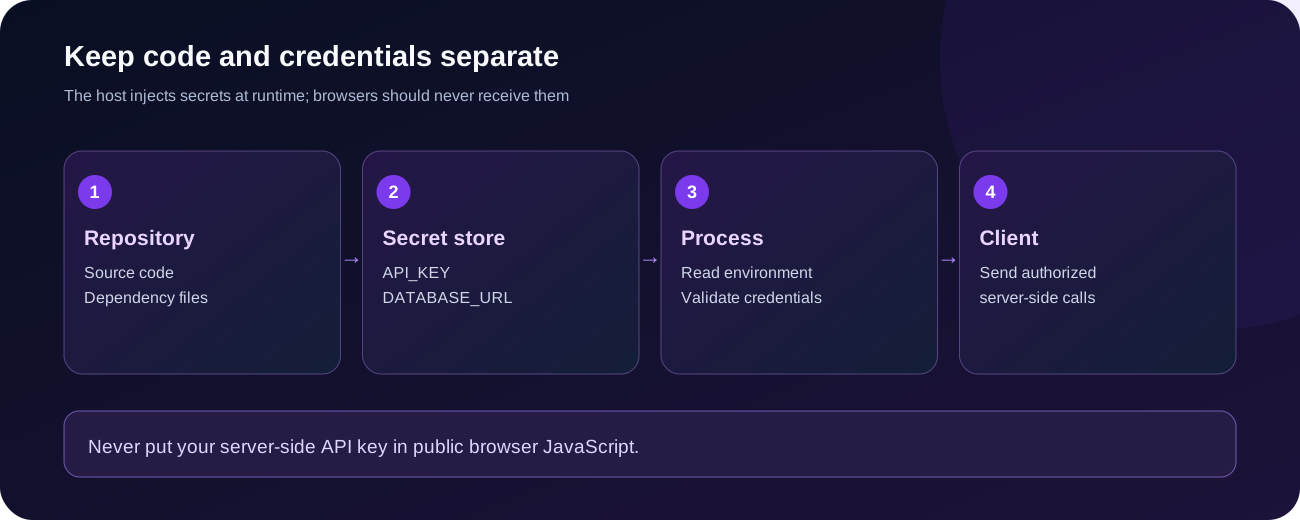
A local .env file can be useful during development, but it is not automatically parsed by Python or Uvicorn. The example reads environment variables through os.environ. On Volyx, prefer the protected secrets or startup-variable controls available for your server instead of committing credentials to source code or pasting them into screenshots.
# Illustrative values only, not production credentials
export APP_ENV=development
export API_KEY=replace-with-a-long-random-secret
export PORT=8000
For a real hosted service, create a high-entropy key and store it in the provider’s secret-management field. Do not use the placeholder above. If the key was ever shared in logs, code or chat, rotate it and update clients. A .gitignore entry for .env is a safeguard but cannot protect a key that was already committed; inspect repository history if exposure occurred.
| Setting | Purpose | Typical mistake |
|---|---|---|
API_KEY | Authenticates requests to demo endpoints | Embedding the key in front-end JavaScript |
APP_ENV | Distinguishes local and hosted behavior | Treating it as an automatic security switch |
PORT | Selects bind port when the host permits | Ignoring an allocated port required by the platform |
DATABASE_URL | Configures optional PostgreSQL connection | Printing credentials or saving them in Git |
WEB_CONCURRENCY | Optional worker count in some setups | Adding workers without considering RAM and shared state |
Important: A header API key is appropriate only for trusted server-to-server callers in this small demonstration. It does not replace user login, authorization, token rotation policies, or per-tenant access checks in a real product. Never ship a shared secret inside code downloaded by browsers.
Uvicorn runs the ASGI application. The expression app:app means import the module named app and read its variable named app. If your entry file is main.py, the import target changes to main:app. Start the example locally with:
python -m uvicorn app:app --host 127.0.0.1 --port 8000Then open http://127.0.0.1:8000/healthz in a local browser or request it from your shell. FastAPI also generates OpenAPI docs at /docs, but those describe routes; they do not prove PostgreSQL credentials, network ingress, or background workloads are healthy. In a publicly accessible service, consider restricting or disabling interactive docs if your threat model requires it.
For a container where an external proxy connects over the container network, the process often needs --host 0.0.0.0 and the platform-assigned port. In a self-managed VPS with Nginx running on the same host, a loopback bind such as 127.0.0.1:8000 is preferable. Do not expose Uvicorn directly to the public Internet just because it starts successfully. Set up a trusted ingress, HTTPS, network restrictions and process supervision appropriate to your environment.
The development flag --reload watches files and restarts the app during editing. It is not a production availability feature. For a production service, run without --reload and choose worker count based on real load and memory. Each worker is a separate process. In-memory note storage, caches, and counters in our demo will not be shared across workers. That is another reason to use a real database before scaling beyond a single process.
The Volyx dashboard offers a web-based management flow for supported runtimes. Because individual allocations and startup configurations can vary, the safest workflow begins with the settings visible in your own account rather than a hardcoded port number copied from another tutorial.
Sign in to Volyx, select a server type that supports Python, and check the available version. Confirm you have the correct permissions and enough remaining hosting resources or Coins for its intended lifetime. A Python bot worker and a publicly accessible HTTP API can both run Python, but their ingress requirements differ.
Use the Files area or your supported upload workflow to transfer app.py and requirements.txt. Keep .env.example as documentation only; do not upload a filled .env with credentials to a publicly browsable directory. If you use a private repository, review access controls and file history first.
On a server whose startup system does not automatically install Python dependencies, run:
python -m pip install -r requirements.txtVerify the environment has permissions to install them, whether they persist across reinstall, and whether the image ships with pip. If the runtime is reset between deployments, put installation in the platform’s supported build or install phase, not in an accidental shell session that gets erased.
Set API_KEY to a newly generated private value. Where the platform defines its own port variable or allocation, use it exactly as documented. Do not overwrite managed variables blindly. Confirm Python can read the environment without printing the secret itself. A log saying API_KEY configured: true is safer than a log that reveals its contents.
Set the supported startup command to run the Uvicorn module and correct app target. If the platform provides a proxy/allocated port, adapt the bind host and port accordingly. Follow the console output until Uvicorn reports a ready process. An ImportError, missing key, or address-in-use error is a startup issue. A process that starts cleanly but is unreachable from outside is likely a routing or network exposure issue.
First test from inside the permitted network: GET /healthz should return {"status":"ok"}. Second, test the public hostname provided by the platform if one actually exists. Third, test a protected endpoint using a secret from a server-side client. No public route? Ask whether the plan supports HTTP ingress, or deploy to a suitable VPS/managed web application host instead. DNS alone cannot turn an inaccessible container port into an HTTPS website.
Restart the application using the panel and confirm health again. Then check whether the host keeps it running or suspends it at the end of its allocation period. Test from a separate machine or external monitor, not just from the same container. A successful internal health check only confirms an internal path.
A browser connection typically follows this route:
Client → DNS → HTTPS reverse proxy / managed ingress
       → Uvicorn process → FastAPI route → JSON response
On a managed platform, follow that platform’s domain-binding workflow. It may give you an A record or CNAME target and handle certificates automatically. Do not invent a target IP or point the domain to an unrelated panel host. On a self-managed VPS, you can put Nginx in front of Uvicorn and obtain an HTTPS certificate with an appropriate ACME client, such as Certbot.
Here is an illustrative Nginx location for an API process bound to loopback on a VPS you control:
location / {
    proxy_pass http://127.0.0.1:8000;
    proxy_set_header Host $host;
    proxy_set_header X-Real-IP $remote_addr;
    proxy_set_header X-Forwarded-For $proxy_add_x_forwarded_for;
    proxy_set_header X-Forwarded-Proto $scheme;
    proxy_read_timeout 30s;
}
This is not a complete Nginx site or certificate configuration. It must live inside an appropriate server block with a valid certificate and controlled access to the upstream. Do not paste this into the production Volyx Nginx configuration without first identifying the correct server block, upstream port and existing services. The example is for explaining architecture, not modifying Volyx’s shared infrastructure.
Uvicorn and FastAPI can interpret forwarded headers from a proxy, but trusting those headers from everyone invites client-address and scheme spoofing. Configure --forwarded-allow-ips to the known proxy IPs that actually connect to Uvicorn. Avoid * unless the network architecture ensures only trusted proxies can reach the application server. If your app lives under /api/v1 while the proxy strips that prefix, investigate ASGI root_path; do not solve that mismatch by stacking random URL rewrites.
A proxied DNS record may protect and accelerate the web-facing endpoint, but only if the origin route itself can be reached using a supported protocol. Cloudflare Full (strict) requires an acceptable origin certificate. A 525-class TLS handshake failure and a 526 certificate-verification error have different root causes. A 502 often indicates a failing reverse proxy or upstream, which may have nothing to do with DNS propagation.
Never choose an insecure TLS mode just to hide a broken certificate or work around unreachable HTTP ingress. Diagnose the layers in order: DNS resolution, edge response, origin TLS, reverse proxy upstream, Uvicorn health, and application dependencies.
With a local instance already running, request:
curl -i http://127.0.0.1:8000/healthzYou should see HTTP 200 and a small JSON payload. The demo includes a protected notes endpoint, so requests without a key should return 401:
curl -i http://127.0.0.1:8000/notesFor an authenticated test, pass your API key privately from the shell environment, never from a public web page:
curl -i http://127.0.0.1:8000/notes \
  -H "X-API-Key: $API_KEY"
Do not paste commands containing live secrets into public tickets or chat. For tests, run against localhost or a dedicated staging URL first. When testing a production API, consider which endpoints can create or delete records. The read-only /healthz route is a safer basic check than a destructive test request.
| Code or symptom | What it usually means | First place to inspect |
|---|---|---|
200 from /healthz | That HTTP handler answered successfully | Still test the public ingress and dependencies |
| 401 | Missing or incorrect API credential | Server-side secret settings and request header |
| 404 | Wrong URL, route prefix or host | URL path, reverse proxy, route table |
| 422 | Body failed Pydantic validation | Request JSON shape and constraints |
| 502 | Reverse proxy could not obtain a valid upstream response | Uvicorn process, port, logs and gateway config |
| 503 / timeouts | Unavailable service, resource saturation or dependency failure | Process, health and external network |
| Browser CORS error | Origin not allowed for browser requests | Allowed-origins configuration; not a server-to-server concern |
| App starts, public URL fails | Ingress/port/domain issue | Provider support, external port test, proxy mapping |
An in-memory list is ideal for an isolated tutorial but disappears after restart. If your API needs durable accounts, jobs, notes or bot settings, move storage to PostgreSQL or another managed database. Volyx has offered PostgreSQL alongside other database engines in its panel, but database availability, access credentials, permissions and connection policies depend on your actual account.
A typical PostgreSQL environment variable is DATABASE_URL. Use the connection details generated for your database, not a connection string copied from screenshots. A simple database-check function might use Psycopg 3 in a controlled environment:
import os
import psycopg

def database_check():
    url = os.environ["DATABASE_URL"]
    with psycopg.connect(url, connect_timeout=5) as conn:
        with conn.cursor() as cur:
            cur.execute("SELECT 1")
            return cur.fetchone()[0] == 1
Install Psycopg separately if using this optional feature. SELECT 1 confirms a basic connection to the specified database; it does not prove your application has the schema it needs. Use parameterized SQL for values, not string concatenation. For real APIs, manage migrations, pooling, indexes, least-privileged database users, connection timeouts and backup/restore testing. Avoid opening a new database connection for every request at high traffic if a correctly configured pool would be more appropriate.
TLS: If your database provider requires TLS, use its trusted certificate and documented settings. Do not disable certificate verification simply to make a connection error disappear. The example application in the ZIP does not enable a live PostgreSQL connection automatically, so reading or deploying the demo never touches an existing database.
When a client reports “the API is down,” logs should tell you whether the process started, which endpoint failed, and which dependency was involved. Log status codes, safe request identifiers, operation names, and durations. Avoid logging the full Authorization header, X-API-Key, DATABASE_URL, unredacted POST bodies, or user-submitted personal data.
A simple operational checklist includes recording a deployment revision, time of restart, Python/Uvicorn version, configured binding, and traceback location for actual exceptions. Rotate and retain logs according to your application’s needs. If failures only happen after a restart, investigate configuration persistence, expired hosting resources, startup commands, and whether data was stored in memory.
A plain /healthz reports the running HTTP handler. For production, consider separate liveness and readiness endpoints: a quick liveness endpoint should not fail just because PostgreSQL has a momentary network hiccup, while readiness may reflect whether the app can serve real user requests. Keep checks lightweight and rate-limited where appropriate so monitoring does not become a source of load.
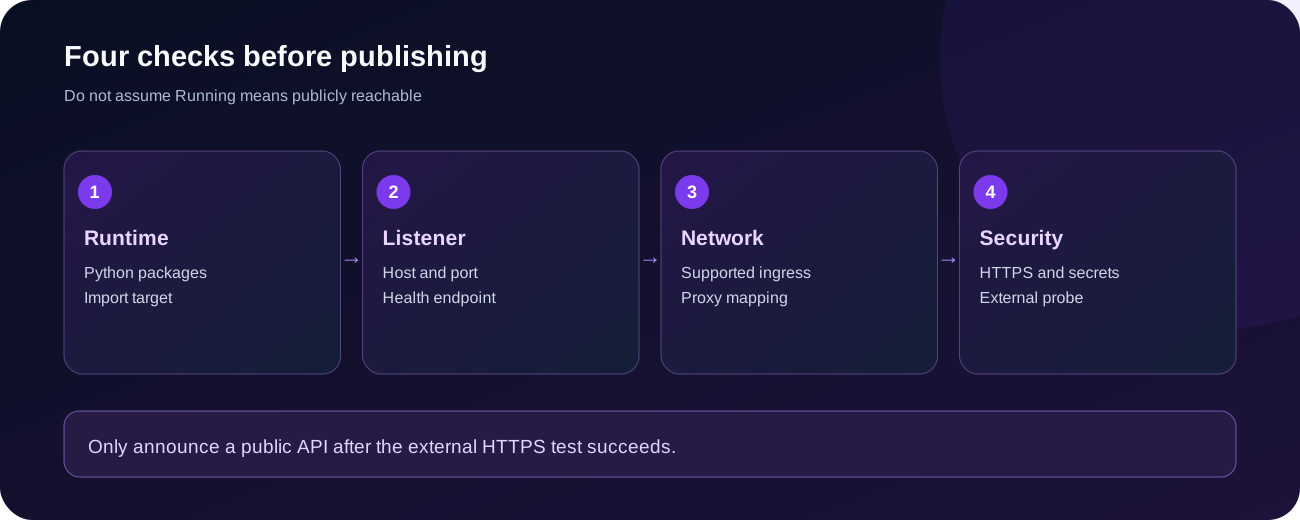
Before advertising a public API, verify the whole chain rather than ticking only “server online”:
--reload.These checks are more valuable than claiming a server is “production-ready” because Uvicorn printed a green startup line once.
Use a deliberate diagnostic order. Start with process output, not random firewall edits. Then validate the interface/port mapping, proxy route and domain. Only after the API itself answers locally should you spend time adjusting browser CORS or DNS.
| Problem | Common cause | Safe diagnostic and fix |
|---|---|---|
ModuleNotFoundError: No module named 'fastapi' | Wrong interpreter or missing installation | Run python -m pip show fastapi; install within the startup environment |
Error loading ASGI app | Wrong main:app target or import error | Match filename and variable; inspect traceback |
Address already in use | Another process bound to the port | Inspect allocation and running processes; don’t kill unrelated services |
| Starts then exits | Missing secret, exception or process supervisor behavior | Read console traceback; check startup settings |
| 502 from a proxy | Upstream process unreachable or unhealthy | Check Uvicorn bind, port, proxy target and logs |
| HTTPS works but redirects to HTTP | Untrusted/misconfigured forwarded headers | Restrict trusted proxy IPs; review root_path when applicable |
404 only under /api/ | Prefix mismatch at ingress | Compare rewritten paths and ASGI root-path behavior |
| 422 on POST | Request fails model validation | Compare JSON body to Pydantic schema |
| 401 on valid-looking request | Header missing, rotated secret or client typo | Confirm server-side key and exact header name privately |
| CORS complaint | Browser origin not configured | Allow known origins, avoid unnecessary wildcard credentials |
| PostgreSQL connection failure | Wrong host, credentials, firewall or TLS configuration | Validate from allowed network and use provider settings |
| App works until restart | In-memory state or nonpersistent config | Move durable data to DB and store secrets in platform settings |
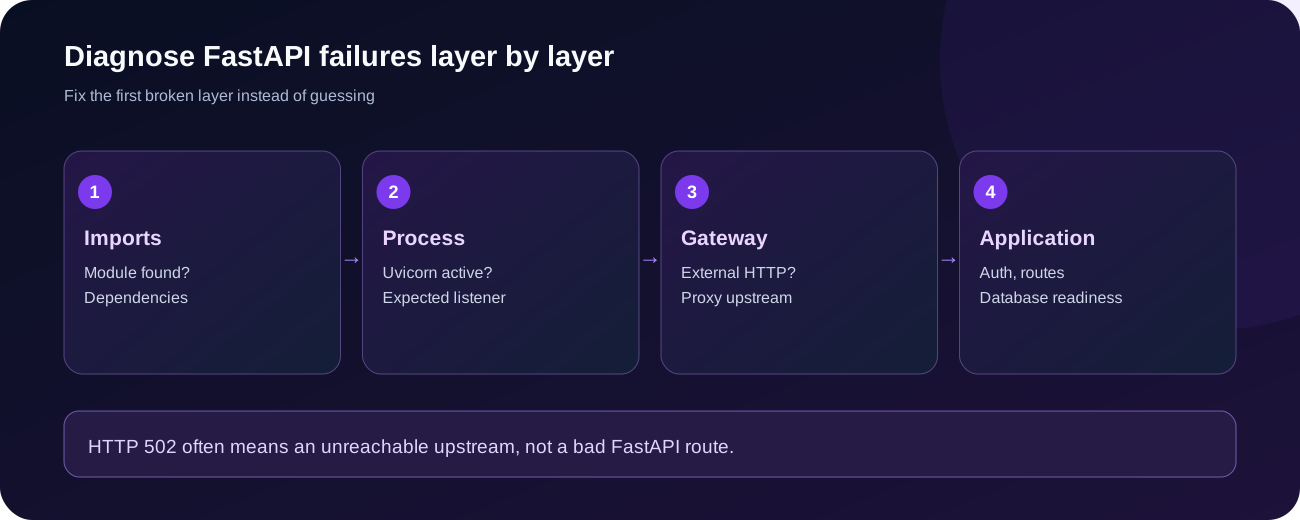
A reverse proxy may answer with 502 because the port is incorrect, the process exited, or the upstream is timing out. The Python code can be perfectly valid. Test /healthz at the point Uvicorn is listening, then at the proxy and public URL, and compare results. If localhost answers but the public hostname fails, changing the @app.get() function is unlikely to help.
A 422 response may mean your schema rejected invalid input correctly. Check whether you submitted { "title": "..." } versus an expected field, sent a number instead of a string, or exceeded a length limit. Prefer readable Pydantic error responses for debugging and keep internal details private.
Do not attempt to bypass platform policy or open a random firewall hole. Verify the supported hosting product and HTTP ingress options; use a suitable web-hosting deployment or a separately administered VPS if needed. If an administrator manages the reverse proxy, provide them the allocated service name and safe internal port—not a request to proxy every process on the server.
Volyx’s console, file manager, runtime selection and resource information can make a Python deployment easier to inspect. Keep a note of the exact Python version, launch command and install phase used in your environment. When sharing a screenshot for support, hide environment values and private database endpoints. For a bot-only allocation, first verify that the server type permits HTTP traffic rather than assuming that a free Discord bot service doubles as a web-app service.
If the Volyx Coins or hosting-expiration model applies to your instance, distinguish those limits from Python process crashes. A suspended instance cannot be fixed by adding retries in FastAPI. Check the panel state, renewal eligibility and server logs. An independent uptime monitor is helpful after public ingress is configured, but it cannot keep an expired allocation alive.
For related technical background, see deploying a Node.js REST API, connecting PostgreSQL to Node.js, and setting up a custom domain and HTTPS. These guides cover complementary deployment layers rather than repeating this Python-focused tutorial.
Yes, on a service that offers a suitable Python runtime and the network access your API needs. Free plans differ in allowed runtime, RAM, traffic, idling, expiration and ingress. Always read those limits. A server that can run Python is not automatically a public web-hosting product.
You can use a compatible Python server to run the application where its runtime allows the required packages and command. Publishing a public API additionally needs a supported HTTP route and allowed port. Confirm your own allocation’s capabilities instead of assuming web ingress is included with every plan.
FastAPI is an ASGI application framework. It is typically served by an ASGI server such as Uvicorn. In production, run that process with supervision and a suitable ingress/HTTPS configuration; don’t rely on the development reloader.
app:app in the Uvicorn command?The first app is the Python module (app.py); the second is the exported ASGI application object inside the module. Change the import path to match the actual project structure, such as main:app when the file is main.py.
127.0.0.1 or 0.0.0.0?On a VPS where an Nginx proxy on the same host forwards to a local upstream, loopback is usually appropriate. In a container with a platform-managed ingress, 0.0.0.0 may be required so the proxy reaches the process. Neither setting creates a public route by itself.
Usually a reverse proxy cannot reach a healthy upstream at the configured location or receives an invalid response. Inspect the Uvicorn process and listener, confirm the allocated port, then inspect proxy logs. DNS and TLS are separate checks.
Use your hosting platform’s protected environment or secrets settings and access values through os.environ or a validated configuration library such as pydantic-settings. A .env file is only used if you explicitly load it. Never commit real credentials to a public repository.
No. The framework can return responses without a database, as our tutorial demonstrates. PostgreSQL is useful when you need durable relational data, but you should adopt it only when the application requires persistent storage and appropriate access is available.
Yes. Use a correct connection URL, parameterized SQL, compatible pool management and the database provider’s TLS requirements. The optional snippet in this guide is a connection example; it is not automatically executed by the sample API.
Use a hosting provider with managed HTTPS ingress, or terminate TLS on a reverse proxy you administer. Point DNS to the correct service target and install a valid certificate. Uvicorn running on port 8000 does not provision certificates automatically.
/docs work locally but fail behind /api/?The reverse proxy may be adding or stripping a URL prefix. Review the routing rules and FastAPI/Uvicorn root_path behavior instead of blindly duplicating /api in every endpoint. The exact solution depends on how the proxy forwards requests.
It depends on the workload, dependencies, serialization, database, concurrency and deployment architecture. Framework-only benchmark claims can be misleading. Compare a representative endpoint under comparable conditions, and focus on correctness and maintainability before claiming performance superiority.
Start with one for small workloads, measure resource use and adjust according to actual traffic and memory. Multiple processes do not share ordinary in-memory state, and more workers can increase database connections and RAM consumption. Avoid copying arbitrary worker formulas into a constrained server.
Generate a strong random value, store it server-side, enforce HTTPS externally, compare credentials correctly, restrict its privileges and rotate it when exposed. For user-facing products, use an authentication and authorization design appropriate to your users rather than one shared API key.
The example intentionally stores them in a Python dictionary for testing. Restarting the process removes that state. Use a persistent database if notes must survive a restart, and test backup/restore separately.
A successful FastAPI deployment is a chain of proven steps: compatible Python, installed dependencies, a working Uvicorn process, protected configuration, correct interface and port, supported public ingress, HTTPS, and measurable application responses. Keep PostgreSQL optional until you need durable storage, and never mistake a process status indicator for an end-to-end uptime guarantee.
Ready to try it? Review your Volyx hosting options and documentation to confirm Python runtime, storage and HTTP routing support. Then deploy the bundled sample to a private test environment, make /healthz return 200, and add public routing only when your host explicitly supports it.
Official references: FastAPI deployment · FastAPI environment settings · FastAPI behind a proxy · Uvicorn configuration · Uvicorn deployment · Psycopg 3
Explore more in-depth articles with code, visuals, and practical walkthroughs.
Browse all articles ↗
A practical, evidence-first guide to fixing Minecraft Java server lag: read TPS and MSPT, profile with spark, tune chunks, and diagnose CPU, memory and plugins.
Read article ↗
Learn the difference between DDoS floods and Minecraft bot raids, secure a Paper or Velocity server, compare TCPShield and Cloudflare, and respond safely using Volyx.
Read article ↗
Compare five real MIT-licensed JavaScript, TypeScript, and Python Discord bot starters, then learn how to deploy one safely on Volyx.
Read article ↗