
Minecraft Server Lag in 2026: Diagnose TPS, MSPT, CPU and RAM
A practical, evidence-first guide to fixing Minecraft Java server lag: read TPS and MSPT, profile with spark, tune chunks, and diagnose CPU, memory and plugins.
Read article ↗Build and test a working Node.js REST API, protect routes with an environment-stored API key, then deploy it to a compatible cloud server or Volyx allocation with HTTPS and health checks.

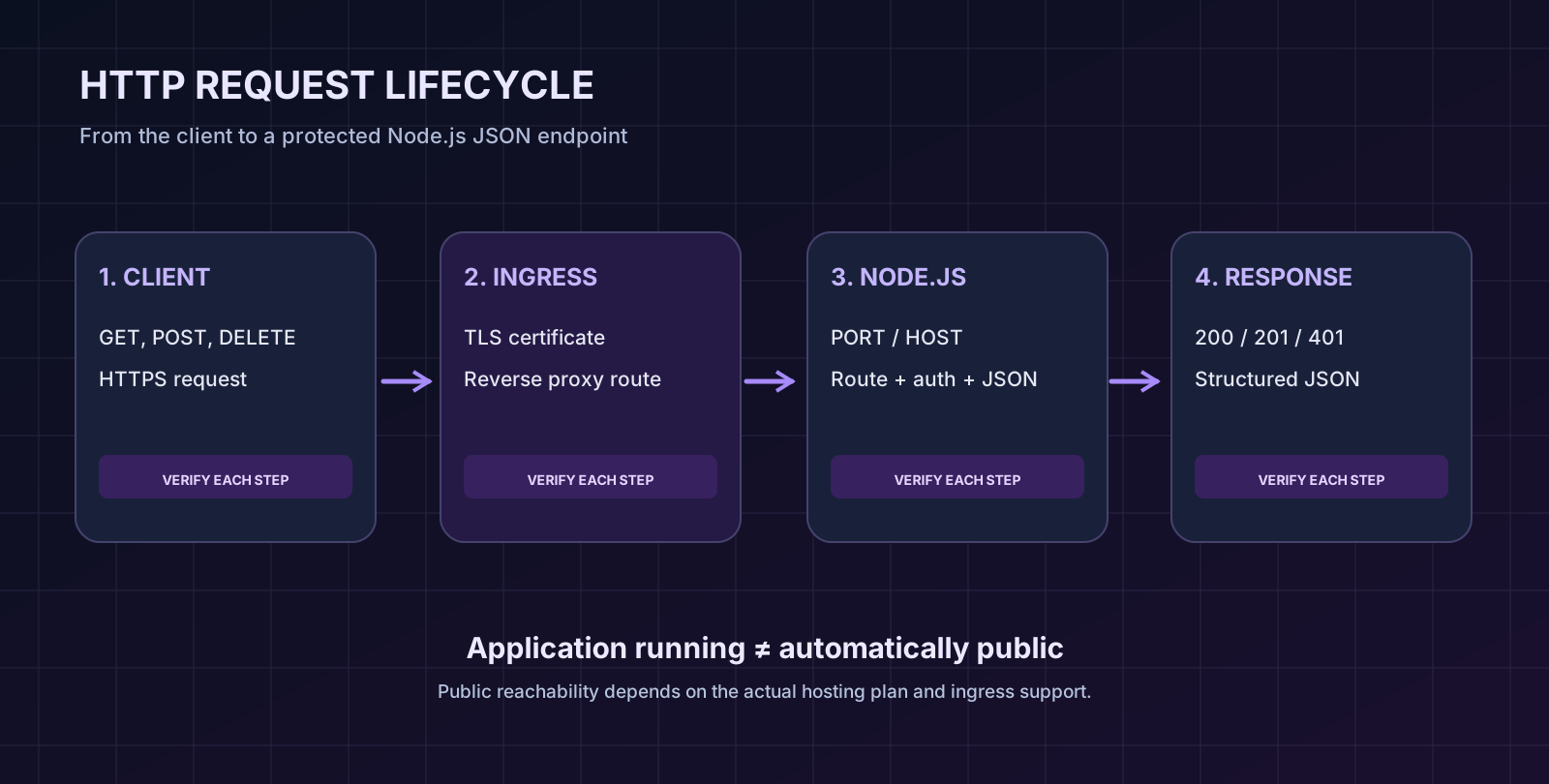
A command-line bot can work without accepting visitors. A REST API is different: another application must be able to send it HTTP requests and receive predictable responses. That distinction matters when you move a Node.js project from your laptop to a hosted server. Starting a process successfully is not the same thing as publishing a secure, reachable API.
This guide builds a tiny but working Node.js REST API in 2026 using built-in Node modules, stores its configuration in environment variables, and shows you how to test, troubleshoot and deploy it. The same skills apply to a Discord bot dashboard, an integration service, a small game-server companion API or a personal developer project. We’ll use Volyx as an example of a hosting control-panel workflow without assuming that every hosting plan automatically provides a public HTTPS endpoint.
Quick answer: Create an HTTP server, give it routes, read its port and secrets from environment variables, run it on a host that supports your Node.js version, and publish it behind an HTTPS endpoint that can actually reach your service. Validate requests and protect non-public routes. You will learn each part, not just copy a command that prints “Server running.”
Important Volyx distinction: Volyx provides managed hosting workflows for developers and bots, with resources tied to its Coins-based service. However, the ability to run a Node.js process does not automatically mean your allocation has a public HTTP ingress, reverse proxy, custom domain or TLS certificate. Check the controls available under your server’s Network and Startup settings. The application in this tutorial can run locally or within a compatible Node.js allocation; a public API needs an explicitly supported inbound route.
Instead of another “Hello World” server that is difficult to extend, we’ll build a minimal Notes API with four useful behaviors. You can copy the included example project from this article’s download package, or create the files yourself.
| Endpoint | HTTP method | What it does | API key required? |
|---|---|---|---|
/healthz | GET | Confirms the process is responding | No |
/api/notes | GET | Lists notes created in this process | Yes |
/api/notes | POST | Adds a note from a JSON body | Yes |
/api/notes/:id | DELETE | Deletes a note by UUID | Yes |
Each response is JSON, and each route uses an appropriate HTTP status code. The example rejects oversized POST bodies, checks the content type, compares API keys safely, and never returns a secret in an error response. It uses the standard node:http and node:crypto packages, so you won’t need to download third-party runtime libraries.
One limitation matters: notes are held in memory. They disappear when the process restarts, scales to another instance or is redeployed. This design keeps the learning example simple; it is not a substitute for PostgreSQL, SQLite or another database when data must survive a restart.
Prepare these items before editing files:
--env-file command-line option. Verify the exact version supplied by your host.server.mjs and package.json.API_KEY and other configuration values, such as local .env for development or the provider’s environment-variable controls.You can start entirely on your own computer. You do not need to buy a domain for local testing. Do not expose a demo server directly to the internet just to complete the exercises.
There are three connected but distinct parts to deploying an API:
127.0.0.1 for local-only access or a container interface when a proxy must reach it. The correct choice depends on network isolation and provider instructions.A Pterodactyl-style dashboard may let you create and start a process while still providing no automatic public URL for your API. Likewise, a panel showing an allocated game port does not prove that HTTP traffic is routed correctly or that HTTPS is configured. Test internal reachability first; ask the hosting provider which public ingress features are supported before advertising an API endpoint.
A typical deployment is: Client → HTTPS endpoint / trusted proxy → Node.js app → JSON response. If any link is missing, the app might show as “online” while its public URL returns 404, 502 or a timeout.
Create a directory named notes-api. You only need these files:
notes-api/
├── server.mjs
├── package.json
├── .env.example
└── .gitignore
The sample package file is deliberately small:
{
  "name": "volyx-notes-rest-api-example",
  "version": "1.0.0",
  "private": true,
  "type": "module",
  "scripts": {
    "start": "node server.mjs",
    "start:local": "node --env-file=.env server.mjs",
    "check": "node --check server.mjs"
  },
  "engines": { "node": ">=22" }
}
The start command expects the environment to be supplied by your hosting platform. The start:local command reads a local .env file while developing. Using separate commands prevents you from accidentally requiring a .env file to exist on a production allocation that already injects environment variables securely.
No npm install is necessary for this specific example because it imports only built-in Node.js modules. In other projects, npm ci is typically preferable when you have a checked-in lockfile and reproducible dependencies. Don’t invent a node_modules directory or upload one built for a different operating system when the host can install its own packages.
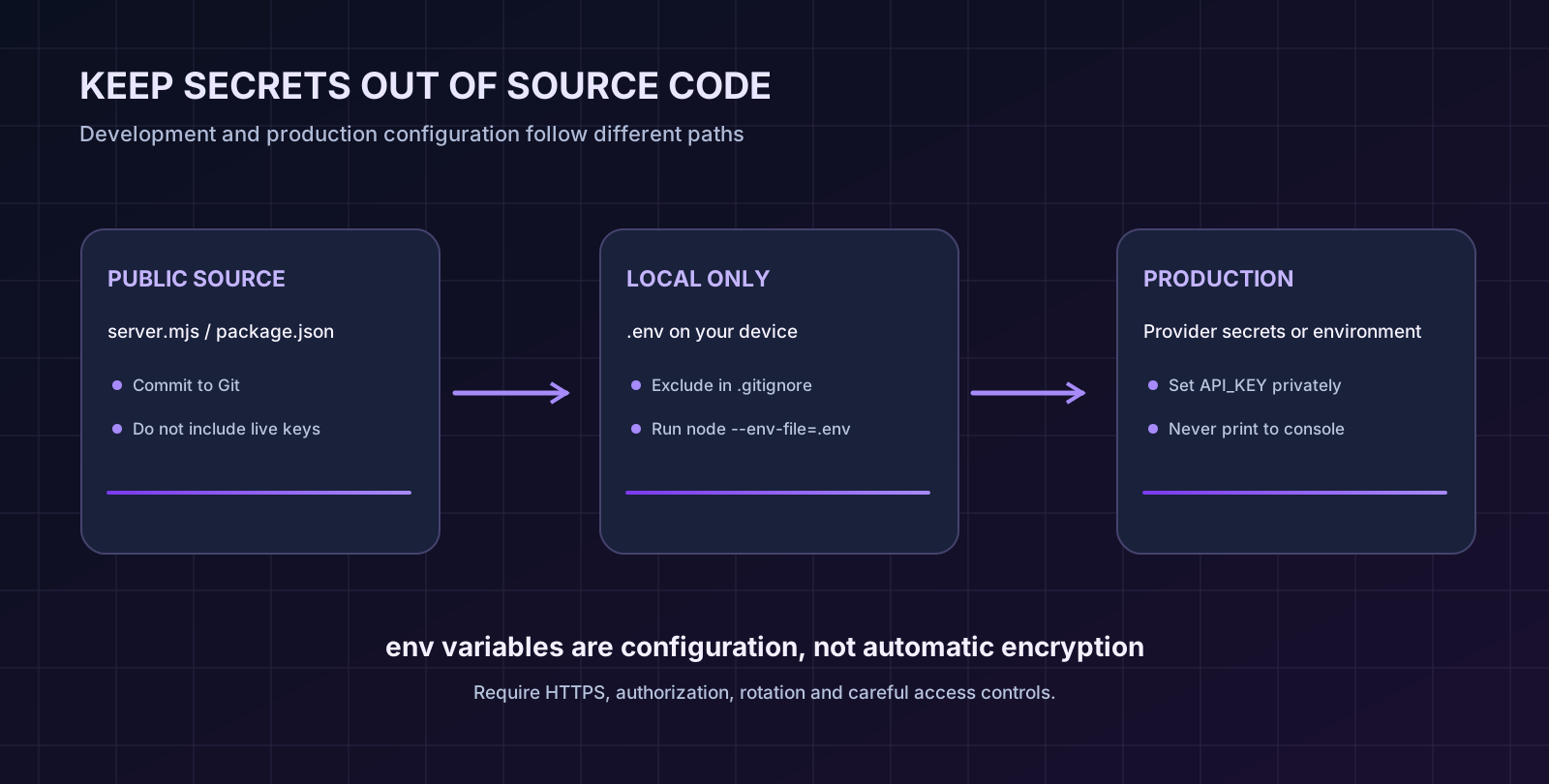
Hardcoding your API key in server.mjs makes accidental disclosure much easier. Put private configuration in environment variables instead. Node.js exposes them through process.env; recent Node releases also support loading a development file with --env-file. Read the official Node.js environment-variable documentation.
Create .env.example to document what the project expects:
HOST=127.0.0.1
PORT=3000
API_KEY=replace-this-with-a-random-secret-of-at-least-32-chars
The placeholder above is not a secure key. Copy .env.example to .env for local testing and generate a fresh random value. For example:
node -e "console.log(require('node:crypto').randomBytes(32).toString('hex'))"Copy the output into your private local .env file. Never paste the real value into a screenshot, public repository, support ticket or article comment. In .gitignore, exclude .env but permit the harmless example file:
.env
.env.*
!.env.example
node_modules/
The actual runtime must see a valid API_KEY, HOST and PORT. On a managed panel, use its documented environment-variable or secret controls. If a field is called SERVER_PORT, MAIN_FILE or something else by the provider, don’t assume it maps automatically to the application’s PORT: verify the startup configuration or adapt the code deliberately.
HOST=127.0.0.1 locally?Loopback binding accepts requests from the same machine and is a safer starting point for development. In an isolated container, a host-managed reverse proxy might require the app to listen on 0.0.0.0 so the proxy can reach it. That setting alone does not protect or publish your API: access still depends on network rules and the proxy. Use the host’s documented interface and port; do not open firewall ports blindly on a shared server.
Save this in server.mjs. It illustrates request routing, a simple authentication check and JSON responses. The complete tested version with all routes is included in this article’s downloadable project; the key implementation pieces are shown here so you can understand the behavior rather than paste a wall of code without explanation.
import { createServer } from 'node:http';
import { timingSafeEqual } from 'node:crypto';

const PORT = Number(process.env.PORT ?? 3000);
const HOST = process.env.HOST ?? '127.0.0.1';
const API_KEY = process.env.API_KEY ?? '';

if (!Number.isInteger(PORT) || PORT < 1 || PORT > 65535) {
  throw new Error('PORT must be a valid TCP port');
}
if (API_KEY.length < 32) {
  throw new Error('Set a random API_KEY of at least 32 characters');
}

function authenticated(req) {
  const supplied = req.headers['x-api-key'];
  if (typeof supplied !== 'string') return false;
  const left = Buffer.from(supplied);
  const right = Buffer.from(API_KEY);
  return left.length === right.length && timingSafeEqual(left, right);
}

function reply(res, status, data) {
  res.writeHead(status, {
    'Content-Type': 'application/json; charset=utf-8',
    'Cache-Control': 'no-store',
    'X-Content-Type-Options': 'nosniff'
  });
  res.end(JSON.stringify(data));
}

const server = createServer((req, res) => {
  if (req.url === '/healthz' && req.method === 'GET') {
    return reply(res, 200, { status: 'ok' });
  }
  if (!authenticated(req)) {
    return reply(res, 401, { error: 'API key required or invalid' });
  }
  return reply(res, 404, { error: 'Route not found' });
});

server.listen(PORT, HOST, () => {
  console.log(`API listening on ${HOST}:${PORT}`);
});
That short extract explains the moving parts; use the complete example-api/server.mjs from this package when you want the Notes endpoints. The complete version also validates incoming JSON, imposes a 16 KiB request-body cap, supports UUID-based deletion and adds graceful shutdown handlers.
The key check is intentionally minimal. An API key can be copied or leaked and does not replace a complete identity and authorization system for multi-user applications. Sensitive production APIs require stronger access rules, audit logging and controlled key rotation. See the OWASP REST Security Cheat Sheet.
Open a terminal in the project folder, copy .env.example to .env, and replace the placeholder key. Start with:
node --env-file=.env server.mjsOr use the npm script:
npm run start:localYou should see a startup message similar to:
API listening on 127.0.0.1:3000
Data is stored in memory and is erased on restart.
First test the public health-check route, which intentionally avoids reporting secrets, environment variables or database details:
curl -i http://127.0.0.1:3000/healthzExpected result:
HTTP/1.1 200 OK
Content-Type: application/json; charset=utf-8

{"status":"ok"}
Next, read the notes with your locally generated key. Replace YOUR_LOCAL_KEY with the value in your private .env file:
curl -i http://127.0.0.1:3000/api/notes \
  -H 'x-api-key: YOUR_LOCAL_KEY'
The first response should contain an empty items array and a count of zero. Add an item:
curl -i -X POST http://127.0.0.1:3000/api/notes \
  -H 'Content-Type: application/json' \
  -H 'x-api-key: YOUR_LOCAL_KEY' \
  -d '{"title":"Deploy my first REST API"}'
A successful POST returns 201 Created and an automatically generated note ID. Reading /api/notes again returns that note. To delete it, substitute the exact returned ID:
curl -i -X DELETE \
  http://127.0.0.1:3000/api/notes/NOTE_ID \
  -H 'x-api-key: YOUR_LOCAL_KEY'
The delete route returns a JSON confirmation. If you restart the server and list notes again, the collection will be empty. This is expected: we’re demonstrating HTTP contracts, not durable persistence.
An API that succeeds only under ideal conditions is not ready for real clients. Run these deliberate checks:
| Request | Expected code | What you learn |
|---|---|---|
GET /healthz | 200 | The HTTP process responds |
GET /api/notes without a key | 401 | Protected routes require credentials |
POST /api/notes with malformed JSON | 400 | Invalid payloads are rejected |
POST /api/notes with text/plain | 415 | Content type is checked |
POST /api/notes with an empty title | 422 | Data is validated |
| Unsupported HTTP method | 405 | The route exposes an explicit method contract |
| Unknown URL | 404 | Missing routes are not confused with authentication |
These cases matter because clients rely on status codes to decide whether to retry, correct input, log in or display an error. A 500 should be reserved for an unexpected server-side failure, not used for every invalid request.
Now that local tests pass, package the project without .env, temporary logs or hidden development credentials. Keep server.mjs, package.json, and .env.example. Before uploading, review the files for hardcoded keys and ensure the expected Node.js runtime is available. Volyx offers different Node versions, but what is selectable for your specific hosting allocation must be checked from its runtime/startup controls.
A practical Volyx deployment checklist:
API_KEY privately and set the correct PORT and HOST for the allocation. Use the panel’s documented secrets/configuration mechanism where available.server.mjs if required, and a startup command such as node server.mjs or npm start according to the server’s startup configuration.Volyx Coins note: A hosting service may use resources and Coins or expire unless renewed. That is an availability consideration separate from whether the Node app works. Your API will not answer requests if the underlying allocation is stopped or suspended. Do not promise “always online” without verifying the plan and its renewal conditions.
For an API that accepts secret-bearing headers, plain HTTP on the public internet is not sufficient. Traffic from the client to the public endpoint must use HTTPS, and the proxy-to-application link needs an appropriate trust boundary. When using a service that manages TLS automatically, follow its domain or ingress setup guide. When you control your own VPS and proxy, you might route a hostname such as api.example.com through Nginx to the loopback API port.
This is a conceptual proxy example, not a paste-and-run modification for the shared Volyx server:
# Illustrative HTTPS server block only; TLS configuration omitted.
location / {
    proxy_pass http://127.0.0.1:3000;
    proxy_set_header Host $host;
    proxy_set_header X-Real-IP $remote_addr;
    proxy_set_header X-Forwarded-For $proxy_add_x_forwarded_for;
    proxy_set_header X-Forwarded-Proto https;
    proxy_connect_timeout 5s;
    proxy_read_timeout 30s;
}
A complete Nginx deployment also needs a correctly configured HTTPS server block, a valid certificate, firewall rules, secure headers, and a verified upstream. Do not apply that snippet blindly on a live shared host or to Volyx Nginx unless you administer the server and know which domain and application port you are changing. For many providers the right action is simply enabling the host’s built-in public-web-service feature.
After connecting a genuine HTTPS endpoint, test it independently of the panel:
curl -i https://api.example.com/healthzYou need a real 200 from that publicly reachable domain. Check the exact hostname, route, certificate validity and that the response comes from your Node app, not from an unrelated default website. Never bypass certificate validation just to make a security test look successful.
Once the public API responds, a backend service can call protected routes. For example, another Node server may read its API key from a private environment variable and send a request using fetch:
const response = await fetch('https://api.example.com/api/notes', {
  headers: {
    'x-api-key': process.env.API_KEY
  }
});

if (!response.ok) {
  throw new Error(`Upstream API returned HTTP ${response.status}`);
}

const data = await response.json();
console.log('Notes:', data.count);
That example belongs in a trusted server-side client, not a public browser bundle. If you embed API_KEY in frontend JavaScript, every visitor can extract it. For browser-facing applications, use an authentication design appropriate to your users: session cookies, scoped access tokens, an authorized backend facade or another proper identity system.
Also remember that setting Access-Control-Allow-Origin: * does not make your API safe. CORS is a browser policy that controls reading cross-origin responses; it is not authentication. Avoid broad CORS rules unless the application actually requires them and has suitable authorization.
Before selecting a host, compare the actual capabilities required by your workload rather than the biggest RAM number on a marketing page.
| Deployment option | How you start the process | Public HTTPS API | Main responsibility |
|---|---|---|---|
| Volyx Node.js allocation | Panel Files, Startup and Console, when offered for your server | Verify per allocation; not implied by a running bot/container | Match runtime, port, Coins and available inbound routing |
| Self-managed VPS | Node process plus a service manager such as systemd | Possible if you configure DNS, TLS, firewall and reverse proxy | You maintain the server, security and updates |
| Managed web-app platform | Git or package deployment using provider-specified start command | Often provided by the web-service product; confirm the plan | Platform handles ingress; you handle app security and limits |
| Local machine | node --env-file=.env server.mjs | No public HTTPS endpoint by default | Best for isolated development and testing |
This is a deployment model comparison, not a claim that one vendor has a particular amount of RAM, zero downtime or unrestricted free hosting. Pricing, resource limits, sleep/idle rules and ingress features can change and should be verified at signup.
A production API usually needs a real data layer. If notes must survive a restart, you might choose PostgreSQL, which can be managed separately and accessed using a private connection string. The application would read DATABASE_URL from its environment, establish a connection pool, create explicit schemas and perform parameterized queries. You would also add migrations, backups, access-control logic and monitoring.
Don’t simply replace the Map() in this example with synchronous writes to a JSON file on a shared hosting filesystem. Parallel requests, crashes and partial writes can corrupt that file. If you use SQLite for a single-instance app, learn its durability and concurrency limits; for a service expected to scale to multiple processes, plan your datastore deliberately.
If your Volyx server offers databases, examine which engine and network access are available in your account. A PostgreSQL option appearing in a general product interface does not guarantee every server allocation includes a database automatically.
Before sharing your API URL, audit these decisions:
For additional background, the OWASP REST Security Cheat Sheet explains secure HTTP methods, authentication, HTTPS, response codes and why exposed keys should never appear in URLs.
A useful log tells you where the failure occurred. Always separate process startup from networking and public HTTPS behavior before changing code at random.
| Symptom | Likely reason | What to check first |
|---|---|---|
node: command not found | Runtime is missing or startup environment is wrong | Node version and executable path supplied by your provider |
SyntaxError: Cannot use import statement outside a module | Module format mismatch | .mjs file extension or "type": "module" |
API_KEY error on startup | No secret supplied or value is too short | Hosting configuration; verify presence without printing it |
EADDRINUSE | Another process already listens on the port | Actual allocation and competing service |
EACCES while binding | Port or interface permission issue | Use provider-allocated unprivileged port |
| Server starts, external request times out | Missing ingress, firewall or wrong bind address | Internal reachability, public route and proxy connectivity |
502 Bad Gateway | Reverse proxy cannot reach healthy upstream | Proxy upstream port, app health and process restarts |
404 Not Found | Wrong path or request routed to another site | Hostname, route, and whether your app received the request |
401 API key required or invalid | Header missing, typo or rotated key | Send x-api-key from trusted client over HTTPS |
415 Content-Type must be application/json | POST uses wrong format | Set JSON content type and send valid JSON |
413 Request body too large | Payload exceeds 16 KiB demo limit | Reduce payload or design intentional upload endpoint |
| Notes vanish after a restart | App uses in-memory storage | Add a database before real-world use |
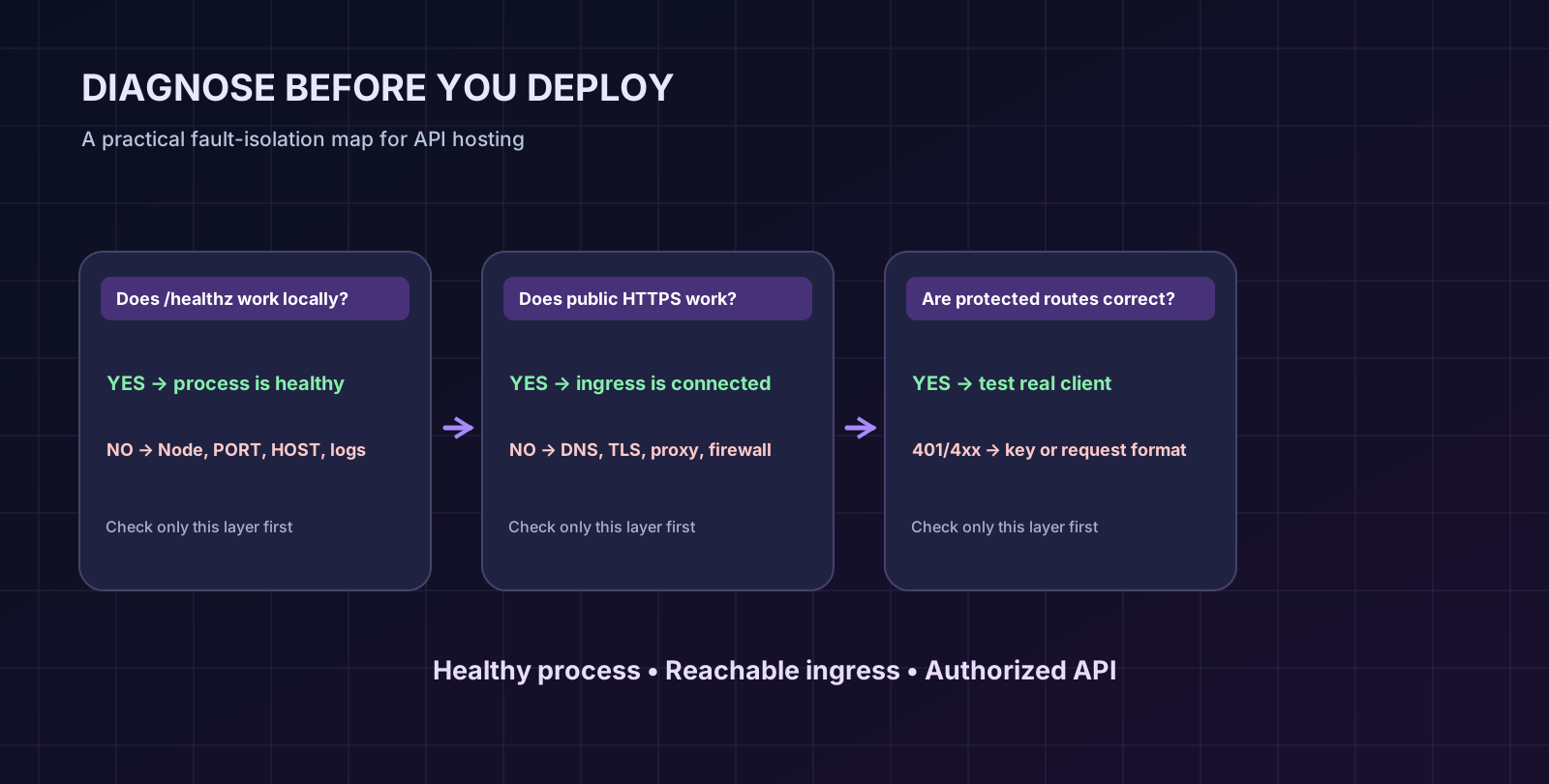
The URL alone cannot tell you which component sent the 404. Try the /healthz route locally against the assigned port, then request the equivalent path on the public domain. If the internal route returns 200 but the public domain returns 404, investigate domain routing or the reverse proxy. If both return 404, inspect your Node router and request method. If only protected routes return 401, your network path is probably functioning and credentials are the next issue.
EADDRINUSEAn EADDRINUSE exception means Node cannot bind the requested address and port because something else is already listening there. On your own VPS, review the service binding; on managed hosting, inspect the configured port and running processes using the panel’s permitted tools. Do not kill unrelated services on a shared host. Avoid hardcoding port 3000 in production if your hosting allocation assigns a different value.
A certificate error can happen even when Node responds perfectly at its internal address. Check domain DNS, active certificate, SNI hostname and proxy routing. Don’t treat curl -k as a successful HTTPS validation for readers: it deliberately bypasses certificate verification and hides an important class of security failure.
/healthz only proves that the process accepts a request. It does not show whether a database connection is healthy or whether data is durable. In this tutorial’s in-memory API, losing notes after a restart is intentional. In a real app, use an operational readiness check that verifies important dependencies without revealing credentials or internal system details to the public.
This is the point where a tutorial ends and real application engineering begins. If you want to serve users or customer data, you should make several upgrades deliberately.
First, separate identities. A single API key gives every authorized caller the same access to every note. In a multi-user product, authenticate individual users and enforce which records each user may read or change. Never assume that knowing a note ID grants permission to delete it.
Second, add persistence. Store notes in a database and define migrations. Decide what happens if two requests update the same record. Include backup and restore procedures, not just a dashboard that says “database connected.”
Third, add sensible operational controls. Use real rate limits, logs with redacted secrets, request IDs, an error budget, and alerts when the app repeatedly restarts. Limit memory use and request sizes; consider graceful shutdown behavior so deployments do not drop all in-flight requests.
Finally, document your API contract. Describe request JSON, response fields, status codes, and authentication. As your API grows, consider an OpenAPI specification and tests for every endpoint. Releasing a public interface without a stable contract makes clients harder to maintain.
Possibly. Some services let you run small Node.js processes without an upfront hosting fee or through earned credits, but free plans often impose resource, network, availability or renewal limits. Public HTTP ingress is a separate requirement; check that your chosen service actually supports HTTPS requests to your app before choosing it for an API.
Volyx supports Node.js workloads through its hosting ecosystem. Whether a particular allocation can receive public HTTPS requests must be confirmed through that allocation’s Network settings and any provider-supported domain or reverse-proxy functionality. Running node server.mjs alone does not create a public API URL.
No. Node includes node:http, which is enough for the small tutorial API built here. Frameworks such as Express can help organize middleware, routing, validation and larger applications, but they are optional. Choose a framework when its abstractions genuinely help your project.
Use a maintained Node.js release compatible with your code and dependencies, and test on that exact release before production. This tutorial targets Node.js 22 or newer. A provider offering several versions does not mean every version is equally appropriate for every project.
process.env in Node.js?It is the standard way Node programs access environment variables inherited from their process environment. These variables can hold configuration such as ports and connection strings. They are not magically encrypted; you still need proper secret storage, access control and log hygiene.
.env file to hosting?Prefer the hosting provider’s secure environment-variable or secrets interface. Do not upload a real .env into a public web directory, commit it to Git, or publish it inside a downloadable archive. A harmless .env.example is useful for documenting the required variable names.
It may be listening only on 127.0.0.1, the provider may not expose incoming HTTP ports, the reverse proxy may target the wrong allocation, or DNS/TLS may be incorrect. Test local health, upstream routing and public HTTPS separately to isolate the cause.
0.0.0.0 always the correct HOST?No. It binds to all available interfaces. That may be necessary for an app behind a container ingress, but it can also broaden exposure if you manage a public interface directly. Use 127.0.0.1 for local development and follow the trusted hosting/proxy topology for deployment.
401 Unauthorized?A protected request did not include the expected x-api-key value, or its value was wrong. Verify that your client sends the header through HTTPS and that the server has the intended current key. Avoid troubleshooting by printing secrets to logs.
Use a durable database. The downloadable Notes example stores records in an in-memory JavaScript Map as a learning exercise. Add PostgreSQL or another appropriate datastore, migrations and backups before storing anything you cannot afford to lose.
Not for most sensitive or multi-user APIs. A key can be leaked and often identifies only an application, not an individual user. Use HTTPS, least-privilege authorization, rotation, limits, monitoring and authentication appropriate to the data and actions involved.
No shared secret should be embedded in frontend JavaScript distributed to visitors. Users can inspect browser code and network requests. Use a trusted backend or an authentication design specifically intended for untrusted browser clients.
Not always. A health endpoint or stateless transformation service may not need persistent storage. An API that creates customer records, uploads, paid accounts or durable notes normally does. The data model should follow the real product need, not the simplicity of an introductory demo.
Usually the public proxy cannot reach a healthy upstream application. Check whether the Node process is running, what address and port it listens on, and whether the proxy has network access to that endpoint. Avoid guessing that the problem is always SSL or Node syntax.
Before calling the tutorial finished, answer each question with evidence: does the server start with your chosen Node version? Does /healthz return 200 locally? Does missing authentication return 401 on protected routes? Can a correct client create and delete a note? Does the public HTTPS URL work with a valid certificate? Are real credentials absent from code and logs? And do you understand which data vanishes when the process restarts?
If all you need is a bot that makes outbound requests, your hosting choice may be much simpler. If you need a publicly reachable REST API, select an allocation and network setup that explicitly supports incoming HTTPS traffic. That distinction will save you more debugging time than changing frameworks.
Ready to build on Volyx? Explore Volyx hosting, learn more in the Volyx documentation, and continue with our related guides: hosting a Discord bot for free, fixing bot startup errors.
process.env, .env parsing and --env-file.Explore more in-depth articles with code, visuals, and practical walkthroughs.
Browse all articles ↗
A practical, evidence-first guide to fixing Minecraft Java server lag: read TPS and MSPT, profile with spark, tune chunks, and diagnose CPU, memory and plugins.
Read article ↗
Learn the difference between DDoS floods and Minecraft bot raids, secure a Paper or Velocity server, compare TCPShield and Cloudflare, and respond safely using Volyx.
Read article ↗
Compare five real MIT-licensed JavaScript, TypeScript, and Python Discord bot starters, then learn how to deploy one safely on Volyx.
Read article ↗