
Minecraft Server Lag in 2026: Diagnose TPS, MSPT, CPU and RAM
A practical, evidence-first guide to fixing Minecraft Java server lag: read TPS and MSPT, profile with spark, tune chunks, and diagnose CPU, memory and plugins.
Read article ↗Protect a Node.js REST API against broken authorization, stolen API keys, injection, excessive requests, unsafe CORS, and deployment mistakes with a working example.

A REST API can work perfectly in development and still expose its users in production. The dangerous bugs are often not spectacular: an endpoint fetches a record by ID without checking its owner, a token appears in a log, a request body contains a field the client was never supposed to set, or a single expensive operation can be repeated without a limit.
This guide takes a practical approach to securing a Node.js API in 2026. You will build a small, testable notes API, then learn which controls protect against which threats, what those controls do not prevent, and how to deploy the project responsibly on a platform such as Volyx.
What makes this guide different: rather than treating a security header or a rate limiter as a magic shield, we trace individual requests through authentication, object-level authorization, validation, execution, and logging. The example project contains automated tests for another user’s inaccessible records, invalid credentials, malformed input, body limits, and rate limiting.
Scope: The downloadable example is educational. It has a single-process, in-memory store and a simple limiter. It must be adapted to use persistent data storage, centrally managed identity, shared rate limits, HTTPS, logging and tested proxy configuration before serving real users.
A solid starting point is to authenticate requests, authorize every resource access, validate all input against a precise schema, constrain resource consumption, protect secrets, and expose only the endpoints and methods you intend. HTTPS, safe error handling, dependency maintenance, and meaningful audit logs provide additional layers.
No single control addresses all API risks. CORS is not authentication, an unguessable ID is not authorization, and an API key is not a defense against every misuse of an authenticated account. A design needs multiple controls at the correct boundaries.
| Control | Example enforcement | What it cannot guarantee |
|---|---|---|
| Authentication | Check a valid token for protected routes | Permission to a particular record |
| Object authorization | Confirm note owner matches caller | Token has not been stolen |
| Input validation | Allow only expected fields and sizes | Safety of downstream dependencies |
| Rate limiting | Return 429 after a defined quota | Network-level DDoS prevention |
| HTTPS | Encrypt requests between client and TLS endpoint | Secure application logic |
| Logging | Record request IDs and safe outcomes | Incident prevention on its own |
| Updates | Patch supported Node.js and dependencies | Correct access-control rules |
The current OWASP API Security Top 10 includes broken object-level authorization, broken authentication, resource exhaustion and security misconfiguration. It is a threat model for choosing controls, not a promise that checking ten boxes produces a secure service.
Before choosing middleware, write down where requests arrive, who provides credentials and what may be trusted. A common deployment path looks like this:
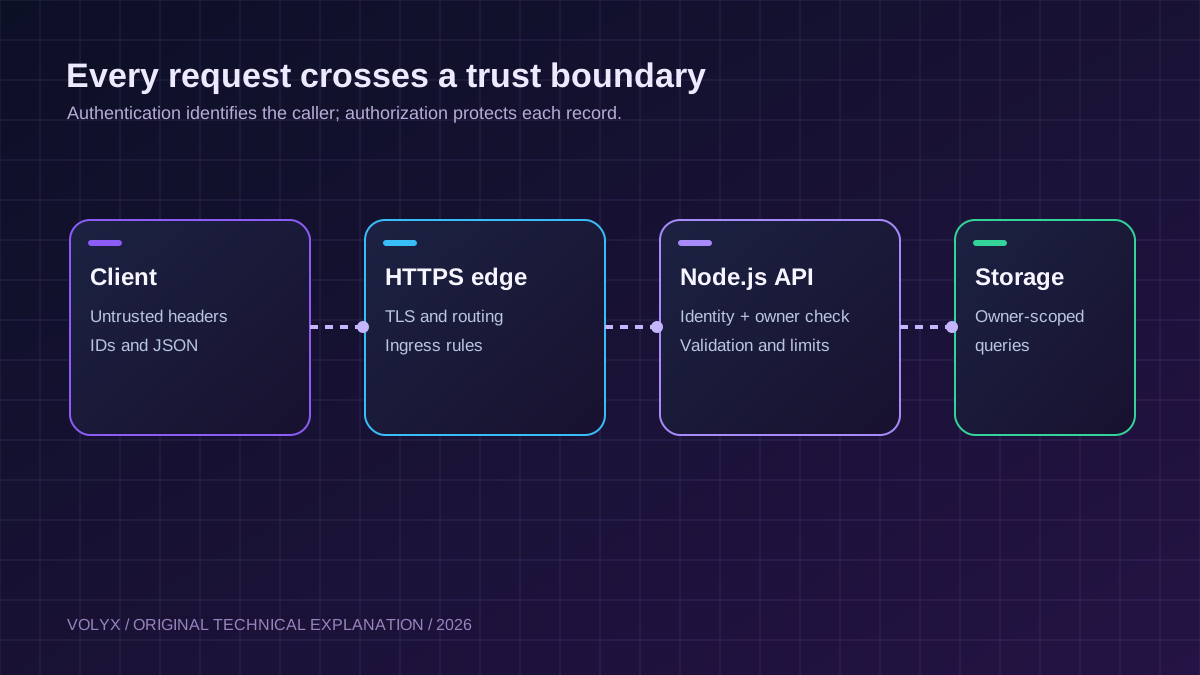
The public client is not trusted. Headers, URLs, IDs, submitted JSON, uploaded files and even values inside a validly authenticated request must be treated as untrusted input. The TLS proxy terminates HTTPS and forwards traffic to the application. The application checks the caller, the action and the target object before touching stored data.
In Volyx, you may use a Node.js runtime and manage application configuration through your hosting controls, but do not assume an arbitrary game or bot allocation automatically exposes an HTTPS API. Confirm that your specific server plan has a supported HTTP ingress, reverse proxy or public web-service mapping. If the app cannot receive public HTTP traffic, publishing a PORT value in code does not create a public endpoint.
For local development, bind the sample application to 127.0.0.1. In a container or managed platform, choose the interface required by the platform and ensure the reverse proxy is actually configured to reach that service. Do not expose the raw development port to the internet merely to make the example work.
Broken Object Level Authorization (BOLA) happens when a legitimate user can call an allowed endpoint with an identifier belonging to another user. Imagine two users, Alice and Bob. Alice creates a note and receives an ID. Bob is authenticated and knows the notes endpoint, but Bob must not be able to read or delete Alice’s note by substituting its ID.
Bad logic makes the ownership decision disappear:
// Unsafe: the ID alone determines which record is returned.
const note = await database.getNote(req.params.id);
return res.json(note);
Better logic includes the authenticated subject in the database query or authorization check:
// Pseudocode: validate the caller, then scope the object lookup.
const note = await database.getNoteForOwner({
  id: validatedId,
  ownerId: authenticatedUser.id,
});
if (!note) return respond(404, { error: 'Not found' });
For SQL storage, use a parameterized query that includes both identifiers: SELECT id, text FROM notes WHERE id = $1 AND owner_id = $2. That prevents cross-user reads when implemented consistently, and it also helps avoid SQL injection. A UUID can make guessing IDs harder, but it does not replace the ownership check. OWASP explicitly calls for object-level authorization at every function using client-controlled IDs.
The downloadable demonstration includes this exact failure case as two tests: Bob cannot read Alice’s record, and Bob cannot delete it. Those negative tests are more important than a test that only proves Alice’s happy path works.
A request might carry a session cookie, access token or API key. Whatever the mechanism, validate the credential server-side. For production applications, prefer an established identity provider and established token validation rather than designing a login protocol from scratch.
If an API uses bearer tokens, a stolen token can be reused by whoever possesses it. Store tokens in the correct secret store, avoid putting them in query strings, and never print them in exception traces, analytics events or support tickets. Rotate and revoke credentials when exposure is suspected. Short-lived credentials and scoped authorization make incidents easier to contain.
For a small server-to-server integration, an API key can identify a service client. However, a single global key shared by everyone cannot reliably distinguish individual resource owners. The sample project intentionally associates each test key with a distinct user ID so the ownership check can be demonstrated.
GET /v1/notes HTTP/1.1
Host: api.example.com
Authorization: Bearer <your-private-token>
A good negative test uses a missing or incorrect token and expects 401 Unauthorized. A separate test uses an authenticated identity that lacks rights to the particular item and expects 404 or 403, according to the API’s documented policy. In our example, 404 avoids confirming that someone else’s note exists.
Accepting an arbitrary JSON object and spreading it into a database model is hazardous. A client that is allowed to set text must not also be able to set ownerId, role, isAdmin, billingPlan or serverLimit.
// Unsafe pattern when requestBody is controlled by the client:
// await db.notes.insert({ ...requestBody });

// Safer: validate exact fields and assign ownership on the server.
const input = validateNoteCreation(requestBody);
await db.notes.insert({
  text: input.text,
  ownerId: authenticatedUser.id,
});
For the example API, a note creation payload is exactly one object with one text field, from 1 to 200 characters. Additional fields cause 422 Unprocessable Content. This is a deliberately narrow teaching schema; a real product may use a library such as Zod or a validated JSON Schema and should document lengths, types, allowed values and formats for each endpoint.
Unknown fields should be rejected unless backward compatibility requires otherwise. Keep response fields similarly limited; a safe request validator does not help if the response serializes password hashes or internal billing metadata.
A publicly reachable HTTP endpoint needs boundaries: supported methods, supported media types, a maximum body size, and an upper bound on computational work. JSON APIs should not silently accept arbitrary binary data or unbounded text.
In the provided sample, POST /v1/notes only accepts application/json and a body up to 4 KiB. Malformed JSON returns 400, other content types return 415, and an oversized body returns 413. A large body is rejected while the request stream is being read rather than being fully loaded into memory first.
The Node.js example also checks that the parsed result is an ordinary object-like payload and not an array. An application handling file uploads should use a separate, purpose-built upload policy with allowed types, safe file names, independent storage, content scanning where applicable, and appropriate size limits.
These controls matter for performance as well as security. Rate limiting alone is insufficient if one request can start an expensive query or allocate enormous buffers. If your API supports exports, search, image processing or AI calls, impose operation-specific limits, timeouts, quotas and cancellation handling.
A limiter can slow brute-force attempts or stop ordinary clients from consuming too many application requests. The server should reply with 429 Too Many Requests when the defined rate is exceeded and may include a Retry-After header. Limits should be tailored to the endpoint: account recovery and token issuance are more sensitive than a cheap health check.
There are several identities a production limiter might use: an authenticated account, an API key, a tenant, an IP address or a combination. Behind Nginx or another proxy, the raw socket IP can represent the proxy, not the user. Do not trust arbitrary X-Forwarded-For headers unless you have configured precisely which proxy is trusted and how the edge normalizes incoming headers.
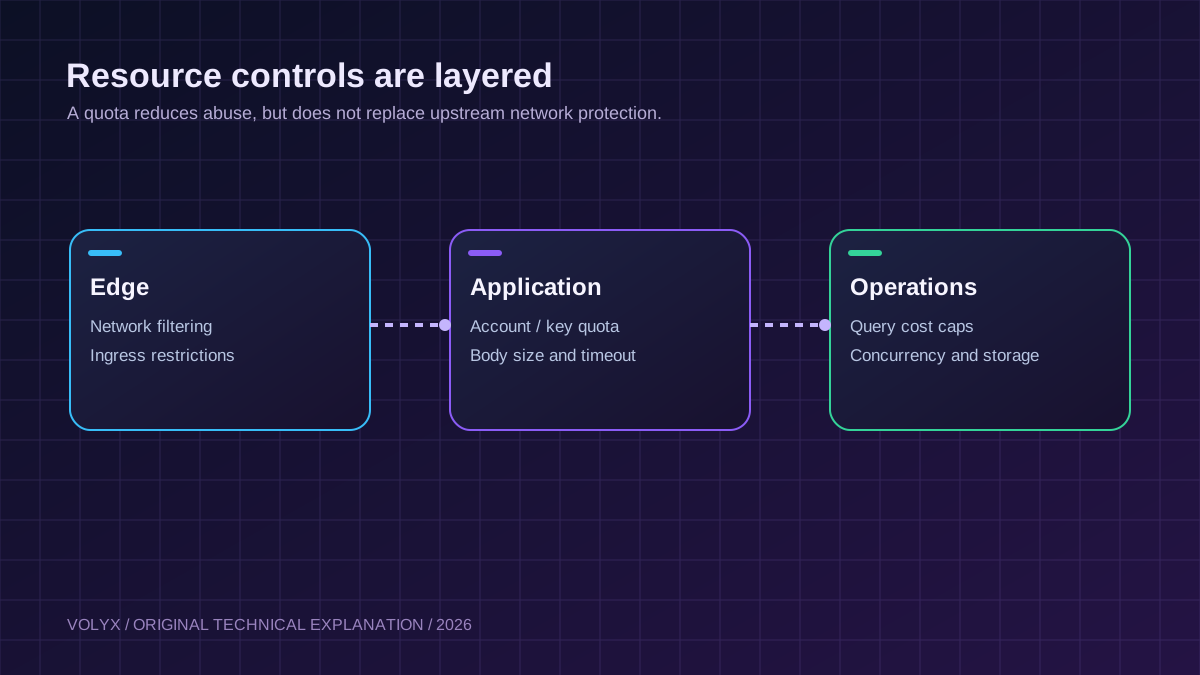
Our small program includes a fixed-window, per-process limiter and returns 429 in a test. It is not appropriate as a distributed production rate limiter: after a restart, the counters reset, and multiple workers do not share state. Use a shared store or an edge gateway for a scaled deployment. Also use concurrency limits and upstream filtering where appropriate.
An application-side limiter does not absorb network-level DDoS traffic. For public APIs, discuss infrastructure and upstream protections with your hosting provider. Do not infer that Volyx or another provider supplies a specific mitigation capacity without its published terms or confirmation.
Cross-Origin Resource Sharing is a browser access policy. It controls whether a browser lets JavaScript from one origin read responses from another origin. CORS does not authenticate a caller, and it does not prevent curl, server-side clients or other non-browser callers from sending requests.
If a dashboard at https://dashboard.example.com needs an API at https://api.example.com, specify the allowed origin rather than reflecting any arbitrary Origin value. Avoid Access-Control-Allow-Origin: * for authenticated cross-origin responses, and configure preflight responses and credential behavior according to the exact authentication architecture.
The sample API does not implement cross-origin browser support by default. This is intentional: it is not necessary for local CLI tests. Add CORS only after identifying the actual front-end origins and request methods you need. Cookie-based authentication may also require CSRF protection; bearer-token APIs have different browser and credential-storage considerations.
A Discord bot token, PostgreSQL password, webhook secret, or API key does not become safe merely because the project is private today. Repositories, support transcripts, CI logs and backup archives can become exposure paths later.
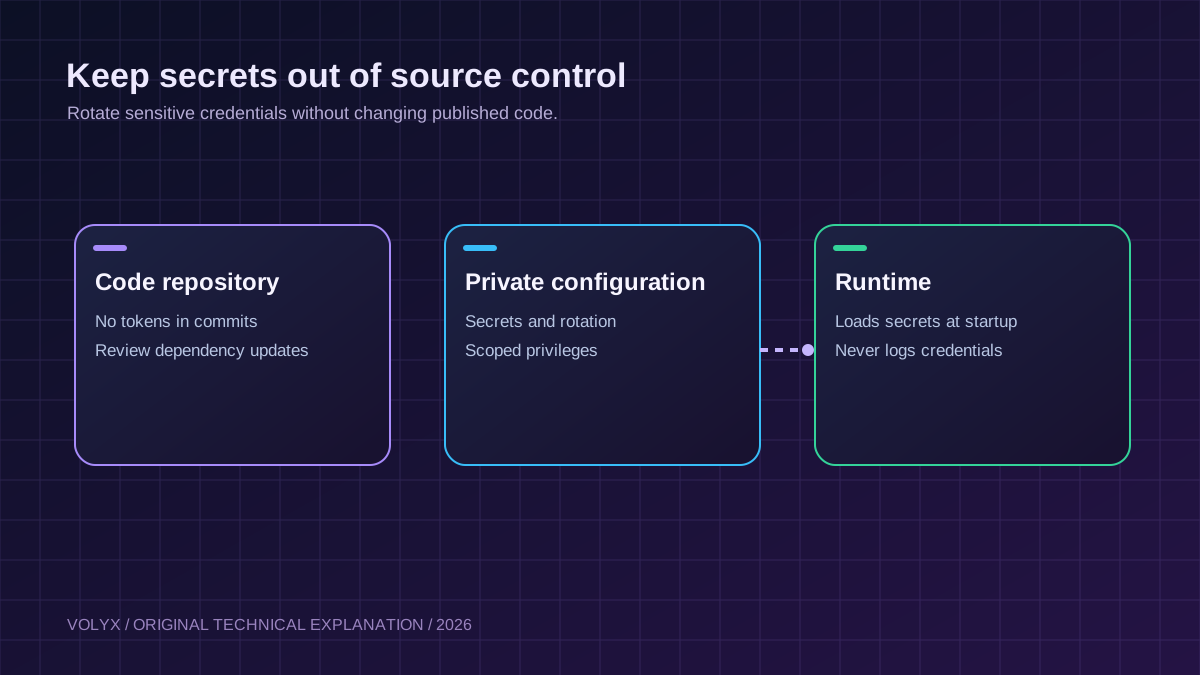
For the example, the environment variable API_KEYS_JSON maps private tokens to user IDs. It is an educational device, not a recommendation to manage a large user database inside an environment variable. For real services, use your platform’s Secrets/Startup controls or a dedicated secrets manager, apply least-privilege permissions, and rotate credentials when employees, automation or integrations change.
An example startup configuration is:
# Local shell example only. Replace placeholders first.
export API_KEYS_JSON='{"YOUR_LONG_RANDOM_TOKEN":{"userId":"demo-user"}}'
export HOST=127.0.0.1
export PORT=3000
node server.mjs
Do not publish API_KEYS_JSON or paste the real values into this article. Do not put secret values in the URL: URLs frequently appear in proxy logs and browser history. Never turn off TLS certificate verification to make a database or external API connection work; diagnose and repair the trust configuration instead.
Different destinations require different defenses. For a SQL query, do not concatenate untrusted values into SQL. Use parameterized queries and limit the database account to the rights it needs. For a shell command, avoid passing user input through a shell. Prefer APIs that do not invoke a shell, or use fixed command arguments that are rigorously validated.
Server-Side Request Forgery (SSRF) is another distinct risk. An API that accepts a URL and fetches it can accidentally reach internal services, metadata endpoints, or admin panels. Strict URL allowlists, DNS/IP validation, network egress controls, redirect policies and destination restrictions are useful layers. Checking only that a URL begins with https:// is not sufficient, because HTTPS URLs can still point to disallowed internal destinations.
The example API intentionally does not execute commands or fetch user-provided URLs. That is a powerful risk-reduction strategy: the safest dangerous feature is sometimes the one you do not expose.
A useful API error tells a client what to correct without dumping stack traces, SQL statements, credentials or full infrastructure details. The sample returns fixed messages and codes for known validation problems, and a generic 500 Internal server error on unexpected failures.
In operations, you need additional context: a request ID, timestamp, route name, response status, authentication outcome, controlled user identifier, and duration. Avoid logging raw tokens, entire request bodies and sensitive personal data. Redaction should happen before a log reaches a central collector—not only when someone opens a dashboard.
For incident analysis, separate security events such as repeated failed authentication or forbidden object access from ordinary developer diagnostics. Retention limits and access controls matter because logs themselves are valuable data.
A browser-facing dashboard and a JSON-only API do not need identical headers. X-Content-Type-Options: nosniff, a consistent JSON content type, and Cache-Control: no-store are helpful defaults for responses that contain private data. The sample sets those. A front-end HTML app also needs a content security policy suited to its scripts, styles and assets; simply copying an example CSP can break functionality or leave gaps.
TLS should be enforced at the public endpoint. If Nginx or a managed edge terminates HTTPS, protect the path from the edge to Node.js according to the deployment model. Configure forwarded headers safely and never assume every incoming Host or X-Forwarded-* header is trustworthy. If a service issues redirects, cookies or absolute links, an incorrect proxy trust configuration can cause security and routing failures.
The sample’s default host is 127.0.0.1, not a publicly reachable address. This is appropriate for local testing or a same-host proxy. Adjust only to the interface needed by the actual deployment and keep any public exposure intentional.
A secure endpoint can still be compromised through a vulnerable dependency or an unsupported runtime. Node.js official guidance recommends lockfiles, reviewing package names, dependency updates and security checks. For npm projects that use packages, prefer reproducible npm ci in deployment, inspect security advisories and remove unused dependencies.
This tutorial’s example uses Node.js built-in modules only. Its package.json declares Node.js 22 or newer and has no third-party production dependencies. That makes the teaching example smaller, but it does not mean Node.js core or your deployment environment never needs updates. Keep a supported, patched runtime and review release/security notices.
For a more complex Express or Fastify application, consult the framework’s documented production security settings in addition to general Node.js guidance. Middleware can implement helpful controls, but your business authorization rules remain application-specific.
The downloadable ZIP contains the example-api/ directory with server.mjs, server.test.mjs, package.json and .env.example. You can inspect all four files before running them.
Use a maintained Node.js version that supports node:test, fetch, crypto and ESM. The example targets Node.js 22+ and was locally tested on Node.js 22. It does not depend on Express, Redis or PostgreSQL.
Generate a long random token with a trustworthy randomness source, and set API_KEYS_JSON through a shell environment or your hosting panel’s secret configuration. The project does not ship usable production credentials. For a shared deployment, prefer a proper identity service instead of static API keys.
node server.mjsThe server uses HOST=127.0.0.1 and PORT=3000 unless environment variables override them. This means it will not be directly accessible from another machine without supported ingress. Do not assume a new public domain or TCP allocation appears automatically.
curl -i http://127.0.0.1:3000/healthzThe expected status is 200 with {"status":"ok"}. The endpoint deliberately avoids revealing runtime versions, environment names, token counts or dependency details.
Using a token that you configured, send POST /v1/notes with JSON such as {"text":"Hello from Volyx"}. The endpoint returns an ID. A later authenticated GET /v1/notes/{id} should return that record only for its owner. A request without authentication should fail.
node --test server.test.mjsThe accompanying tests cover the normal flow and access-control denial. An API that returns 200 to all callers may look functional but be disastrously insecure. Negative tests make the intended security boundary visible and repeatable.
Do not use this in-memory notes store for customer data: records disappear on restart. The rate limiter also does not share counters across instances. To make a real application, replace both components deliberately and retest authorization with the new data-access layer. Our PostgreSQL connection and pooling guide covers database fundamentals, and our REST API deployment guide explains environment settings and hosting requirements.
Volyx users managing a Node.js app can apply the same ideas to a Discord bot dashboard, web-service API or internal automation endpoint. The most transferable controls are private tokens, a validated startup environment, explicit file permissions, defensive code, and console-based error diagnosis.
A public API adds an infrastructure requirement: it needs a reachable HTTP(S) route. Verify the chosen Volyx environment supports that route, and whether HTTPS/reverse proxying is managed by Volyx or by the user. A process that starts successfully in the console is not proof that the API is public or secure.
You should also consider quota-related constraints. A small hosted instance may reach CPU, memory, file-count or connection limits sooner than a large VPS. A very permissive upload or request endpoint can cause costly resource exhaustion even when it is authenticated.
The platform’s Coins system and limits should be described based on the current account and plan, not with invented universal numbers. API security and hosting availability are separate questions; this guide provides a general security foundation rather than a guarantee about Volyx capacity or mitigation products.
| Scenario | Insecure behavior | Protected behavior in this guide |
|---|---|---|
| User changes an ID | Other person’s record becomes visible | Owner check; other user receives 404 |
| Missing API key | Endpoint still returns private data | 401 |
Extra ownerId field | Client can impersonate record owner | 422 for unexpected fields |
| Malformed JSON | Unhandled server exception | 400 with bounded parsing |
| Oversized body | Entire request loaded into memory | 413 once limit is exceeded |
| Too many requests | Unlimited work per process | Demonstration returns 429 |
| Wrong HTTP method | Handler mutates state unexpectedly | 405, with Allow header |
| Unexpected server error | Internal trace returned to client | Generic 500, operator-side diagnosis |
| Credential printed in URL | Leaks into common request logs | Bearer header; no secrets in query strings |
| Database restarted | Records silently vanish | Use persistent storage in a real deployment |
401 Unauthorized even with a tokenCheck whether the request uses Authorization: Bearer <token>, whether the token has been rotated, and whether the process actually received the environment configuration. Do not log the full token as a debugging shortcut. For JWT-based systems, also review issuer, audience, algorithm and expiry validation.
403 or 404 when opening an existing recordAn existing record may belong to another account. Confirm the authenticated user’s identifier and the authorization policy rather than disabling the ownership test. A 404 can be deliberate to avoid disclosing record existence.
413 Request Entity Too LargeThe application or reverse proxy rejected the payload size. Inspect both limits and decide whether the endpoint truly needs larger bodies. For file uploads, use a dedicated upload route with separate controls rather than raising a global JSON limit.
415 Unsupported Media TypeSend the declared Content-Type: application/json header only for requests carrying JSON. Check that the client actually encodes valid JSON. Do not make a handler accept arbitrary types just because one client was misconfigured.
422 for an unexpected fieldCheck the documented request schema. A rejected role, ownerId or other privileged field is a desirable security outcome, not a bug to fix by allowing all keys.
429 Too Many Requests from unexpected clientsDetermine whether a limiter is keyed by IP, token or account. Behind a proxy, the remote IP may represent the proxy, collapsing unrelated clients into one bucket. Fix the trusted-proxy architecture and use a shared limiter instead of trusting every forwarded header.
Check the exact browser origin and allowed methods. CORS errors do not imply the API rejected authentication, and turning on * is not a general security fix. Server-to-server HTTP clients do not enforce browser CORS rules.
502 Bad Gateway after deploymentCheck the listening interface, port, startup command, container readiness, and reverse-proxy upstream address. A healthy process listening only on localhost inside an isolated container cannot automatically be reached from the host’s proxy. Verify supported port mapping.
The configuration may not have been saved to the right environment, or the process was not restarted after changes. Verify presence without displaying the secret value. Rotate the credential if it appeared in any public output.
A single expensive endpoint can defeat frequency limits. Profile per-request work, cap query sizes and concurrency, enforce timeouts, and inspect downstream dependencies. Also examine Discord bot CPU and memory troubleshooting for Node.js monitoring concepts.
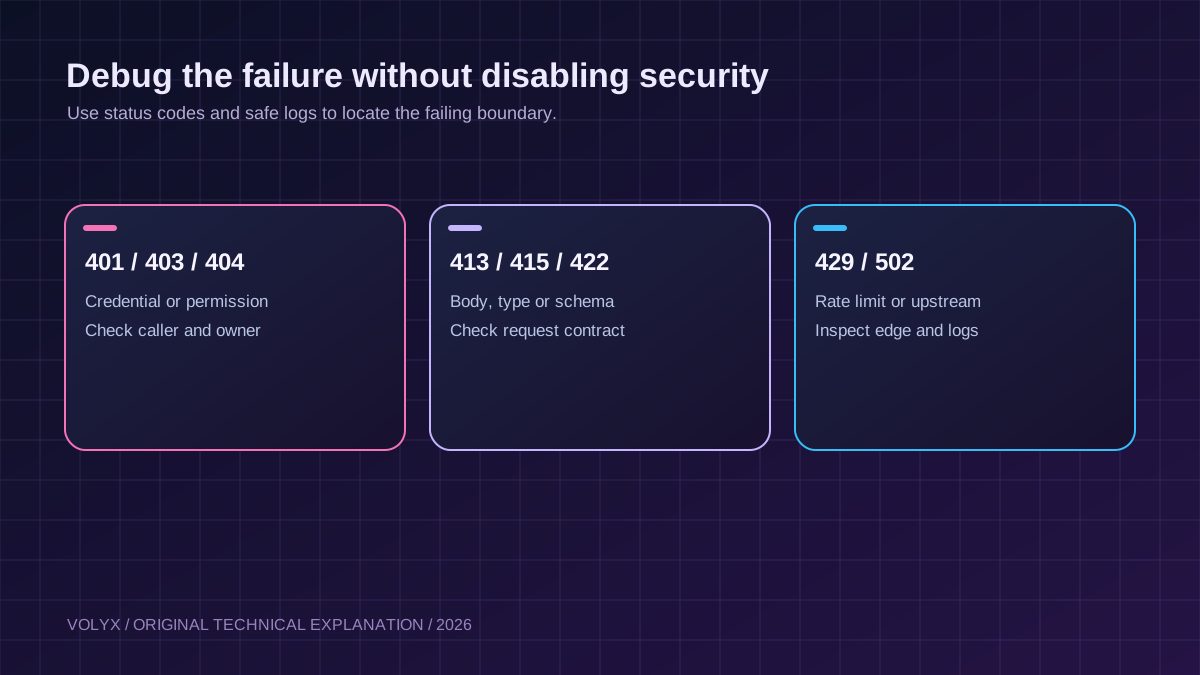
Before allowing real users to access an API, test the failure paths as carefully as the success paths. Confirm that a user cannot access another user’s records, that privileged fields cannot be assigned from JSON, that credentials can be rotated, that transport encryption is configured, that each expensive action is bounded, and that monitoring can distinguish code failures from permission failures. Review dependency advisories, backup recovery, service identity, and how the team responds when a credential is exposed.
Use at least two test identities, even for a small application. A test with only one identity will not reveal the most basic cross-user authorization failure. Include regression tests whenever a new endpoint accepts an object ID, tenant ID, user ID, payment ID or export key.
Yes, Node.js can run secure APIs when the application and infrastructure are designed, maintained and tested correctly. Runtime choice does not make up for missing authorization, unsafe dependencies or exposed credentials.
An API key can authenticate a calling application, but by itself it does not ensure a caller may access every object or action. Combine authentication with permission checks, quotas and lifecycle management.
Broken Object Level Authorization is when an authenticated caller can read or change another caller’s record by changing an ID or another reference. Fix it by enforcing ownership or explicit grants at each resource access.
No. CORS is enforced by browsers for cross-origin scripts. CLI tools and server-side programs can still send requests. Authentication and authorization must be enforced by the server.
Unpredictable IDs can reduce enumeration opportunities, but hidden or random IDs are not authorization checks. Every operation must verify the requester’s rights to that record.
It means the client exceeded an enforced request limit. The server may include a retry delay. Rate limits vary by endpoint and do not replace CPU, memory or network-level controls.
Use the supported private configuration or secrets mechanism available to your account, limit who can read it, and avoid putting secrets in source files or public screenshots. Confirm what the selected hosting environment actually supports.
The reverse proxy may be unable to reach the running process. Check the configured port, listening interface and public HTTP ingress. A successful console startup does not guarantee a working external HTTP route.
Not for a single-process demonstration. For multiple instances or workers, a central limiter backed by a shared service is often needed so all instances enforce a coherent quota. Evaluate failure behavior and privacy requirements as well.
helmet necessary for an API?Security-header middleware can help configure useful HTTP headers. The exact header policy depends on whether you serve JSON, HTML or both. Middleware is not a substitute for authorization and input validation.
Yes. HTTPS protects transport, not database query construction. Use parameterized queries and least-privilege database credentials.
No. It intentionally stores data and limiter counters in memory, uses simplified static credentials and demonstrates only selected defenses. Replace those parts and complete a security review before storing real user data.
Both may be valid depending on your security policy. Returning 404 can reduce information leakage about whether a record exists. The important part is denying access consistently and testing it.
Use a policy based on sensitivity and exposure. Rotate on suspected compromise, after relevant personnel or integration changes, and whenever required by your organization’s risk model. Prefer systems that support safe overlapping rotation windows.
No universal guarantee exists. Protection depends on the specific provider, network architecture and service plan. An application limiter can reduce ordinary abuse but does not replace upstream DDoS mitigation.
The most valuable habit in API security is to ask two questions on every operation: Who is making this request? and Is this caller allowed to perform this action on this specific object? Then add bounded input, careful secrets management, correct transport settings, monitoring and automated negative tests.
Use the example project to practice locally. When you’re ready to host a service on Volyx, confirm a supported public HTTP route, add persistent data storage and proper authentication, and keep the API’s security checks independent of what the front-end UI happens to show.
Continue learning: Deploy a Node.js REST API · Connect PostgreSQL to Node.js · Volyx documentation.
Editorial note: Examples are intentionally simplified and intended for defensive development and testing. Security guidance should be reviewed against current vendor documentation and the actual deployment architecture before production use.
Explore more in-depth articles with code, visuals, and practical walkthroughs.
Browse all articles ↗
A practical, evidence-first guide to fixing Minecraft Java server lag: read TPS and MSPT, profile with spark, tune chunks, and diagnose CPU, memory and plugins.
Read article ↗
Learn the difference between DDoS floods and Minecraft bot raids, secure a Paper or Velocity server, compare TCPShield and Cloudflare, and respond safely using Volyx.
Read article ↗
Compare five real MIT-licensed JavaScript, TypeScript, and Python Discord bot starters, then learn how to deploy one safely on Volyx.
Read article ↗