
Minecraft Server Lag in 2026: Diagnose TPS, MSPT, CPU and RAM
A practical, evidence-first guide to fixing Minecraft Java server lag: read TPS and MSPT, profile with spark, tune chunks, and diagnose CPU, memory and plugins.
Read article ↗Build reliable Discord bot backups with Pterodactyl, pg_dump, retention, checksum verification and a tested PostgreSQL restore workflow. Includes a working Python backup example.

A Discord bot can seem simple until it becomes the only place your community stores moderation settings, support queues, scheduled jobs, or member preferences. Losing index.js is inconvenient; losing the PostgreSQL database behind that bot can be much worse. And a backup that you have never restored may give you confidence without giving you a working recovery plan.
This guide shows how to protect two different parts of a Discord bot: the application files that run on your host and the database that stores persistent state. We will use a Volyx/Pterodactyl-style hosting environment as the practical example, explain what a panel backup may and may not include, build a repeatable pg_dump workflow, and rehearse a safe restore. The process is also useful on any Linux VPS or hosting platform with equivalent permissions.
Quick answer: Back up the bot’s essential files and PostgreSQL separately, keep at least one protected copy outside the application host, verify your archive, and regularly restore both to an isolated test environment. Automation matters, but a successful restore test is the strongest proof that your backup is usable.
Important: A game-server or bot-container allocation does not necessarily include shell access,
pg_dump, database administration privileges, automatic backups, or external storage. The Volyx dashboard may offer Pterodactyl-style Files, Backups and Schedules, but the exact features, limits and permissions depend on your account. Verify what is enabled before following a command. This article does not promise an unlimited backup quota or automatic off-site copies for every Volyx user.
| Component | Recommended capture method | What it protects | What it does not protect |
|---|---|---|---|
| Bot source and local data | Pterodactyl backup or carefully selected file archive | Code, uploaded configuration templates, local persistent files | External PostgreSQL content |
| PostgreSQL database | pg_dump -Fc to a private location | Database schema and logical records | Uncommitted changes after the dump, instance-level roles by default |
| Secrets | Separate, restricted secrets-recovery plan | Ability to reconnect after recovery | Safety if stored unencrypted in a publicly shared archive |
| Off-site copy | Encrypted, access-controlled second location | Recovery if the hosting node fails | Integrity unless you verify copied bytes |
| Restore rehearsal | Test server plus test database | Evidence that your recovery instructions work | Guaranteed zero data loss after the last backup |
A backup plan has two independent goals: Recovery Point Objective (RPO) is the amount of recent data you can afford to lose, while Recovery Time Objective (RTO) is how long you can afford to remain offline. A six-hour schedule does not magically guarantee an RPO of six hours; missed jobs, incomplete exports and lost storage increase exposure. Start by identifying which data truly matters before deciding on a schedule.
Bot data is often scattered among multiple locations. A typical project may contain package.json, src/, command handlers and templates; the live PostgreSQL server may hold guild settings and moderation cases; an object-storage bucket may hold attachments; and the hosting control panel may store environment variables or a startup command. These are different backup scopes.
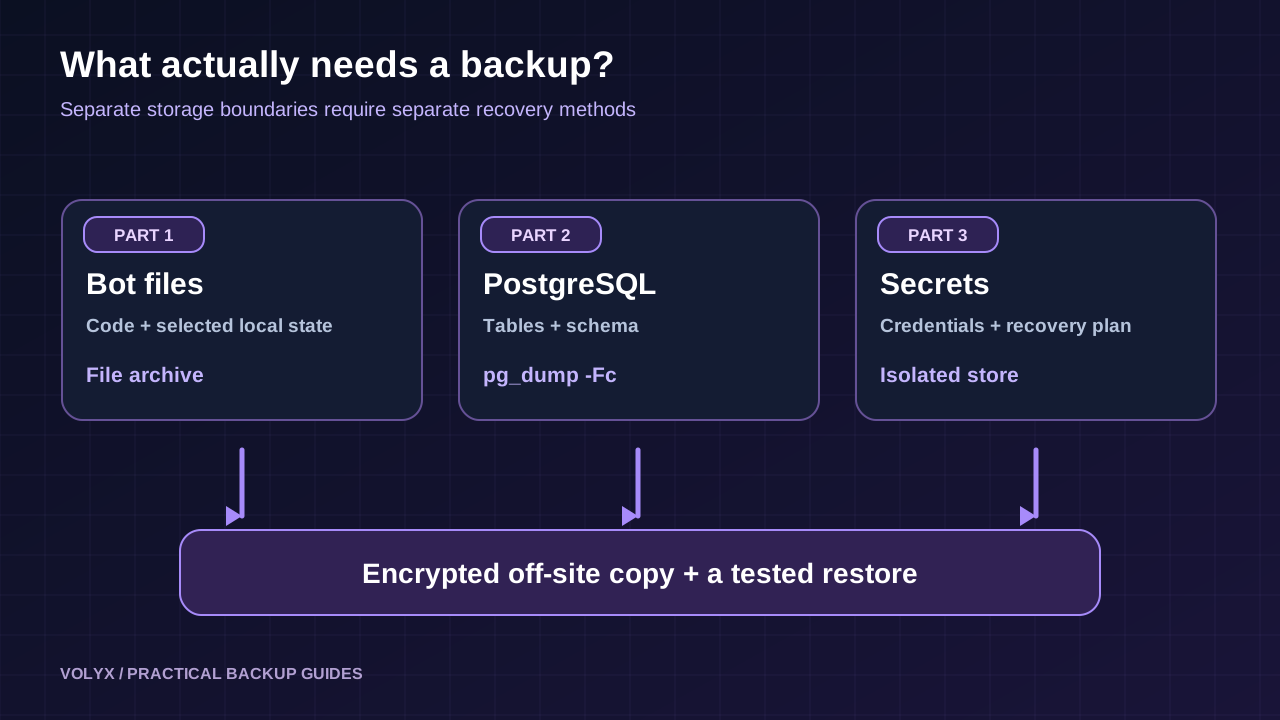
Before you create anything, make a small inventory of:
data/ directory, if your bot genuinely uses them.A Git repository is excellent for source history, but it does not contain new database rows unless you deliberately commit them—which you usually should not. Likewise, a database export generally does not recover your bot source. Treat both as separate recoverable items.
Files such as .env, secret-bearing config.json, .pgpass, private keys and credential caches deserve special handling. You may need them for full recovery, but copying them into a broadly accessible ZIP increases the impact of an accidental share. Store secrets in a dedicated secret manager or a separately encrypted, tightly permissioned recovery process. A restore checklist should say which values must be recreated, not reveal them.
Also avoid backing up node_modules, temporary logs, cache directories, .git objects and build output unless you have a specific recovery requirement. These often waste storage and may expose unnecessary operational data. Keep a trusted dependency lockfile so dependencies can be reinstalled later.
Open your Volyx server through the dashboard, confirm which server you are working on, and look for Backups, Files, Schedules and Startup. Different plans or server types may expose different permissions. If Backups is available, create a small test backup and check that it finishes before depending on it. If scheduling is available, find out whether it supports a backup task and whether account-level backup slots limit the number of retained copies.
Pterodactyl has separate endpoints to create and inspect backups. A completed file backup can be downloaded through an authorized, time-limited link. However, a backup of a bot server’s filesystem should not be assumed to include a separate PostgreSQL instance. Verify the scope by inspecting the resulting archive or testing recovery. Official Pterodactyl restore documentation also warns that existing files may be overwritten, and a truncate option may remove existing files before restoration. Read the Pterodactyl v1 restore reference.
Practical rule: Do not click Restore on your primary bot while experimenting. Download the backup, preserve the active server, and practice on a separate server or temporary directory first. A backup UI is not a substitute for a controlled recovery exercise.
Possibly—if your Volyx account exposes the relevant Pterodactyl task and sufficient backup slots. Test one execution manually, inspect the resulting backup, then enable a conservative recurrence. Some plans restrict schedule creation, backup retention or downloads. Never write an article that promises this automation for every user without checking those capabilities.
If the panel does not support scheduled backups, an independent scheduled job on a trusted VPS or backup worker may be more suitable. This worker should use a narrowly scoped account and never require the bot token to run. Avoid copying your Pterodactyl API key into the article, public repository or process command line.
pg_dump, not a copied database folderPostgreSQL’s pg_dump creates a consistent logical dump while the database stays online. For a single application database, the custom archive format (-Fc) is convenient because pg_restore can inspect and restore selected database objects later. PostgreSQL’s documentation describes custom-format archives as flexible and portable between systems, subject to version and extension considerations.
First, check whether the required command exists in the environment that will run backups:
command -v pg_dump
pg_dump --version
A game-server container may not have these tools. Do not install server-wide packages into someone else’s shared host. If the container lacks pg_dump, use a permitted external backup worker with database network access, or a provider-managed database export instead.
A minimal manual export from an account that already has PostgreSQL authentication configured looks like:
umask 077
mkdir -p "$HOME/private-bot-backups"
pg_dump --format=custom --no-owner --no-acl \
  --file="$HOME/private-bot-backups/bot-$(date -u +%Y%m%dT%H%M%SZ).dump"
This assumes PGDATABASE and an authentication mechanism such as a private PostgreSQL service file or .pgpass have been configured for the service account. It will fail if no database or credentials are configured. Do not place passwords inside a shell command, URL committed to Git, cron definition or terminal screenshot. Make the backup directory private; a umask of 077 helps new files default to owner-only access.
Use a pg_dump client whose version is compatible with the server, and check compatibility again before restoring to a different PostgreSQL major version. PostgreSQL extensions, roles and global configuration sometimes need their own recovery steps. A logical dump does not mean full point-in-time recovery: WAL archiving and physical backups are different mechanisms.
PGSERVICE versus DATABASE_URLMany Node.js applications use DATABASE_URL; pg_dump is a separate utility and does not automatically read your application’s variable. A PostgreSQL service definition (PGSERVICE) or environment variables such as PGHOST, PGPORT, PGDATABASE and PGUSER can select the connection. Use .pgpass or a secure credential provider for authentication, with owner-only permissions. On platforms that provide a secure connection string, consult their documentation for a supported command without exposing the secret in logs.
pg_dump lock my tables?A regular logical dump takes a consistent snapshot and can read while normal transactions continue, though certain DDL operations or resource constraints can still interfere. It may consume CPU, disk bandwidth and connections. Schedule heavy exports outside peak usage and watch the database for slowdowns. A very large database may need a different backup architecture.
A files archive created at 02:00 and a PostgreSQL dump created at 04:00 are not a true snapshot of the same point in time. That matters if a deployment changes the schema while the bot writes records. For smaller bots, briefly pausing writes or stopping the bot, taking the file snapshot and database dump, then restarting reduces mismatch risk. Before stopping anything, understand your bot’s traffic and how queued events are handled.
When full downtime is unacceptable, use schema-migration discipline: version migrations, make deployments backward compatible, dump a transactionally consistent database, and document the exact app release that can read it. For stricter consistency or low RPO, consider database-native point-in-time recovery and production-grade orchestration rather than relying on two unrelated manual exports.
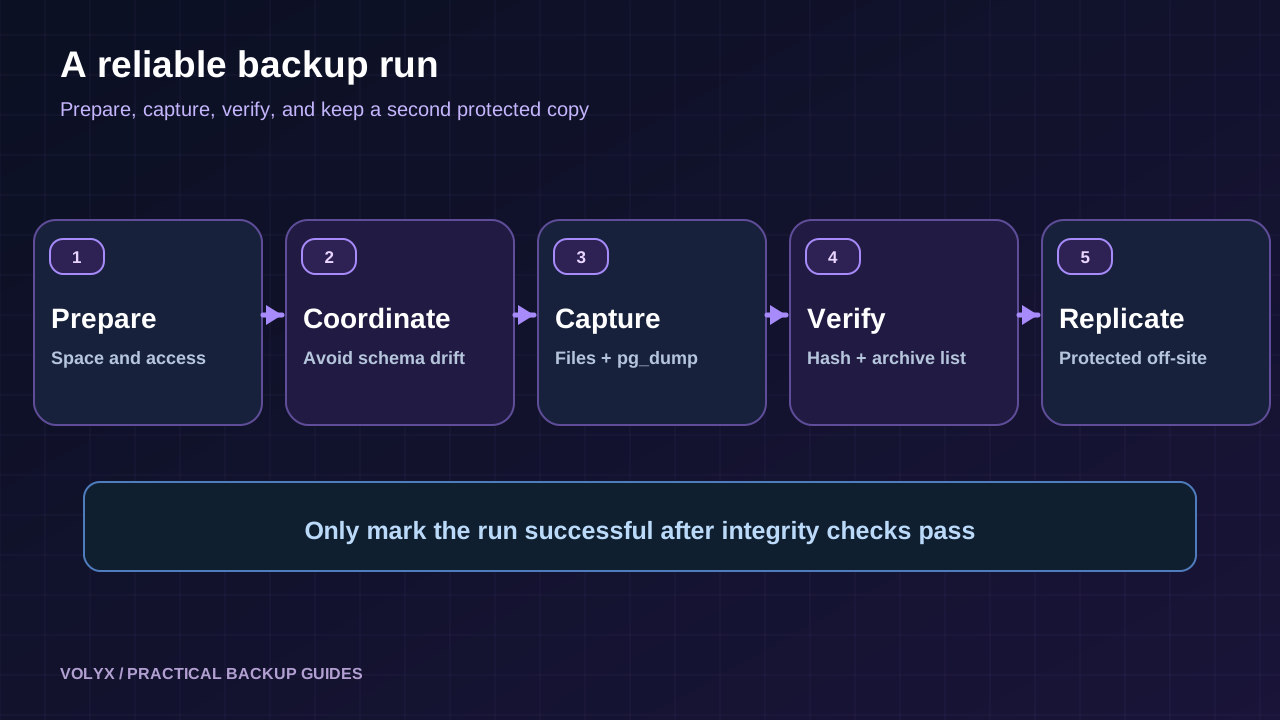
A reasonable six-step workflow is:
pg_dump to exit successfully.pg_restore --list, then transfer an encrypted copy off the host.Do not confuse “backup completed” with “backup verified.” An archive file may exist even when its contents are incomplete, its file list is wrong, or its credentials have expired. The next sections make those problems observable.
The downloadable ZIP includes backup-example/backup_tool.py, a small reference tool using the Python standard library. It creates a private backup set containing selected bot files, an optional PostgreSQL custom-format dump, a manifest and SHA-256 checksums. It never restores data automatically and does not need your Discord bot token. It also prevents two backup runs from overlapping on the same backup directory.
The example intentionally avoids installing dependencies or starting services. It only backs up paths you explicitly include. You should review the selection before using it for real data; no generic script can know which files contain your secrets.
Example project layout for a typical Node.js bot:
my-discord-bot/
├── src/
│   ├── commands/
│   └── index.js
├── data/
│   └── settings.json
├── migrations/
├── package.json
├── package-lock.json
├── .env                 # handled separately, not in sample file backup
└── node_modules/        # reinstalled, not copied
If you extracted the article ZIP on your own Linux workstation or a dedicated backup machine, use a dedicated unprivileged service account and run the sample tool after reviewing its source. For a file-only test, specify a sandbox directory and omit the database connection:
python3 backup_tool.py backup \
  --source /path/to/my-discord-bot \
  --destination /path/to/private-backups \
  --include src,data,migrations,package.json,package-lock.json
For a database backup, add --database after configuring compatible pg_dump and connection credentials for that service account. The tool does not prompt for or persist a database password:
PGSERVICE=botbackup python3 backup_tool.py backup \
  --source /path/to/my-discord-bot \
  --destination /path/to/private-backups \
  --include src,data,migrations,package.json,package-lock.json \
  --database
botbackup is an illustrative service name, not a real Volyx endpoint. You must create a suitable private PostgreSQL service configuration first. In a managed panel with no shell access, run the utility on a permitted machine instead of forcing these commands into a container that lacks the necessary capabilities.
After verifying a manual run, you can schedule the job under the same non-root account on a machine that supports cron. For example, run every six hours, with paths changed to match your machine:
15 */6 * * * /usr/bin/python3 /srv/backup-jobs/backup_tool.py backup --source /srv/bot --destination /srv/private-bot-backups --include src,data,migrations,package.json,package-lock.json --database >> /srv/backup-jobs/backup.log 2>&1The service account still needs PostgreSQL credentials and access to its private backup destination when cron runs. The example uses a single-job file lock to refuse overlapping runs. Cron does not guarantee success: implement monitoring for missing backups, nonzero exit codes, expired credentials and storage exhaustion. Avoid rm -rf cleanup recipes that can delete valid recovery points after a failed run.
A sensible starting point for a small project is daily backups for a short window, several weekly copies and at least one protected off-site copy. Your actual retention should reflect database growth, quota, incident history and recovery needs. Keep old generations until a new verified set exists. This sample deliberately does not auto-delete old backups; a separate, tested retention policy should control that.
Also remember that backup copies contain private member information. Apply least-privilege storage permissions, encryption in transit and at rest, access logging where supported, and a deletion schedule appropriate to your data responsibilities.
Once the script finishes, use its printed backup-set path with the verify command:
python3 backup_tool.py verify \
  --backup-set /path/to/private-backups/YYYYMMDDTHHMMSSZ-xxxxxx
The example checks the manifest, file checksums and archive member paths. If it contains database.dump and pg_restore is available, it also asks pg_restore to list the database archive contents without modifying a database. That proves format readability, not complete logical correctness. A test restore is still required.
For a separate manually created database archive, read its table of contents without applying SQL:
pg_restore --list /path/to/private-bot-backups/bot-20261020T120000Z.dumpUse sha256sum (or a comparable checksum tool) on the origin and off-site copy to verify they match. A checksum alone does not make malware or a malicious archive harmless; it only checks whether bytes have changed relative to a trusted recorded hash.
The important success signal is a complete restore rehearsal: can the recreated bot load dependencies, connect to the restored database, validate its schema, and answer a benign test command? If it cannot, treat the backup workflow as incomplete until you find out why.
Restoring is the riskier half of backups. A wrong destination name, --clean flag, or panel restore can overwrite data. Never test a restore against the only production database. Create a disposable test database and use credentials with access to that database only.
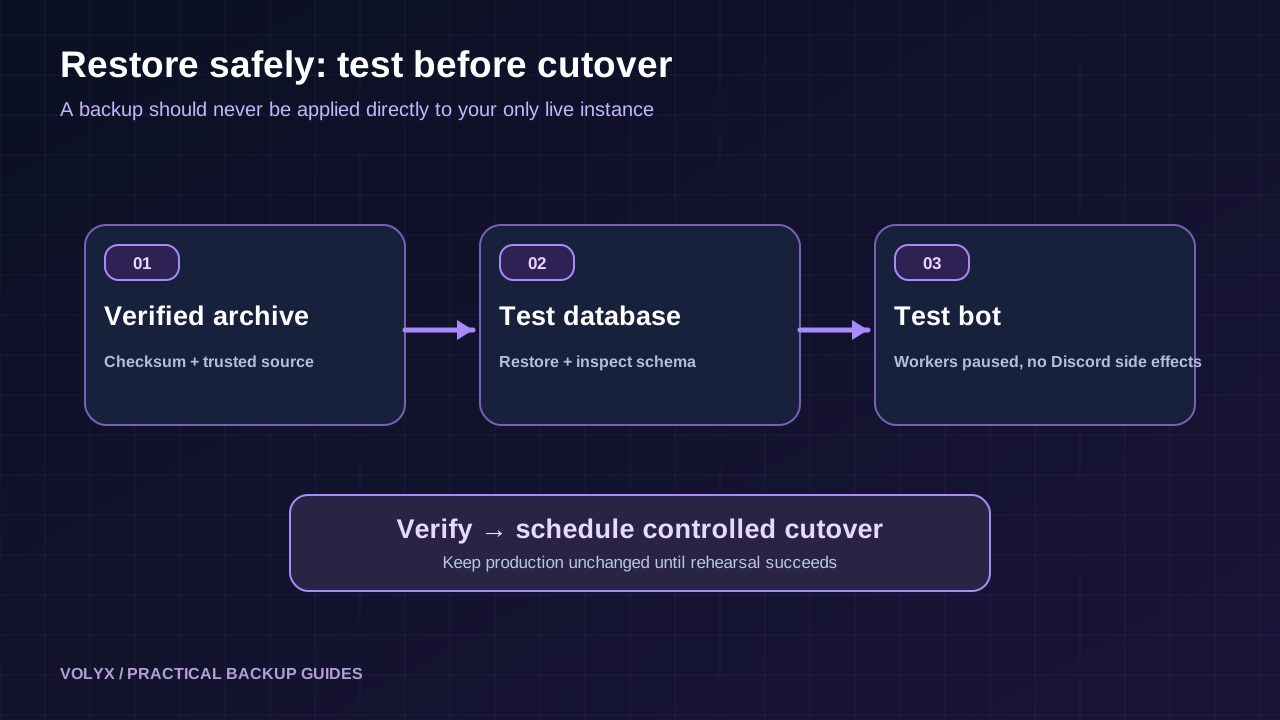
A safe outline is:
pg_restore --list and run a restore using the privileges allowed by your provider.With a separately prepared, empty test database named bot_restore_test, a representative PostgreSQL restore command is:
pg_restore --dbname=bot_restore_test \
  --no-owner --no-acl --exit-on-error \
  /path/to/verified/database.dump
This is a template: provide connection details through a private service file or equivalent supported environment, and verify that bot_restore_test genuinely refers to the isolated test database. Do not use --clean or --create casually. If the archive contains extensions or owner-specific objects, the test account may need provider assistance or adjusted database setup. For untrusted archives, inspect objects before execution because restores may execute SQL/functions contained in a dump.
Prefer creating a separate test instance and uploading the reviewed archive there. If your only choice is a local restore directory, ensure the target is empty and inspect all paths before extraction. The provided example tool does not implement extraction on purpose; this prevents users from interpreting a verification command as permission to overwrite live files.
If using Pterodactyl’s Restore action, confirm the server ID and backup ID twice. Depending on truncate, the restore operation can overwrite or remove existing files. Preserve an independent copy of the current state before attempting any production restore, and keep the original online service stopped if conflicting writes would corrupt recovered files. Review what the button will do in your specific panel version.
Bot code is not automatically compatible with an old database schema. A failed deployment may have already applied a migration, even if the JavaScript process did not stay online. Restoring a two-week-old dump and deploying the latest bot can fail because the new code expects columns or indexes that did not exist at the time of the dump.
Track the application’s Git commit or release tag alongside the backup set. Keep migration history and a tested upgrade path. If using an ORM such as Prisma or Drizzle, follow the tool’s actual migration and shadow database requirements; avoid executing migrations directly against the only copy of a recovered database until the test succeeds.
For a Discord bot, also consider scheduled jobs and side effects. A restored bot that immediately replays pending jobs might send duplicate notifications or apply old moderation policies. Start the restored instance with background workers paused, confirm timestamp fields and idempotency handling, and only then switch to normal operation.
| Strategy | Best fit | Strength | Important limitation |
|---|---|---|---|
| Panel file backup | Beginner using Pterodactyl | Convenient file capture and restore UI | External PostgreSQL may be excluded; quotas vary |
Git + manual pg_dump | Small, low-change bot | Simple, auditable and inexpensive | Easy to forget a dump; no automatic off-site copy |
Scheduled file archive + pg_dump | Small-to-medium Linux deployment | Repeatable with checksums and alerts | Requires trusted worker, permissions and restore rehearsals |
| Managed database backups + off-site app files | More demanding production bot | Provider-managed retention and possible PITR | Costs, capabilities and restore guarantees vary by provider |
Which is best for Volyx? If your bot only stores code and non-secret JSON files, the available Pterodactyl Backups feature may be sufficient for that portion. If the bot also uses PostgreSQL, you need a separate database recovery plan. If your account cannot schedule exports or cannot access a remote database from a backup worker, use a provider-supported export process rather than pretending a copy of package.json protects database records.
| Symptom | Likely cause | Safe next action |
|---|---|---|
pg_dump: command not found | PostgreSQL tools missing | Use a trusted backup worker or supported database export |
connection refused | Incorrect endpoint, firewall or tunnel | Confirm database hostname/port and allowed sources without exposing the server |
| Authentication failed | Wrong credential, stale .pgpass or rotation | Update private service credentials; do not paste secrets in logs |
| Dump is zero bytes | Export failed or path truncated | Check exit status and re-export; never rotate the last good backup |
| Backup quota reached | Account slot or disk limit | Review retention and move verified copies off-site before deleting old ones |
| Backup task never runs | Cron environment, path or permission mismatch | Run it manually as the same account and inspect exit logs |
| Two jobs overlap | Long export or overlapping schedule | Use a lock and adjust interval |
pg_restore unsupported archive version | Client version mismatch | Use compatible PostgreSQL client tools |
| Restore fails on extensions | Missing privileges or extension | Ask provider to prepare approved extensions in a test database |
| Bot starts but cannot find tables | Restored wrong DB/schema or missing migrations | Compare connection target, schema and release metadata |
| Bot duplicates jobs after restore | Both test and live workers are active | Disable background jobs/Discord login in test instance |
| All backups vanish with host failure | Copies were on the same machine | Introduce a protected, periodically verified off-site copy |
Check which database the credentials actually selected. A PostgreSQL instance can host multiple databases with similar names; a client that silently connects to a default database might produce a perfectly valid archive of the wrong records. Capture expected table counts, migration version and database identity using a read-only query, and compare during a restore rehearsal. Do not put customer names or private messages in a diagnostic log just to prove the archive has data.
A backup can fail midway when the filesystem runs out of space. It may also slow the live service and cause more failures. Verify capacity before launching exports and keep the destination off the active workload’s tight disk quota when possible. Disk space reported by the VPS host is not always the free space available inside an individual hosting container. Backups are not a reason to delete user data without a documented retention plan.
A backup account should do little more than read the files and database it must export and write to a private backup destination. It should not have arbitrary admin privileges in Pterodactyl, unrestricted access to other tenants, or a broad Discord permission set. Keep credentials out of Git and command history; encrypt stored copies, verify TLS to remote databases, and limit who can download an archive.
For Pterodactyl users, a file backup URL should be treated as sensitive even if it expires. Never embed signed backup URLs in a public article or issue tracker. When changing credentials after an incident, rotate both the database identity and any backup storage credentials that might have been exposed. Review provider access logs where available.
An auditable backup log should include time, status, bytes, checksum, destination identity and duration, but not token values or SQL row content. Set an alert if the newest successful backup is older than the permitted RPO or if repeated exports fail. Most importantly, assign someone to carry out a monthly test restore and record the result.
Imagine a Discord bot whose moderation preferences live in PostgreSQL and whose handlers live in src/. A configuration change causes the bot to crash during startup. You need to decide whether the problem is purely application code or actual data corruption before choosing a restore.
First examine the console log and recent code deployment. If only the startup command is wrong, fix it; restoring a database would add unnecessary risk. If the database schema was damaged, preserve the incident state, identify the latest verified backup and restore it to a separate database. Compare schema, bot release and a few safe aggregate counts. Stop duplicate background tasks, then plan a controlled cutover. Announce possible data loss to affected users if records created after the recovery point cannot be restored.
This scenario illustrates an important distinction: a backup is the last line of defense, not the first troubleshooting button. Diagnosing a bad environment variable is very different from reconstructing damaged database contents. Volyx’s Console, Files and relevant database tools can help you inspect your own server, but a host is not automatically authorized to edit, export or restore another customer’s data.
Usually not when PostgreSQL is hosted as a separate service. A file backup captures the selected filesystem, while the database needs its own backup method. Confirm the scope of your hosting provider’s backup before relying on it.
The available feature can help preserve server files, but access and quotas vary. If your bot stores persistent data in an external database, plan a separate database export or managed backup. Keep an off-site copy whenever practical.
Use your acceptable data loss to decide. A small learning bot might tolerate daily exports, whereas a moderation or economy bot may require more frequent backups. Check the actual success of each run, not just its schedule.
pg_dump safe while the bot is online?PostgreSQL supports a consistent logical dump while normal transactions proceed. However, performance overhead and changes between separate file and database backups can matter. For strict cross-system consistency, coordinate writes or use a more advanced recovery design.
pg_dump backup the same as point-in-time recovery?No. A logical dump represents a database snapshot. PostgreSQL point-in-time recovery typically requires a suitable base backup and a continuous sequence of WAL records, plus a tested recovery process.
pg_dump -Fc works with pg_restore, which can list and selectively restore archived objects. It is practical for many small and medium deployments; plain SQL exports also have uses but different restore tooling.
Use an appropriate private service file, .pgpass, or platform secret manager under a dedicated account. Avoid adding passwords directly to scripts, public repositories, shell history or log files.
.env into every backup?Not into a broadly accessible file archive. Some recovery plans need secret restoration, but sensitive credentials should be handled separately with encryption, restricted access and a rotation procedure. A bot can often regenerate tokens instead of restoring old ones.
Only if your retention policy and recovery requirements support that. Never delete the last verified recovery point just because a new export file appeared. The example tool deliberately does not delete old sets automatically.
pg_dump exits with an error?Treat the backup job as failed, keep previous verified copies and investigate credentials, disk space, connectivity or database version problems. Do not call the newly created archive a successful backup based only on its filename.
Restore to an isolated database without changing the live bot first. A final production cutover requires a carefully coordinated plan to avoid conflicting writes, duplicate jobs and schema mismatches.
No. Checksums establish that bytes match a recorded hash. Only a complete restore test validates dependencies, database structure, application behavior and access permissions.
No general guarantee exists across plans. Check the actual provider quota, backup availability, retention limits and terms. Always keep another verified copy of important data if the platform permits it.
SQLite is a local database file, so its backup process differs. Use SQLite’s online backup facilities or a coordinated safe copy; copying a live SQLite file without handling its journal/WAL state can produce an incomplete snapshot. Do not replace its backup procedure with the PostgreSQL commands in this guide.
No. Your Discord bot token authenticates the bot to Discord; it should not grant access to a database or backup service. Use separate narrowly scoped credentials for each system, and keep them out of shared archives.
Start small: inventory the files and database you actually own, create one correct file backup and one PostgreSQL dump, verify both, and prove that a test restore works. Then add scheduling, monitored retention and an off-site copy. This gives your Discord community a far stronger safety net than an untested “Backup completed” label.
You can explore Volyx hosting and the Volyx Blog for related deployment guides. For a technical companion, see How to Host a Discord Bot for Free in 2026, How to Connect PostgreSQL to Node.js and Discord Bot Startup Errors. These guides complement the backup workflow but are not substitutes for a tested restore.
Explore more in-depth articles with code, visuals, and practical walkthroughs.
Browse all articles ↗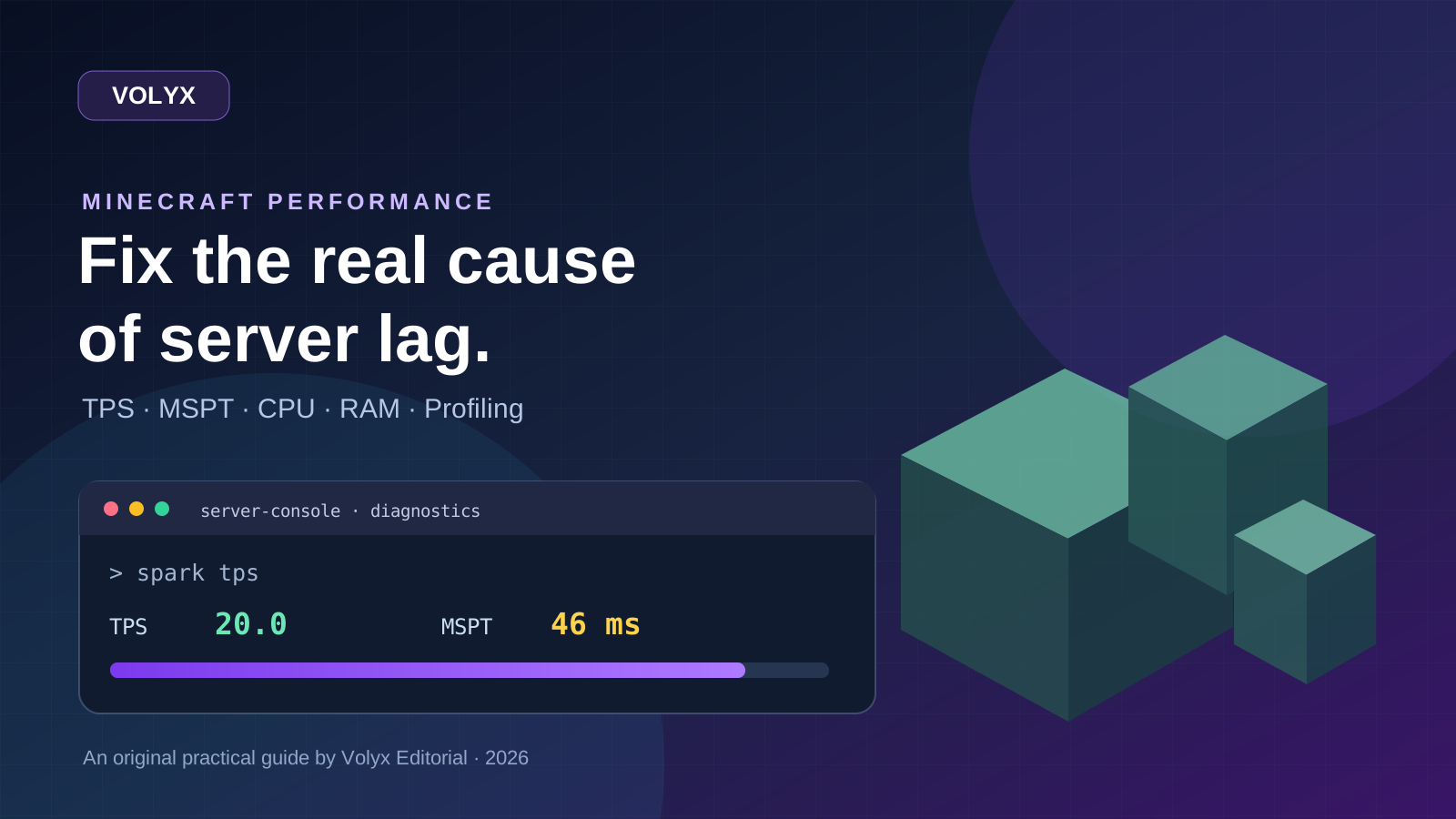
A practical, evidence-first guide to fixing Minecraft Java server lag: read TPS and MSPT, profile with spark, tune chunks, and diagnose CPU, memory and plugins.
Read article ↗
Learn the difference between DDoS floods and Minecraft bot raids, secure a Paper or Velocity server, compare TCPShield and Cloudflare, and respond safely using Volyx.
Read article ↗
Compare five real MIT-licensed JavaScript, TypeScript, and Python Discord bot starters, then learn how to deploy one safely on Volyx.
Read article ↗