
Minecraft Server Lag in 2026: Diagnose TPS, MSPT, CPU and RAM
A practical, evidence-first guide to fixing Minecraft Java server lag: read TPS and MSPT, profile with spark, tune chunks, and diagnose CPU, memory and plugins.
Read article ↗Build a Discord bot that remembers per-server settings with MySQL or MariaDB. Learn database creation, mysql2 pools, safe SQL, permissions, backups, and Volyx deployment.

A Discord bot is easy to start and surprisingly easy to make forgetful. You can write a command that changes a welcome message, restart your process, and discover that the new setting has disappeared. As soon as a bot serves more than one Discord server, the problem gets more interesting: settings for Guild A must never leak into Guild B, administrators need safe ways to change values, and a crashed process must not take its data with it.
This guide solves that specific problem. You will create a small database table, connect a Node.js Discord bot using MySQL2, write and read a guild-scoped setting with parameterized queries, and run the project on an environment such as Volyx. The example is a real teaching project, not a claim that every hosting plan includes unlimited databases or a public MySQL endpoint. We will also cover MariaDB compatibility, database credentials, indexing, migration, troubleshooting, and backups.
Quick answer: create a database for your bot; save its connection details as private environment variables; install mysql2; use a small connection pool; store each guild’s setting under its unique Discord guild_id; enforce Discord permissions when users modify settings; and test recovery before you rely on the database.
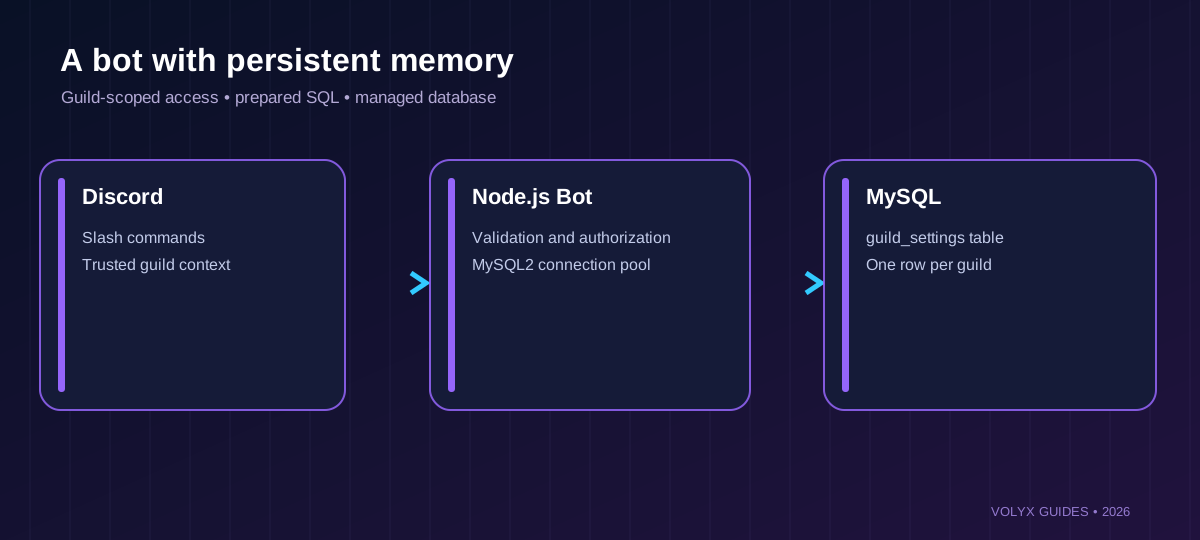
Not every bot does. A simple /ping command has almost nothing to remember. A moderation bot, welcome-message manager, ticket system, leveling bot, or server configuration panel needs information that survives restarts. For these applications, persistent storage is part of the feature, not an optional enhancement.
Imagine a welcome bot serving three communities. Each community wants a different message. You could keep messages in a JavaScript object, but it would vanish whenever Node.js restarts. You could store them in JSON files, but concurrent writes and backups become awkward as the bot grows. A relational database gives you a clear schema, transactional writes, permissions, and familiar management tools. It is not automatically faster or simpler than a file: the benefit is predictable persistence and structure.
Choose MySQL if you already have a managed MySQL/MariaDB database or prefer its tooling. PostgreSQL is also excellent, and SQLite often wins for a tiny single-process project. The most important question is whether your application’s storage matches its deployment and recovery needs—not which database has the loudest marketing.
The downloadable example includes two slash commands: /welcome-set saves text for the current Discord guild and /welcome-show reads it back. The first command requires Manage Server permission. The second only reads the setting. Both use the guild ID from Discord itself, not a guild ID supplied by a user in chat.
This is an administrative settings demo, not an automatically posting welcome bot. It deliberately does not request the privileged GuildMembers intent or send messages when members join. A real welcome-message feature would add a handler, the relevant Discord intents/permissions, channel configuration, and careful rate-limit handling. Keeping those responsibilities separate makes the persistence lesson easier to verify and avoids unnecessary permissions.
You will need an account for a Discord application, a private bot token, a test Discord guild where you can install the bot, and a database you are authorized to use. For Node.js, use a release compatible with your selected discord.js version: the contemporary documentation for discord.js 14.27 specifies Node.js 24.17.0 or newer. A provider offering Node.js 24 is not necessarily running that exact patch version; check the startup console rather than assuming it.
You also need the database hostname, port, database name, username, and password. In Volyx, these may be shown under your server’s Databases area if database creation is enabled for your server. Some servers can use a provider-managed MySQL or MariaDB instance; others may have no database slots available. Check your dashboard rather than inventing a host, password, or allowance.
Keep one architectural boundary clear: the Pterodactyl panel’s own application database is not your bot’s database. Never repurpose the panel’s administrative MySQL credentials in a user bot, and never create tables in the panel’s own database. Your application should have a separate database and a narrowly scoped user.
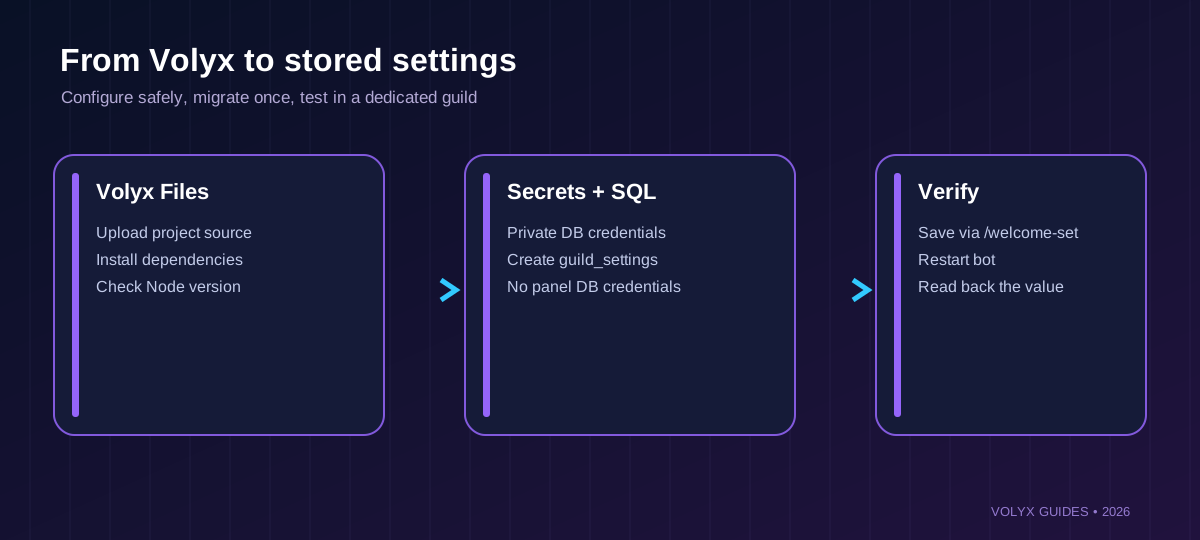
Start inside your Volyx server dashboard. Open Databases, check how many slots are available, and choose MySQL/MariaDB if the engine is offered. Create an application database with a descriptive name, such as discord_settings. Volyx or Pterodactyl may generate a real database name and username with a server-specific prefix. Use the exact values displayed in the control panel; an illustrative name is not necessarily the database’s actual name.
Record the connection values privately: host, port, database, username, password. Database host addresses differ by deployment. localhost means the same networking namespace as the bot process, not simply the same physical VPS. In containerized hosting, a database running elsewhere is rarely reachable at your bot container’s own 127.0.0.1.
Do not make MySQL publicly accessible just to solve a connection problem. Ask whether the configured database host supports connections from your application node, and allow only the necessary source addresses when you administer your own database. If your provider offers a private network endpoint, that is generally preferable to opening TCP port 3306 to the internet.
Volyx-specific note: access to resources and databases is governed by your server allocation and Coins/hosting rules. This article describes a workflow where the database feature is available; it does not promise a fixed number of databases, a particular RAM allowance, or always-on free service for every account.
The downloadable folder includes package.json, bot.js, db.js, settings-repository.js, commands.js, register-commands.js, schema.sql, and a .env.example template. Upload these into a new bot project. Use the Node.js runtime selected for your server, not a TypeScript-only startup if your files are .js.
Install the packages using the runtime’s standard dependency mechanism:
npm install
node --version
For this example, the package declares discord.js and mysql2. In a production deployment, commit and deploy a lockfile produced by a tested installation and use npm ci for reproducible installs. The archive intentionally contains no installed node_modules directory, tokens, or live credentials.
An example project tree looks like this:
bot/
  bot.js
  db.js
  settings-repository.js
  commands.js
  register-commands.js
  package.json
  schema.sql
  .env.example
  test/settings.test.js
If a host requires a configured startup file, the runtime entrypoint is bot.js and the npm script is npm start. Do not run the schema SQL as if it were JavaScript. SQL belongs in a database client or the database import interface available to your account.
The table below stores one row per Discord community. We use VARCHAR(20) for a Discord snowflake because IDs are identifiers, not quantities to add or subtract; a string is safe across JavaScript and SQL boundaries and avoids number precision pitfalls.
CREATE TABLE IF NOT EXISTS guild_settings (
  guild_id VARCHAR(20) NOT NULL PRIMARY KEY,
  welcome_text VARCHAR(300) NOT NULL DEFAULT 'Welcome!',
  updated_by VARCHAR(20) NOT NULL,
  updated_at TIMESTAMP NOT NULL DEFAULT CURRENT_TIMESTAMP
      ON UPDATE CURRENT_TIMESTAMP
) ENGINE=InnoDB DEFAULT CHARSET=utf8mb4
  COLLATE=utf8mb4_unicode_ci;
The PRIMARY KEY makes the guild ID unique and provides an index for the main lookup. There is no need to add another index on guild_id in this example. utf8mb4 supports a broad Unicode range, including emoji, subject to your database’s collation behavior and the Discord API’s text constraints.
The updated_by column lets you identify the Discord account that last made a change. It does not replace a proper audit system, and it should not be mistaken for evidence of who had permission at any earlier point. A production application with compliance needs might add a separate audit table and retention policy.
When you apply the schema, use the application’s own database user if it has table-creation privileges, or run the migration through your provider’s approved mechanism. Once tables exist, consider reducing runtime privileges so the bot only needs the operations it actually performs. Do not run DROP TABLE, destructive migrations, or arbitrary restore commands against an existing production database.
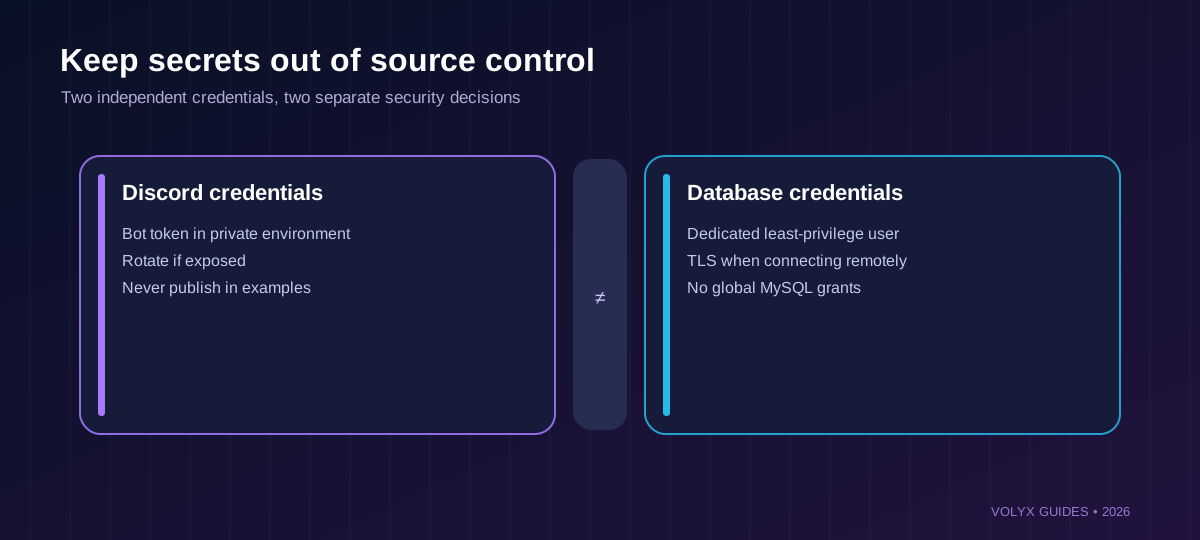
Bot tokens and database passwords do not belong in your JavaScript files, Markdown articles, screenshots, or GitHub commits. Add them to your hosting panel’s private Startup/Secrets settings, or supply them through a secret manager appropriate for your deployment.
DISCORD_TOKEN=your_private_token
DISCORD_CLIENT_ID=your_application_id
DISCORD_GUILD_ID=your_test_guild_id
DB_HOST=database_host_from_panel
DB_PORT=3306
DB_NAME=database_name_from_panel
DB_USER=database_user_from_panel
DB_PASSWORD=your_private_database_password
DB_TLS=false
The values above are placeholders. Never publish real replacements. DB_TLS=false in the sample means the example does not automatically enable TLS; for a remote database traversing an untrusted network, configure a database endpoint that supports trusted TLS and enable verification. TLS availability depends on your provider. Do not bypass failed certificate verification with rejectUnauthorized: false.
A useful diagnostic: print whether required variables exist, never their values. Logging an entire environment object leaks secrets. If your token has ever been pasted into a public repository or public ticket, regenerate it in the Discord Developer Portal and update the private configuration.
A Discord bot can receive multiple interactions concurrently. Opening a brand-new TCP connection for every command adds overhead and may exceed provider limits. A connection pool reuses connections and queues work within configured limits. It is not a license to open hundreds of sessions on a shared database.
import mysql from 'mysql2/promise';

const pool = mysql.createPool({
  host: process.env.DB_HOST,
  port: Number(process.env.DB_PORT || 3306),
  user: process.env.DB_USER,
  password: process.env.DB_PASSWORD,
  database: process.env.DB_NAME,
  waitForConnections: true,
  connectionLimit: 4,
  queueLimit: 20,
  connectTimeout: 10000,
});
The downloadable db.js includes required-variable checks, validates the port, and allows TLS with certificate verification. Start with a modest limit such as four connections for a small demonstration, then measure query latency and your actual provider limits before changing the number. If you add more workers or replicas, their connection limits add up; four pools of four workers may create up to sixteen connections.
Important MySQL2 distinction: pool.execute(sql, values) provides prepared execution for the values. It does not automatically make dynamically concatenated table names safe. SQL identifiers cannot be safely parameterized using ordinary ? placeholders; keep table names in reviewed source code or explicitly allowlist them.
Saving a string from Discord is a classic place where insecure bots turn user-controlled input into SQL. Avoid constructing queries by joining input into the SQL text. Use placeholders:
await pool.execute(
  `INSERT INTO guild_settings
   (guild_id, welcome_text, updated_by)
   VALUES (?, ?, ?)
   ON DUPLICATE KEY UPDATE
     welcome_text = VALUES(welcome_text),
     updated_by = VALUES(updated_by)`,
  [guildId, welcomeText, userId]
);
This example uses an upsert: the first save inserts a row, and later saves update the existing guild’s row. The VALUES(column) syntax is broadly useful with MySQL/MariaDB versions commonly encountered in managed hosting, but recent MySQL releases deprecate that form for the ON DUPLICATE KEY UPDATE clause. If you target MySQL only, review the row-alias syntax supported by the exact server version before production use.
For reading:
const [rows] = await pool.execute(
  'SELECT welcome_text FROM guild_settings WHERE guild_id = ? LIMIT 1',
  [guildId]
);
const currentText = rows[0]?.welcome_text ?? null;
Both queries include the guild ID. This matters more than a superficial SQL-injection demo: a bot serving many communities must never accidentally return Server A’s settings to Server B. The provided settings-repository.js validates IDs and sizes and uses parameters. Unit tests verify those properties using an injected fake MySQL pool.
Prepared statements protect query values, but they do not authorize users. A person might be able to issue a syntactically safe query that still changes someone else’s setting. Always check who is allowed to perform the operation, which guild it belongs to, and whether that guild’s identifier is derived from a trusted Discord interaction.
The demonstration offers two guild commands. /welcome-set needs Manage Server permission; /welcome-show reads the saved value. The command registration script sets a default permission for the modification command, and the running bot checks interaction.memberPermissions again when an interaction arrives.
if (!interaction.inGuild() || !interaction.guildId) return;
if (!interaction.memberPermissions?.has(PermissionFlagsBits.ManageGuild)) {
  await interaction.reply({
    content: 'Manage Server permission required.',
    flags: MessageFlags.Ephemeral,
  });
  return;
}
await store.upsert(
  interaction.guildId,
  interaction.options.getString('text', true),
  interaction.user.id
);
Discord’s slash-command permission defaults are useful, but do not rely on client-side visibility as your only authorization. The server-side check protects the data layer even when command configuration changes. The example also uses ephemeral responses, preventing routine settings from filling a channel with administration messages.
Register the two commands for a test guild first:
npm run register
npm start
Guild command registration is convenient for testing; a production bot may use global commands and a controlled release workflow. Make sure your Discord application ID and test guild ID are correct, and do not confuse your application’s client secret with its bot token. The example only needs the bot token and application ID for this flow.
In a Volyx setup that offers Node.js bot hosting and MySQL/MariaDB for your server, upload the project to the Files area, configure its environment variables privately, and set the appropriate Startup command. The exact path and controls may differ depending on your server runtime. Look at the console for node --version, dependency installation messages, and the bot’s readiness log.
A disciplined deployment test is more valuable than a green badge. First connect to MySQL with the bot’s own credentials and verify SELECT 1. Next register slash commands in your test guild. Then start the bot, run /welcome-set, run /welcome-show, restart the bot, and confirm the value is still there. Finally, invite the bot to another test guild (when permitted) and check that it does not inherit the first guild’s value.
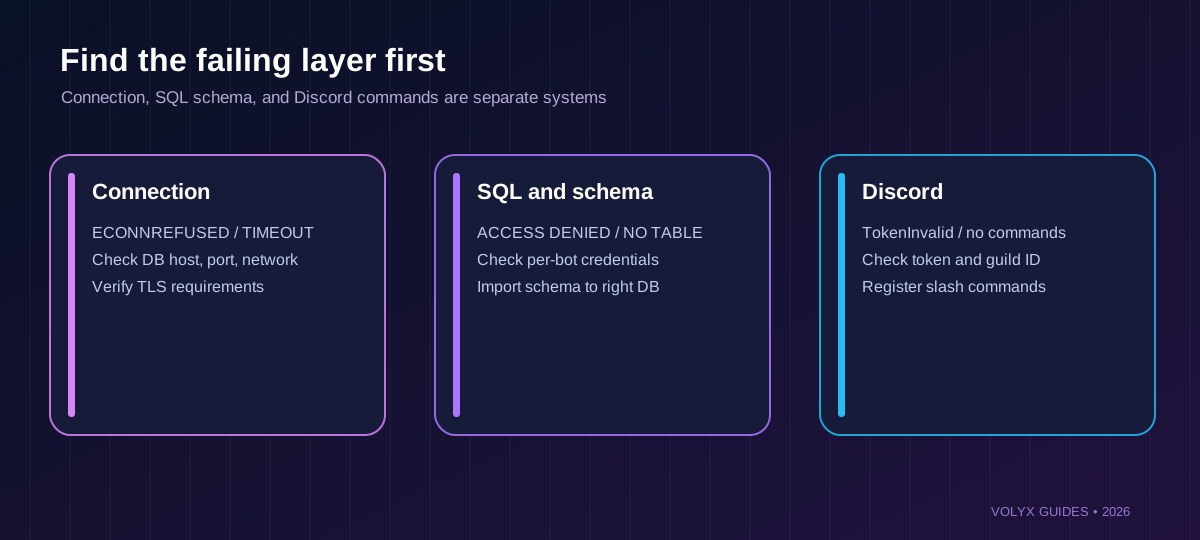
If the bot starts but the SQL connection fails, do not repeatedly regenerate tokens. Investigate the database network path. If a query succeeds but slash commands don’t appear, the problem is likely Discord registration, guild selection, or permissions—not MySQL.
Welcome to our testing guild with /welcome-set./welcome-show.The accompanying tests check code behavior, but they do not simulate a real Discord gateway connection or a real MySQL/MariaDB server. Test those two components on your own provisioned resources before deploying publicly.
| Question | MySQL / MariaDB | PostgreSQL | SQLite |
|---|---|---|---|
| Separate database service required? | Usually yes | Usually yes | No; embedded file |
| Easy single-process prototyping? | Extra connection setup | Extra connection setup | Usually simplest |
| Multi-worker access | Designed for it | Designed for it | Possible with careful write concurrency |
| SQL and indexes | Yes | Yes | Yes |
| Backups | Logical dumps and managed snapshots | pg_dump, snapshots | Consistent file/database backup |
| Good fit | Managed hosting already offers MySQL | Advanced relational features or established PostgreSQL stack | Small local bots with a single persistent disk |
Performance varies by schema, workload, server resources, drivers, indexes, and location; the table is an architectural comparison, not a benchmark. Don’t migrate a working PostgreSQL bot to MySQL just because a new tutorial exists. The earlier Volyx guide about PostgreSQL covers connection pooling for that engine: Connect PostgreSQL to Node.js. If your bottleneck is a slow query, indexing and query design matter more than the database logo: PostgreSQL query optimization.
| Symptom | Likely cause | Next safe check |
|---|---|---|
ECONNREFUSED | Wrong host/port or listener unreachable | Check the host shown in Databases and TCP reachability |
ETIMEDOUT | Network restriction, filtering, distant endpoint | Confirm source-network access with provider |
ENOTFOUND | DNS host does not resolve | Check the hostname and resolver; don’t replace it with a random IP |
ER_ACCESS_DENIED_ERROR | Wrong user/password or host grants | Recheck account credentials without logging secrets |
ER_BAD_DB_ERROR | Database name differs from configured name | Copy exact assigned database name |
ER_NO_SUCH_TABLE | Schema not applied to this database | Review database selection and run approved migration |
ER_DUP_ENTRY | Insert violates unique key | Use expected upsert or handle duplicates intentionally |
PROTOCOL_CONNECTION_LOST | Network flap or connection was dropped | Check transient faults and pool behavior |
Too many connections | Aggregate pool sizes exceed allowance | Reduce workers and pool size; inspect slow queries |
Handshake inactivity timeout | Connection stalls or TLS/host mismatch | Verify network path and compatible TLS requirements |
TokenInvalid or login failure | Discord token or gateway configuration | Verify the private bot token separately from SQL |
| Slash command not found | Commands not registered to this guild | Run registration, check application ID and command scopes |
127.0.0.1 so often fails in hosting containersWhen your bot runs in an isolated container, 127.0.0.1 points back to that bot container. It does not magically refer to the provider’s database service or even another container on the same physical node. Use the database hostname published by Volyx. If you self-host MySQL on a separate VPS, configure network controls for the specific connection path rather than publishing 3306 to the world.
The Discord gateway connection and the database connection are independent. Your bot can log in to Discord while MySQL is unavailable, or the database can work while your bot’s slash commands are not registered. Monitor the two systems separately. Consider an informative health indicator, but do not expose credentials or guild settings in public health endpoints.
Database persistence does not equal a backup. Human mistakes, compromised credentials, schema bugs, or provider incidents can still delete records. For small MySQL deployments, a logical dump is often a useful layer alongside any managed backups. Make sure the export is saved outside the same server whose failure you are protecting against.
For an authorized server where you have mysqldump, a logical backup can use a credential file or approved secret provider instead of putting the password directly on the command line. A typical command shape is:
mysqldump --single-transaction --quick \
  --host=YOUR_DB_HOST --port=3306 \
  --user=YOUR_DB_USER YOUR_DB_NAME > discord-bot-db.sql
The tool will prompt for a password only in some configurations; confirm your authentication mechanism and do not assume a backup succeeded because a file exists. Check exit status, size, and ability to restore into a separate empty test database. Encrypt and restrict backups because they may contain community identifiers, moderation data, or personally identifiable information.
Before migrations, record a rollback plan. Avoid destructive ALTER TABLE operations during peak load without assessing their locks and runtime. For this guide, CREATE TABLE IF NOT EXISTS is additive, but it does not reconcile an already-existing table whose schema differs from the example. Production migrations deserve their own version-controlled process.
For a broader strategy that separates bot files from database backups, see Discord bot and PostgreSQL backup planning. The restore principles apply here, but the SQL tools and dump format are engine-specific.
Each MySQL connection consumes resources on the database server, and each query competes for CPU, I/O, and locks. A larger pool can make a busy bot worse when the database is already saturated. Start with a modest connection limit, use indexes matching real queries, set timeouts, and measure the time between command start, query completion, and interaction response.
If a command does multiple slow operations, consider acknowledging the interaction promptly using deferReply and later sending an ephemeral result. Do not let the Discord interaction timeout become your application timeout strategy. Likewise, do not put large, frequently changing configuration blobs into a single VARCHAR(300) field just because the tutorial does.
A mature bot might evolve to a normalized schema with separate guild_settings, audit_events, and user_preferences tables. Introduce complexity in response to an actual requirement. At the beginning, one carefully indexed row per guild is easier to test, back up, and reason about.
One of the most dangerous mistakes is copying the Pterodactyl panel’s database credentials into an example bot because both use MySQL. Another is taking a database screenshot that exposes the username and password, then sharing it publicly. Protect these values the same way you protect your Discord token.
Avoid dynamic SQL built from a server name, environment-variable dumps in logs, granting global MySQL privileges, automatic destructive migrations on startup, and sending raw SQL error messages to Discord members. Never use untrusted guild_id text from a command argument when Discord has already provided the authoritative guild context.
Finally, do not interpret mysql2 connection success as full security. You still need member authorization, secure backups, a patch process for Node.js and dependencies, and TLS appropriate to your network. Good hosting reduces operational friction; it does not replace application security.
Yes. Save guild-specific settings in a table keyed by the Discord guild ID. Use a prepared query and verify that only authorized guild administrators can change them.
Volyx has a Databases interface supporting MySQL/MariaDB in supported configurations, but access, slots, and limits depend on your specific server. Check the panel before assuming a database is included.
They are related relational database systems with broad protocol and SQL overlap, not identical products. The basic schema and driver flow in this article should be reviewed against your actual MariaDB version, especially for version-specific SQL features.
mysql2 provides a Promise API and prepared execution through execute, making the example concise. Evaluate maintenance, compatibility, and driver options for your existing application before switching libraries.
The current discord.js package documented for this article requires Node.js 24.17.0 or newer. Older supported combinations may exist for legacy bots, but use version-matched documentation rather than installing the latest library blindly on Node.js 20.
It may store the values only in memory, save to a temporary filesystem, or write to a file that is replaced on deploy. A successful MySQL write persists independently of the Node.js process and should survive a restart.
ECONNREFUSED appear?The application cannot establish a TCP connection to the selected endpoint. Verify the assigned DB host, port, container network, service status, and provider connection policy before changing credentials.
Not by default. Prefer a private network connection or a restricted managed endpoint. If remote access is essential, authorize the specific client network, require secure authentication, and follow the provider’s TLS guidance.
It is SQL whose data values are bound separately from the query structure. In MySQL2, execute(sql, values) handles placeholders such as ?. It does not automatically secure table names or authorize the user issuing an operation.
guild_id on every settings query?A bot can join many communities. Guild-scoped queries prevent reading or writing another community’s settings by accident. For tables with multiple rows per guild, use a relevant composite index based on the access pattern.
A tiny bot may run with one connection, but a small pool gives controlled reuse and queuing when several interactions arrive. Pool size must respect database limits, workload, and the number of bot workers.
Yes, if your schema and connection support Unicode appropriately. utf8mb4 is a sensible choice for MySQL/MariaDB, and you should also validate against Discord’s message and command limits.
No. The bot must still validate inputs, verify Discord permissions, protect its token and database password, restrict network access, and test backup recovery. Prepared statements are one layer of protection.
Use a supported managed backup or an authorized logical dump, keep copies outside the same failure domain, and test restoring into a separate database. Preserve bot files, database schema, and environment configuration as distinct recovery items.
Technically yes, but doing so adds complexity. Choose one persistence layer unless you have a clear integration or migration need. The Discord gateway code can remain the same while the repository implementation changes.
Rotate the database user’s password, update the private secret store, invalidate exposed backups or logs where possible, and review grants and access logs. Change the Discord token separately if it was also exposed.
The path is straightforward when you keep its boundaries intact: create a dedicated database, store secrets privately, make one guild-specific schema, execute parameterized queries, enforce Manage Server for edits, and check persistence after restart. Then add backups and monitoring before depending on the settings for important community workflows.
Volyx can be part of this workflow when your hosting server has the necessary runtime and database access. Explore Volyx hosting or read the Discord bot startup troubleshooting guide if the bot fails before it ever reaches MySQL. For deeper data access patterns, the Node.js REST API guide provides a related but separate example.
Next step: download the example, use a non-production database, pass its unit tests, then complete the two-guild acceptance test yourself. A single verified successful persistence test is more valuable than ten untested hosting promises.
executeExplore more in-depth articles with code, visuals, and practical walkthroughs.
Browse all articles ↗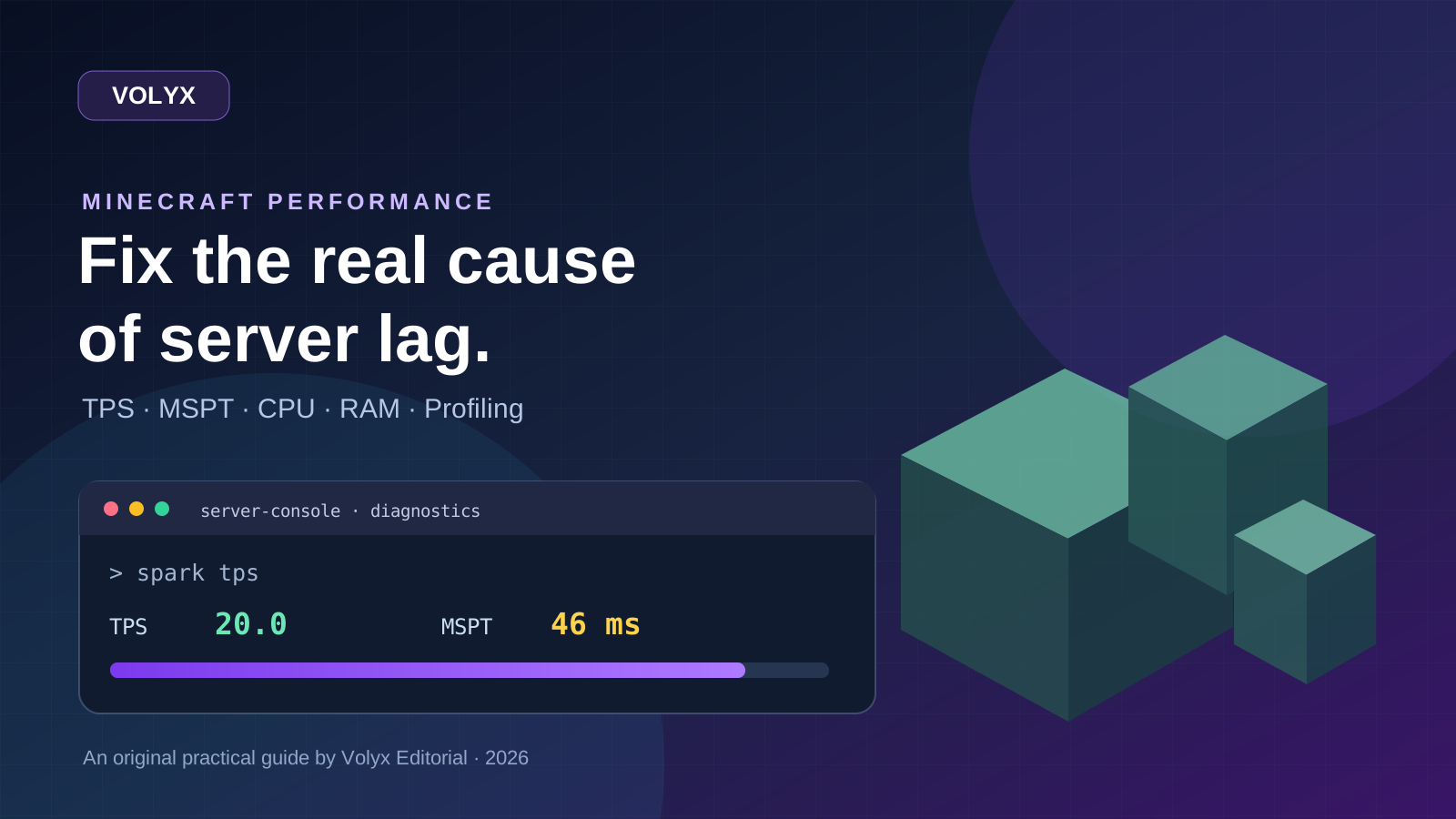
A practical, evidence-first guide to fixing Minecraft Java server lag: read TPS and MSPT, profile with spark, tune chunks, and diagnose CPU, memory and plugins.
Read article ↗
Learn the difference between DDoS floods and Minecraft bot raids, secure a Paper or Velocity server, compare TCPShield and Cloudflare, and respond safely using Volyx.
Read article ↗
Compare five real MIT-licensed JavaScript, TypeScript, and Python Discord bot starters, then learn how to deploy one safely on Volyx.
Read article ↗