
Minecraft Server Lag in 2026: Diagnose TPS, MSPT, CPU and RAM
A practical, evidence-first guide to fixing Minecraft Java server lag: read TPS and MSPT, profile with spark, tune chunks, and diagnose CPU, memory and plugins.
Read article ↗Build a Redis cache-aside layer for a Node.js API, choose safe TTLs, invalidate updated records, handle Redis outages and deploy where network access is supported.
An API that responds quickly with ten users can feel very different when hundreds of people ask for the same information at once. The problem is not always Node.js itself. Your application might execute the same database query repeatedly, fetch the same external data for every visitor, or rebuild an expensive response even though the underlying information has not changed. Redis caching can reduce that repeated work—but only when you understand what belongs in the cache, when it expires, and how to recover if Redis becomes unavailable.
This guide builds a small, reproducible Node.js + Redis cache-aside example and explains how to connect it to a hosting environment such as Volyx. It also covers TTL selection, invalidation after writes, security, monitoring, common deployment failures, and the limits of caching. You can follow along without copying someone else’s boilerplate: the accompanying source project was created for this guide.
Volyx availability note: Volyx offers Node.js hosting and a server-management panel, but access to a Redis instance is not assumed. A working Redis endpoint, network access from your application, permission to create keys, and appropriate TLS/authentication settings are prerequisites. Check your actual Volyx allocation and database features before planning a public deployment. This article does not claim a free managed Redis tier or guaranteed 24/7 operation.
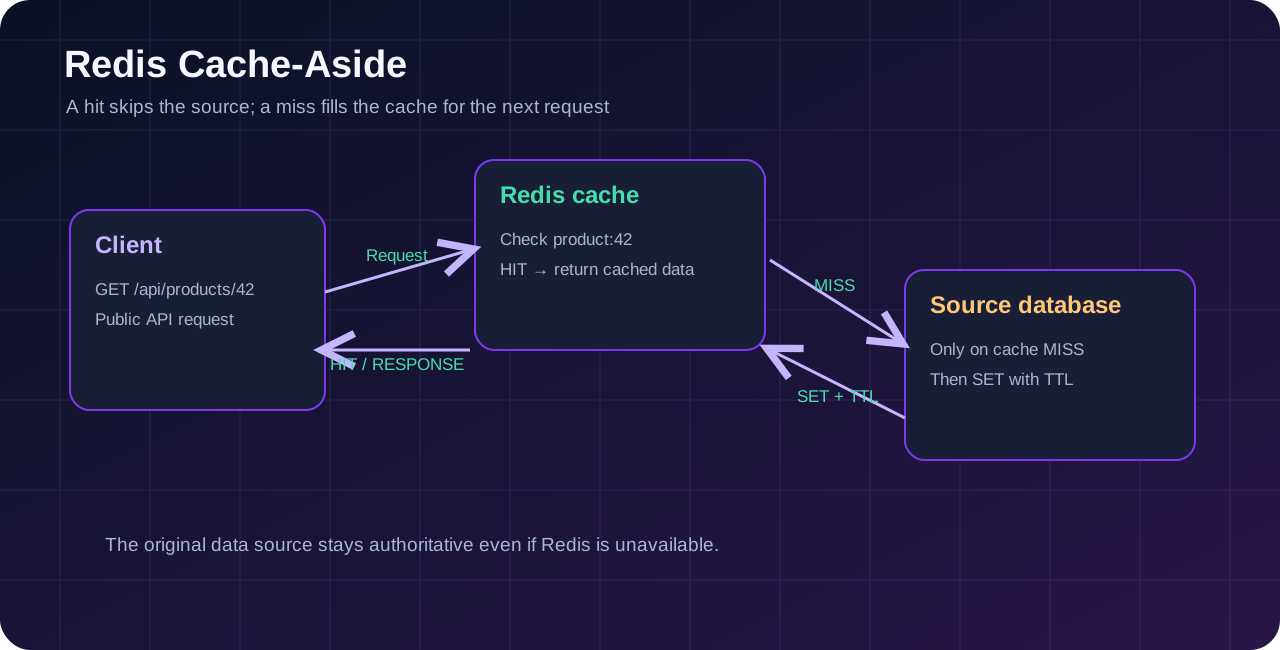
Redis is an in-memory data store often used as a shared cache in front of a durable database or another data source. Your application checks Redis for a result. If it exists, it returns the cached value. If not, it asks the underlying source for the data, stores a copy with a time-to-live (TTL), and returns the result. When a user changes that data, the application updates the underlying source first and invalidates the stale cache entry.
The critical detail is the word copy. A cache is an optimization, not the only place to keep data you cannot afford to lose. If Redis restarts or evicts a key, the API must still know how to answer from the original source.
What you will learn:
redis client.Suppose a game community site displays a public server list. The list changes occasionally, but thousands of visitors may request it between updates. Re-querying the primary database on every request wastes CPU and database connections. A short-lived Redis entry can avoid most of those duplicate lookups.
Now consider the opposite scenario: an API processes a payment or updates a user’s balance. You should not blindly cache a writable balance and hope a 60-second expiration fixes consistency. These operations need authoritative reads, transactions and carefully designed consistency rules. Redis might still help with rate limiting or derived public views, but you must define the behavior explicitly.
Good first candidates include public catalog entries, documentation navigation, aggregate statistics that tolerate modest delay, computed leaderboards with clear update rules, and frequently requested reference data. Poor first candidates include secrets, one-time tokens, private responses without user-scoped keys, rapidly changing inventory, and anything where a stale answer could damage data integrity.
| Workload | Should you cache it? | Initial approach |
|---|---|---|
| Public game-server list | Often | TTL plus invalidation after edits |
| Static configuration shared by every visitor | Usually | Local memory or short Redis TTL |
| Public article metadata | Often | Cache repeated reads; regenerate when published |
| User-specific profile | Sometimes | User-scoped key and strong authorization |
| Password reset tokens | Not as a general response cache | Use a dedicated, secure token design |
| Wallet or coin transaction balance | Only with a formal consistency model | Treat durable data as authoritative |
Start with metrics: record how often a query runs, its latency, and whether many requests ask for identical content. A cache that turns a 2 ms local lookup into an extra remote network request may not improve anything. Redis is especially useful when multiple application processes need to share cached values or the underlying read is genuinely expensive.
A local Map in Node.js is extremely convenient for one process, but each process has its own copy. Restart the process and that copy disappears; run two replicas and they may disagree. Redis puts the cached copy in a separate service available to trusted clients. PostgreSQL, meanwhile, is usually your durable source of truth for relational records.
| Feature | Node.js Map | Redis cache | PostgreSQL database |
|---|---|---|---|
| Shared between application instances | No | Yes, if reachable | Yes |
| Designed for durable relational records | No | Not primarily | Yes |
| Per-entry expiration | Build it yourself | Native TTL | Usually application logic |
| Additional service to manage | No | Yes | Yes |
| Behavior after cache is lost | Data disappears | Rebuild from source | Restore according to backup design |
| Best use | Small process-local memoization | Shared, repeated reads | Source-of-truth data and transactions |
Redis itself can be configured for persistence, and supports other data structures and workloads. However, this guide deliberately uses it only as a cache. That keeps the failure model simple: when Redis is down, the API can still read the original data source, perhaps more slowly.
Prepare a Node.js runtime compatible with the current redis npm package, access to a Redis server, and a terminal where you can run npm. You also need a host and port or REDIS_URL from the Redis service operator. If the endpoint is remote, find out whether it requires encrypted rediss:// connections, credentials, IP allowlisting, or a private network.
For testing, localhost Redis on your own development machine is fine. For a hosted app, localhost means that app’s own container or VM. It does not automatically refer to the Redis process on another VPS or a different Volyx server. This is one of the most frequent deployment misunderstandings.
Checklist before deployment:
Within Volyx, open your server’s available environment/startup settings and networking options. Check for the intended Node.js runtime and whether outbound TCP connections to your chosen Redis endpoint are permitted. You may be able to host the Redis service elsewhere, but do not expose an unauthenticated Redis port to the internet as a shortcut. If the application has no public HTTP endpoint assigned, test it inside its container first; an HTTP server listening on a port is not proof that the public domain is routed to it.
The cache-aside pattern separates reads and writes:
On a read:
volyx-demo:product:42.GET in Redis.SET with an expiration, then return it.On a write:
That is why simply setting a 60-second TTL is not enough for every use case. Without invalidation, a user may see yesterday’s state for the remainder of the TTL—even immediately after editing a record.
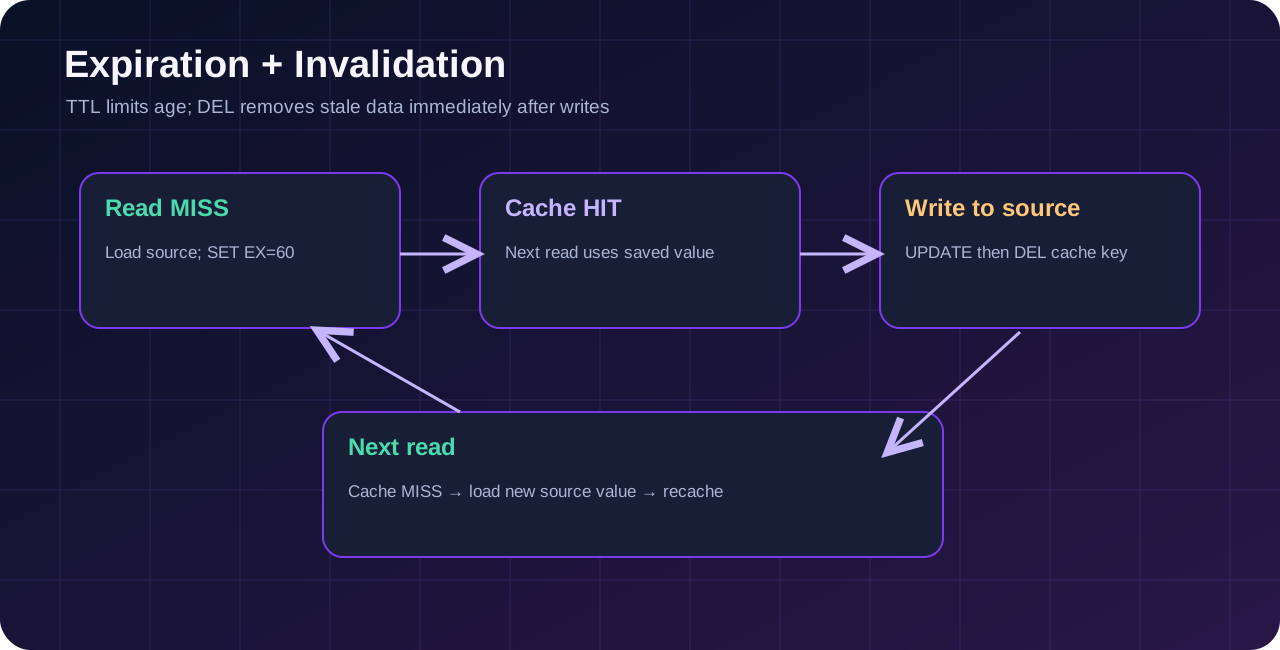
A TTL is not a promise of perfect freshness. An update from another application could bypass your invalidation logic. For strongly consistent workflows, use a design that does not depend on stale cached data. For concurrent writes, cache-aside can also race: an in-flight read may populate an old value after a writer deletes the key. Versioned keys, events, or stricter consistency controls may be needed in high-concurrency systems.
The downloadable ZIP for this article includes an example-redis-api/ folder. It uses Node.js built-in HTTP handling and the official Redis client. It intentionally keeps the authoritative sample records in a local Map so readers can run the example without installing PostgreSQL. This is a teaching simplification: the local Map is not durable. Replace it with a real database before handling actual production records.
mkdir redis-cache-demo
cd redis-cache-demo
npm init -y
npm install redis
Copy the accompanying app.mjs, cache-core.mjs and package.json from the example folder, or read them alongside the explanation. Set API_KEY to a sufficiently long random secret before starting the service. The demo does not enable writes without an API key.
Create a local .env file for development, but do not commit it:
PORT=3000
API_KEY=replace-with-a-long-random-secret
REDIS_URL=redis://127.0.0.1:6379
CACHE_TTL_SECONDS=60
With a supported Node.js version, start with:
node --env-file=.env app.mjsOn a hosting control panel, use its protected environment-variable mechanism instead of uploading a secret file into a publicly readable directory. REDIS_URL can contain credentials; never print the entire value in diagnostics. If your Redis operator requires TLS, use the connection settings provided by that operator, commonly rediss://..., and do not disable certificate verification to make errors disappear.
The official client provides createClient, connect, get, setEx and del. The demo attaches an error handler and disables its offline command queue so a disconnected cache does not indefinitely accumulate commands.
import { createClient } from 'redis';

const client = createClient({
  url: process.env.REDIS_URL,
  disableOfflineQueue: true,
  socket: { connectTimeout: 3000 }
});

client.on('error', () => {
  console.error('Redis connection or command error');
});

try {
  await client.connect();
  console.log('Redis ready');
} catch {
  console.warn('Redis unavailable; database reads continue');
}
In a real service, reconnect monitoring, bounded operation timeouts and a dependency health policy matter too. Some errors occur after a successful connection and must be handled per operation rather than only at startup.
The example wraps the data store and Redis adapter in createProductService(). This makes the behavior easier to test than embedding database calls directly in HTTP route code.
async function readProduct(id) {
  const key = `volyx-demo:product:${id}`;
  const cached = redis.isReady ? await redis.get(key) : null;
  if (cached !== null) {
    return { item: JSON.parse(cached), cache: 'HIT' };
  }
  const item = await database.findProduct(id);
  if (item && redis.isReady) {
    await redis.setEx(key, 60, JSON.stringify(item));
  }
  return { item, cache: 'MISS' };
}
This simplified block illustrates the algorithm; the complete sample catches Redis exceptions and falls back to the source without breaking the GET request. In production, be careful about caching null/not-found results, cache stampedes, serialization formats and payload size limits.
The sample’s authorized PUT /api/products/:id route changes the source record and then calls DEL for the corresponding cache key. If the DEL fails, the source still holds the correct value, but a stale cache entry may remain until expiration. A stricter application may instead fail the operation, publish invalidation events, or use versioned keys depending on its consistency requirements.
Start with the health route:
curl -i http://127.0.0.1:3000/healthzThen request a sample product twice:
curl -i http://127.0.0.1:3000/api/products/42
curl -i http://127.0.0.1:3000/api/products/42
With Redis reachable and the key initially empty, the first successful response should show X-Cache: MISS and the next normally X-Cache: HIT. If Redis is unavailable, both requests can succeed with X-Cache: BYPASS while the source store remains reachable. This graceful degradation is intentional. A hit is not a guarantee that your full web request has low latency: networking and JSON serialization still cost time.
Update the record (replace the placeholder with the key you configured):
curl -i -X PUT http://127.0.0.1:3000/api/products/42 \
  -H 'Content-Type: application/json' \
  -H 'X-API-Key: YOUR_LOCAL_TEST_KEY' \
  --data '{"name":"Updated example product"}'
Request the item again. It should be loaded from the source and recached with the updated name. The sample limits request size and does not expose a listing of Redis keys. It is still a demonstration, not a production-ready commerce API.
Volyx’s panel can help you manage a Node.js application, but the network and Redis prerequisites are separate from the programming steps. Follow this process rather than assuming every game/bot container can publicly serve a REST API:
Choose a suitable Node.js runtime supported by the selected server. Review startup configuration, file permissions, outbound connectivity, the allocated PORT and any reverse-proxy or HTTP routing offered by the account. An assigned game-server port is not necessarily the same as a publicly configured HTTPS application endpoint.
Use the Volyx Files area or your normal deployment method. Upload app.mjs, cache-core.mjs, package.json and the other required project files. Do not upload .env or a real API key into a public repository. Make sure the configured entry point corresponds to the file that actually exists—Linux paths are case-sensitive.
Run npm install where supported, then configure REDIS_URL, API_KEY and CACHE_TTL_SECONDS in protected startup/environment settings. Verify the Redis endpoint is reachable from inside this specific application container. If your account cannot connect to Redis, the demo can illustrate fallback locally, but the real caching layer will not operate.
Launch node app.mjs or your project’s configured start command. A successful Node process log does not, by itself, prove a public route works. First request /healthz from the environment where it is running. If external access is enabled, confirm HTTPS routing and run the two-request HIT/MISS test through the assigned domain.
A useful cache should fail in a controlled manner. Restart or temporarily disconnect a test Redis instance that you own or are authorized to manage, then verify the API still serves the underlying demo records. Do not reboot a shared production Redis instance just to test this article. Monitor errors and confirm the application returns to cache HIT behavior after reconnection.
Hosting honesty: The presence of a Databases section in a dashboard does not confirm Redis support. MySQL or PostgreSQL availability is not equivalent to a Redis service. If Redis access or public HTTP routing is not enabled for your server, use a separate authorized service or a platform that explicitly supports your deployment requirements.
TTL is how long a cache entry may stay available before Redis expires it. In node-redis, setEx(key, seconds, value) attaches a TTL as part of the write. Every key in this tutorial has a finite expiration so that cache memory and stale-data windows remain bounded.
A 30-second TTL and a 30-minute TTL serve very different purposes. The right value depends on update frequency, cost of a cache miss, acceptable staleness, and traffic patterns. There is no universal 60 that makes all applications fast and correct.
| Example data | Starting experiment | Freshness consideration |
|---|---|---|
| Public service catalog | 60–300 seconds | Invalidate on edits |
| Public documentation menu | 5–30 minutes | Rebuild or invalidate when publishing |
| Read-heavy game statistics | 10–60 seconds | Display the timestamp of the measurement |
| Public leaderboard | 15–120 seconds | Decide how recent scores must be |
| User-specific settings | Carefully scoped short TTL | Authorization and invalidation are essential |
| Money or critical authorization state | Avoid naive response caching | Read authoritative state with strict consistency |
These ranges are planning examples, not benchmarks or Volyx default settings. Record real hit rates and stale-data incidents before tuning. A very short TTL can overload your source during traffic spikes; a very long TTL hides updates.
If many popular keys expire simultaneously, many requests may hit the database at once. This is called a cache stampede. A small random variation in TTL spreads some expirations apart. For very busy endpoints, use request coalescing, a bounded lock or stale-while-revalidate approach designed for your failure model. The demo intentionally does not implement a distributed lock; one would add complexity to a first tutorial without automatically guaranteeing correctness.
Caching all unique URLs is a trap. A user-controlled cache key can cause millions of low-value entries to consume memory. Prefer a documented key prefix, strict ID validation, reasonable maximum payload sizes and only endpoints with measurable duplicate reads. Review eviction and memory alerts on the Redis server; TTL alone does not prevent a burst of new keys from filling memory.
Redis should normally be reachable only by trusted application servers on an internal network or through a provider’s approved protected endpoint. The official security guidance explicitly warns against exposing an unauthenticated Redis port to the public internet. Configure credentials and access control lists where supported; use TLS when required for remote connections, and keep authentication out of frontend JavaScript, logs and version control.
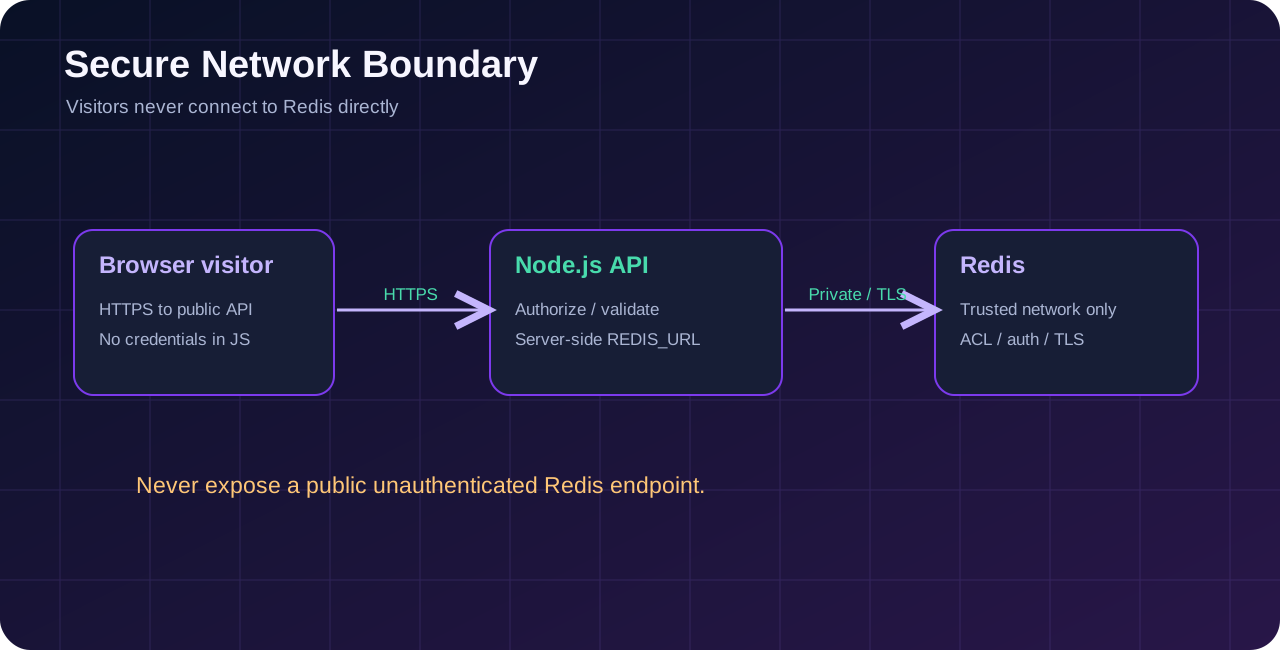
For a Volyx deployment, the application should contact Redis server-side. Browser visitors should contact your API, which validates and authorizes requests. Do not put REDIS_URL in client-side HTML or expose raw Redis commands through a generic proxy. The sample API requires a separate API_KEY for writes; that key protects the demo endpoint, not Redis itself.
Avoid these shortcuts: disabling TLS verification; opening Redis on 0.0.0.0:6379 without a carefully secured network policy; reusing administrative Redis credentials for applications; publishing connection URLs in screenshots; or treating the Redis cache as a backup.
Take a baseline before enabling Redis, ideally under representative traffic. Measure request latency (especially P95), request rate, primary database query rate, cache hit ratio, memory usage and error rate. A cache can make average requests faster but introduce new failure conditions or memory pressure. Keep both latency and correctness visible.
A useful experiment is to call one stable public endpoint repeatedly, first with caching bypassed and then with caching enabled, while measuring source reads. Do not report invented numbers such as “500% faster” without actual measurements. Performance depends on geography, Redis host, payload size, concurrency and the underlying data source.
The sample’s X-Cache header is for demonstration and debugging. For production systems, decide whether that header should remain public or be restricted to trusted diagnostics, and never leak private cache key material or credentials.
Use this table after reading your application’s actual logs. Each error has multiple possible causes, so treat the suggestions as starting checks rather than guaranteed diagnoses.
| Symptom | Likely explanation | Useful first check |
|---|---|---|
ECONNREFUSED | Nothing listening, wrong host or blocked port | Check endpoint and network access |
ENOTFOUND | Hostname cannot resolve | Verify DNS spelling in REDIS_URL |
| Connection timeout | Firewall, routing, slow handshake | Test reachability from application container |
| Authentication error | Wrong username/password or ACL | Verify provider-issued credentials securely |
| TLS handshake failure | Scheme or certificate mismatch | Confirm redis:// vs rediss:// and trusted CA |
GET always BYPASS | Client never becomes ready | Check startup and Redis connection events |
GET always MISS | Wrong keys, too-short TTL or failed writes | Inspect setEx errors and cache readiness |
| Old data after PUT | Missing invalidation or a write race | Trace source update and DEL operation |
| Redis key grows indefinitely | Missing TTL or unbounded key generation | Check TTL and key cardinality |
| Response contains another user’s data | Cache key lacks identity/authorization scope | Disable affected cache path and audit immediately |
API returns 502 | HTTP proxy/app routing failure | Check proxy, process and port separately |
| Redis out-of-memory errors | Cache exceeds memory policy | Inspect usage, eviction and key sizing |
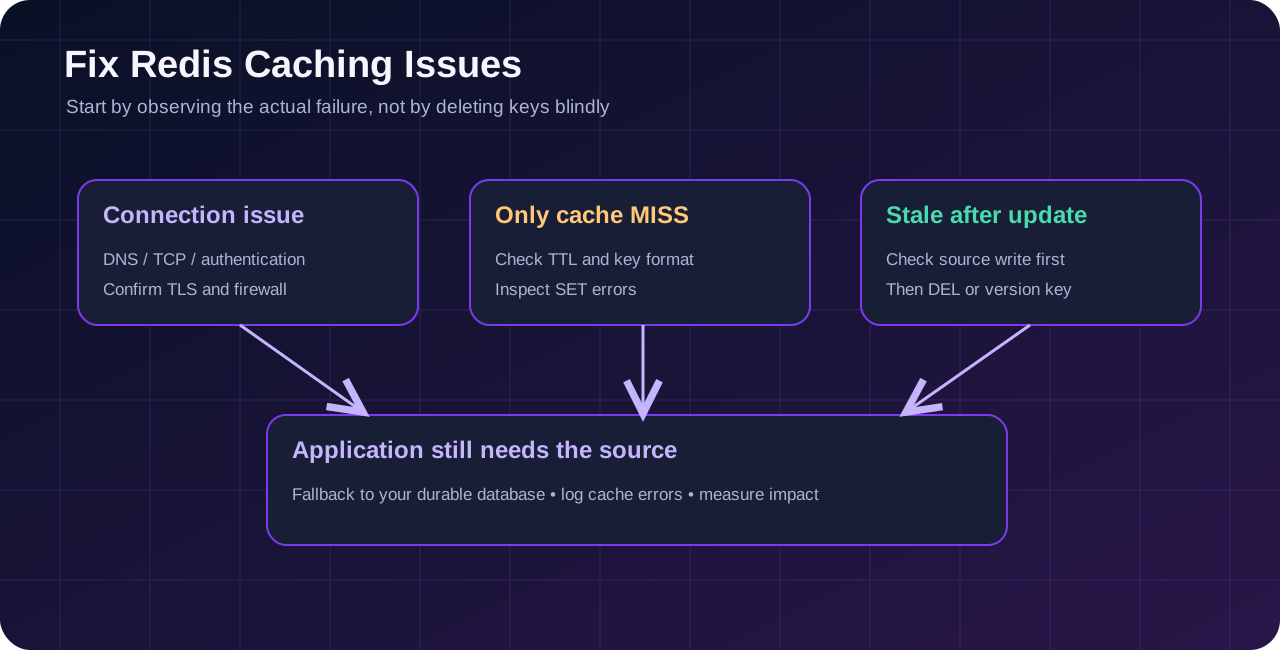
Your API can serve the demo store from memory even when Redis is down. That is useful for development and demonstrates a resilience pattern. It does not mean a real production database is optional: if both the application and its in-memory source restart, data disappears. For production, replace the local Map with PostgreSQL or another proper durable store and test Redis outage behavior against that store.
That can happen when your underlying query is already cheap or when Redis is across a distant network. Inspect actual timings rather than assuming all Redis usage is an automatic improvement. Local process memory may be faster for small, immutable objects, while a shared Redis cache can be advantageous for multiple app replicas.
Check whether every write path invalidates the correct key. Admin dashboards, scheduled jobs and external integrations can mutate the source without triggering application invalidation. A version field and cache invalidation events are possible solutions; for strict consistency, re-evaluate whether this data should be cached at all.
Potentially, if your specific Node.js hosting environment permits outbound access to a compatible Redis service and you have valid credentials. This guide does not imply Volyx offers managed Redis to every account. Verify networking and your selected service before deployment.
Redis Open Source software can be self-hosted under its applicable license and terms, but hosting a Redis service may consume paid or limited resources. Managed providers set their own pricing and quotas. Check the provider’s current terms before choosing a plan.
Not in the cache-aside pattern presented here. PostgreSQL remains the authoritative durable source, while Redis holds copies that can be regenerated. Redis supports more capabilities than caching, but they require a separate design decision.
A hit means the requested key is in Redis and can be returned directly. A miss means the key is absent or expired, so the application loads the information from the authoritative source and may cache it for later requests.
Time to live is a duration after which Redis expires a key. It helps bound cache staleness and memory usage, but by itself it does not ensure instant freshness after an update.
Start by deciding how stale the result can be, then test an appropriately short TTL and measure misses, latency and consistency. Public reference data might tolerate minutes; rapidly changing data may need explicit invalidation or no caching at all.
In a properly designed cache-aside setup, the application can fall back to its underlying source. The example demonstrates this behavior. Production systems should also limit command delays, monitor reconnections and protect the primary database from sudden additional traffic.
Redis is designed for trusted clients, and public access can expose its commands and data. Keep it on an appropriately protected network and enable the provider’s authentication and TLS recommendations.
redis:// or rediss://?Use the scheme your Redis provider documents. rediss:// is generally used for TLS connections. Don’t use an unencrypted remote connection or disable certificate checking merely to bypass a connection error.
It can reduce repeated expensive work and database calls, but adds its own network overhead and a separate memory-consuming service. Measure end-to-end performance and the combined resource cost rather than assuming a universal reduction.
No. Availability depends on application hosting, the source database, network routing, maintenance and operating limits. A cache can improve resilience in specific failure modes, but it cannot create an uptime guarantee.
Delete the precise key associated with that item from an authorized application path, such as DEL volyx-demo:product:42, after updating the source. Avoid global flush commands on shared Redis installations.
Only with carefully scoped keys, authorization checks and an appropriate sensitivity policy. A shared cache key for personalized responses can leak one person’s data to another. Where possible, avoid caching secrets or sensitive fields entirely.
Confirm the account has a supported web routing arrangement or reverse proxy. Node.js binding to a container port is insufficient by itself. Use a trusted TLS configuration at the public edge and restrict direct administrative access.
It may be enough for a simple single-process prototype. When you add multiple replicas, need shared invalidation, or have a repeat-heavy workload, a separate cache can help. Data durability remains a separate requirement in both cases.
Redis is most useful when you know which repeated work you want to remove. Start with one measurable endpoint, document its freshness requirement, use a bounded TTL, invalidate correctly after writes, and build a safe fallback for cache outages. If you are deploying through Volyx, verify your actual network and Redis options first rather than promising a feature your plan may not provide.
Next steps: Test the accompanying Node.js project locally, read the Volyx documentation, and explore the Volyx Blog for practical server deployment and troubleshooting guides. If you are new to bot hosting, start with How to Host a Discord Bot for Free in 2026 before moving to caching.
Last reviewed October 2026. Examples are educational; test against your own software versions and hosting permissions before production deployment.
Explore more in-depth articles with code, visuals, and practical walkthroughs.
Browse all articles ↗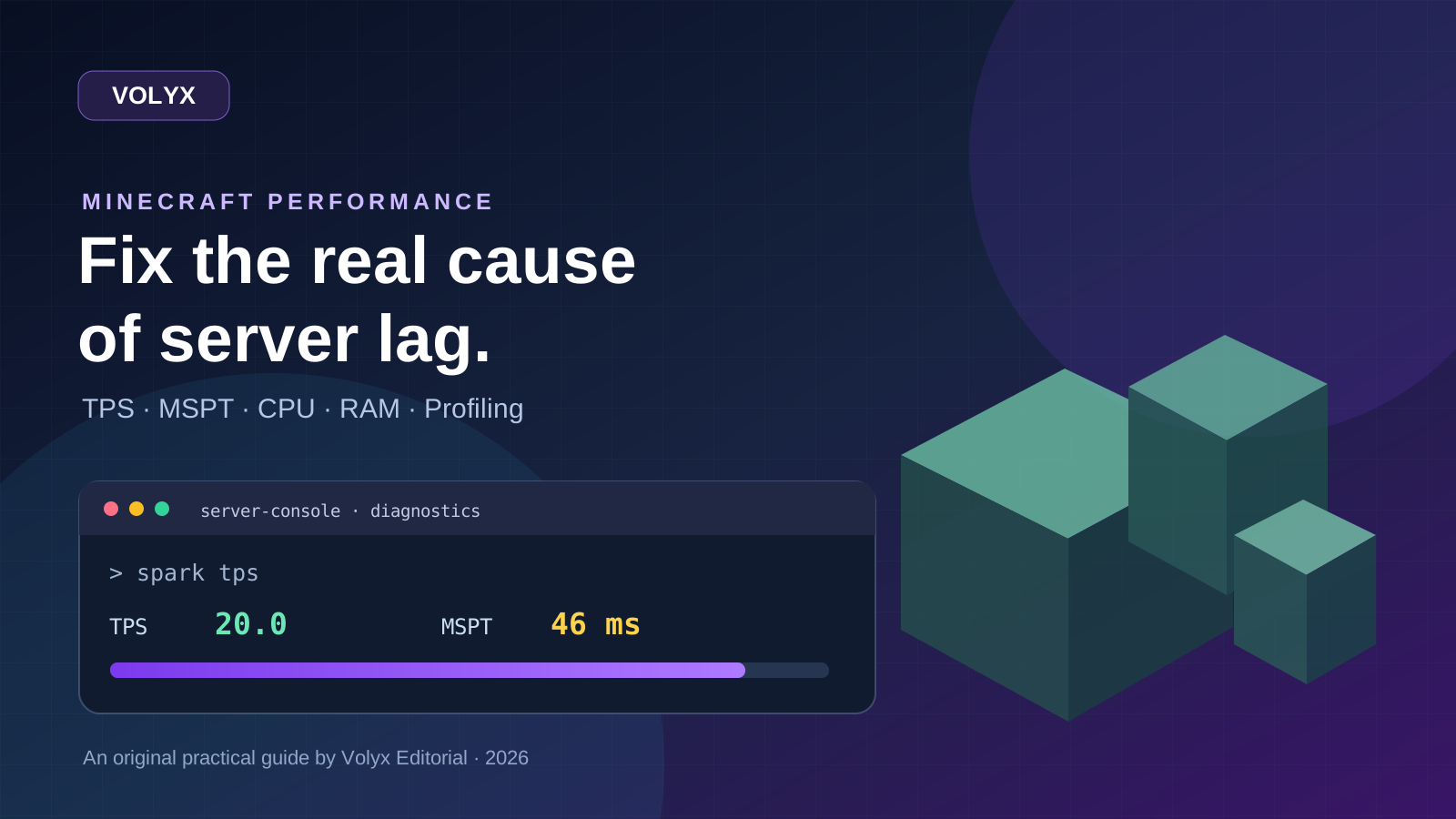
A practical, evidence-first guide to fixing Minecraft Java server lag: read TPS and MSPT, profile with spark, tune chunks, and diagnose CPU, memory and plugins.
Read article ↗
Learn the difference between DDoS floods and Minecraft bot raids, secure a Paper or Velocity server, compare TCPShield and Cloudflare, and respond safely using Volyx.
Read article ↗
Compare five real MIT-licensed JavaScript, TypeScript, and Python Discord bot starters, then learn how to deploy one safely on Volyx.
Read article ↗