
Minecraft Server Lag in 2026: Diagnose TPS, MSPT, CPU and RAM
A practical, evidence-first guide to fixing Minecraft Java server lag: read TPS and MSPT, profile with spark, tune chunks, and diagnose CPU, memory and plugins.
Read article ↗Find slow PostgreSQL queries, read EXPLAIN ANALYZE, design useful indexes, and tune Node.js connection pooling with a measured, safe workflow.

A Node.js API can return responses instantly during local testing and become painfully slow after a few thousand users, orders, or bot events. When that happens, adding more RAM to the application is tempting. So is adding an index to every database column. Neither is a reliable first step. A request can be slow because PostgreSQL reads too many rows, waits for a lock, sorts an enormous result, transfers more data than needed, or waits for a free connection in the Node.js pool.
This tutorial builds a repeatable way to measure the actual bottleneck, choose a targeted fix, and verify the change. We will use a small order-history example that resembles a dashboard, a Discord bot economy, or an API hosted on a service such as Volyx. The techniques work on standard PostgreSQL installations, not just on one hosting brand.
Before you begin: All schema changes and test-data commands in this guide belong in a separate test database. Do not copy them into a production database containing users’ information. The Node.js measurement tool bundled with this article executes read-only
SELECTqueries; running anEXPLAIN (ANALYZE)on a busy database can still consume significant resources.
Quick navigation: Identify the bottleneck · Build the demo · Read EXPLAIN · Choose indexes · Node.js pooling · FAQ
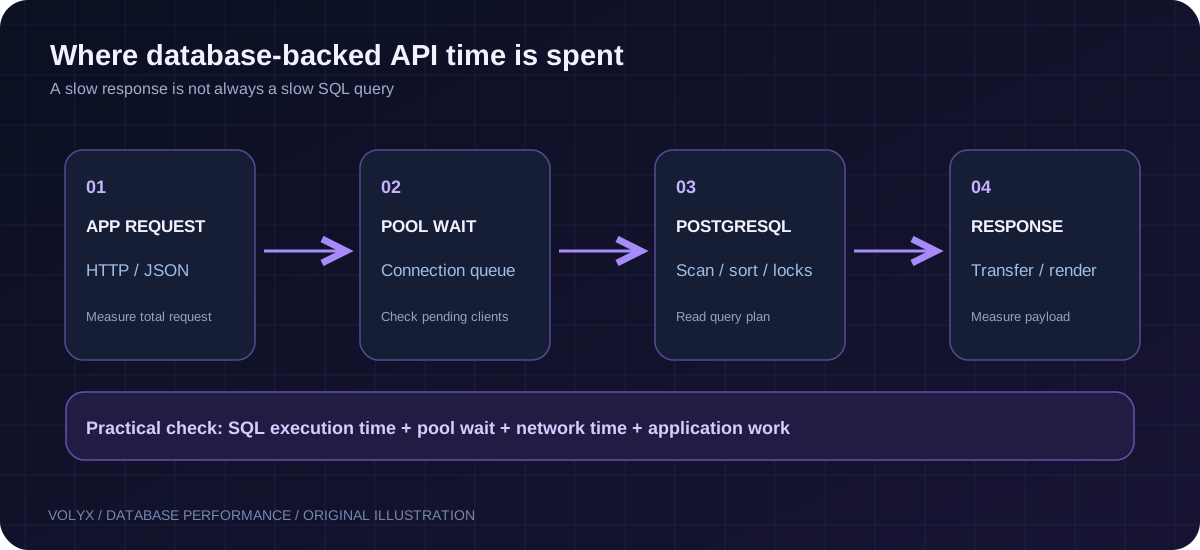
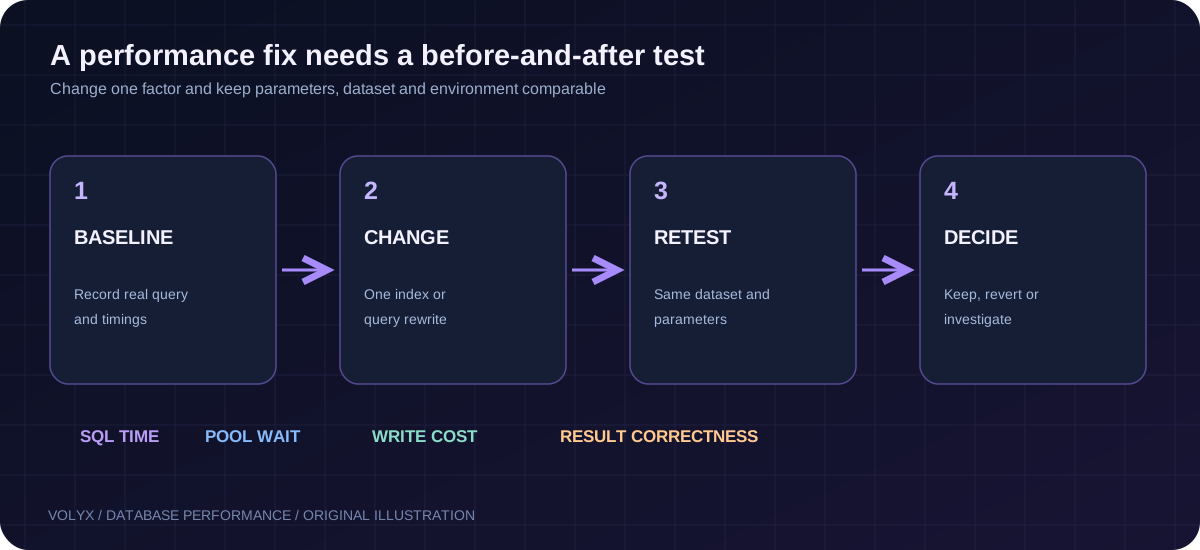
If your API is slow, capture the exact SQL statement, the number of rows it returns, and where the time is spent. Inspect its plan with EXPLAIN; for appropriate read-only queries in a controlled environment, use EXPLAIN (ANALYZE, BUFFERS). Look for excessive scanned rows, expensive sorts, inaccurate estimates, repeated operations, and disk I/O. Then change one thing at a time: a query predicate, a composite index, a page size, or connection-pool configuration. Retest with comparable data and record the trade-offs.
A successful optimization is not necessarily an Index Scan. PostgreSQL may correctly choose a sequential scan on a tiny table or when most rows must be returned. An index can reduce lookup costs while increasing storage, memory pressure, and write amplification. The goal is lower end-to-end latency at an acceptable operating cost.
Start by separating application latency from SQL execution time. They are related but not identical. An HTTP request can spend 300 ms waiting in a pool queue while its database query takes only 8 ms. Or PostgreSQL may spend 400 ms on a query while Node.js itself uses almost no CPU.
| Symptom | Plausible cause | Best first check |
|---|---|---|
| Requests slow only at peak traffic | Too many concurrent requests, pool saturation, database capacity | Pool wait, connection count, API request rate |
| One endpoint slows as data grows | Table scan, sort, offset pagination | EXPLAIN on its actual SQL |
| Query is fast locally but slow remotely | Network latency, region, TLS/connect overhead | Database and API regions; connection reuse |
| Spikes during writes | Lock contention, checkpoints, I/O | PostgreSQL activity and waiting sessions |
SELECT * returns thousands of rows | Oversized response and serialization cost | Response bytes, result count and API timing |
| Performance degrades after a deployment | Query shape or index changed, outdated statistics | Compare plans and migration history |
In Volyx, begin with your application’s Console, environment configuration, and resource graphs when available for that server. Measure the Node.js process before assuming the database is at fault. Database access and monitoring rights vary by plan and configuration. A user who can create a database may not have permission to change server-wide PostgreSQL settings or install extensions.
For each problematic endpoint, capture the date, deployment version, endpoint name, and four numbers: overall HTTP duration, database-query duration, returned rows, and approximate result size. Add error rate and pool wait when your instrumentation supports it. Mask tokens, connection strings, email addresses, and customer identifiers in shared logs.
const started = performance.now();
const result = await pool.query(sql, values);
const queryMs = Math.round(performance.now() - started);
console.log({ operation: 'recent-orders', queryMs, rows: result.rowCount });
This measures the time spent awaiting the pool.query() promise, which can include waiting for an available client. It does not isolate server execution time. For finer detail, collect pool statistics, use controlled database plans, and compare measurements from the same environment.
Set a concrete goal. For example, the recent-orders endpoint should return 25 records without collecting the entire history into Node.js. It should remain responsive with many accounts using the application, and new orders should still be inserted normally.
A useful baseline checklist is: record the query text with placeholders, capture its normal parameter values, note existing indexes, record PostgreSQL major version, collect timings over several requests, and test with a dataset close to production in distribution and size. Do not present one lucky run as proof of improvement. Query caches, operating-system caches, autovacuum, disk state, and concurrency can change the result.
Consider a multi-tenant service that shows a user their last 25 paid orders. A game-server marketplace, hosting dashboard, and Discord bot management tool can all have similar data patterns. For an isolated test database, create a sample table named blog_demo_orders so it cannot be confused with a real production table.
-- ONLY in a disposable test database.
CREATE TABLE blog_demo_orders (
  id bigint GENERATED ALWAYS AS IDENTITY PRIMARY KEY,
  tenant_id bigint NOT NULL,
  status text NOT NULL CHECK (status IN ('paid', 'pending', 'cancelled')),
  total_cents integer NOT NULL CHECK (total_cents >= 0),
  created_at timestamptz NOT NULL DEFAULT now()
);
Populate the test database with enough rows to make comparison meaningful. This example creates 80,000 synthetic orders, not real customer data:
INSERT INTO blog_demo_orders (tenant_id, status, total_cents, created_at)
SELECT
  (1 + (n % 200))::bigint,
  CASE WHEN n % 5 = 0 THEN 'pending'
       WHEN n % 13 = 0 THEN 'cancelled'
       ELSE 'paid' END,
  (500 + n % 100000)::integer,
  now() - (n * interval '17 seconds')
FROM generate_series(1, 80000) AS n;

ANALYZE blog_demo_orders;
The data is intentionally synthetic, with predictable values. It is suitable for learning how plans change, not for claiming a production speedup. Never rerun the insert blindly in a shared database; it adds another 80,000 rows each time.
The first version of the dashboard query is:
SELECT id, total_cents, created_at
FROM blog_demo_orders
WHERE tenant_id = 42 AND status = 'paid'
ORDER BY created_at DESC, id DESC
LIMIT 25;
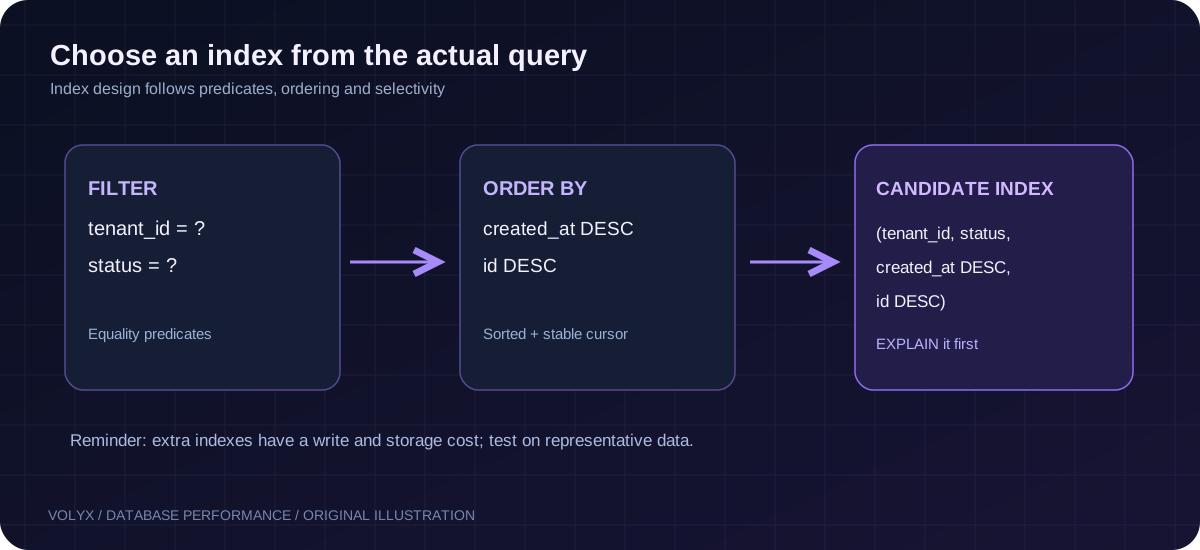
Notice three meaningful parts: we filter by account, filter by order state, and sort by newest timestamp with an ID tie-breaker. The right index should reflect the combined access pattern, not whichever column name sounds important.
PostgreSQL’s planner chooses a way to execute a query. EXPLAIN shows the plan and estimates without executing the statement; EXPLAIN ANALYZE executes it and reports observed work. For our read-only SELECT on test data, run:
EXPLAIN (ANALYZE, BUFFERS, SETTINGS)
SELECT id, total_cents, created_at
FROM blog_demo_orders
WHERE tenant_id = 42 AND status = 'paid'
ORDER BY created_at DESC, id DESC
LIMIT 25;
Learn these labels before touching any configuration:
| EXPLAIN label | What it means | What to ask |
|---|---|---|
Seq Scan | Reads table pages sequentially | Is the table small, or are we reading far too many rows? |
Index Scan | Uses an index to find rows, may visit table | Is it selective and reasonably ordered? |
Index Only Scan | May satisfy columns from the index | Are heap fetches still necessary? |
Sort | Orders intermediate rows | Can a suitable index serve the required ordering? |
Rows Removed by Filter | Candidates rejected after reading | Is the access path too broad? |
actual rows vs estimated rows | Observed vs predicted cardinality | Are statistics stale or data distributions unusual? |
Buffers: shared hit/read | Pages visited through memory or storage | Are page reads excessive for the returned result? |
Execution Time | Time inside the database | Does that account for your application’s observed latency? |
Important: EXPLAIN ANALYZE UPDATE, DELETE, and other data-modifying queries really perform their operations. Do not run them casually on live data. A transaction with rollback may undo row changes, but triggers, sequences, locks, and external effects can still be significant. The examples in this article only analyze SELECT statements.
You may see Seq Scan even after adding an index. That is not automatically a failure: with small tables or queries that return a large fraction of rows, it can be cheaper than bouncing between index and heap pages. Always reason from the total plan and actual work, not an isolated node name.
Official reference: PostgreSQL — Using EXPLAIN.
For our frequent query, a candidate composite B-tree index is:
-- Test in a disposable database first.
CREATE INDEX idx_blog_demo_orders_recent_paid
ON blog_demo_orders (tenant_id, status, created_at DESC, id DESC);
Why that order? Equality filters (tenant_id and status) come first; the ordered columns (created_at, id) follow to support newest-first retrieval. PostgreSQL can sometimes use multi-column indexes differently, and modern versions have additional planner optimizations. This sequence is a candidate to measure, not a universal recipe.
Run ANALYZE blog_demo_orders; if statistics need refreshing. Then repeat the EXPLAIN (ANALYZE, BUFFERS) query and compare the same parameters. Look for reduced scanned rows, fewer buffer reads, avoidance of a large sort, and acceptable total execution time. Also inspect the index size:
SELECT pg_size_pretty(pg_relation_size('idx_blog_demo_orders_recent_paid'))
  AS index_size;
If most queries need only paid orders, you could test a partial index as an alternative rather than stacking both indexes:
CREATE INDEX idx_blog_demo_orders_paid_only
ON blog_demo_orders (tenant_id, created_at DESC, id DESC)
WHERE status = 'paid';
A partial index works when the planner can establish that the query predicate implies its condition; parameterized or generic plans can complicate this. Compare both variants on a representative workload, then retain only the indexes that justify their write and storage costs.
Each new index consumes disk space. Inserts and changes to indexed columns require extra maintenance. On a hosting server with limited disk or I/O, a faster read endpoint can come at a measurable write penalty. The right design balances read frequency, selectivity, sort order, table size, and write rate.
There is no universally fastest PostgreSQL index type. The common options address different problems:
| Index design | Good candidate for | Cost or limitation |
|---|---|---|
| B-tree on one column | Equality/range filters | May not help multi-column sorting |
| Composite B-tree | Frequently repeated filter + ordering pattern | Column order matters; increases write cost |
| Partial B-tree | Well-defined subset, such as active jobs | Planner must recognize predicate |
Covering index with INCLUDE | Small extra columns for index-only scans | Larger index; index-only benefit depends on visibility map |
| GIN | Supported arrays, full text, JSONB operators | Heavier update and storage costs |
| BRIN | Very large tables physically correlated with a value | Less selective; not a substitute for B-tree everywhere |
If an endpoint returns total_cents, you can consider INCLUDE (total_cents) on a test index. That may reduce heap reads for an index-only scan, but it makes the index wider. It is not automatically worthwhile, and heap fetches may still occur until pages are marked all-visible. Test against actual query plans and write volume.
A common beginner mistake is using an expression that prevents a simple index from being useful:
-- Often less index-friendly for a plain created_at B-tree:
WHERE date(created_at) = DATE '2026-10-20'
For a known reporting timezone, prefer a timestamp range computed in the application:
WHERE created_at >= TIMESTAMPTZ '2026-10-20 00:00:00+00'
  AND created_at <  TIMESTAMPTZ '2026-10-21 00:00:00+00'
Use UTC consistently where possible and convert local-day boundaries deliberately for the user’s timezone. An expression index might also help particular workloads, but it should be a measured decision.
A page-based admin list might begin with:
SELECT id, total_cents, created_at
FROM blog_demo_orders
WHERE tenant_id = 42 AND status = 'paid'
ORDER BY created_at DESC, id DESC
LIMIT 25 OFFSET 50000;
At a deep offset, PostgreSQL may need to process many rows just to discard them. For a continuously scrolling feed, keyset pagination is often a better fit. Use the last created_at and id from the preceding page:
SELECT id, total_cents, created_at
FROM blog_demo_orders
WHERE tenant_id = 42
  AND status = 'paid'
  AND (created_at, id) < (
    TIMESTAMPTZ '2026-10-15 10:45:00+00',
    12345
  )
ORDER BY created_at DESC, id DESC
LIMIT 25;
The cursor values above are illustrative; your application must take them from the actual preceding result. The ordered pair avoids ambiguity when multiple records share the same timestamp. A composite index matching equality filters and descending sort keys can support this pattern.
Keyset pagination is not ideal for every interface: arbitrary jumping to page 729 is harder, and cursor behavior must be documented when records are deleted or inserted. Use it where sequential navigation is natural.
Do not ask PostgreSQL for data you will throw away. Returning SELECT * can increase network transfer, memory allocation, and JSON serialization. For a list page, retrieve only the columns the user can see. Put sensible caps on LIMIT values and avoid accepting an arbitrary SQL sort expression from a request.
With node-postgres, values should be passed separately from SQL text:
const sql = `
  SELECT id, total_cents, created_at
  FROM blog_demo_orders
  WHERE tenant_id = $1 AND status = $2
  ORDER BY created_at DESC, id DESC
  LIMIT $3
`;
const result = await pool.query(sql, [tenantId, 'paid', 25]);
Parameters represent values, not table names or SQL syntax. If users can choose a sort field, map a small allowlist of accepted fields to fixed SQL fragments instead of interpolating arbitrary input. Also get the tenant/account ID from authenticated server-side identity, never trust an unverified query-string tenant ID in a real multi-tenant application.
See also the Volyx guide on connecting PostgreSQL to Node.js for connection setup and parameterized query fundamentals.
A pool reuses connections so each HTTP request does not have to establish a fresh database session. That saves setup overhead, but configuring max: 50 does not create fifty times more database capacity. Several Node.js instances can exhaust PostgreSQL’s connection limit when each has a large pool.
A simple configuration looks like:
import pg from 'pg';
const { Pool } = pg;

const pool = new Pool({
  connectionString: process.env.DATABASE_URL,
  max: 5,
  connectionTimeoutMillis: 3000,
  idleTimeoutMillis: 30000,
  maxUses: 7500
});

pool.on('error', err => {
  console.error('Idle PostgreSQL client error:', err.message);
});
Five is an illustrative starting value for a small service, not a recommendation for every Volyx allocation. Determine the usable connection count from the database service, number of application replicas, maximum concurrency, and observed queue length. The option maxUses may not be needed in simple deployments; connection rotation requirements depend on your architecture and pg version. Check that your installed client library supports the options you use.
Your application should shut down cleanly with await pool.end() when exiting. One transaction must keep using the same acquired client for BEGIN, statements, COMMIT, or ROLLBACK; never spread a transaction over arbitrary pool.query() calls.
If PostgreSQL runs a query in 6 ms while the endpoint takes 250 ms, do not keep adding indexes. Investigate waits, network distance, large JSON payloads, and other application work.
Official references: node-postgres Pool and Queries.
The accompanying ZIP includes example/measure.mjs. It accepts a database connection string and a test tenant ID via environment variables, executes only parameterized SELECT queries, and reports a series of query timings. Its --dry-run mode shows the SQL without connecting to any database.
cd example
npm install
node measure.mjs --dry-run
When you have an isolated test PostgreSQL database containing the sample table, supply a connection string privately and run:
# Supply DATABASE_URL, DEMO_TENANT_ID and DEMO_STATUS through
# your local shell or your hosting provider's secret controls.
node measure.mjs
The script deliberately does not create tables, insert rows, build indexes, or run EXPLAIN ANALYZE. It limits its sample count so someone does not accidentally launch a large load test against a shared server. Compare results before/after a planned index change, but remember that app timings are not equivalent to PostgreSQL’s planner timings.
PostgreSQL uses statistics to predict how many rows filters will match. If a large data import changes the distribution dramatically, stale statistics can lead to an unexpected plan. ANALYZE updates planner statistics, but it also consumes resources. On production, rely on managed autovacuum/analyze settings unless you have a reason and permission to intervene.
The pg_stat_statements extension can aggregate statement statistics and help identify frequently expensive queries. However, it requires server-level configuration including shared_preload_libraries and typically a restart to enable if not already loaded. A managed hosting account may not have permission to do that. Ask your database provider which instrumentation is exposed rather than following a VPS-only system configuration guide on a shared database.
Useful diagnostic queries, if granted:
-- Connections and waiting sessions (permissions affect visibility):
SELECT state, wait_event_type, count(*)
FROM pg_stat_activity
GROUP BY state, wait_event_type
ORDER BY count(*) DESC;
-- Table sizes and estimated live/dead tuples:
SELECT relname, n_live_tup, n_dead_tup
FROM pg_stat_user_tables
WHERE relname = 'blog_demo_orders';Treat statistics as clues. They do not automatically prove the cause of a slow endpoint. A NULL wait event does not guarantee a session is healthy, and values are often sampled or estimates.
On a populated production table, a normal CREATE INDEX can block writes while building. PostgreSQL provides CREATE INDEX CONCURRENTLY to reduce that blocking in many cases, but it consumes resources, takes longer, and has operational caveats. It cannot run inside a transaction block, and a failed concurrent build can leave an invalid index that needs inspection and cleanup.
-- Operational example only: review names, load, backups and permissions.
CREATE INDEX CONCURRENTLY idx_blog_demo_orders_feed_live
ON blog_demo_orders (tenant_id, status, created_at DESC, id DESC);
Do not apply this example unchanged to Volyx’s internal platform database or a customer database. Always inspect existing indexes, ensure sufficient free storage, verify backup/restore capability, and schedule appropriately. On shared hosting, you may not have enough privileges or control to build this index at all.
For a safe change, write down a rollback plan before creating the index; keep the old path functional; measure application performance and insert/update latency afterward; and examine index validity if the operation fails. A failed migration should trigger investigation, not an automatic loop that retries index creation.
Imagine the same endpoint has the following hypothetical timings in a development benchmark. These numbers illustrate a method; they were not measured on Volyx or any customer database.
| Check | Before optimization (illustrative) | After (illustrative) |
|---|---|---|
| Rows delivered to API | 25 | 25 |
| SQL execution | 180 ms | 14 ms |
| HTTP response | 240 ms | 49 ms |
| Data correctness | 25 expected records | Same 25 records |
| Trade-off | No extra lookup index | Additional index storage/write work |
Even when results look promising, retest under similar load, compare multiple samples, and review insert performance. If latency did not improve, consider whether your endpoint is dominated by network/serialization instead of SQL. If writes became slower, revisit index width or redundancy.
The best outcome for a small application might be replacing an expensive report with a paginated query rather than adding any index at all.
| Problem | Likely explanation | Safer next step |
|---|---|---|
Seq Scan seen in a plan | Planner may think scanning is cheaper | Compare actual rows and buffers; don’t force an index |
| Index exists but query still sorts | Index doesn’t match filters/order | Review WHERE + ORDER BY combination |
LIMIT is present but request is slow | Expensive filtering before limit | Inspect plan, predicates and sort nodes |
Very deep OFFSET | Many prior rows skipped | Consider keyset pagination |
| Composite index ineffective | Leading columns don’t suit query | Revisit column order and selectivity |
| App slow but database fast | Pool wait or network/serialization | Break down end-to-end timings |
| Connection count spikes | Too many application pool clients | Review per-instance pool max and replicas |
| Queries unexpectedly change plan | Estimates or statistics changed | Compare plans and statistics on representative data |
| Insert speed drops | Too many/wide indexes | Measure write costs and index necessity |
EXPLAIN ANALYZE hangs | Query really executes and may be expensive | Start with plain EXPLAIN; use test data |
CREATE INDEX CONCURRENTLY errors | Transaction block or permissions, or failure | Inspect state and docs; don’t blind-retry |
| Index-only scan still reads heap | Visibility map doesn’t allow index-only retrieval | Inspect heap fetches; check routine maintenance |
If your Node.js application uses a PostgreSQL database available through Volyx or an external provider, confirm the database endpoint and SSL settings from the service’s connection details. Keep credentials in private startup/environment controls, not in article screenshots or public repositories. Use Console logs to note when latency begins, then measure a representative query against a test database before making schema changes.
You can learn the connection basics from our earlier guide, Connect PostgreSQL to Node.js, and start from the Node.js REST API guide if you do not yet have a working backend. Database indexes and SQL changes are separate from any modifications to the Pterodactyl panel software itself.
Pre-deployment checklist: backup confirmed; migration reviewed; sufficient disk; query baseline saved; exact index name checked; peak traffic considered; Postgres privileges confirmed; verification and rollback documented. The goal is fewer incidents, not merely a better screenshot of a query plan.
The filter may match too many rows, the index might not support your sort order, or planner statistics may lead PostgreSQL to choose another plan. Inspect the complete query with EXPLAIN, use representative parameters, and check actual timing only in a controlled environment.
No. For small tables or queries returning a large percentage of rows, sequential reading may be efficient. The relevant question is whether the chosen plan completes the workload within your latency and resource budget.
EXPLAIN displays a planned strategy and estimated work without running the statement. EXPLAIN ANALYZE executes it and reports observed work. Be especially careful with writes: data-modifying statements actually execute.
It depends on your predicates and ordering. Equality filters on leading columns followed by range/sort columns are a common starting point for a B-tree candidate, but you should compare actual plans and understand the PostgreSQL version’s planner behavior.
It creates an index for a primary key or unique constraint, but referencing columns of foreign keys are not automatically indexed in every case. Evaluate indexes on heavily used relationships and deletion/update patterns.
No. More indexes consume disk space and slow inserts and updates. Prefer a small set justified by actual repeated queries and revisit indexes that no longer serve real workloads.
Yes. PostgreSQL must maintain relevant indexes as data changes. Very wide or numerous indexes can increase write cost and storage use.
Keyset pagination loads records after a stable sort cursor, rather than discarding a very large OFFSET. It often fits feeds and history views, but it complicates random jumps to an arbitrary numbered page.
There is no universal value. Base it on PostgreSQL connection limits, number of Node processes, concurrency, query duration, and observed queueing. A larger pool can reduce throughput if it overloads the database.
No. Pooling reuses database sessions. Prepared statements can reduce planning overhead for repeated statements in some situations, subject to driver and server behavior. Parameterized queries primarily help separate SQL values from SQL syntax.
CREATE INDEX CONCURRENTLY always safe?It reduces some blocking compared with ordinary index creation but still consumes I/O and CPU, has restrictions, and can fail, potentially leaving an invalid index. Always use a reviewed change plan with adequate permissions and backups.
ANALYZE speed up all queries?Not directly. It refreshes statistics used by the planner, which can improve decisions when estimates were stale. It cannot fix every slow query and does not replace good query design or indexes.
Only if the provider enables the required server configuration and grants appropriate access. Many managed services expose equivalent dashboards instead of permitting configuration changes by every account.
It can reduce execution time but cannot remove network latency, pool waiting, JSON serialization, or other application work. Measure those layers separately.
Yes, for your own application tables, such as commands, jobs, order histories, or bot event logs, provided you control the database and have permission. Do not modify Volyx’s underlying panel databases or any other user’s data based on a general tutorial.
Start with one endpoint and one measurable symptom. Capture its SQL; confirm that the result set is appropriately small; inspect EXPLAIN; test one targeted index or query rewrite; compare plans, database time, HTTP time, and write cost; and retain the change only if it improves a representative workload.
That workflow is deliberately less glamorous than adding six indexes at once. It is also far more reliable. Volyx provides a convenient environment for running bots and applications, but performance is earned through measurement and sound database design, not by promises of automatic acceleration.
For another practical tutorial, browse the Volyx Blog and Volyx Documentation.
Editorial note: This article contains synthetic sample data and illustrative benchmark numbers. No performance claims were measured on Volyx production servers.
Explore more in-depth articles with code, visuals, and practical walkthroughs.
Browse all articles ↗
A practical, evidence-first guide to fixing Minecraft Java server lag: read TPS and MSPT, profile with spark, tune chunks, and diagnose CPU, memory and plugins.
Read article ↗
Learn the difference between DDoS floods and Minecraft bot raids, secure a Paper or Velocity server, compare TCPShield and Cloudflare, and respond safely using Volyx.
Read article ↗
Compare five real MIT-licensed JavaScript, TypeScript, and Python Discord bot starters, then learn how to deploy one safely on Volyx.
Read article ↗