
Minecraft Server Lag in 2026: Diagnose TPS, MSPT, CPU and RAM
A practical, evidence-first guide to fixing Minecraft Java server lag: read TPS and MSPT, profile with spark, tune chunks, and diagnose CPU, memory and plugins.
Read article ↗A complete TypeScript Discord bot deployment walkthrough: Node.js compatibility, tsconfig, slash commands, compilation, secure tokens, Volyx startup settings, logs, and 12 fixes.

You have a Discord bot written in TypeScript, and it works in your editor. Then you upload index.ts to a server and get a surprising error: Node.js cannot find the entry point, Unknown file extension ".ts", or the process starts but none of your slash commands appear. The problem is often not the bot code. It is a mismatch between the project’s TypeScript build strategy, its JavaScript output, the selected runtime, and the command used to start it.
This practical 2026 guide takes a small slash-command bot from an empty folder to a repeatable deployment on a hosting control panel such as Volyx. It covers actual file structure, secure token handling, command registration, runtime checks, an optional tsc build, reading Pterodactyl-style console logs, and what to do when a server stops or runs out of resources. The included example uses a /ping command that responds without requiring the privileged Message Content Intent.
By Volyx Editorial · Updated October 2026 · Approximately 24-minute read.
Compatibility note (October 2026): The current discord.js v14 documentation requires Node.js 24.17.0 or newer. Some hosts offer a selector labeled “Node.js 24,” but that label alone does not prove the exact patch version. Run
node -vin the actual container. This guide uses TypeScript compiled to JavaScript so that the deployment is reproducible; direct.tsexecution is a different, runtime-specific approach.
Jump to: Requirements · Example project · Deploy on Volyx · Errors · FAQ.
You need a Discord account, access to the Discord Developer Portal, a bot application you own, and a place to run the bot. You also need a TypeScript code editor, npm, and an installed Node.js version compatible with the libraries you choose. If using Volyx, confirm that your account has a server allocation or sufficient Coins to create and maintain one; exact limits and availability depend on your account and the platform’s current rules.
| Requirement | Why it matters | How to verify |
|---|---|---|
| Discord application and bot | Provides the application’s ID and secret bot token | Developer Portal → your application |
| Node.js 24.17.0+ for current discord.js | Required by the current library documentation | node -v |
| npm and a working dependency install | Installs discord.js, TypeScript, and type definitions | npm -v, npm install |
| TypeScript compiler | Produces runnable .js files and catches many typing errors | npx tsc -v |
| Startup command | Tells the host which JS entry point to run | npm start or node dist/index.js |
| Storage for tokens | Avoids committing credentials to Git or exposing them in logs | Environment/Secrets field or protected variables |
| Console and logs | Helps distinguish build failures from runtime crashes | Volyx Console / terminal logs |
| Deployment duration and resources | Determines whether the server remains active | Check your hosting allocation, expiry, and Coins |
A bot running only as a Discord Gateway client does not require a public website or HTTPS domain. By contrast, an OAuth dashboard, interaction webhook receiver, or web application does require an appropriate public HTTP route. Don’t buy a domain or expose a port for this /ping example just because an unrelated hosting tutorial does.
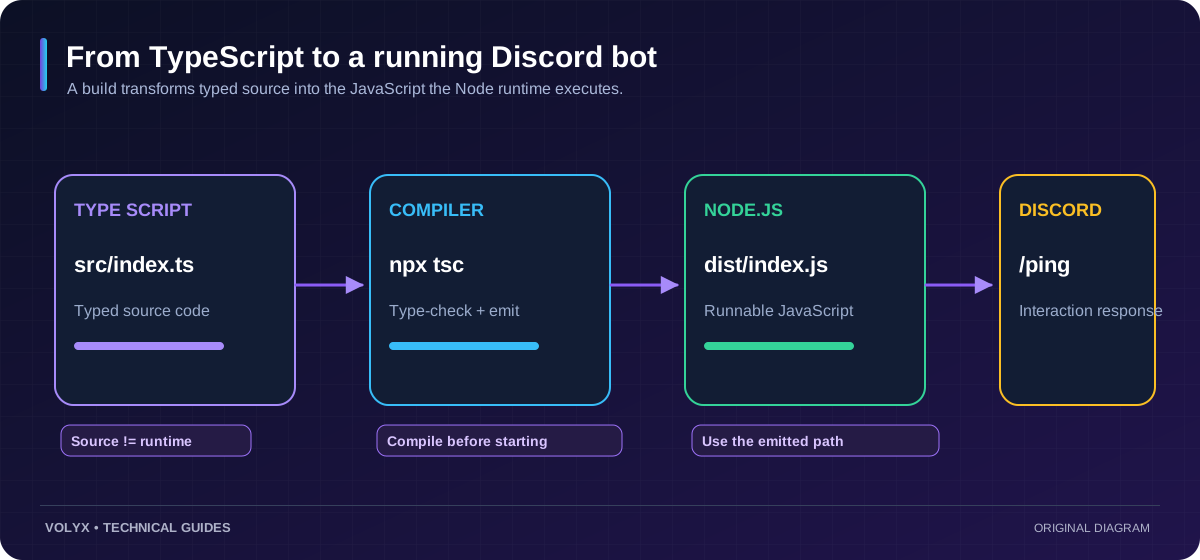
There are two common approaches. In a compile-and-run workflow, tsc converts .ts into .js; Node.js executes the generated JavaScript. This is the strategy in the example and is easy to audit. In a direct TypeScript workflow, a loader, runtime, or supported TypeScript execution feature starts .ts files directly. That may be convenient, but behavior depends on the installed Node release, ESM configuration, and the host’s startup integration.
Volyx has supported TypeScript runtime choices in its hosting interface, but that does not mean every project can use node index.ts interchangeably with node dist/index.js. Check the selected image/runtime, exact Node version, main-file setting, and the startup command displayed for your specific server. When in doubt, build to JavaScript and explicitly start the output file.
| Approach | Entry point | Advantages | Limitations |
|---|---|---|---|
| Compile before deployment | dist/index.js | Predictable artifacts, static type checking, easy to test | Requires a build step |
| Build on server, then run JS | npm run build followed by npm start | Uses source uploads and a repeatable build | Needs TypeScript installed in build environment |
| Direct TypeScript runtime | src/index.ts | Short development loop | Loader/runtime-dependent; may differ between host images |
| Bundle for production | Bundler output, often dist/index.js | May reduce file count | Needs correct Node/Discord dependencies and configuration |
For most learners, compile to JavaScript is a sensible baseline. You can optimize packaging later when you have a working and observable deployment.
The downloadable package includes the exact example file structure. Here is what we’re building:
typescript-discord-bot/
├── src/
│   ├── config.ts
│   ├── index.ts
│   └── register-commands.ts
├── package.json
├── tsconfig.json
├── .env.example
└── .gitignore
You can open this folder locally, or upload the source using Volyx’s Files page. The dist/ directory is intentionally missing at first: it is generated by TypeScript when you build. If your provider disallows installing development dependencies at runtime, build locally and upload dist/ together with the required production dependencies or arrange a build step supported by the hosting platform.
The sample uses ES modules. That means "type": "module", module: NodeNext, and explicit .js relative import extensions work together after TypeScript emits JavaScript. It is tempting to copy settings from a CommonJS tutorial, but mixing both module systems without understanding them is a major source of deploy failures.
{
  "name": "volyx-typescript-ping-bot",
  "private": true,
  "version": "1.0.0",
  "type": "module",
  "engines": { "node": ">=24.17.0" },
  "scripts": {
    "build": "tsc -p tsconfig.json",
    "start": "node dist/index.js",
    "register": "node dist/register-commands.js",
    "check": "tsc --noEmit -p tsconfig.json"
  },
  "dependencies": {
    "discord.js": "^14.27.0"
  },
  "devDependencies": {
    "@types/node": "^24.0.0",
    "typescript": "^5.9.0"
  }
}
These ranges are illustrative for the documented 2026 setup. On a real project, use the lockfile created by npm install and verify any future package updates before deployment. The package shipped with this article doesn’t include a pre-generated lockfile because no remote dependency installation is performed as part of building the article itself.
tsconfig.json for Node.js{
"compilerOptions": {
"target": "ES2022",
"module": "NodeNext",
"moduleResolution": "NodeNext",
"rootDir": "src",
"outDir": "dist",
"strict": true,
"esModuleInterop": true,
"skipLibCheck": true,
"forceConsistentCasingInFileNames": true,
"noEmitOnError": true
},
"include": ["src/**/*.ts"]
}NodeNext mirrors the way modern Node.js interprets CommonJS and ECMAScript modules. Since this project declares "type": "module", the output will use ES module syntax. Notice the .js extension in local TypeScript imports: for instance, import { getConfig } from './config.js' resolves to config.ts during compilation, and still resolves when Node executes the generated config.js file. This is deliberate, not a typo.
Create .env.example with placeholders, but do not paste the real token into that file if you intend to publish or share the project. The working example reads process.env, so set your values in the host’s protected environment settings or in an environment mechanism you explicitly configure. Node.js does not automatically read .env.example.
DISCORD_TOKEN=replace-with-real-bot-token
DISCORD_CLIENT_ID=replace-with-application-id
DISCORD_GUILD_ID=replace-with-test-server-id
DISCORD_TOKEN authenticates the bot and is the most sensitive field. DISCORD_CLIENT_ID identifies the application and DISCORD_GUILD_ID identifies the test server for guild-specific slash-command registration. Never send the token to a support ticket, public log, tutorial screenshot, or front-end JavaScript bundle. If one leaks, reset it in the Developer Portal and update the running service.
The sample configuration rejects empty or obviously placeholder values early. The full code is included in the package; the key idea is fail-fast validation:
export function requireEnv(name: string): string {
  const value = process.env[name]?.trim();
  if (!value || value.startsWith('replace-')) {
    throw new Error(`Missing configuration: ${name}`);
  }
  return value;
}
This avoids a common mistake: an error such as TokenInvalid appears much later, when the underlying problem was simply that a host never received the environment variable. It also prevents a developer from accidentally printing the token while inspecting an object.
/ping command handlerThe bot needs only the Guilds Gateway Intent. A slash command arrives as an interaction rather than a normal message, so Message Content Intent is unnecessary for this tutorial.
import { Client, Events, GatewayIntentBits } from 'discord.js';
import { getConfig } from './config.js';

const { token } = getConfig('bot');
const client = new Client({ intents: [GatewayIntentBits.Guilds] });

client.once(Events.ClientReady, ready => {
  console.log(`Ready as ${ready.user.tag}`);
});

client.on(Events.InteractionCreate, async interaction => {
  if (!interaction.isChatInputCommand() || interaction.commandName !== 'ping') return;
  try {
    await interaction.reply({
      content: `Pong! Gateway latency: ${Math.round(client.ws.ping)} ms`
    });
  } catch (error) {
    console.error('Unable to reply to /ping:', error);
  }
});

client.login(token).catch(error => {
  console.error('Discord login failed:', error);
  process.exitCode = 1;
});
This example intentionally handles one command. A larger bot may need a modular command router, command-level permissions, persistent storage, structured logging, and protection against duplicate responses. Those are sensible next steps, but they should not obscure whether the deployment itself works.
Creating a slash command in code is not enough. Discord must also receive the command definition through its API. The included src/register-commands.ts uses the discord.js REST client and registers /ping to one test guild. Guild registration is useful while developing because you can test in a controlled server rather than pushing every change globally.
const commands = [
  new SlashCommandBuilder()
    .setName('ping')
    .setDescription('Check whether the TypeScript bot is responding')
    .toJSON()
];
await rest.put(
  Routes.applicationGuildCommands(clientId, guildId),
  { body: commands }
);
The complete file includes token and ID configuration. The application must be installed in your test server with the appropriate bot and application-command authorization. Command registration and starting the Gateway client are separate operations. Do not register every time the bot restarts unless that is part of a deliberate deployment system; repeated registration creates needless API traffic and complicates debugging.
On a trusted development machine with a compatible Node.js version:
node -v
npm install
npm run check
npm run build
npm run register
npm start
The first two commands verify and install dependencies. The type check verifies source types without emitting files. The build then creates dist/index.js, dist/config.js, and dist/register-commands.js. The registration step configures the test-guild slash command, and npm start launches the bot. If npm run check fails, do not proceed as though the build succeeded; fix the TypeScript error first.
Once the console says Ready as ..., invoke /ping from the server where you registered it. The reply proves that the bot is authenticated, the command exists, and the interaction handler is working. It doesn’t prove long-term uptime or that every feature of a larger bot is healthy.
Volyx provides a Pterodactyl-style panel with Console, Files, Startup, and resource information for hosted servers. The exact navigation and available runtimes can change, so use your real panel labels rather than blindly following a screenshot from another hosting company.
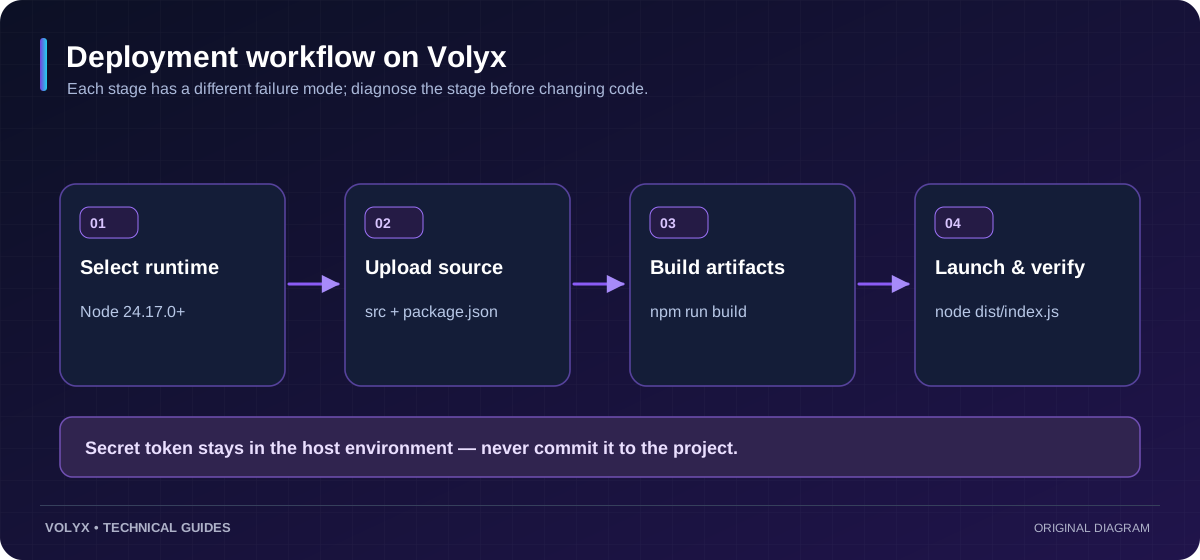
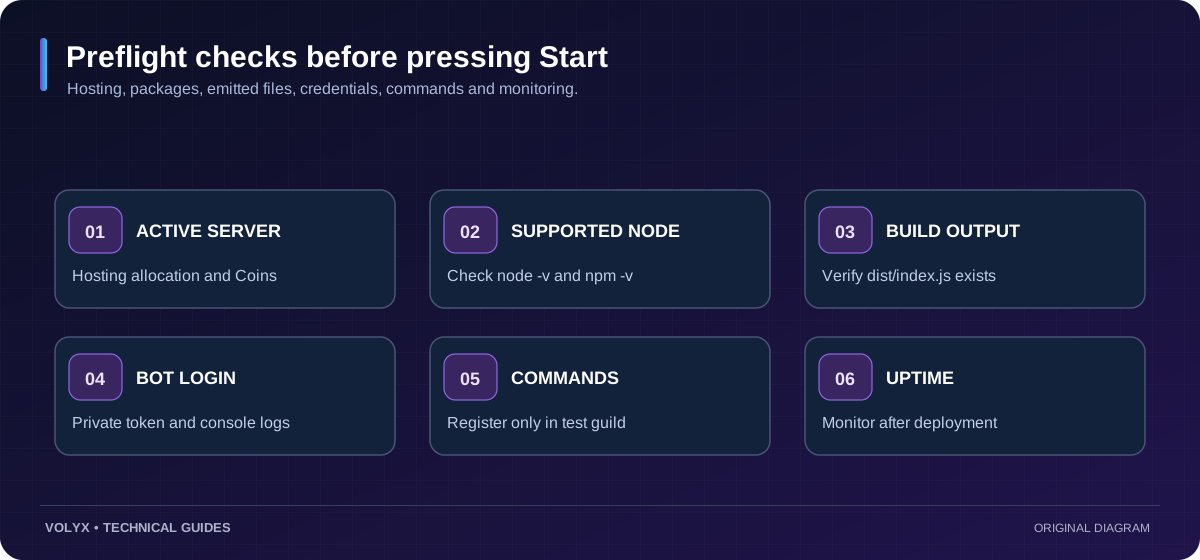
Log in at Volyx and open your authenticated panel. Select a supported Node.js or TypeScript application server and check its resources, duration, and Coins requirements. Some host images offer Node 24 or 25; verify the actual patch version in Console. Current discord.js documentation requires at least 24.17.0; if the container is older, update to an appropriate image or select a compatible, documented dependency version rather than overriding npm’s engines check.
Use Files or an approved file-transfer method to upload package.json, tsconfig.json, and the src/ directory. Do not upload a real .env file into a publicly accessible directory. If you built locally, you can upload dist/, but still ensure the required production packages are installed in the target runtime. Avoid nested folders such as /home/container/mybot/mybot/src if the startup command assumes the project root is /home/container.
Use an environment-variable or secrets feature if your server type provides one. Volyx’s panel has included a protected Files/Secrets workflow, but availability and how it injects variables may differ by server and runtime. Confirm that the variables are actually present to the bot process; merely saving them in a UI does not guarantee your particular startup template reads them. Never print process.env wholesale, and never share token-bearing logs.
If your runtime supports a private .env loader, configure it explicitly. Don’t assume that Node reads arbitrary .env files in every version or startup image. The sample application only reads standard process.env values.
If your server permits installation and compilation, run the install and build commands once after uploading or whenever the source changes. The final Startup should launch the generated JavaScript:
node dist/index.jsAn alternative is a host-managed installation step followed by npm start. Do not use npm install && npm run build && npm start as a permanent restart loop without considering resource limits, offline package registries, and interrupted installs. Build in a controlled step, then run the built artifact. If you select Volyx’s direct-TypeScript runtime, follow its documented main-file semantics instead; don’t mix direct .ts startup with compiled .js startup unintentionally.
Open Console, start the server, and look for the readiness line. If the process exits, inspect the first actual error, not just the panel’s final “offline” indicator. Common classes of errors include missing tokens, incompatible Node releases, missing installed modules, ERR_MODULE_NOT_FOUND, and TypeScript output paths that differ from the configured entry point.
In the panel, also check whether the allocation has reached a memory or CPU limit, whether the hosting period has expired, and whether the server is suspended. Code cannot recover a server whose hosting allocation is no longer active. In a Coins-based system, running out of available resources or reaching the hosting expiry is a different issue from a bug inside index.ts.
TypeScript adds compile-time checks that are particularly valuable when handling Discord interactions, command arguments, and data models. It does not magically make a bot faster, more secure, or online for longer. Node.js still runs emitted JavaScript, and runtime errors are still possible.
| Concern | TypeScript approach | JavaScript approach |
|---|---|---|
| Type errors | Checked by tsc before deployment | Discovered through tests/runtime, or optional type checking |
| Runtime | Normally compiled to JS, or executed by supported TS runtime | Executed directly by Node.js |
| Startup complexity | Requires compatible TypeScript build/runtime configuration | Fewer build steps for a simple bot |
| Discord API usage | Same underlying Discord API/library | Same underlying Discord API/library |
| Hosting resources | Similar runtime work for equivalent emitted code | Similar runtime work |
| Best fit | Growing projects and teams with structured commands | Small experiments and developers who prefer JS |
Choose TypeScript when type-checking helps you change the bot safely. Choose JavaScript when simplicity matters more. Switching an existing project is a software-maintenance decision, not an SEO feature or a hosting-performance hack.
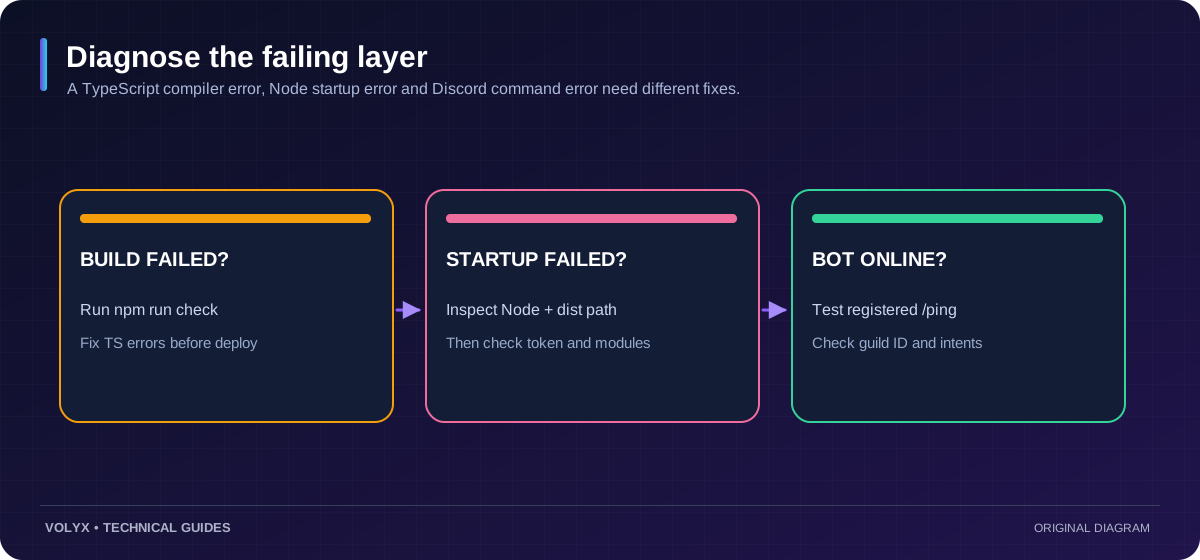
The messages below are examples of what can go wrong during deployment. Their exact wording changes between Node versions and libraries; always read the real logs.
| Symptom or error | Likely cause | First action |
|---|---|---|
Unknown file extension ".ts" | Node started source directly without compatible TS handling | Start dist/index.js after building |
Cannot find module ... dist/index.js | The build didn’t run or outDir differs | Check tsconfig.json, rebuild, list dist/ |
ERR_MODULE_NOT_FOUND for ./config | ESM import missing .js extension in emitted code | Use ./config.js in NodeNext TS source |
Cannot use import statement outside a module | Module mode and package type disagree | Match "type": "module" with NodeNext settings |
TS2307 Cannot find module 'discord.js' | Dependency not installed or wrong working directory | Verify package.json, run npm install |
npm EBADENGINE warning/error | Node.js version too old for a dependency | Check node -v, select compatible image |
TokenInvalid or failed login | Token missing, rotated, or incorrect | Reconfigure token privately; rotate if exposed |
/ping doesn’t appear | Command not registered or wrong guild/app | Re-run controlled test-guild registration |
| Bot online but no replies | Missing interaction handler, errors, or permissions | Inspect the interaction event and exceptions |
Discord intent error 4014 | Unauthorized privileged Gateway Intent requested | Remove unneeded privileged intent or configure approval |
| Process exits with OOM/suspended status | Memory limit, server status, or hosting expiry | Check panel limits, state, and resource graphs |
TS18003 / no inputs found | include or project folder path doesn’t match files | Confirm source path and rootDir |
“Unknown file extension .ts.” First look at the exact command executed by the host. node src/index.ts isn’t equivalent to node dist/index.js. If you’re using the compilation workflow, stop the process, compile the source, verify the emitted file, and point Startup at that emitted file. You generally don’t need to rewrite your bot to fix this.
“Cannot find module dist/index.js.” Confirm that the build succeeded inside the same project directory where the server starts. The presence of src/index.ts only proves that source was uploaded. Check the outDir, examine the Files page for dist/index.js, and make sure the startup command uses the correct working-directory-relative path.
“Bot is online but /ping doesn’t appear.” A connected Gateway bot and a registered application command are different resources. Ensure the DISCORD_CLIENT_ID belongs to the same application as the bot token, and that DISCORD_GUILD_ID matches the test server. Register once using the test-guild script, and check the app’s installation authorization. Don’t add Message Content Intent as a blind fix for a slash command.
An update should be reproducible, reversible, and observable. Keep the source code in a version-controlled repository and review new library requirements before installing upgrades. Commit a lockfile for a real project. Test changes in a private guild first. Consider a separate test server when altering persistent data, and don’t overwrite production credentials in shared examples.
A sensible deployment sequence is: create a backup of the current working source and settings, install dependencies against the lockfile when available, type-check, build, register commands only if their definitions changed, then restart and test /ping. Monitor logs after rollout. If the update fails, roll back to the last known working artifact rather than applying random changes under pressure.
Do not put secrets in commit history. Even after deleting a file from the newest commit, an exposed token may still exist in previous revisions; reset compromised credentials. Restrict staff permissions in the hosting panel. The Discord bot token and any web dashboard client secret belong to different trust boundaries and should be treated accordingly.
node -v at 24.17.0+ for the current discord.js documentation.DISCORD_TOKEN, DISCORD_CLIENT_ID, and DISCORD_GUILD_ID outside public source files.npm run check and npm run build, and inspect the generated dist/ files./ping in a test guild once, then start the correct JavaScript entry point./ping, and inspect Console for errors.Yes, if a hosting service supports the runtime and your workload fits the resources and terms available to you. Volyx provides a Coins-based hosting model, so check account-specific requirements, server duration, and available runtime images. “Free” should not be confused with a guarantee of unlimited resources or indefinite uptime.
.ts files directly?Some Node versions and dedicated TypeScript runtimes can handle certain TypeScript syntax directly, but support differs by feature, loader, and release. This guide deliberately compiles .ts to JavaScript so the startup path is predictable. Follow your hosting runtime’s documented TypeScript mode if you decide to use direct execution.
The current discord.js v14 documentation lists Node.js 24.17.0 or newer. Verify the requirement again when installing or upgrading, because package requirements change. A “Node 24” selector might still contain an older patch release.
tsc and tsx?tsc type-checks and can emit JavaScript output. tsx is a development-oriented runtime tool that can execute TypeScript through its tooling, but using it doesn’t replace the need to understand your runtime and deployment artifacts. This example uses tsc for reproducibility.
node dist/index.js or npm start?Both work if package.json defines "start": "node dist/index.js" and the dist/ folder exists. Use the command required by your server’s Startup integration. Whichever you choose, the working directory and build output must agree.
/ping command?No. This example uses a slash command delivered as an interaction and only requests the Guilds Gateway Intent. Message Content Intent becomes relevant when your bot reads regular message content for features that genuinely need it.
Local machines and hosting containers may have different Node versions, current directories, dependencies, environment variables, and startup commands. Compare node -v, project paths, build outputs, and the first error in the Volyx Console instead of assuming the TypeScript code itself is the problem.
Use a protected environment or secrets mechanism that the bot process can actually read. Never put it in Git, screenshots, or public front-end assets. Rotate the token in the Developer Portal if it was exposed. The sample .env.example is only a template.
/ping not showing in my Discord server?Check that the application is authorized for your test server, the command-registration script ran successfully, the application ID matches the bot token, and DISCORD_GUILD_ID is the right guild. Command registration is separate from starting the bot process.
The compiler uses resources during a build, but the emitted JavaScript runs under Node.js like a JavaScript project. Equivalent applications usually have similar runtime behavior; libraries, caches, intents, and workload matter more than the original source language.
dist/ to Git?You may choose to store compiled output for environments that cannot build, but most projects generate dist/ during CI or deployment and commit source plus lockfiles instead. The right choice depends on whether your host supports builds and how you deliver artifacts.
Yes. A bot can store guild settings or user preferences in PostgreSQL, SQLite, or another supported database. Keep the database credentials in secrets and use parameterized queries. Start with one working slash command before adding persistence and migrations.
If a bot requests privileged intents that aren’t enabled or approved where required, Discord can close the Gateway connection. Inspect the error code and enable only genuinely necessary intents. The example’s /ping command doesn’t need privileged message content, member, or presence intents.
No. A Gateway client maintains an outbound connection to Discord. An interaction webhook endpoint, HTTP API, or web dashboard is a different architecture and may require public HTTPS routing. Confirm your Volyx server has suitable networking before planning a public endpoint.
Running duplicate active copies can produce conflicting behavior, repeated jobs, or duplicated responses if your application isn’t designed for multiple instances. Keep one primary process while learning, and introduce sharding or distributed coordination only when needed.
Check the Volyx dashboard for server state, renewal requirements, Coins, and resource limits. A successful TypeScript build cannot revive a hosting allocation that is expired or suspended. Restore or renew the allocation according to the service’s available controls.
A good TypeScript bot deployment isn’t defined by the number of npm packages or the complexity of the editor. It is defined by being repeatable: the source type-checks, the right Node version is selected, the emitted JavaScript exists, secrets are private, commands are registered in the right server, and the panel shows useful logs when something breaks. These habits matter whether you’re deploying your first /ping command or a feature-rich community assistant.
If you’re ready to try the project on Volyx, open the hosting platform and confirm the current TypeScript/Node runtime and Coins requirements for your account. If your bot fails to start, continue with our 12 common Discord bot startup errors guide. You can also read our free Discord bot hosting walkthrough and our Discord bot RAM/CPU optimization guide once deployment works.
Explore more in-depth articles with code, visuals, and practical walkthroughs.
Browse all articles ↗
A practical, evidence-first guide to fixing Minecraft Java server lag: read TPS and MSPT, profile with spark, tune chunks, and diagnose CPU, memory and plugins.
Read article ↗
Learn the difference between DDoS floods and Minecraft bot raids, secure a Paper or Velocity server, compare TCPShield and Cloudflare, and respond safely using Volyx.
Read article ↗
Compare five real MIT-licensed JavaScript, TypeScript, and Python Discord bot starters, then learn how to deploy one safely on Volyx.
Read article ↗