
Minecraft Server Lag in 2026: Diagnose TPS, MSPT, CPU and RAM
A practical, evidence-first guide to fixing Minecraft Java server lag: read TPS and MSPT, profile with spark, tune chunks, and diagnose CPU, memory and plugins.
Read article ↗Build a Python Discord slash-command bot that stores each server's settings in PostgreSQL. Follow safe asyncpg pooling, SQL, environment variables, backups and Volyx deployment.
A Discord bot can answer /ping in a few lines of Python. The harder question arrives after someone changes a setting and your bot restarts: where did that setting go? A variable in memory disappears when a process restarts. An unprotected JSON file can become awkward when multiple commands update it. And when a bot serves several communities, one guild’s configuration must never appear in another guild.
This guide builds something you can actually reason about: a Python Discord bot with PostgreSQL-backed per-server settings. We use discord.py for slash commands, asyncpg for asynchronous database access, parameterized SQL for safe queries, and a deliberately small connection pool. Then we show how to prepare the project for hosting in a managed environment such as Volyx. Every step includes a check, a failure case, or an explanation of what it does not guarantee.
Quick answer: create a separate PostgreSQL database, create the guild_settings table, provide private connection credentials to your bot, initialize an asyncpg pool, and use the Discord guild ID as a database key. Keep the bot token outside your source files; deploy the same tested code to a Python runtime; and test restart persistence before announcing that your bot is ready.
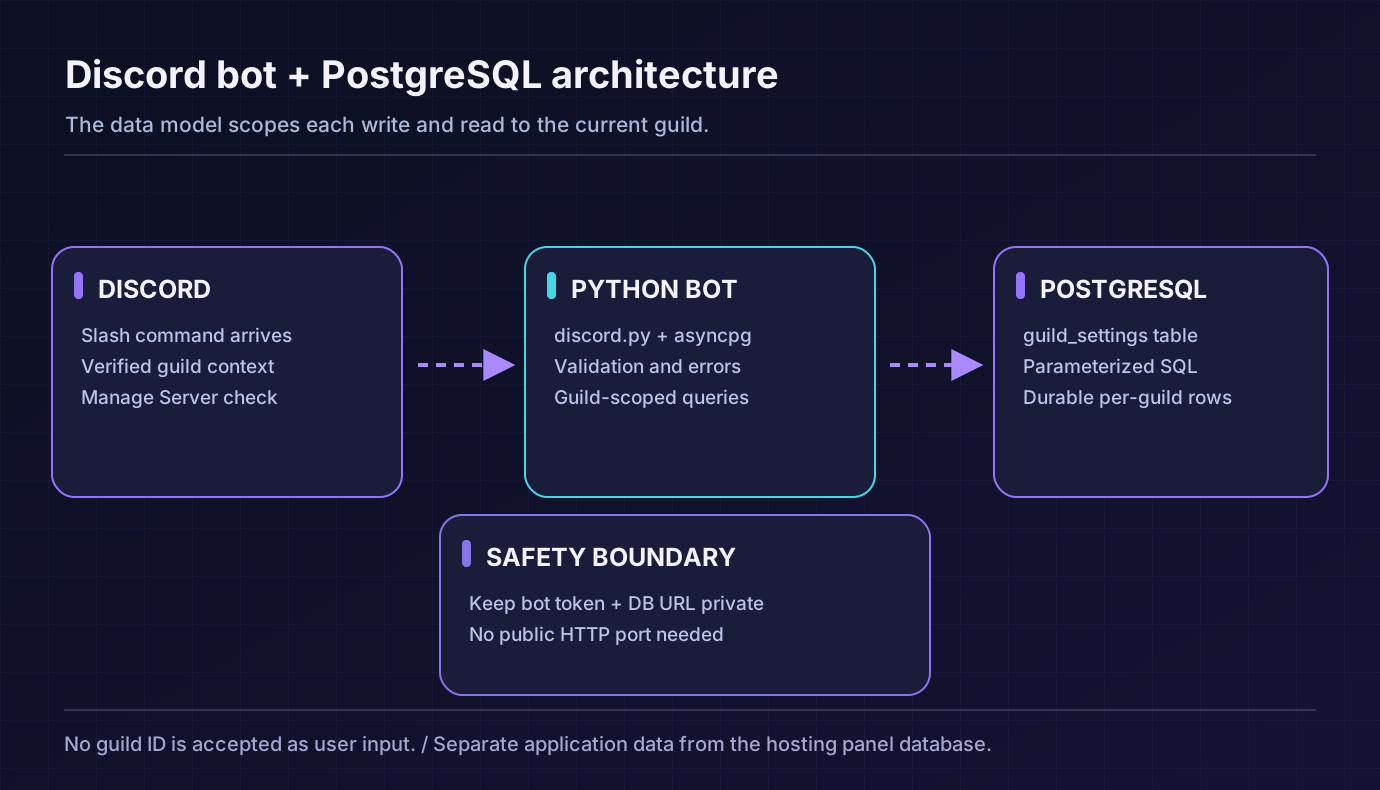
What the downloadable sample does:
/pingchecks that the bot responds;/welcome-setsaves text for the current guild;/welcome-showreads the value after a restart. It does not automatically send welcome messages when somebody joins. That additional feature would need a joining-member event handler, suitable intents, message permissions and another test plan. Keeping persistence separate makes this example easier to learn and less likely to request unnecessary Discord privileges.
The example project is a compact repository, rather than a paste of unrelated snippets. Its files have distinct jobs: config.py reads secrets safely; settings.py holds input validation and SQL; main.py starts Discord and defines slash commands; schema.sql creates the single table; and the tests exercise validation and persistence behavior using a fake database connection.
The data model is intentionally small. One Discord guild has one stored welcome message. The guild ID is a text primary key, because Discord snowflakes are identifiers rather than numbers you calculate with. The message is bounded to 500 characters. The database records an updated_at timestamp so you can tell when a change occurred.
The design teaches five reusable principles: identify the guild from a trusted Discord interaction; check permissions before modifying that guild’s data; parameterize all untrusted values; keep database work out of long-running bot callbacks; and treat persistence and backups as separate responsibilities.
| Component | Purpose | What it does not do |
|---|---|---|
| Python 3.10+ | Run the bot and asyncio | Make an API publicly reachable |
discord.py | Connect to Discord and handle slash commands | Store durable settings automatically |
asyncpg | Communicate asynchronously with PostgreSQL | Encrypt a database connection unless configured correctly |
| PostgreSQL | Store per-guild settings durably | Replace a backup and recovery plan |
| Volyx / hosting runtime | Start and supervise your bot process | Guarantee a particular resource allowance or public PostgreSQL endpoint |
You need a Discord application with a bot user, a server where you can test commands, a Python runtime, and a database you are authorized to use. The official discord.py documentation supports Python 3.8+, but this sample targets Python 3.10 or later so that modern typing, error handling and testing examples stay straightforward. Check the exact Python version supported by your selected hosting egg or runtime instead of assuming that every panel option is identical.
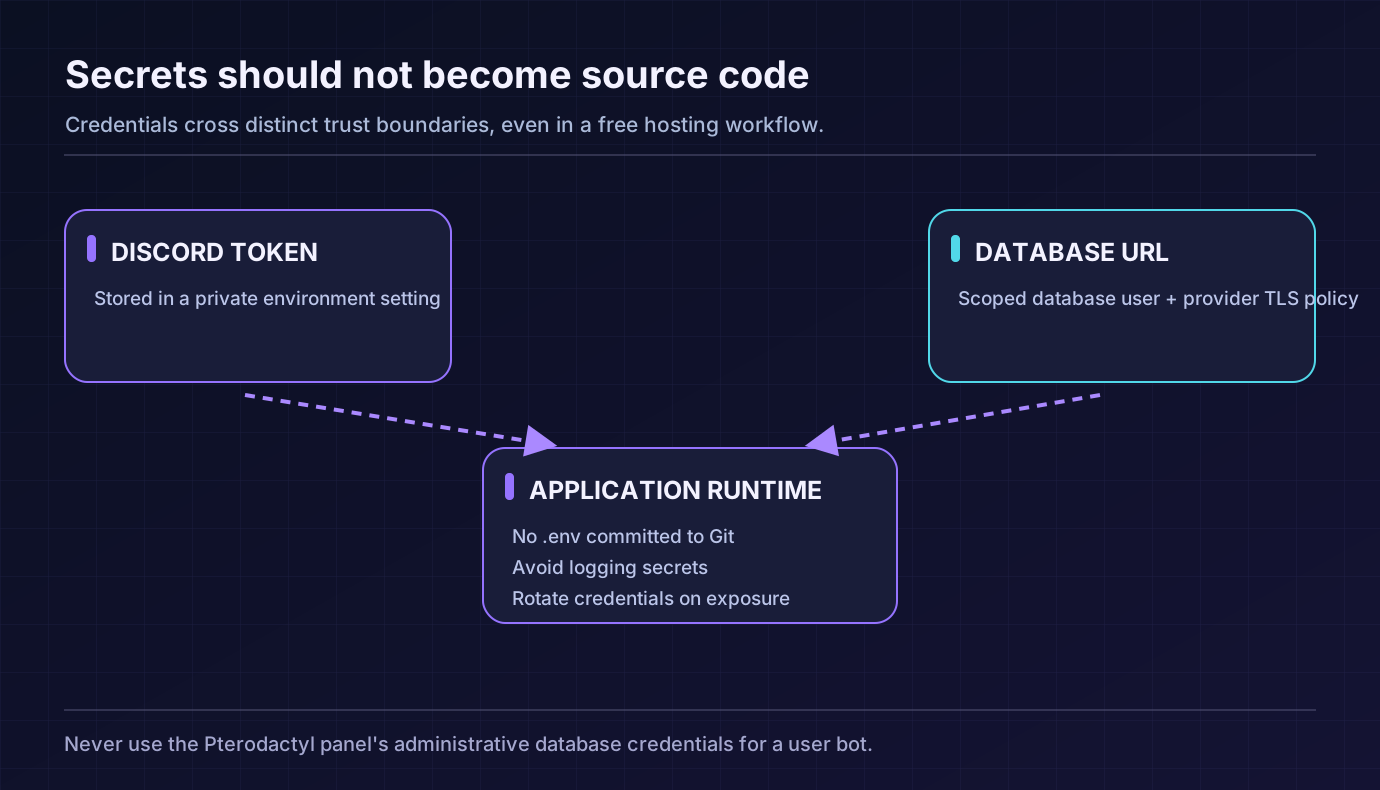
For PostgreSQL, collect the hostname, port, database name, username, password and TLS requirements. A provider-managed database may expose those under its database controls. Do not use the Pterodactyl panel’s own administrative database for your bot. Do not assume that every free Volyx server includes PostgreSQL slots, outbound network reachability, or the permission to install a PostgreSQL daemon. Verify what your own server allows.
You also need to decide where your bot and database live. They do not need to be on the same machine. A bot running inside a container can connect to a managed PostgreSQL service if the network route, firewall, credentials and TLS policy permit it. A database hostname that works from your laptop might be unreachable from a hosting container. Test from the bot runtime.
/ping and read/write configuration commands. This sample does not require the privileged Message Content Intent; it also does not need to read members’ messages.DEV_GUILD_ID when testing guild-scoped command registration. Developer Mode in Discord makes it easier to copy IDs.Do not invite an unfamiliar template with Administrator permission simply because a tutorial asks you to. In our example, a user must have Manage Server to change the saved text. The bot can operate without Administrator privileges.
Create a database and application user through your hosting provider’s supported workflow. If you own the database server, create a user limited to the relevant database/schema. Avoid handing your bot a PostgreSQL superuser password. The bot only needs permission to read and update its own settings table after you have applied the schema. The account running migrations may be separate from the runtime account.
The sample includes this migration:
CREATE TABLE IF NOT EXISTS guild_settings (
    guild_id TEXT PRIMARY KEY,
    welcome_message VARCHAR(500) NOT NULL,
    updated_at TIMESTAMPTZ NOT NULL DEFAULT now(),
    CONSTRAINT guild_id_digits CHECK (guild_id ~ '^[0-9]{15,20}$')
);
Run the migration once against your own empty test database using a PostgreSQL client or provider database console. For example, on a machine where psql is available and you are authorized to connect:
psql "$DATABASE_URL" -v ON_ERROR_STOP=1 -f bot/schema.sqlThat command modifies the selected database; check the URL before running it. The downloadable bot does not create the table every time it starts. This keeps schema changes visible and helps prevent accidental database modifications during a routine restart.
The sample expects DISCORD_TOKEN, DATABASE_URL and optionally DEV_GUILD_ID. The file .env.example contains placeholders, not credentials. Depending on your hosting environment, configure the values under Startup, Variables, Secrets or the equivalent supported settings. A .env file alone is not loaded magically by Python; if you use one locally, configure a trusted loader or export the variables in your development shell.
DISCORD_TOKEN=<your-secret-bot-token>
DATABASE_URL=postgresql://bot_user:REPLACE_ME@db.example.net:5432/botdb
DEV_GUILD_ID=<your-test-guild-id>
Do not copy the angle-bracket placeholders into production as though they were valid credentials. The public tutorial never needs your real token, host password or database URL. Our example code validates that important settings exist before connecting and avoids printing them in exception messages.
A connection URL can encode a password and therefore must be treated like a secret. Be careful when pasting commands into terminal history, sharing logs, or creating screenshots for support. When a password is exposed, rotate it; deleting a screenshot does not make the compromised credential safe again.
Some database providers require TLS; others offer an explicitly private network and support other policies. Follow the database provider’s connection instructions. Do not blindly set ssl=False to make a broken connection work, and do not turn off certificate verification to hide an unknown-authority error. If your provider requires a CA bundle or a particular SSL context, configure it in the database client and test it from the container.
A first successful connection proves only that your credentials, route and handshake work right now. It does not prove that a firewall is secure, backups exist or the service will never be interrupted.
Use a development directory containing requirements.txt and the bot/ package. On a development machine that supports virtual environments:
python3 --version
python3 -m venv .venv
. .venv/bin/activate
python -m pip install -r requirements.txt
python -m unittest discover -s tests -v
A managed hosting panel may use a different Python installation workflow. On Volyx, choose an available Python runtime and check the Startup configuration. If a hosting egg installs requirements automatically, follow that runtime’s instructions. Avoid running a second virtual environment inside a container if the provider already manages Python dependencies in its own way.
The dependency list uses compatible release ranges for discord.py and asyncpg. Pin tested exact versions in your real deployment after verifying them. Python 3.13 and older Python 3.10 images can differ in package compatibility; the presence of a “Python” option alone does not prove every wheel will install.
The repository contains two functions: read a message and save a new one. Both use asyncpg placeholders ($1, $2), never string interpolation inside SQL. That distinction matters because a welcome message is typed by an administrator and therefore must be treated as untrusted input—even if it looks harmless.
async def save_message(pool, guild_id: str, message: str) -> None:
    guild_id = validate_guild_id(guild_id)
    message = validate_message(message)
    await pool.execute(
        """
        INSERT INTO guild_settings (guild_id, welcome_message)
        VALUES ($1, $2)
        ON CONFLICT (guild_id) DO UPDATE
          SET welcome_message = EXCLUDED.welcome_message,
              updated_at = now()
        """,
        guild_id,
        message,
    )
ON CONFLICT is useful here because the same guild can change its setting repeatedly. You don’t need a separate SELECT followed by an INSERT that could race with another request. The primary key is what makes that upsert deterministic.
For reads, fetchrow retrieves a single result. The query includes the guild ID; it never returns an arbitrary row from some other server. If nothing has been saved, the bot returns a friendly “not configured” answer.
async def get_message(pool, guild_id: str) -> str | None:
    guild_id = validate_guild_id(guild_id)
    row = await pool.fetchrow(
        "SELECT welcome_message FROM guild_settings WHERE guild_id=$1",
        guild_id,
    )
    return None if row is None else row['welcome_message']
The text is also constrained at the database layer, not just in Python. This is intentional defense in depth. A future code path that forgets to check message length still cannot store arbitrarily long values in the same column.
asyncpg.create_pool is designed to reuse a small set of connections instead of opening a new database session for every command. The example starts with min_size=1 and max_size=3. Those values are tutorial defaults, not a universal optimum. Small bot instances and shared database plans often benefit from a conservative limit. Large shards or multiple replicas may need a carefully calculated global connection budget.
Imagine deploying four bot instances with three connections each: your maximum potential connection count is already 12, before administrative clients, migrations or other applications connect. Always consider the sum across replicas rather than tuning each process independently.
The bot acquires its pool during setup_hook() and closes it when the Discord client shuts down. setup_hook() runs before Discord’s websocket is connected; it is a safe place for database initialization but not for waiting on wait_until_ready(), which would deadlock in that phase. The source code uses no such wait.
/ping responds without touching PostgreSQL. That matters: when the database is unavailable, the bot can still demonstrate that the Discord connection is alive. /welcome-set validates message length, checks the user’s guild permissions and writes using the current guild’s ID. /welcome-show reads only that guild’s value. All responses are ephemeral, so a user does not unintentionally broadcast configuration details to a public channel.
The write command should be protected in two places. Discord’s default_permissions(manage_guild=True) makes the intended requirement visible in command configuration, but the server-side handler also checks the invoking member’s current manage_guild permission. This second check guards the actual update operation rather than relying only on command visibility or UI defaults.
We never take a guild ID from a slash-command parameter. Instead, we trust interaction.guild_id, which Discord supplies from the context in which the command was invoked. A user should not be able to choose another community by typing its ID into a form.
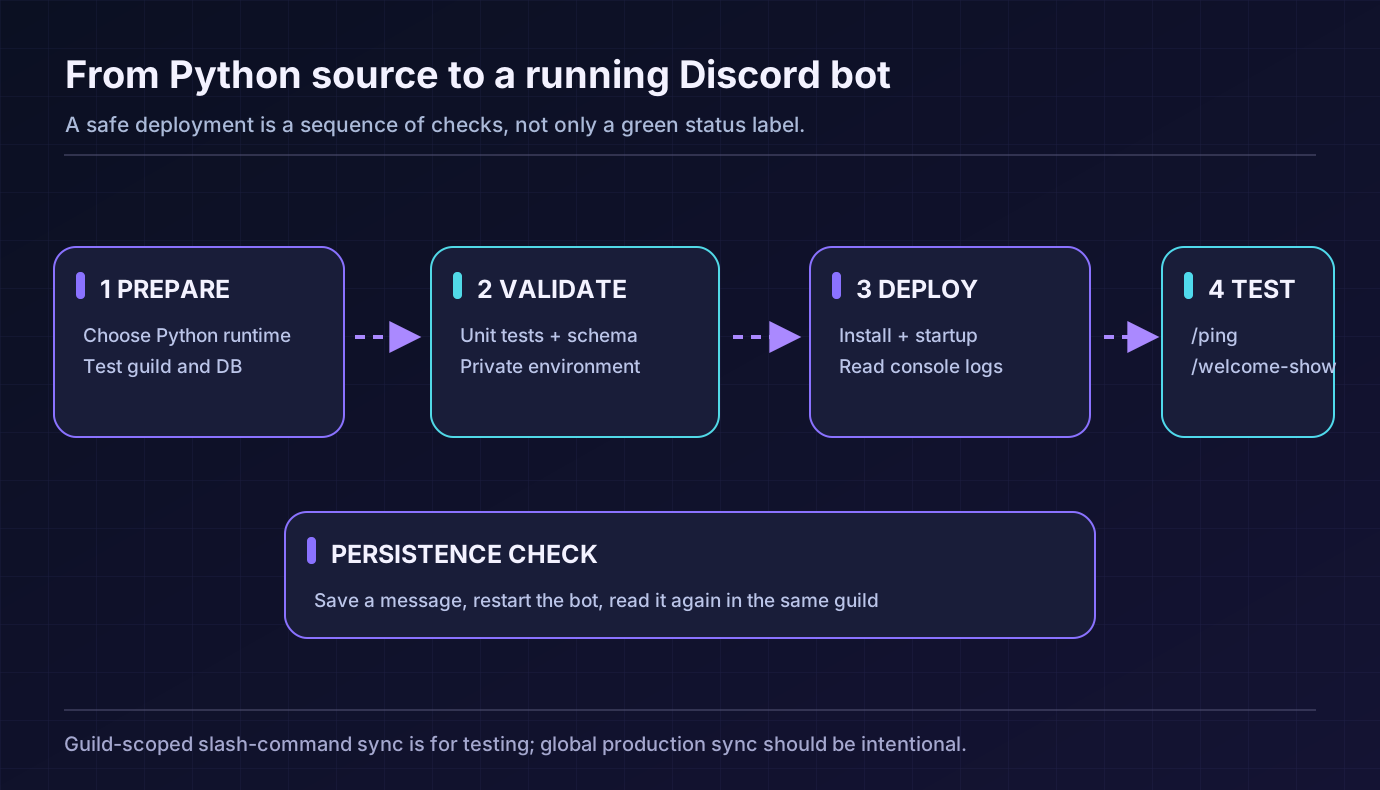
For quick testing, use DEV_GUILD_ID. The example copies the global command definitions into the test guild and syncs that guild’s command tree. Guild-scoped registration is convenient when iterating because the commands normally appear sooner than globally distributed changes. Once tested, plan how you will register commands for production instead of carelessly synchronizing every guild on each startup.
Do not repeatedly bulk-overwrite commands across a live application just to fix a single missing menu item. Verify the application installation, command scopes and guild ID first. Discord may take time to distribute global command changes.
For privacy and simplicity, this example does not implement a web dashboard or an HTTP webhook. A Python Discord gateway bot can run without exposing a public HTTP port. Adding a public web server only to make the bot look “online” introduces a separate service to secure.
Volyx provides game and bot hosting workflows through a Pterodactyl-based panel. The exact options available depend on your server, plan and selected runtime; do not assume every feature is enabled for every account. This is the sequence to follow after testing the project locally:
python -m bot.main from the project root. A runtime that forces a different main-file format will need an equivalent supported startup setting.requirements.txt, the bot/ directory and any allowed project files through Files or a supported upload method. Never upload .env containing real credentials or a local virtual environment.DISCORD_TOKEN, DATABASE_URL and DEV_GUILD_ID using the panel’s supported private variable controls. If variables are not available, ask the provider for a secure alternative rather than hard-coding secrets into a public script.schema.sql to a test database, then start the bot once and read the Console output. Do not infer successful database connection merely from the process having a PID./ping, /welcome-set and /welcome-show in your test guild. Restart the bot, run /welcome-show again and verify that the text survived the restart.The result should be a server-specific setting that remains readable after a process restart. If an application cannot reach PostgreSQL from inside Volyx, fix the reachability, allocation or provider setting first; retrying the same command endlessly will not change network policy.
| Test | Expected result | If it fails |
|---|---|---|
| Startup console | Bot connects; no token printed | Check Python runtime, package installation and token |
/ping | Ephemeral pong response | Check Discord scopes and slash-command sync |
/welcome-set as an authorized member | Setting is stored | Verify Manage Server and database rights |
/welcome-set without permission | Update is refused | Review the live permission check |
/welcome-show in Guild B | Guild A’s value is not shown | Check the guild-scoped SQL key |
| Restart and read | Setting persists | Verify database URL and migrations |
| Database temporarily unavailable | Controlled error; no secrets logged | Check network/TLS and pool recovery |
SQLite can be an excellent starting point when a single bot process owns a local file and you have reliable persistent storage and backups. It is easy to deploy and does not need a networked database service. PostgreSQL is helpful for multi-process services, structured transactions, centralized access and stronger concurrency. MySQL/MariaDB are equally practical when your provider already manages them and your team knows the tooling.
| Question | SQLite | PostgreSQL | MySQL/MariaDB |
|---|---|---|---|
| Separate database server required | No | Usually | Usually |
| Best for a tiny single-process bot | Often simplest | Possible but extra setup | Possible but extra setup |
| Shared access across multiple bot instances | Requires careful file strategy | Strong fit | Strong fit |
| Network and TLS configuration | Not typically | Required for remote hosting | Required for remote hosting |
| Backups | Safe copy/backup API | pg_dump, managed snapshots, recovery | Provider snapshots, dump tools |
| Schema migrations | Yes | Yes | Yes |
Do not choose PostgreSQL simply because someone claims it always beats SQLite in performance. Network latency can make remote database writes slower than a local file for a very small bot. The reason to use PostgreSQL here is durable, centralized, structured storage that can grow with the service.
The fastest repair starts with identifying which layer failed. An invalid Discord token is not a PostgreSQL problem. A database authentication error is not fixed by reinstalling discord.py. When a command cannot be found in Discord, changing your SQL schema will not make it appear.
| Symptom or error | Likely cause | First useful check |
|---|---|---|
ModuleNotFoundError: No module named 'discord' | Dependencies missing from the active Python environment | Print Python executable; install requirements in that runtime |
ModuleNotFoundError: No module named 'asyncpg' | Package was not installed for the running interpreter | Verify package install logs and wheel compatibility |
LoginFailure: Improper token has been passed | Token invalid, revoked or includes extra formatting | Rotate token in Developer Portal; update secret privately |
/ping does not appear | App not installed with correct command scope or sync target | Verify guild ID, installation and sync strategy |
InvalidCatalogNameError | Database name does not exist | Compare URL with provider’s exact database name |
InvalidPasswordError | Username/password mismatch | Check account credentials without printing them |
ConnectionRefusedError | Nothing listening on target host/port or path blocked | Verify DB hostname/port and provider firewall |
| Connection timeout | DNS, routing, firewall or unavailable database | Test connectivity from the bot’s runtime |
| Certificate verification fails | TLS hostname or CA mismatch | Follow DB provider’s verified TLS setup |
UndefinedTableError: guild_settings | Migration never applied to the current database | Check which database is connected; run schema in test environment |
InsufficientPrivilegeError | Database user lacks table or schema rights | Check least-privilege grants for the bot user |
TooManyConnectionsError | Too many clients/replicas/pool slots | Reduce pool budgets; check global connection count |
RuntimeError: Event loop is closed | Lifecycle misuse or async client across loops | Recreate pool in correct setup_hook lifecycle |
| Command unexpectedly returns Guild A text in Guild B | Missing guild filter in custom code | Confirm guild_id is part of every read/write query |
Never “fix” a permissions error by switching the bot to the database superuser. Never solve TLS validation trouble by universally disabling certificate checks. Both actions replace a diagnosable problem with a broader security risk.
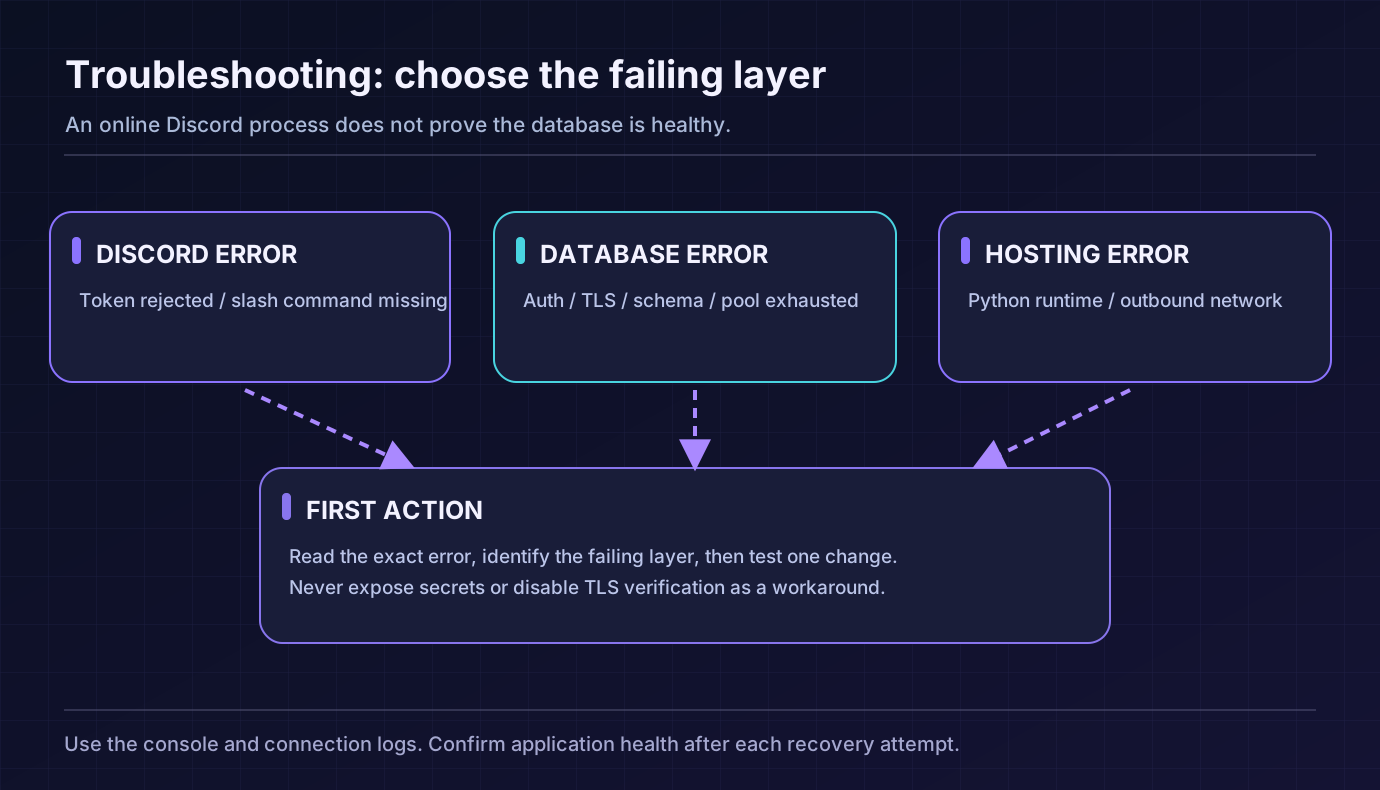
A gateway connection only proves that the bot can talk to Discord. It does not prove that SELECT queries work. The example catches database exceptions at the command boundary and returns a controlled user-facing message. In a larger project you would add structured health information, bounded retries, error metrics and alerting. Avoid infinite tight reconnect loops that burden the database when it is already failing.
If you restart the process to temporarily recover, inspect why the connection was lost: provider maintenance, expired access, DNS, network changes, idle connection timeouts or exhausted connection limits. A successful restart can hide a recurring root cause.
One of the highest-value tests is negative: store “Welcome to Alpha” in Guild A and “Hello from Beta” in Guild B. Read each after restarting. A query that forgets WHERE guild_id=$1 can expose someone else’s server configuration even though it uses parameterized SQL. Parameterization prevents SQL injection; it does not automatically provide authorization or tenant isolation.
For a larger application, automate this as part of a database integration test. Our included lightweight unit tests focus on validation and query composition using fakes; they do not replace a real cross-guild integration test against PostgreSQL and Discord.
PostgreSQL persists writes, but persistence is not the same thing as a backup. Corrupted data, a mistaken delete, an administrator action or an account incident can still cause permanent loss. Keep a database export in a controlled location separate from the runtime, monitor backup errors and practice restoring to a scratch database.
For a database you own and are authorized to export, pg_dump can produce a portable archive:
pg_dump --format=custom --file=botdb-backup.dump "$DATABASE_URL"The output may contain sensitive content. Restrict its file permissions and storage access. Do not automate uploading dumps to a public web directory. Test a restore on an empty test database, review the object list with pg_restore --list, and confirm the rows are present. The pg_dump utility is useful, but for large production databases you may also need provider snapshots, WAL-based recovery or a more complete disaster-recovery design.
The project’s schema should evolve through named migrations. When adding a column, test the application against the new schema in staging first; don’t improvise an ALTER TABLE against the only live database while users are active. Before a risky migration, secure a working backup and a documented rollback path.
Use a dedicated bot token and application database role, keep credentials in private environment settings, rotate exposed secrets, keep dependencies updated, and scope Discord permissions narrowly. Avoid writing full message contents, authorization headers or connection URLs to public logs. Keep your bot’s command handlers bounded: validate text length, constrain the permissions of administrative slash commands, and handle upstream timeouts gracefully.
For remote PostgreSQL, verify network access restrictions and TLS settings. Consider that role checks in Discord are part of your authorization story, but so is choosing the correct guild ID for each query. Operationally, set up alerts for repeated database failures and unexpected disconnects, and test a restore before relying on your backups.
If Volyx provides server-level Backups, those may protect files inside the server, but they should not be assumed to include a separate managed PostgreSQL service. Inspect the provider’s retention and scope. Back up the application and its database as distinct items, then test how they restore together.
Some services, including Volyx, offer free-hosting models with resource rules or earning systems such as Coins. Check the current server options and renewal terms. Free does not automatically mean unrestricted CPU, storage, databases or permanent 24/7 execution.
No. A bot that only responds to /ping may need no persistent database. PostgreSQL becomes useful when settings need to survive restarts or be shared between services. SQLite can be simpler for a single small process.
discord.py handles Discord interactions, not SQL queries by itself. You connect to PostgreSQL through a client library such as asyncpg and call that client from async command handlers.
Both can be valid choices. asyncpg provides a native asyncio interface and convenient pools for the lesson. psycopg also offers modern asynchronous APIs; use whichever fits your dependencies, operational requirements and tested environment.
No. The tutorial targets Python 3.10+ and should be run with compatible dependency versions. Check the Python release in your selected Volyx runtime and test the installed package versions; do not assume that every Python runtime is interchangeable.
No, not for this sample. Discord sends interaction data to application commands. The Message Content Intent is a separate privileged intent for reading ordinary message content and is unnecessary for these three commands.
No. This bot uses Discord’s gateway connection and slash-command interactions through discord.py. A separate web dashboard or HTTP interaction endpoint would have additional hosting and security requirements.
Check whether the app is installed in the right guild, which scopes it received, whether you used a development guild ID and whether command sync completed successfully. Global command changes may take longer to propagate than guild commands.
No. This example uses a narrow user-side Manage Server check for the write command and does not ask for broad Administrator permissions for the bot. Grant only the permissions that a feature genuinely needs.
default_permissions enough to secure an admin command?Treat it as configuration and user-interface guidance, not a replacement for checking authorization when handling the operation. The sample also checks the invoking member’s current guild permissions before writing anything.
A pool reuses connections and avoids opening a new database session for every slash command. But oversizing the pool can exhaust database limits. Begin conservatively, then tune from actual concurrency and provider constraints.
$1 protect against every SQL attack?No. Placeholders separate user-supplied values from SQL structure. They do not validate business rules, authorize a user or make dynamic SQL identifiers safe. Keep identifiers fixed or vetted and always scope guild data correctly.
Yes, if every access is scoped to the correct guild and the database schema enforces the intended keys. This tutorial stores one row per guild ID and has tests for the query parameter shape. A larger app should also run end-to-end tenant-isolation tests.
Not necessarily. Server file backups and separately hosted databases are different systems. Check what your provider actually captures and create a separate export or backup for the managed database when required.
Persistence commands fail until connectivity returns. Your bot should catch exceptions, avoid logging secrets, show a controlled error and alert an operator. A successful Discord gateway connection by itself does not imply that the database is healthy.
Usually, yes. Move the source and dependency manifest, configure private secrets on the destination, make the database reachable or restore it into an authorized service, then test command registration and cross-guild isolation before switching the bot over.
A successful Discord bot is not just a green process indicator. It is a process that starts with the intended Python interpreter, connects to the correct database securely, limits administrative commands, stores only the current guild’s configuration, survives a restart, and can recover from an accidental change.
If you are preparing your own project on Volyx, begin with the Discord bot hosting overview and compare its available runtime and database features with this guide. For the other half of the stack, see our PostgreSQL connection guide and our Discord bot troubleshooting guide. These are related topics rather than required prerequisites for the Python example.
When the project works, keep the code, secrets, schema and backup plan separately managed. The result is not a magic “always online” bot, but a practical foundation you can improve with confidence.
Explore more in-depth articles with code, visuals, and practical walkthroughs.
Browse all articles ↗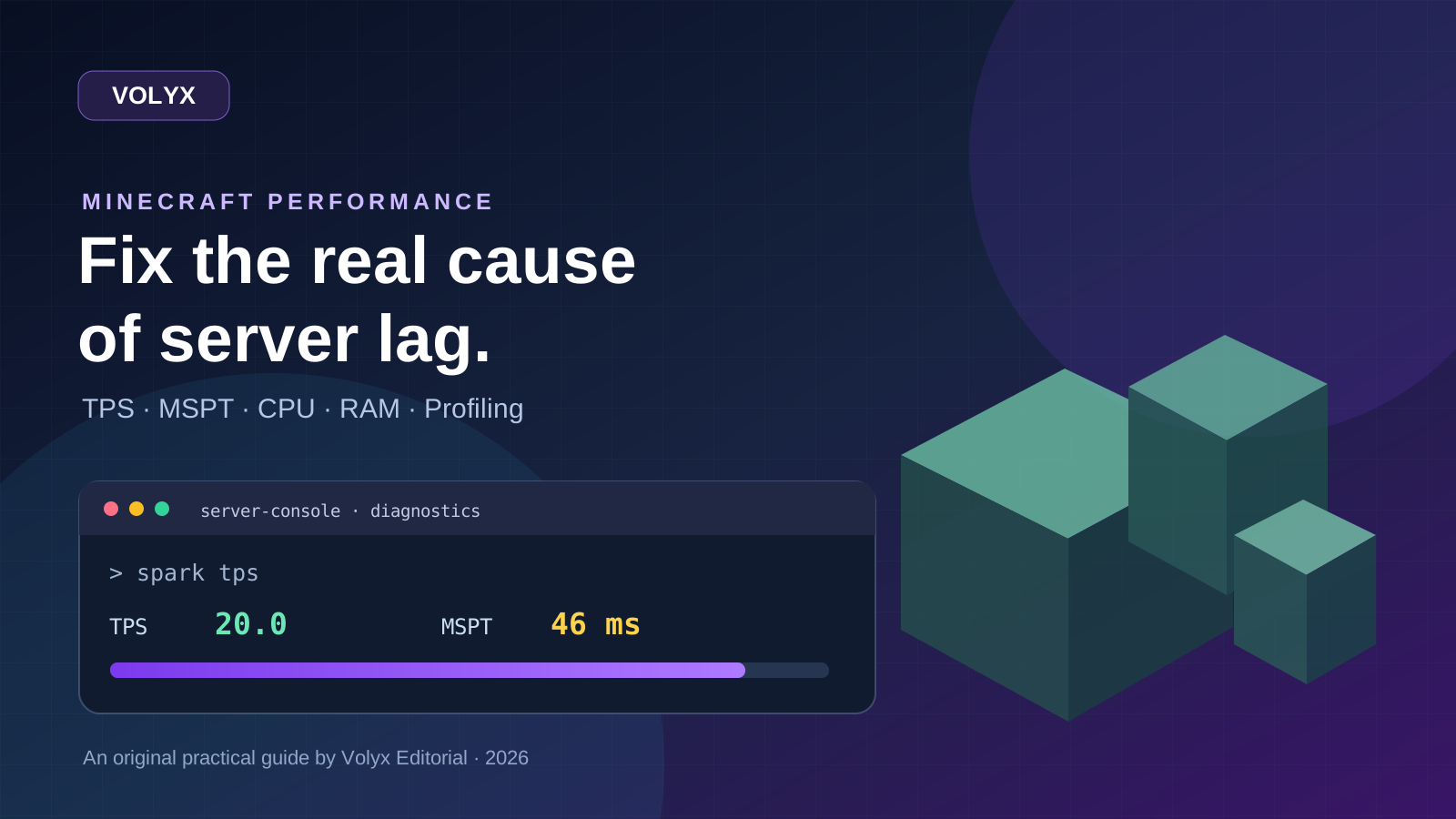
A practical, evidence-first guide to fixing Minecraft Java server lag: read TPS and MSPT, profile with spark, tune chunks, and diagnose CPU, memory and plugins.
Read article ↗
Learn the difference between DDoS floods and Minecraft bot raids, secure a Paper or Velocity server, compare TCPShield and Cloudflare, and respond safely using Volyx.
Read article ↗
Compare five real MIT-licensed JavaScript, TypeScript, and Python Discord bot starters, then learn how to deploy one safely on Volyx.
Read article ↗