
Minecraft Server Lag in 2026: Diagnose TPS, MSPT, CPU and RAM
A practical, evidence-first guide to fixing Minecraft Java server lag: read TPS and MSPT, profile with spark, tune chunks, and diagnose CPU, memory and plugins.
Read article ↗Monitor Minecraft servers, Discord bots, and Node.js apps with external checks, logs, resource metrics, incident alerts, and a tested Node.js monitor.

A Discord bot can appear online while its commands quietly time out. A Minecraft server can accept a TCP connection but fail when players try to join. And a green dashboard status can tell you that a process is running without proving that people can use the service. Uptime monitoring in 2026 needs more than one green dot.
This practical guide explains how to monitor a game server, a Discord bot, and a Node.js application without mistaking basic connectivity for genuine health. We will use Volyx as the hosting-panel example, then introduce an independent monitoring layer and an optional Node.js checker that you can run on a machine you control. You will learn how to pick the correct type of probe, send sensible alerts, investigate outages, and keep a small incident history.
The goal is not to claim perfect uptime or sell a dashboard. It is to make it easier to answer three questions: Is the process alive? Can users reach it? Does the feature they need actually work?
Volyx availability note: A Volyx server’s resource limits, renewal rules, Coins requirements, and available network allocations depend on the actual service and account. A running server is not a guarantee of continuous 24/7 availability. Always verify the specific plan and panel controls before configuring a monitor.
If you only have ten minutes, start here. In your Volyx panel, confirm the server process is running and inspect recent logs. Next, create an independent probe for the public service your users actually access: an HTTP health URL for a web API, a suitable status probe for your Minecraft edition, or an application heartbeat for a Discord bot. Finally, configure notifications that trigger only after repeated failures and send a recovery message when service returns.
Do not use a generic website checker against a Discord bot that has no website. A Discord Gateway connection is not an HTTP service. Likewise, opening the Minecraft TCP port does not demonstrate that a world has loaded or a player can complete login.
| Service | Basic signal | Better check | What remains unverified |
|---|---|---|---|
| Discord bot | Process state in panel | Bot heartbeat and a small end-to-end command test | Every command, permission, external dependency |
| Minecraft Java | TCP connection | Java Server List Ping plus a periodic real join test | Mod compatibility, player experience |
| Minecraft Bedrock | UDP reachability | Bedrock/RakNet status probe plus a join test | Actual gameplay and permissions |
| Node.js REST API | HTTP 200 from /healthz | Health response plus an authenticated synthetic transaction | Every database path or queue |
| Panel itself | Website loads | Login, API and Wings/resource health checked separately | All hosted customer services |
The key is layers, not more aggressive polling. A single check every minute from another network often provides a better first warning than dozens of internal checks that depend on the failing server itself.
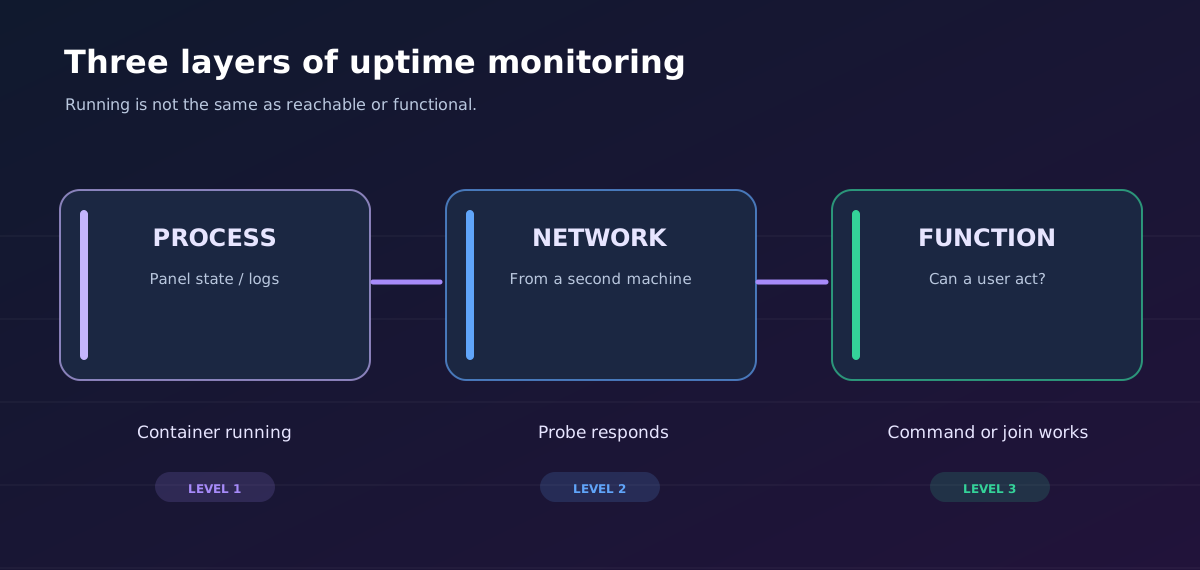
The simplest question is whether the container or program is running. Pterodactyl-based panels can expose running, starting, stopping, or offline state along with CPU, memory and disk usage. This is invaluable when diagnosing startup failures and resource pressure. However, a running status cannot prove that a bot successfully authenticated with Discord or that the Minecraft main thread is not stalled.
Record the last restart, start-command changes and any errors printed in the console. A process that restarts every few minutes may appear green whenever you glance at the panel but still provide an unreliable experience.
A probe outside the hosting node tests the network path the user takes. HTTP monitors can check response codes, TLS certificates and expected response content. TCP monitors tell you whether a connection can be established. These are useful but different signals: an open port does not imply a fully working application.
Place the external checker on a separate host or independent monitoring service. If your monitor runs inside the same container as the game, the monitor will disappear at exactly the moment you need it. If you monitor a private service, use approved private-network routing rather than opening an administrative port to the internet.
A functional test tries a small, safe user workflow. For a bot, that could be an authorized test of a slash command in a private test guild. For a game server, it could be a status request supplemented with a periodically scheduled, low-frequency join attempt. For a web API, it might create and read a temporary test record and then clean it up.
Functional checks should be non-destructive, rate-limited and explicitly permitted. Do not create dummy public messages every minute or repeatedly join a busy production world with a test account. They should test one representative function, not become a new source of load.
Before installing a monitoring tool, collect a brief baseline. Sign in to your Volyx panel and open the relevant server. Look at its Console, runtime or startup settings, and the resource graphs available for that server. Record the approximate process state, recent restarts, and any recurring error messages. Take a screenshot for your private notes rather than publishing console contents that might include sensitive values.
Use this checklist:
running, starting, stopping or offline? Check whether it is suspended or expired before diagnosing code.MODULE_NOT_FOUND, token errors, or watchdog messages?Do not expose personal access tokens, a Discord bot token or customer server details while collecting screenshots. If the panel offers resource history, compare the minutes before and after a failure; if not, preserve your own timestamps so you can correlate events later.
On installations where the Client API is enabled for your account, Pterodactyl 1.x documents this endpoint:
GET /api/client/servers/{server}/resources
Authorization: Bearer YOUR_CLIENT_API_TOKEN
Accept: application/json
The response can contain current_state, is_suspended, and resource fields such as memory_bytes, cpu_absolute and disk_bytes. A Client API key has user-level scope; do not use an administrative Application API key just to read your own server’s metrics. Keep the key in a private monitoring service, never in a browser-side script or public repository. Access to API paths and exact features may differ with the Volyx customization or permissions assigned to your account.
You can inspect the Pterodactyl 1.x resource endpoint documentation before building an integration. A successful panel API response confirms what the panel knows about the server; it does not replace an external service check.
For Java Edition, a normal Minecraft client uses TCP and typically connects on port 25565, although your allocation may use another port. A generic TCP probe can be a rough first signal, but the Java Server List Ping protocol gives a better indication: it can return a status response with the software’s advertised version, description and player information. Treat player counts as self-reported information, not audited capacity data.
Practical setup: choose a monitoring service that explicitly supports Minecraft Java status, supply the correct public hostname and allocated port, and compare the result with what you see in the multiplayer server list. Set a reasonable timeout and poll interval rather than sending continuous requests. If you use DNS SRV records, confirm whether the monitor resolves them or requires the actual host and port.
A server configured with enable-status=false, a connection proxy or an aggressive firewall may not answer status probes even while the gameplay route works. When that happens, a negative probe result is inconclusive until you test the intended player route. If a proxy sits in front of multiple backend servers, monitoring only the proxy may hide a failed backend.
It proves the observed server or proxy responded to that particular status request. It does not prove that a player can authenticate, load the world, join a modded backend, or play without lag. For critical communities, pair the status check with periodic permitted join tests and an in-game health indicator such as TPS/MSPT from appropriate server tooling.
If players report lag while the status stays green, follow our Minecraft TPS and MSPT troubleshooting guide rather than treating the issue as a total outage.
Bedrock does not use the same Java status protocol. Typical public Bedrock servers use UDP and RakNet, commonly on port 19132 unless configured otherwise. A TCP monitor aimed at that UDP port is the wrong test. Use a Bedrock-specific status checker that understands the UDP exchange, the correct host and the actual game port.
Because UDP has no TCP handshake, no response does not automatically mean the server is down. The packet might have been filtered, rate-limited, misrouted or lost. Treat repeated timeouts as a reason to investigate, not absolute proof of an outage. Monitor the server process and attempt an authorized client connection before publishing a broad outage announcement.
A cross-play installation using Geyser or a proxy can have separate Java and Bedrock entry points. Track those separately: Java may be healthy while Bedrock connections fail due to a UDP allocation, firewall or plugin configuration problem.
A Discord bot often connects outbound to Discord’s Gateway. It does not need a public HTTP endpoint to remain connected. A traditional website monitor cannot tell whether such a bot receives interactions or whether its slash commands work. First inspect the bot’s logs and gateway reconnect history. Then select one of these methods based on your deployment.
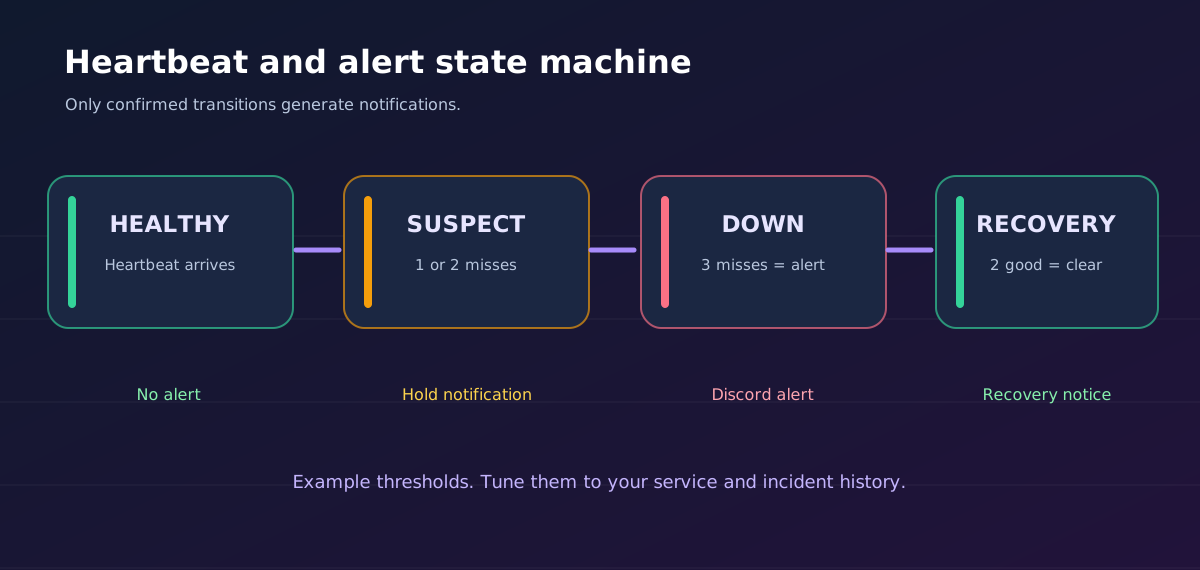
Heartbeat / Push monitor: while the bot is successfully running and responsive, it sends a small heartbeat to a monitoring service. If heartbeats stop arriving for longer than the expected interval, the monitor alerts. This is useful for programs with no public listening port, but it can still report healthy when an internal command handler is broken.
External synthetic test: an authorized test service sends a known command in a private environment or checks a business-level signal. This detects more functional failures, but Discord’s API, permissions and rate limits must be respected. Do not automate abusive message traffic or bypass bot restrictions.
Gateway-aware telemetry: log connection changes, reconnect loops, interaction latency and unhandled promise rejections. A bot that logs in successfully, then repeatedly disconnects or blocks the Node.js event loop, may deliver a poor experience despite an active process.
If you already have a Node.js bot, you can add a private heartbeat only after the bot is ready. The example below is pseudocode for an optional integration, not a drop-in replacement for your Discord.js version:
// Use your actual bot client's documented ready/connection events.
// HEARTBEAT_URL is a private push-monitor URL, not a Discord bot token.
let interval;

function beginHeartbeat() {
  if (interval) return;
  interval = setInterval(async () => {
    if (!botIsReadyAndUseful()) return;
    try {
      await fetch(process.env.HEARTBEAT_URL, {
        method: 'GET',
        signal: AbortSignal.timeout(5000),
      });
    } catch (error) {
      console.warn('Heartbeat failed:', error.name);
    }
  }, 60_000);
  interval.unref?.();
}
Replace botIsReadyAndUseful() with a real, permission-aware condition appropriate to your library and your app. The heartbeat destination may contain a private monitor key: store it with Volyx secrets or server-side environment settings, never display it publicly. An expired server or halted instance cannot send heartbeats, so your external monitor must remain independent.
If your bot starts and immediately exits, first read our Discord bot startup troubleshooting guide. For resource saturation, see Discord bot memory and CPU optimization.
For HTTP services, create a dedicated, inexpensive health endpoint that checks whether the application is responsive. A minimal example is:
import http from 'node:http';

const server = http.createServer((req, res) => {
  if (req.method === 'GET' && req.url === '/healthz') {
    res.writeHead(200, {
      'content-type': 'application/json',
      'cache-control': 'no-store',
    });
    return res.end(JSON.stringify({ status: 'ok' }));
  }
  res.writeHead(404).end();
});
server.listen(Number(process.env.PORT || 3100), '127.0.0.1');
This example binds to loopback for a self-managed VPS with a local reverse proxy. In a hosted container, your listener and gateway configuration may be different. Do not assume every Volyx game/bot allocation automatically includes public HTTPS ingress. You need an approved public HTTP route or a private monitoring path that can reach the endpoint.
A response from /healthz proves the request loop is alive. Keep that endpoint simple; do not leak database credentials, stack traces, system variables or user data. For deeper readiness testing, implement a separate internal endpoint that verifies critical dependencies with strict timeouts, but do not expose destructive test operations to anonymous visitors.
An HTTP 200 is a useful starting point, not sufficient in every application. A default Nginx page may return 200 while your Node.js process is broken. Configure your monitor to check a distinctive JSON field or expected keyword when possible, such as "status":"ok". Monitor response time as well as status. If the app returns 302 to a sign-in page, decide explicitly whether that is expected; silently following redirects can hide a broken route.
For a secure application, use synthetic tests with a dedicated least-privilege test account rather than your owner’s API key. Never publish monitoring credentials in the HTML of your status page.
Uptime Kuma is a self-hosted monitoring dashboard with HTTP(S), TCP, Ping, DNS, Push and several other monitor types. It supports Discord notifications, status pages and certificate details. Run it on a machine or approved hosting environment separate from the service being checked so its alerts survive the monitored server’s failure.
The recommended process is straightforward:
Never run Docker installation commands intended for your own VPS inside a restricted Pterodactyl container unless the hosting service explicitly supports that workflow. Installing Uptime Kuma on another host or using a trusted third-party monitor may be simpler than operating a monitoring server yourself.
Create a Discord webhook in a channel you control, treat the webhook URL as a secret, and use the monitor’s built-in Discord notification integration when available. A webhook URL can post messages to its target channel: leaking it allows spam until you rotate or revoke it. Do not print the complete URL in screenshots, logs, public GitHub code, status dashboards or support tickets.
An alert should explain the service name, affected check, observed time, and whether this is a new failure or recovery. It should not include bot tokens, player identifiers or full environment dumps. Use a separate notification channel for noisy development services so important production incidents do not get buried.
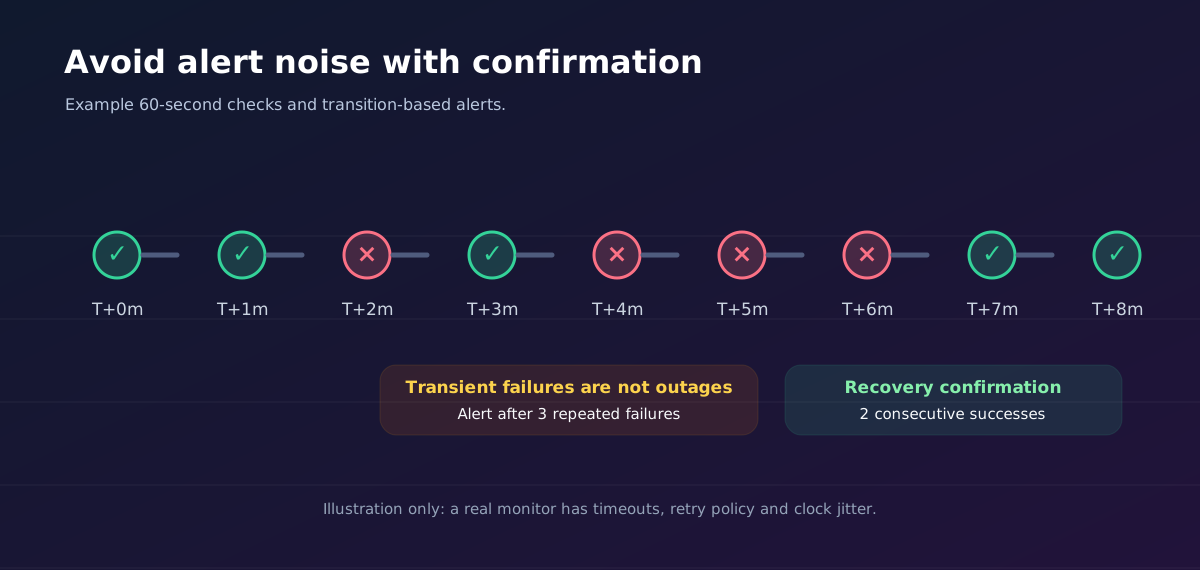
Monitoring every second is rarely justified for a small bot. It adds network traffic, unnecessary alert noise and can create rate-limit problems. Start with something like 60 seconds per probe, a 5-second timeout, and two or three consecutive failures before alerting. Adjust for application startup time, monitoring provider limits and real incident history.
This is an illustrative configuration, not a Volyx availability guarantee:
| Setting | Starting point | Why it matters |
|---|---|---|
| HTTP or Minecraft check interval | 60 seconds | Enough to notice ordinary outages without a flood of probes |
| Probe timeout | 5 seconds | Prevents probes hanging indefinitely |
| Outage confirmation | 3 failed checks | Filters many transient network blips |
| Recovery confirmation | 2 good checks | Reduces flapping notifications |
| Heartbeat grace period | 2–3 heartbeat periods | Allows a little scheduling and network jitter |
| Alert delivery | Discord plus a backup channel for critical systems | One notification service may itself be impaired |
| Review cadence | Weekly plus after significant incidents | Checks can drift when ports and domains change |
A 60-second interval with three consecutive failures may not alert until roughly 2–3 minutes after the actual outage, depending on timing. That trade-off is often better than paging an operator on one dropped packet. For critical customer services, define error budgets and incident urgency explicitly rather than borrowing arbitrary thresholds from a tutorial.
The companion download includes example-monitor/monitor.mjs, a dependency-free Node.js 20+ example. It monitors a fixed HTTPS URL configured through environment variables, checks the response and optional keyword, and sends a Discord notification only when the state has crossed a failure or recovery threshold. It does not scan ports, discover hosts or request administrative access.
For a local demonstration, node test.mjs starts a temporary HTTP listener bound to 127.0.0.1, tests success and failure conditions, and verifies state transitions. The regular CLI deliberately accepts only HTTPS targets, so you do not accidentally point a production monitor at an insecure URL. The local tests use a separate injected test endpoint and do not send real Discord messages.
A minimal configuration looks like this:
MONITOR_URL=https://status.example.com/healthz
MONITOR_NAME=Public API
MONITOR_KEYWORD="status":"ok"
MONITOR_INTERVAL_MS=60000
MONITOR_TIMEOUT_MS=5000
MONITOR_FAILURES=3
MONITOR_RECOVERIES=2
# Optional secret, keep out of Git:
DISCORD_WEBHOOK_URL=
status.example.com is only an example, not a working monitoring target. If you do not control an HTTPS health endpoint, use Uptime Kuma’s appropriate Push or TCP/Minecraft-specific monitor instead. This demo is single-process and in-memory: if you restart it, its alert counters reset. Real production monitoring should use durable incident history, monitoring from more than one location where appropriate, and a secure secret store.
A monitor should observe before it acts. Automatically restarting a Minecraft process during world saving, a database migration or backup can make an incident worse. Similarly, repeatedly restarting a Discord bot with an invalid token will not repair it. Start with alerts plus runbooks; only introduce carefully designed automated recovery after you have safe conditions, backoff, audit logs and manual overrides.
An application may be available but unbearably slow. In addition to availability, measure response time distributions, error rates and resource trends. P95 latency is the 95th percentile of observed requests, not the average. A single slow health probe can be a monitoring-network anomaly; a sustained increase across checks is a stronger signal.
For a Java Minecraft community, collect TPS and MSPT to distinguish server-thread lag from network latency. For Discord.js bots, an elevated event-loop delay or memory pressure can make interactions timeout even if the process stays connected to the gateway. Node.js provides monitorEventLoopDelay() and memory/CPU metrics in its official APIs, although interpretation requires an understanding of sampling and workload.
Measure one thing at a time when tuning. If you double the RAM, install five plugins and change the CPU limit simultaneously, a later improvement cannot be attributed reliably. Keep a short before/after record with timestamps and player or guild activity so you understand the result.
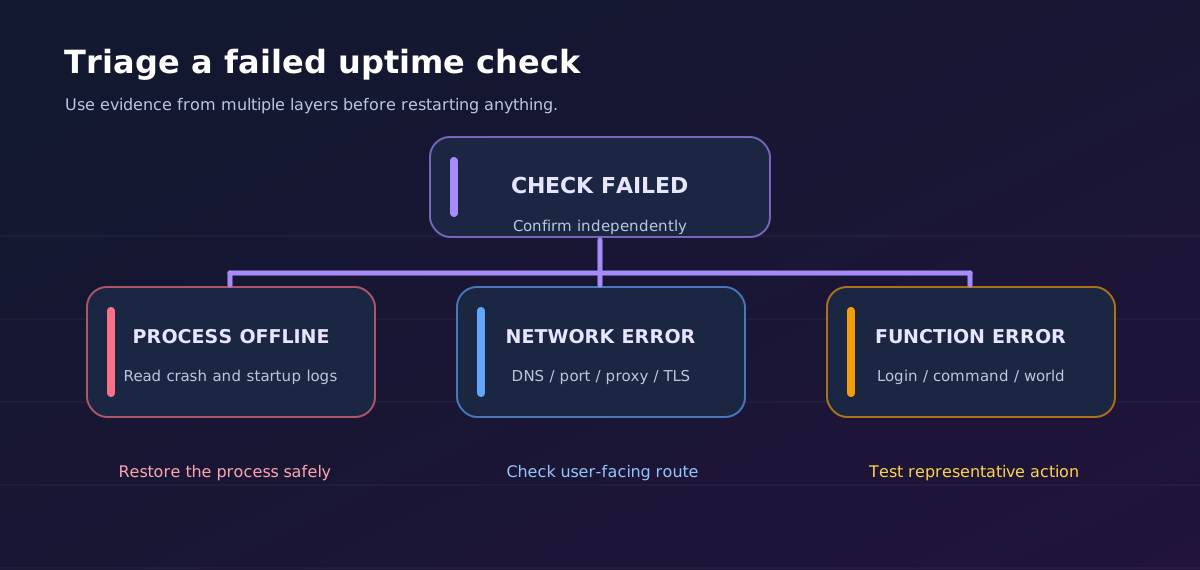
When an alert fires, use a repeatable sequence instead of immediately changing configuration:
If the problem is specific to Discord token/login failures, inspect the bot’s authentication and intents before touching networking. If Minecraft reports inability to join, determine whether the issue is the gateway, mod mismatch or backend rather than restarting the proxy repeatedly.
| Symptom | Likely explanation | First safe action |
|---|---|---|
| Panel says running; bot commands fail | Gateway connected but handler blocked or erroring | Test one command and read application logs |
| Monitor shows healthy; Minecraft players cannot join | TCP listener responds but login or backend fails | Test a real join and review proxy/server logs |
| Java status says offline; players still connect | Status disabled or check routed incorrectly | Confirm enable-status, proxy and host/port |
| Bedrock status keeps timing out | UDP filtering or wrong edition/port | Check allocation and use Bedrock-aware probing |
HTTPS health endpoint returns 200 during failure | Default proxy page or shallow check | Verify expected JSON content and real app route |
| Alerts fire during every deployment | Startup window shorter than monitor threshold | Increase grace period or schedule maintenance |
| Discord alerts never arrive | Webhook revoked, invalid or notification misconfigured | Test integration privately and rotate exposed URLs |
| Bot heartbeat is green while features are broken | Heartbeat does not exercise handlers | Add an occasional authorized functional test |
| Monitor itself goes down | Same-host dependency or monitor process failed | Put monitor elsewhere and add secondary alerts |
| Constant down/up flapping | Thresholds too aggressive or network unstable | Require consecutive failures and recoveries |
API check gives 403 or 401 | Expected authentication or missing monitor credential | Use least-privilege synthetic identity, not a master key |
| CPU/RAM looks fine but replies are slow | Event-loop stalls, disk, database or external API latency | Measure per-dependency latency and event-loop delay |
Treat this as a diagnostic map, not a promise that a single fix resolves every possible incident.
| Tool | Best role | Strength | Limitation |
|---|---|---|---|
| Volyx/Pterodactyl Console and resources | Internal process troubleshooting | State and resource evidence close to the workload | Not a full outside-user test |
| Uptime Kuma | Independent availability monitoring | Many probe types, Discord notifications, status pages | Needs separate hosting, updates and secure operation |
| Simple Node.js checker (included) | Learning or small fixed HTTPS checks | Transparent code, small footprint, no packages | No durable history or distributed probing |
| Specialist Minecraft status service | Game protocol visibility | Java/Bedrock-aware measurements | Game status still does not prove complete gameplay |
| Functional/synthetic test | Critical end-to-end behavior | Detects failures green dashboards miss | Requires maintenance, authorization and careful scope |
The right choice is usually two complementary layers, not one winner. Use your hosting panel to diagnose a server, and an independent service to tell you when users cannot reach it. Add a small functional test only for your most important workflows.
For a defined observation window, a simple availability percentage is:
Availability (%) = 100 × (eligible time − unavailable time) / eligible timeDefine eligible time first. Decide whether scheduled maintenance counts, which regions are measured, and what qualifies as unavailable. Reporting “99.9% uptime” without stating the measurement window and method can be misleading. For example, over exactly 30 days, 99.9% availability allows about 43.2 minutes of measured downtime. A single status check per minute also has limited resolution: it might miss a brief outage between probes.
Do not confuse a monitoring dashboard’s result with a formal service-level agreement. The article’s sample thresholds and measurements are educational and are not claimed performance metrics for Volyx.
A monitoring stack often has access to sensitive endpoints, so it deserves the same care as production code:
For more on securing application endpoints, consult the OWASP API Security Project and the Volyx documentation for hosting controls available to your account.
Yes. A Discord bot often makes an outbound connection to the Gateway and has no public HTTP listener. A Push monitor or heartbeat can observe whether the bot sends regular signals. Combine that with logs and a limited functional check if you need stronger confidence.
Not necessarily. It primarily reflects process or container information. A program may still be stuck, unable to authenticate, or serving the wrong route. Use an external reachability probe and a relevant functional test for better evidence.
There is no universal best option. Uptime Kuma is free and open source but requires you to operate it somewhere. Other hosted monitoring services may offer free tiers with usage limits. For a bot without a public port, support for Push/heartbeat is particularly useful.
A 60-second interval is a reasonable starting point for a small community, but the correct value depends on your monitoring provider, tolerated alert delay and traffic. Avoid aggressive polling that burdens the server or violates service rules.
The Server List Ping and actual gameplay login are different paths. Authentication, protocol mismatches, proxies, mod requirements or backend failures can prevent joins after the status probe succeeds. Test an actual permitted join and inspect logs.
Not reliably. Bedrock generally uses UDP/RakNet for server discovery and gameplay. Use a Bedrock-specific checker with the proper UDP port; lack of a reply alone is not conclusive proof of downtime.
Use the monitoring application’s native Discord notification integration and a webhook created in a channel you control. Treat the URL as a secret, test it privately and configure recovery messages as well as failure messages.
A restart temporarily interrupts a process or heartbeat. Add retry thresholds and, when supported, a maintenance window for planned changes. Avoid permanently muting alerts because genuine failures may occur after deployment.
Yes, when your monitor has an authorized private path such as a VPN, tunnel or internal agent. Do not expose admin dashboards, database ports or Pterodactyl credentials publicly just to get a green monitor.
No. CPU is one resource metric; uptime measures observed availability over time. A healthy application can briefly use a lot of CPU, while a broken program can sit idle at near-zero usage.
Its checks and alerts may stop. Hosting the monitor separately helps, but you may also want a second independent check of the monitor itself for important systems. Keep a backup of configuration and know how to reach your service logs without the dashboard.
It depends on the account’s available resources, renewal and Coins requirements, runtime behavior and service policy. Do not assume continuous availability based on the words “free hosting” alone. Read the current conditions shown for your own server.
Usually start with alerts. Automatic restart loops can hide the cause or interrupt data operations. Once you understand failure modes, controlled recovery with backoff, safe conditions and audit logging can be appropriate.
Only what visitors need: service name, current operational state, maintenance notices, and an incident history. Avoid customer-identifying details, internal hostnames, API tokens and confidential debug output.
Monitoring helps you detect and diagnose failures, but does not automatically eliminate them. Improved reliability comes from acting on the evidence: fixing crashes, improving deployment procedures, avoiding resource exhaustion and testing restoration and recovery processes.
Begin with one internal process signal and one external service signal. Make those checks trustworthy before adding charts or an elaborate status page. Use a Discord alert channel with confirmed delivery, leave enough retries to ignore transient glitches, and test recovery notifications. Over time, review incident notes and add functional checks where a green status has previously hidden a broken feature.
If your project runs on Volyx, first use the controls available in your own hosting panel to check server state and logs. Then use a monitoring service independent of that server to measure the route real users need. A clearly documented two-layer setup is worth more than a dashboard full of indicators nobody knows how to interpret.
Ready to deploy or troubleshoot a service? Explore the Volyx hosting platform and the Volyx documentation. Use the companion example in this guide as a small learning tool; test it locally before relying on its output.
Editorial note: This guide describes monitoring practices and examples; no uptime, resource utilization or service-level guarantees are asserted for Volyx or any competitor. Features and limits must be checked for the account and service in use.
Explore more in-depth articles with code, visuals, and practical walkthroughs.
Browse all articles ↗
A practical, evidence-first guide to fixing Minecraft Java server lag: read TPS and MSPT, profile with spark, tune chunks, and diagnose CPU, memory and plugins.
Read article ↗
Learn the difference between DDoS floods and Minecraft bot raids, secure a Paper or Velocity server, compare TCPShield and Cloudflare, and respond safely using Volyx.
Read article ↗
Compare five real MIT-licensed JavaScript, TypeScript, and Python Discord bot starters, then learn how to deploy one safely on Volyx.
Read article ↗