Config
Config controls how your project starts, which runtime it uses, how Volyx handles crashes and recovery, and which lifecycle events can be sent to Discord.
Config overview
The Config page is split into several areas. Some settings describe your project, while others affect startup, runtime behavior, protection, notifications, and diagnostic information.
Available runtimes, versions, detected project types, and some protection options can differ between servers. The values shown in your current Config page are the source of truth.
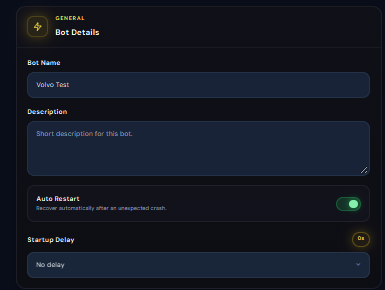
Bot Details
Bot Details contains the basic project information and recovery behavior for the server.
Runtime Environment
Runtime Environment controls which supported runtime and version Volyx uses for the project.
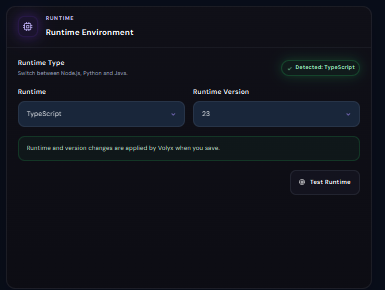
A project must be compatible with both the selected runtime type and version. After changing either value, restart the server and check Console for errors.
Smart Startup
Smart Startup helps Volyx determine how the project should be launched.
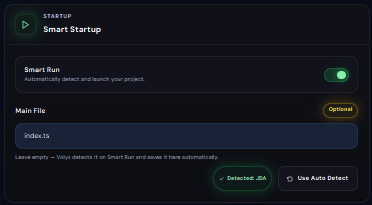
For TypeScript projects, supported entry files can include
.ts, .mts, and .cts.
When Smart Run is enabled, Volyx may be able to detect the startup file automatically. Use a manual Main File when you need to explicitly control the project entry point.
Crash Protection
Crash Protection helps prevent a broken project from repeatedly crashing and immediately restarting without control.
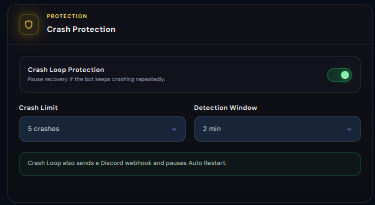
If the project repeatedly crashes, inspect Console and fix the underlying error. Crash protection only controls repeated recovery behavior.
Discord Notifications
Discord Notifications lets the server send selected events to a Discord webhook.
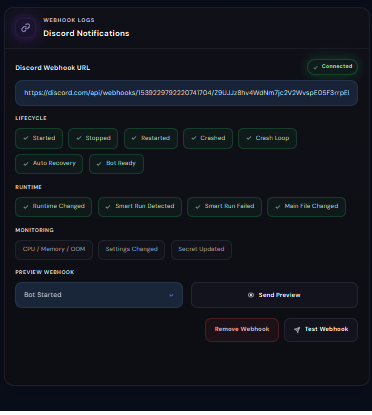
Discord Webhook URL
Enter the Discord webhook used for notifications. The interface can display whether the webhook is connected.
A Discord webhook URL acts like a credential. Do not publish it in screenshots, public repositories, or support messages.
Lifecycle events
You can choose which server lifecycle events should send a notification.
Server or project startup.
Server or project shutdown.
Restart event.
Unexpected project crash.
Repeated crash-loop detection.
Automatic recovery action.
Supported project-ready event.
Runtime events
Runtime configuration changed.
Smart Run detected the project startup configuration.
Smart startup detection or execution failed.
The configured application entry file changed.
Monitoring events
Resource or out-of-memory related events when supported.
Selected server configuration changes.
Notification when a supported Secret change occurs.
Webhook tools
The Discord notification area also includes tools for checking the webhook before relying on it.
Last Start Info
Last Start Info summarizes what happened during the most recent startup or recovery attempt.
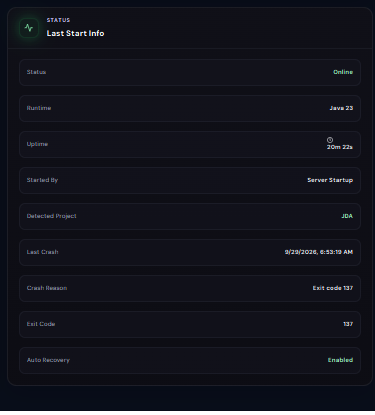
Last Start Info provides a summary. Console usually contains the detailed log output needed to understand the actual application error.
Changing Config safely
- Change one major setting at a time.
- Save the configuration before restarting.
- Check Console immediately after a runtime or startup change.
- Verify the Main File exists before setting it manually.
- Keep webhook URLs and project credentials private.
- Use Last Start Info when diagnosing repeated crashes.
Next step
Continue with Settings to configure the server interface, preferred file editor, navigation, plan options, renewal, and server management actions.